Good questions from the Auckland Ciena Jump partners

Earlier this week, Jo Cocker, Auckland Libraries’ Digital Literacy Specialist, convened a webinar for Auckland Library Jump partners engaging in the new Ciena Jump delivery processes. This generated a number of excellent questions that could be on the minds of other partners who have signed up to support this expanded initiative.

Q: How do we find out which schools are already participating in the CIENA programme?

A: Most of the schools already participating in the Ciena programme are in Auckland and Christchurch. You can find a schedule of both existing and potential Ciena schools here, together with their nearest Jump partner. In Christchurch this has been managed to date by the Greater Christchurch Schools Network (GCSN). From 31 January 2023, the sign-up process changed with modems now being issued by 37 selected (for the trial) Jump partners. Students seeking to participate must have a referral from their school or Jump partner as well as parent/guardian permission.

Q: Who initiates the process to sign students up for the Ciena plan?

A: From 31 January 2023, existing Ciena schools have been asked to send all student referrals to a nearby Ciena Jump Delivery Partner to get a Jump modem and complete the online signup processes (Skinny Jump and the Jump Profile Form (2023 version). Late in 2022, all Jump partners were invited to consider becoming a Ciena Jump Delivery Partner, and just under 40 partners were selected for the trial. These partners identified schools where they believed there would be students who could benefit from the Ciena assistance. It is now up to the partners to approach schools and explain the opportunity. We encourage partners to start with one or two schools in their community, as we are uncertain about how much demand there will be, but the programme is open to all schools (primary and intermediate as well as secondary). Briefing materials (including referral forms for distributing to schools) have now been sent to partners and the first signups are underway.

Q: If a student moves from a CIENA-school to a non-CIENA school, can they still be part of the programme?

A:Yes. The CIENA plan is associated with an individual household (not a school) where the student lives. If the family moves to a new address, they must follow standard Jump protocol, i.e. check that their new address has Jump coverage and then notify the Skinny Care Team (0800 475 4669).

Q: How many schools can we support with this CIENA offer?

As many as you like, but giving priority to secondary school students. While the internet can be important for learning at all levels, secondary school students face special challenges with assessments such as NCEA and the more successful they are during their school years, the more choices they will have in moving to tertiary studies or into the workforce.

Q: Will existing CIENA schools already have helped all their students get access to the internet, so should we focus on other schools?

A: All schools have new students arriving every year; many of these might be from households that can’t afford commercial internet plans, so it is better to not make any assumptions and just help raise awareness of the CIENA opportunity in schools and families in your community.

Q: What happens when the scheme ends in December 2023?

CIENA families will have the option of retaining the Jump modems and migrating to a standard Skinny Jump service (currently capped at 225GB with 6 $5 x 35GB top ups) or returning their modems to a Jump partner.

Q: What happens if CIENA families use all their 210GB allowance before the end of each calendar month?

A: The internet will stop working until the next monthly 210GB allowance is added to their accounts on the first day of the next month. We know that some households do use more than 210GB each month, especially households with a large number of family members. If this becomes a problem, we need to make it clear to participants that there is no penalty in terminating their Ciena Jump connection; we only ask that the modem be returned to a Jump partner so that it can be reprovisioned for another family.

Q: There is no provision on the Referral Form for a teacher or staff member to ‘authorise’ a student’s eligibility, yet the Profile Form requires the student to name the person who invited them to join the Ciena plan.

A: This is a question we expect partners to ask applicants before issuing a modem – who provided them with the Referral Form? This should be a named person from the student’s school or can be a Jump partner staff member. This is an extra step to validate the application, especially if there are any concerns about the student’s eligibility. We may contact this person if we have any concerns before provisioning the modem for Ciena. The important thing is to provide an actual name, not a generic position.

Q: I am doing a regular Jump sign-up and am aware that the applicant family could benefit from the CIENA plan. Can I sign them up or do I need to get approval from their school?

A: Any CIENA Jump Partner with access to the CIENA Referral forms can give approval and simply enter the name of the staff member completing the application on the Profile Form.

Q: How do families know their modem has been provisioned for CIENA?

A: This will generally happen within 1 working day of the modem being issued and the Profile Form and Referral Form being submitted. An email will be sent to the customer by DIAA confirming that their modem has been provisioned for Ciena and customers will notice the data bar on their dashboards change from the startup 35GB to 210GB.

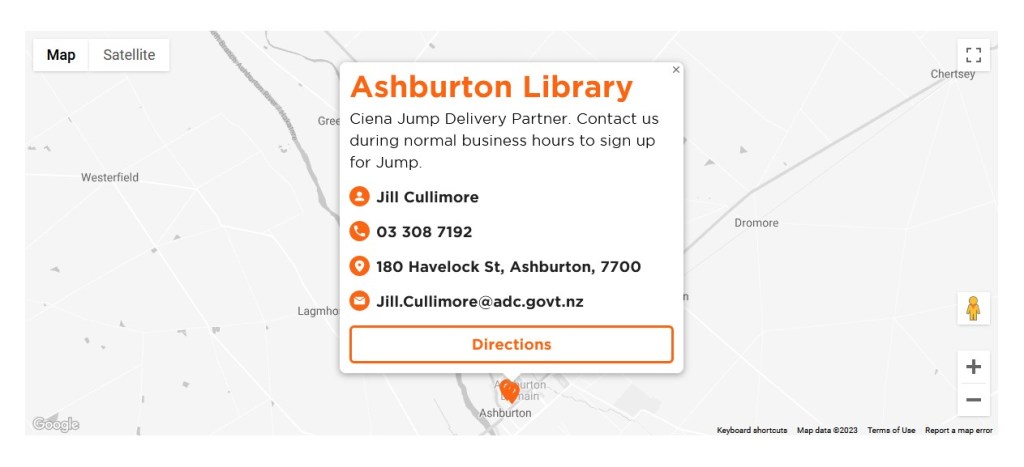
Q: How do schools and the general public know where to find a CIENA Jump Delivery Partner?

The Skinny Jump website has been updated identifying trial partners as Ciena Jump Delivery partners, as per the example below:
First student provisioned for CIENA Jump for Students using new processes

Malcolm Foster, the Jump coordinator at Shirley Library in Christchurch, has successfully submitted a Jump profile form requesting CIENA provisioning for one of his customers. The Skinny team has actioned the request and a confirming email has been sent to the student.

As one of the first Ciena Jump partners to road test the new processes, Malcolm discovered a problem with our new cunning plan (suggested by one of our Auckland library partners) to provide an option to upload the Ciena Jump for Students Referral Form as part of the Profile Form. We didn’t know until we tried it either that in order to use the file upload feature with Google Forms, people completing the Form must be signed into a Google account.

We quickly decided that this is a complication that partners don’t need and withdrew this option. This means that the only option now is for partners to email a scanned or photographed copy of the Referral Form to jump@diaa.nz

These Referral Forms will be kept securely by DIAA; our advice to Ciena Jump delivery partners is that the original copy be returned to the customer, as this contains useful information about the Terms and Conditions.

Support for Jump customers impacted by recent severe weather events

The recent weather events in Auckland and Northland have forced many people out of their homes and into temporary accommodation. If customers seek your advice, suggest they check for Jump coverage at their temporary address and if there is coverage they can take their Jump modem with them. Remind them to also contact the Skinny Care team on 0800 475 4669 to advise their change of address and avoid being disconnected.

Any existing Jump customer who has been displaced from their home or is facing additional financial hardship should be encouraged to contact the Skinny Care team and discuss the forms of support that are available.

We are also aware that some fixed line internet services (copper and fibre) to individual homes have been disrupted by flooding and landslides. Households in Jump coverage areas can apply for a wireless Jump modem, as it could be some time before fixed line services are reinstated. Applicants should be advised to check with their internet provider first to understand how long it might take to reinstate their existing service.

Jump profile form changing tonight

From 8.00am on Tuesday 31 January Jump partners will notice a change in the Skinny Jump Profile form that you complete whenever you issue a modem. From 31 January a new process is being used for students to sign up for the CIENA programme, which for the last two years has been managed by participating schools.

We have upgraded the Profile Form to capture the additional information needed by the Skinny team to provision Jump modems issued by existing Jump delivery partners for the CIENA plan.

32 partners are participating in the CIENA Jump for Students Fund trial; these partners have already received an information pack on the programme. Depending on how things go this may be extended to other partners.

Most Jump signups will continue as normal and provided you select “Standard Skinny Jump” instead of the sponsored plans, the signup process should look much the same. The one change that you will notice however is that we are now asking every applicant to indicate the address where they plan to use their Jump modem. This is to help with our modem returns process; we are frequently being asked to send replacements for faulty modems, but no address is being given.

We hope this change will be seamless; you can continue to use the same URL for the new Profile Form.

Managing your Jump waitlists

Some partners have asked for advice about managing their waitlists. We understand many are having difficulty contacting customers who have been added to the waitlist and the question then is how much effort do you put into following up with people who are difficult to contact.

The Auckland Library team discussed this at a recent Jump Community of Practice and agreed to set aside modems for up to 7 days; some felt it didn’t even need to be as long as this, as we are continuing to face up to six week delays in the supply chain.

We support the idea of a definite timeframe being communicated to customers and agree it should be no longer than 7 days. We find many people are reluctant to answer calls from unknown numbers but can be responsive to text messages when they know it is about Jump.

I know some partners try time and time again to contact these customers, but my advice is that one call is all that is necessary – leave a message if possible (voice or text). The ‘reserved’ modem should then be released for distribution after 7 days. This practice should be explained to customers at the time they are added to the waitlist. They should also be encouraged to take responsibility for checking in with you from time to time as well.

Partners are welcome to leave unresponsive names in the Waitlist section of their Jump registers but they eventually ‘expire’ (currently after 6 weeks) when it comes to influencing modem re-order quantities.

You are also welcome to add your own notes in column H of the register and contact details in columns I to N.

Christmas comes early for Jump customers

Today, being the first day of the month, all Jump customers received a special holiday present from the Skinny team. The free monthly data allowance of 15GB that applies to all standard Jump accounts has been doubled to 30GB for December and January. Note this does not apply to sponsored plans, such as those supported by the Ministry of Education, Red Cross and CIENA.

The additional data allowance is intended to help Jump customers get the most out of their connections during the busy holiday period. The Skinny team knows that holidays can be an expensive time of year and they hope that the extra free data can help keep customers connected with their loved ones during this time.

All Jump customers received an email about the additional free data earlier this week, but we wanted Jump partners to know about this as well in case you get any inquiries.

Skinny Jump is not a mobile service

Skinny Jump is not a mobile service. This means it can not be used in a vehicle or transferred between houses without the explicit approval of Skinny.

We have heard reports about people trying to connect their modems to the cigarette lighter outlet in their cars, but that seems like a lot of trouble to go to when mobile phones have much easier hotspot functions. We have also heard reports of people temporarily relocating their modem to an alternative address.

Both of these uses are a breach of the Skinny Jump Terms and Conditions.

Some customers are uncertain about whether they can take their modem with them when they move to a new house. The short answer is “yes, they can” provided:

(a) they have checked there is coverage at their new address; and

(b) they have contacted the Skinny Care Team (0800 475 4669) and confirmed their new address.

If service is not available at the new location, the modem must be returned to a Jump partner; the modem can then be reset (using the Modem Returns form) and reissued to another family that is in coverage.

More on Jump Waiting Lists

Many partners are now actively using the waiting list process to signal unmet demand for Jump modems, and we are continuously monitoring these lists to adjust delivery quantities for partners as well as priorities. We currently have 102 modem orders for partners in the pipeline, with total requests for over 1200 modems. This might seem like a lot, but the good news is that waiting times are trending down, and with Christmas coming, we expect this trend to continue at least until February. We have adjusted the re-supply trigger quantity down from 8 weeks to 5. This means that whenever you receive a new supply of modems, you should have enough to last 5 weeks (based on the number issued during the previous five weeks). We do factor in customers on waiting lists, so a couple of reminders about this process.

(1) When you add someone to the waitlist towards the bottom of your Jump Register please include their first and last name and the date they have applied for Jump. The most important field is the date – it must be in the following format: “22-Nov-2022”. Other date formats may not be recognised and this directly affects re-supply quantities.

(2) Do not add people living at locations that fail the Jump coverage test to your waitlists. You should complete an online application for them, so that we get ongoing data about demand that can not currently be met. We do double check coverage for every online application and send an email to applicants at locations where there is no Jump service.

(3) We have noticed some situations where applicants get the green light for Jump coverage when they initially apply, but by the time new modem supplies arrive the situation has changed. This is regrettable, but it is not something we can control. In these situations, please transfer the applicant from your waiting list to an online application.

(4) Some partners are confused about the address verification process and have reported that by the time they discover their customer’s address is not in coverage, they have already set up a Skinny account. The address coverage check MUST come first, and certainly before you start to set up a Skinny Jump account.

(5) And before you add anyone to your waitlist, we do strongly encourage you to use the 6 C’s checklist with your customer to make sure Jump is the right product for them. Failing to do this is likely to lead to further frustration when modem supplies become available and the customer only then discovering that the data cap is not going to work for their household, for example.

And the 6 C’s winner for October is…

Congratulations to Skye Colonna from Tauranga City Library, who is our first winner in the monthly Skinny Jump draws for partners submitting stories about how they are implementing the 6 C’s with their customers in an effort to reduce churn. Skye was selected in a random draw from the entries received between 1 and 31 October. The Jump team will be arranging for your team shout.

Some of the suggestions submitted were:

  1. Provide partners with a handout with brief prompts (otherwise discussion could be quite lengthy)
  2. Could an incentive be provided for returned modems?
  3. We provide a weekly ‘digital drop-in’ at each of our four branches; this provides opportunities to sign up new Jump customers, but also ongoing opportunities for customers to come back to use if they have any issues with their modems.
  4. We offer adult digital classes once a week where customers can upskill themselves to make the most of their internet connection.
  5. We are checking with every customer as they sign up, and ask questions when enquiries are made.
  6. Some larger households have decided to go with fibre connections after we explained the data limitations of Skinny Jump.
  7. We have spent time upskilling our library and admin staff on how to respond to customers who call or walk-in with Skinny Jump issues.
  8. We follow up with customers over the phone the same day that they sign up to check if they need any further help.
  9. We provide in-person help for people needing help with topping up or troubleshooting.
  10. We contact customers from time to time to ensure the modem is working and doing what our customers need.

Thank you everyone for participating and sharing your success stories and ideas for tackling Jump churn. Another draw will be held for entries received between 1 November and 30 November.

Jump modem return stickers – arriving this week

Keep an eye out this week for a courier delivery of Modem Return stickers. These have been prepared as part of the campaign to reduce churn and remind customers to return their modems when they no longer need them.

You may recall the webinars in September when the Jump team discussed the high level of churn amongst Jump customers. They suggested a new framework for you to use before helping customers set up their modems – the six C’s: Connection, Cost, Continuity, Capped, Care and Community.

Thank you for your feedback so far – one of the suggestions was a sticker to attach to every modem, to remind customers what to do when they no longer require their modem:

We now need your help to attach one of these stickers to every modem you issue. Please do this when you are working through the Skinny Account setup process and activating the modem. This creates an opportunity for you to explain to customers how important it is for the modem to be returned when it is no longer required – so that the modems can be re-used by other households, or if the modem is faulty, returned for repair or recycling. This is not only good for the community, helping households get connected to Jump, but also good for the environment (keeping old modems out of landfills).

We have estimated the number of stickers you might need, based on the number of modems you have issued during the last 6 months. But do let us know if you need further supplies. Just email us at jump@diaa.nz and we’ll get some more on the courier for you.

To support this initiative, the Jump website has been updated with a dedicated page on Modem Returns.

Thanks for your help and it’s not too late to submit an entry for the October draw of Churn feedback, telling us how you are getting on the the 6 C’s (closes at midnight tonight – 31 October 2022). But there will be another opportunity in November if you miss this one.