Some partners have recently been having problems when using the app to sign up new customers – for some reason this has been a particular issue with modems that have been delinked and should be ready for reissue. Please do not assume these modems are faulty.
We have now been advised that this problem affects signups on both Android and IoS phones and this has been escalated to the Mobile App team at Spark.
The error happens at Step 05 of 07:Connect a modem. After entering the Broadband number and modem verification code, customers get the “Something went wrong” error message.
To sign-up customers in the interim, please use the web browser option – (Chrome/Safari/Firefox/Edge).
Use the same email address and login password used when signing up via the Jump App (as this has already been registered)
Once successfully logged in, you will see an ‘Activate’ button – click that
Click the ‘Broadband’ tab next to ‘Mobile’
Enter in BB number and modem verification code
Success
The customer has now activated their service. Close down the app and reopen. Login using same email address and password used. The customer can then continue to use the app for top-ups and plan renewals.
Spark has issued a media release celebrating the 10-year anniversary for Jump. What is stunning is that Jump has helped over 100,000 households connect to Jump since 2016. This has provided a lifeline for so many families, many of whom have moved on to commercial internet plans when they can afford it. Today 35,000 households continue to benefit from New Zealand’s only pay-as-you-go internet service. Pre-pay services revolutionised the uptake of mobile phones over 20 years ago; we have seen the same impact during the last 10 years with Jump.
Thank you to all our Jump partners who have made this possible.
Marty La’a, Digital Equity – Centre of Excellence Lead for Spark, did an interview with the Ryan Bridge Now show early this morning about the 10 year anniversary.
This interesting question was raised during a recent Community of Practice Jump meeting with Auckland Libraries. A bit of “umming and ahhing” on my part but then I suggested a possible solution.
I then followed this up by checking with our colleagues at Spark and they concurred with my solution, so I thought I should share this with everyone.
But first of all why would someone want to do this? In the Auckland case it was simply a matter of a customer wanting to update their email, as they were no longer using the one they signed up to Jump with. Fair enough, that makes sense.
So, we think the best way to do this is to put the modem through our de-linking process, using the Modem Returns form, but indicate on the form that the replacement modem has the same IMEI and Broadband numbers and is suitable for reissue. When the modem is de-linked it will be like a new modem and the customer can set up a new account with their updated email.
But just a warning, because the customer is changing to a new email, they will not be able to transfer any residual funds on their account, so do suggest they wait until their balance is zero before actioning this.
The other slight problem is that we ask partners to always use their email address on the Modem Returns form, so that you receive notification when the modem has been delinked. In this particular situation though, you could use the customer’s email, so that they get the notification directly. Alternatively, you are welcome to continue using your own email and then alerting your customer when they can set up their new account. They will have the free start-up 35GB when their modem is de-linked, so the transfer should be seamless.
I have had a few calls this week from partners who have received this message when trying to sign a new customer up using the App. In all the reported examples, this involved a modem that had recently been de-linked.
Not surprisingly then, partners thought this might be a back-end problem with the de-linking process.
But no, this doesn’t seem to be the case. We have received confirmation that the modems in question have been correctly de-linked and are ready for issue – the problem appears to be with the App.
The Skinny Jump team has raised an incident report with the App developers, so hopefully this will be resolved quickly.
In the meantime, if you encounter this message please sign-up using a web browser, either on desktop computer or a browser on your customer’s mobile device.
We have nearly reached our target of 350 new families signed up to the Ciena plan, but just a word of advice for partners signing up the last few.
Yesterday, a customer signed up for Jump and the helpful library staff explained about the CIENA plan, so she signed up. But oh, oh! When she got home and plugged her modem in, she discovered that she only had 35GB instead of the promised 210GB. So thinking that the library team had given her the wrong modem, she promptly reported this to a Skinny Care agent who determined her modem was faulty and asked for a CIENA replacement to be sent.
Fortunately she had a distinctive second name and this rang alarm bells in our office when the faulty request arrived.
So, a quick email to explain to the customer that all Jump modems are provisioned for standard Jump, so everyone receives a free 35GB start-up package. This hopefully keeps them going until the CIENA provisioning request makes its way to the Skinny team and the customer’s account is updated to CIENA (normally within 24-48 hours) – this is carried out remotely and has nothing to do with the physical modem. When it is provisioned, hey presto, customers discover 210GB data on their account, which is renewed on the 1st day of every calendar month. There is no need to replace the modem.
So hopefully, all’s well that ends well.
Just a reminder to everyone signing families up for CIENA, please tell them it might take 1-2 days before the CIENA provisioning is in place.
Two partners have raised really interesting questions this week about how to deploy Jump for older people who would have difficulty managing a pre-pay account. Both have been attracted by the low cost pricing structure for Jump and they definitely qualify.
What the people caring for both these older people want is a “set and forget” option in terms of managing ongoing payments and plan renewals. Personally, I think these two older people represent the tip of a growing iceberg – the big D or dementia iceberg.
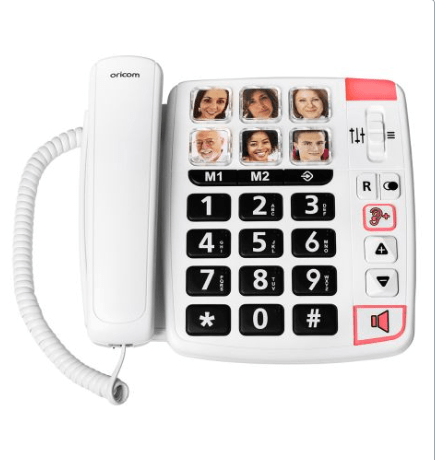
Case 1: Social worker working with an older woman to try and get her a phone she can use. This enterprising social worker had discovered a phone (in Australia) that she thought would do the trick – AUS$110.
Big buttons, even family pictures with auto dial. So she was then wondering how to organise some automatic billing for a Jump connection.
Alarm bells starting ring!
Skinny Jump does not support normal voice calls; the device she has in mind would need a fibre or copper fixed line connection. She could of course make voice or video calls using WhatsApp or other internet-based services, like Facetime on Apple devices. But this makes things much more complicated than a device where you just push a button to call family or friends.
The next alarm bell comes with the need for a ‘set and forget’ prepay billing arrangement. She could use an auto top-up option to add funds to her Skinny account when the balance gets low, but Jump does not support ‘auto plan renewals’ or ‘set and forget’ options. So she would still be faced with have to login to her account and select a new plan when she needed her next 35GB.
Case 2: Request from a support worker from a supported living organisation for a resident who could not manage the top-up / plan renewal process
The downside of pre-pay services like Skinny Jump for people in this sort of situation is that it is not a ‘set and forget’ service (unless it is someone with a very low data usage, who can live on the free 15GB a month). We have encountered situations where a family member takes responsibility for setting up the account and managing the top-ups and plan renewals – even when they live in another country! But I am not sure a support worker would want to do this.
The solution here is to identify who is going to be responsible for top-ups; they need to take responsibility for setting up the account and linking to the modem with their email. All the person using the service needs to do then is plug the modem in and connect their device to wifi, which I am sure is something support workers could help with.
So thank you to the two partners who raised these issues and for going the extra mile in trying to help. I’d love to hear how things develop with your two customers and their social/support workers.
As at the start of May we have reached 271 new families signed up for the Ciena plan since the start of the year. So the clock is ticking for our 2026 target of 350.
The good news of course is that it’s not too late to sign families up for this amazing sponsored plan – free internet for the rest of the school year!
There’s a lot of talk about ‘affordable’ internet and research has revealed that $30 a month is the limit for many households. This is not news to the Skinny team, who set this cap 10 years ago (6 plan renewals x $5 = $30, for those who skipped maths at school).
But if $30 is affordable, what is $0? With 8 months left of 2026, the Ciena package can save families up to $240! (8 x $30 = $240). Now I am sure there are a lot of things families could do with an extra $240 in their pockets.
So roll on up – keep those Ciena referrals flowing.
Pātea is famous for two things. One is world famous and the other, well, perhaps less famous outside Pātea.
Let’s start with the most famous thing – Poi E!—a groundbreaking Māori-language hit created in the early 1980s by the Pātea Māori Club. Written by Dalvanius Prime and performed by local community members, the song fused traditional Māori culture with contemporary pop and hip-hop influences at a time when te reo Māori was rarely heard in mainstream music. Its national success—topping the charts in 1984—helped revitalise pride in Māori language and identity, while also putting the small Taranaki town of Pātea firmly on the cultural map. Today, Poi E! remains an iconic symbol of grassroots creativity and cultural resurgence, and Pātea is closely associated with its enduring legacy.
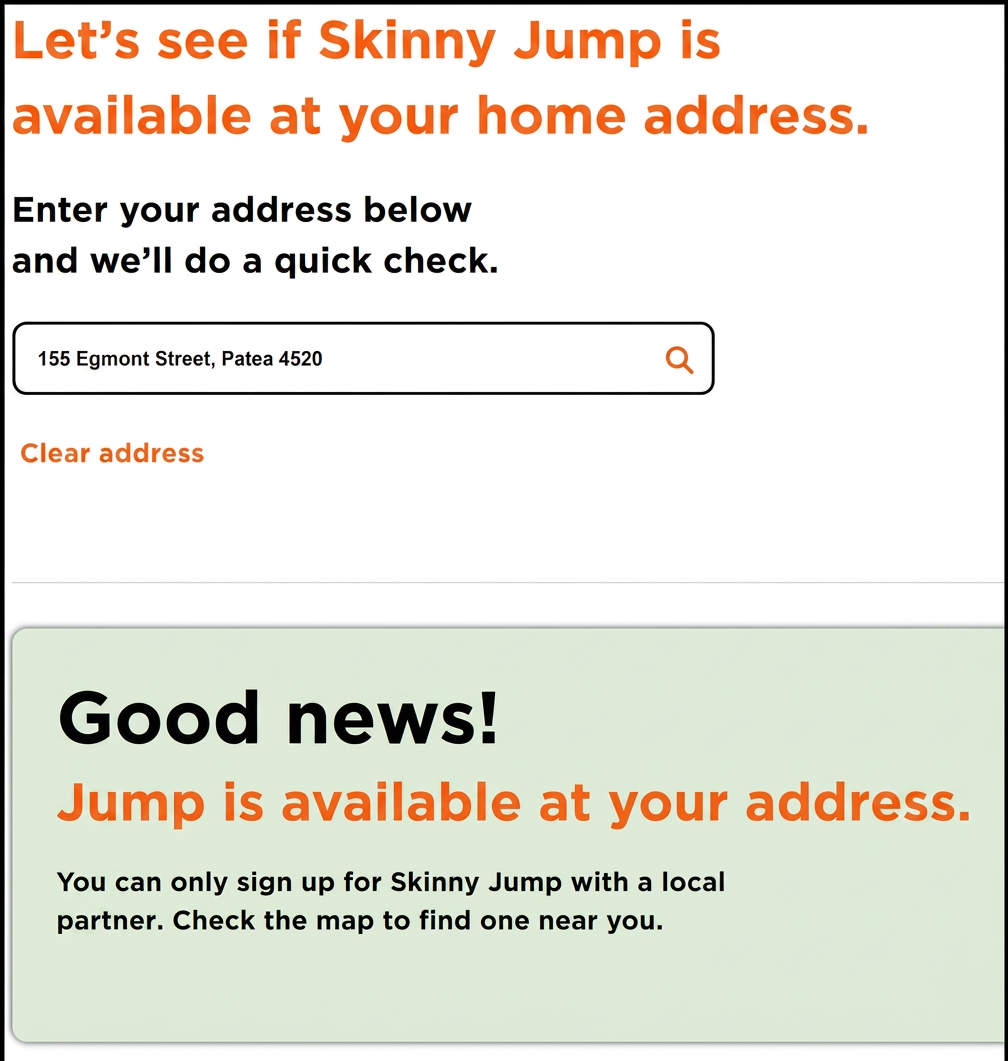
Well that’s what everyone knows! What you might not know unless you live in Pātea is that for many years there has been no broadband capacity on the local cell tower. So much so that this has been Sue Kini’s reliable ‘go to’ place when explaining the ‘no coverage’ message that partners sometimes see when checking coverage for a Skinny Jump customer.
But last week this all changed and for the first time in many years the coverage checker returned this message for a Pātea address:
So of course the moral of this story is “never say never” when you have to say no to a potential Jump customer. Encourage them to check their address from time to time for coverage and they might receive a nice surprise. The address checker is updated every night, so things can change overnight, or as we have seen in Pātea, this can take some time.
PS for the Pātea LibraryPlus team: Can you remember the people you have had to turn down; perhaps let them know it might be worth checking their address again before the internet in Pātea becomes as popular as Poi e!
The Skinny Jump team has advised that the issue reported yesterday has been found and fixed. They confirmed this by running a test and have managed to successfully progress through (see below)
Step 01: Enter your email address
Step 02: Set a password
Their advice for Partners/Customers:
Close Jump App
Check to ensure both app (via Playstore / App Store) and system software are up to date (via device Settings)
Reopen app and continue Sign Up process
They also reminded us of other Useful Resources if you encounter problems with the app – Jump App Cheat Sheet that is available on the SteppingUP website, here.
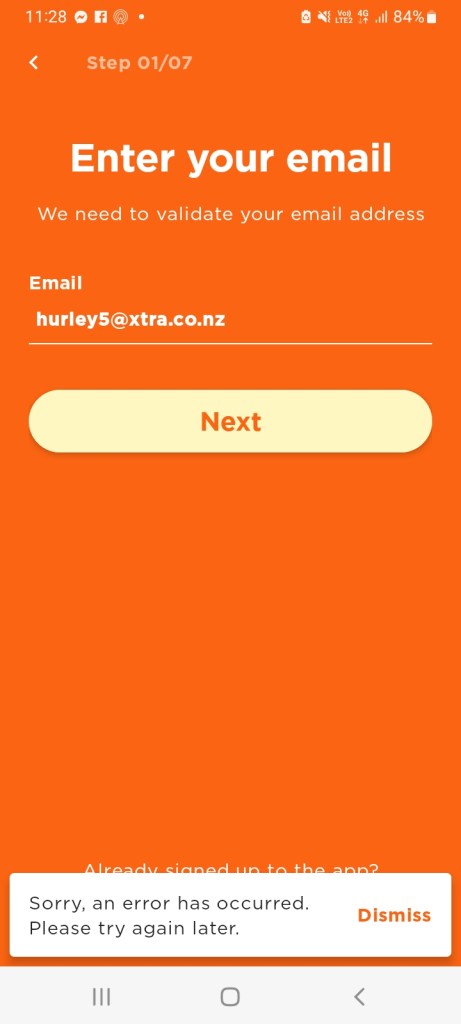
One of our Jump partners has reported a problem in signing up customers with the Jump app. They are getting the following error message:
The Skinny Jump squad has been able to replicate this error for both Android and Apple signups and have escalated the issue. In the meantime, their advice is to use the web browser signup process. They have confirmed this is still working as expected.
However, the partner who reported the problem is still experiencing a sign-up problem using this approach as well. Mel from the Skinny Jump team has advised: “I tried earlier and it worked and tried again just now to ‘Create a new account’/Register via desktop web browser and its worked and allowed me to progress through to enter First and Last name? You might need to clear cache, try incognito or different browser.”