SIM SWAPS are only for Jump Customers (not Partners)

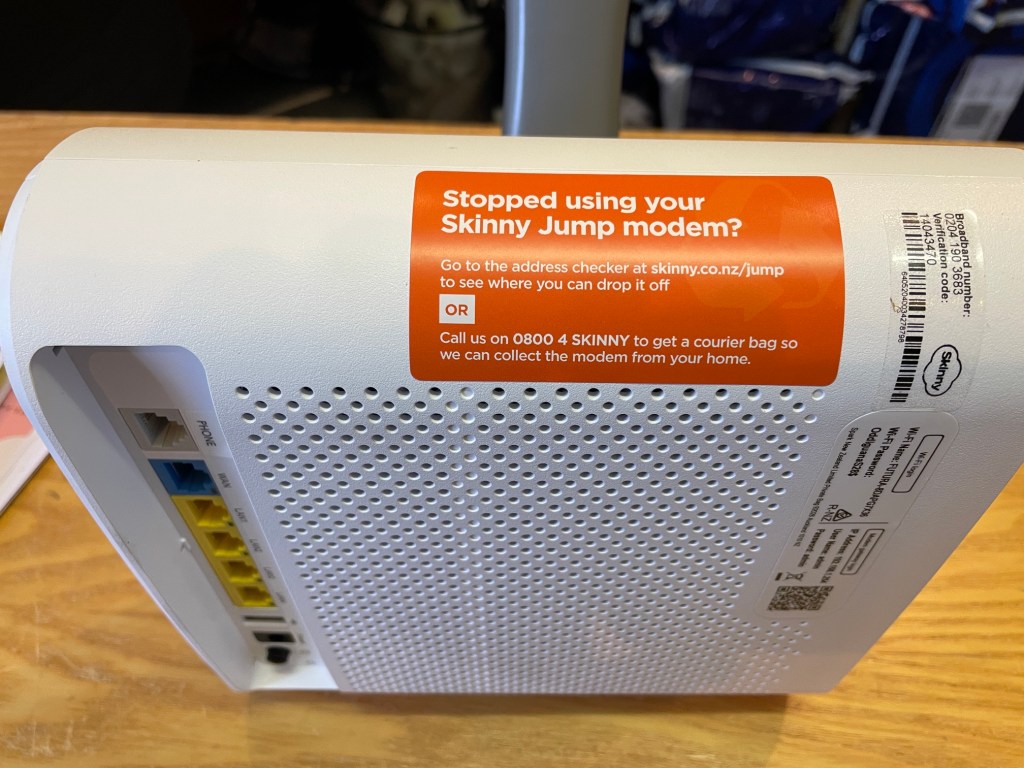
When a customer returns a modem to a Jump Partner and says ‘my SIM card has been stolen or lost’, it appears partners are issuing a replacement modem. That is all good.

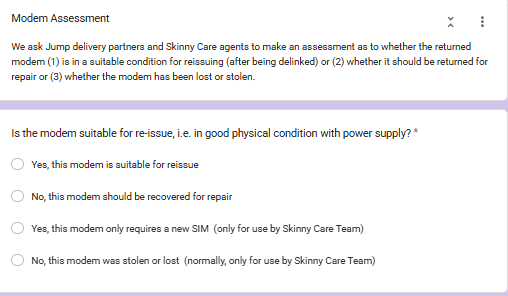
The problem occurs when the Modem Returns form is filled in, requesting a SIM SWAP. It is too late to do this when the modem has been returned to a Partner, especially when a replacement has already been issued. So the correct classification is that the modem is faulty and must be recovered for repair.

The SIM SWAP process only applies when the modem is still with the customer and the customer has reported this to the Skinny Care Team.

The Care Team will make a call whether the modem itself is faulty and must be recovered or whether it is just a matter of sending a replacement SIM. The process involves changing the Broadband number on the new SIM to match the customer’s existing broadband number, so it is a relatively simple process to reactivate the modem without the customer having to set up a new account.

So as a general rule, Partners should never select the “SIM SWAP” option. Once a modem has been returned to a Partner, you really only have two options:

(1) Yes, this modem is suitable for reissue, or

(2) No, this modem should be recovered for repair

Of course there is the “stolen or lost modem” option, but you may recall, we have asked that you never issue a replacement modem unless the customer returns their existing modem. Customer claiming “stolen or lost” must contact the Skinny Care Team.

How can customers change the email linked to their Skinny Jump account?

This interesting question was raised during a recent Community of Practice Jump meeting with Auckland Libraries. A bit of “umming and ahhing” on my part but then I suggested a possible solution.

I then followed this up by checking with our colleagues at Spark and they concurred with my solution, so I thought I should share this with everyone.

But first of all why would someone want to do this? In the Auckland case it was simply a matter of a customer wanting to update their email, as they were no longer using the one they signed up to Jump with. Fair enough, that makes sense.

So, we think the best way to do this is to put the modem through our de-linking process, using the Modem Returns form, but indicate on the form that the replacement modem has the same IMEI and Broadband numbers and is suitable for reissue. When the modem is de-linked it will be like a new modem and the customer can set up a new account with their updated email.

But just a warning, because the customer is changing to a new email, they will not be able to transfer any residual funds on their account, so do suggest they wait until their balance is zero before actioning this.

The other slight problem is that we ask partners to always use their email address on the Modem Returns form, so that you receive notification when the modem has been delinked. In this particular situation though, you could use the customer’s email, so that they get the notification directly. Alternatively, you are welcome to continue using your own email and then alerting your customer when they can set up their new account. They will have the free start-up 35GB when their modem is de-linked, so the transfer should be seamless.

Skinny Jump modem stocktake: it’s time for a mid-year sync

With talk of a modem stocktake, you are probably wondering why Christmas has come early this year. But with temperatures the way they are these days, that is certainly not the case.

What is the case is that our records are increasingly slipping out of sync with your on-the-ground realities.

And how do we know this, you might ask. We have the best and fastest delivery of modems that I can ever remember, but I still get requests from partners that they have run out. When I check their GSheets, I see that they have stock levels above their re-order triggers, so this means a new order has not been generated.

This generally means that some modems are slipping out the door without Profile Forms being completed. I might sound like a cracked record (I have been accused of that in the past), but please make sure all staff issuing modems are completing Profile Forms – this is the only way that we (DIAA) can tell a modem has been issued. That said, I did discover a new issue in a partner’s GSheet this week – some IMEI numbers had been entered more than once, so this of course inflated their apparent stock. Just another good reason for a mid-year sync!

So, back to the point of this post. We are planning a 30 June stocktake.

So, on 30 June there are two ways this can happen: (please don’t do this before then as we will be doing a final update of all partner GSheets on Monday 29th to make sure we have all the Profile Forms entered)

(1) Partners check the number in cell E2 (Actual stock on hand) and if that matches your actual stock, please send an email to jump@diaa.nz confirming the match, or if there is a mismatch, please send us an email with the IMEI numbers of the modems that you are actually holding.

(2) Partners who don’t respond by 6 July will receive a call from the delightful Georgia and Tori, asking you to do a live stocktake. This will also be an opportunity to let us know if there have been any staff changes and who the primary point of contact for Skinny Jump is.

Hoisted by my own petard!

I have to take my hat off to one of our Jump delivery partners who diligently searched my blog posts for the answer to a jump problem she was experiencing. She discovered the answer in one of my posts way back in 2020, but the problem was that this post no longer reflected current procedures.

The advice in the post asked her to email the Skinny Support team to get a modem de-linked. This was the procedure in 2020, but was subsequently changed to align with the “Returns and faulty modems” procedures on page 21 of the November 2024 edition of the Partner how-to Guide, i.e. complete a Modem Returns form.

So I guess this is even worse than institutional memory – my blog post remains in black and white forever!

Needless to say, it took all of 30 seconds to bin the old blog post. But of course the bigger issue is what other outdated advice is lurking in my blog? The safe thing might be to bin all posts whenever a new edition of the Partner Guide is published.

But perhaps, until I get over my “never throw anything away — might come in handy one day” syndrome, perhaps you can just be a tiny bit cautious about any old posts, especially those discussing operational procedures. A good guideline is that anything to do with modem distribution and recovery is a DIAA issue (jump@diaa.nz). Anything to do with the Skinny Jump service is a Care Team responsibility (0800 475 4669).

PS: The story with the partner discovering this problem ended well. She was politely referred to me by the Skinny team.

Those tight covers!!

Thanks to the team from Grey District Library who have raised an issue that challenged me for some time until I asked someone else. How to remove those jolly orange sleeves on the Futura modems without destroying the sleeves in the process?

“The newest modem boxes have very tight orange covers, which take two staff members to remove. One to hold the cover and one to pull the box out, and even then, it’s still not easy. We have had staff members accidentally rip the modem box when trying to get it out, and we have had a staff member have to cut the cover off because there weren’t any other staff members available to help remove the cover, and the patron they were signing up was elderly, so they couldn’t help.”

Well, there is a solution. You might have met Georgia and Tori, (or G&T as we know them, not to be confused with the tonic version!). They spend some hours every weekend keeping the engine room of Jump modem distribution ticking over. You might have met them at our Jump annual stocktake time, when they are making sure our records align with your reality.

Anyway, I digress. I asked them to explain how they get the sleeves off the Futura modems and in less time than it is taking me to write this post, they had produced a YouTube clip. Starring Georgia, with Tori recording on her smartphone.

I look forward to seeing a video clip from the Grey District Library about how this has transformed their Jump lives!

PS. Maybe I could use more G&T media* to reduce my sometimes verbose posts!

*Not to be confused of course with G&T Productions, a New Zealand theatre production company that specialises in bringing large-scale international musical theatre productions to audiences across Aotearoa.

“No Coverage” – What happens next?

Duncan Philps from Onehunga Library asked this interesting question recently and it’s just possible that some other Jump partners might also have similar lingering thoughts.

Let me restate a few facts about this while answering Duncan’s question.

A customer contacts you and wants to sign up for Jump. What’s the first thing you do? Check their address has Jump coverage of course. And then you have to deal with a disappointed customer when you get this message:

FACT ONE: No coverage doesn’t necessarily mean ‘no coverage’: First thing to note is the small print, explaining what “No coverage” means. Nine times out of ten, it doesn’t actually mean there is no coverage, as the 4G network is very widespread and it is quite rare to discover a location with no wireless coverage. Most of the time it means that it is a capacity issue, i.e. the address is an area that has reached the maximum number of modems that can be connected to the nearest cell tower. The reason for capping the number of connections is to preserve an acceptable standard of service for existing customers; adding too many connections will degrade the service for everyone served from that tower.

FACT TWO: Cellphone towers radiate in three 120 degree sectors: Your customer might then want you to explain “how come then that my neighbour has coverage”, or “I tested my neighbour’s Jump modem in my house and it worked!” Click on the even smaller print in the “We’re sorry” message and you’ll end up here. You should also have copies of a DL pamphlet explaining cell tower coverage; you can find a link here to order more if you have run out.

FACT THREE: The Skinny Jump coverage checker is updated every night: The number of broadband customers connected to any cell tower can vary every day, so that a coverage check the next day or later in the same week could give the green light for a new connection. Customers can also move to other wireless service providers or a fibre connection, freeing up space on the Skinny tower.

FACT FOUR: For customers without coverage, completing an Online Application Form or a Profile Form does not guarantee a Jump connection: We introduced these options for partners primarily to help diffuse difficult situations with angry customers who cannot walk out the door with a Jump modem.

FACT FIVE: Capturing the details of ‘no coverage’ customers enables us (DIAA) to double-check coverage/capacity at the customer’s address: We do this when processing both the online applications and the profile forms. Sometimes we get a pleasant surprise and discover that capacity has become available and will contact the customer directly to see if they still want a Jump connection. But it is quite rare to get a positive result straight away. We check these addresses three to four weeks after receiving the ‘no coverage’ application and advise the customer by email of the result. We do not automatically do any further checks, which is why we advise customers to check themselves periodically, and many do this.

FACT SIX: Skinny does not contact Jump applicants who complete a ‘no coverage’ response on an Online Application or Jump Profile form when capacity becomes available: Skinny does not have access to individual customer information on either the Online Application of Jump Profile forms. The Skinny team uses the same address checker that we do.

FACT SEVEN: Capturing ‘no coverage’ addresses helps us inform Spark of Skinny Jump blackspots: We aggregate the data from the ‘no coverage’ responses to identify areas where there are many people waiting for Jump and share this data with Spark. That said, we have no influence on how Spark prioritises their investments in further 4G cell tower capacity. We know they have made significant investments in 5G infrastructure and we hope that as customers migrate to 5G, this will free up more 4G capacity for Jump.

PS: Duncan – I hope this addresses your questions.

Jump Modem Returns – Why does the Skinny Care Team keep referring customers to partners?

William Chou from Te Manawa Library in Auckland has recently raised this question and to be fair, he isn’t the first one to do so.

William advised us that there had been at least three instances at Te Manawa during the last two months where the Skinny Care agents had advised customers reporting a faulty Jump modem to go to the library, “as it would be faster”. But as William pointed out, this conflicts with my previous posts (and as it happens, the Jump Partner Guide).

Here’s an extract from my April 2025 post:

It seems that part of the confusion arises when Skinny Care agents mistakenly direct customers to Jump partners for replacements. Please note: Skinny agents should never refer customers to partners for replacement modems. If they confirm the modem is faulty, they should complete the Modem Returns form instead.

So William is quite right to question whether our processes have changed.

The short answer is that our agreed processes have not changed. The challenge that we seem to have is training new Skinny Care agents. The agents are dealing with both regular Skinny products and Skinny Jump, and we do have quite a lot of unique procedures for Jump, especially around the distribution and return of modems, and are regularly making tweaks to Jump processes. I can understand that this could be quite a challenge for Care Agents to keep up to date with.

I know the Jump Squad in Spark provide regular updates and training for Care Agents and all they can really do is keep issuing reminders of the correct procedures.

But we also know that some Jump partners are happy to issue replacement modems. There are problems in doing this, especially around timings for delinking the faulty modems from customers’ accounts. So despite the instructions in the User Guide (does anyone read user guides these days???), customers will keep coming to partners for faulty replacements.

But we want this to be your choice, not feeling that others, e.g. Care Team, are handing on work onto you that they should be dealing with.

How do we fix this? Frankly, I don’t know. Maybe persistence? So please keep alerting me (jump@diaa.nz) to any instances where customers are saying “Skinny told me to come to you for a replacement modem“. In a perfect world it would be great to know the name of the Agent providing this wrong advice, or as a minimum, the day and time of the call.

Jump modem supplies flowing smoothly

More good news for 2026! First, there was the announcement that Ciena has extended their sponsorship for another 350 families and now CEVA, the supplier of Jump modems, is shipping modems within days of our orders being placed. This is a fantastic improvement compared to last year, when modem shipments were often lagging by 6-8 weeks.

As the delivery lag reduces, we change the trigger level for new orders; towards the end of 2025, this was set to the number of modems issued by each partner during the previous 30 days. The goal was to ensure that partners had sufficient stock for at least 30 days.

But, like the Reserve Bank’s official cash rate (OCR), we can adjust the trigger level to reflect changes in the Jump economy. So thanks to Marian Hector at Glen Eden Library, who noticed the impact of the 30 day rule meant her Jump modem stock levels are now persistently much higher. Not that she was complaining, but some partners might find this puts more pressure on their storage spaces.

So, like the Reserve Bank Governor does with the OCR, I am please to announce that as from today, the OJR (Official Jump Rate) has been reduced to 14 days.

Well, this certainly wins the Jump creative award for 2025!

Now the challenge is to spot what the following two pictures have to do with Jump!

Here’s a hint. She works in a library. She is famous for many things, not least of all is her creativity. She has exhibited at Te Papa! She features regularly in local and international media. She has the enviable position of Digital Inclusion Coordinator | Kaikōtuitui, Mātau Matihiko in her North Island Library. Now, wouldn’t just every library love to have one of those!

She says: I just wanted to share that I love Skinny JUMP modem time because I love reusing the boxes and the packaging! Our last delivery was in September and I used the boxes and the packing paper to help fill a brand-new garden bed that I was creating on my driveway. I am now eagerly considering a new garden box to stuff my latest round of Skinny JUMP boxes and packing paper into! 

She is the one and only Leala Faleseuga!!

Watch out sustainable awards – here she comes – reduce, reuse , recycle!!

Why do I need to complete a Jump Profile Form?

I received an email from a partner yesterday who had just completed a mini stock-take and discovered 3 modems listed on their GSheet that they no longer had. He thought this was probably because Profile Forms had not been completed by some staff members when the modems were issued.

So this led him to ask was: “what is the impact of us not completing the profile form?” He wanted a compelling reason to explain to staff issuing modems why this is important. Fair enough, I thought.

Sure, we ask for a lot of demographic information – this is used in our annual report to programme funders, providing evidence that the modems are reaching the target groups. But that is not the most important thing.

We ask for the address where the modem is going to be used, so that we can avoid issuing more than one modem to the same household. But that is not the most important thing either.

We also use the address information to provide summary reports by town and region to provide evidence that Jump is reaching the most digitally disadvantaged communities. But that is not the most important thing either.

We ask customers to tell us who is helping them set up their Jump modems. We think the support provided by libraries and local community partners is absolutely critical to the ongoing success of Jump, and this helps provide the evidence. But this is not the most important thing either.

We ask customers if they have school-aged children and therefore qualify for free internet connections with programmes like Ciena. But that is not the most important thing either.

We ask for the phone contact details of the customer and their explicit approval for any follow up calls to get feedback on how Jump is helping them. But that is not the most important thing either.

OK, enough, I hear you cry! What then is the most compelling reason for completing a Skinny Jump Profile Modem??

Quite simply, so that we know when to send you more modems!

We (DIAA) manage the modem supply process for Jump, and for probably rather obvious reasons, we do not have access to Skinny’s customer database. So we rely on the Profile Form to update us on the modems being issued. We closely monitor all partners’ stock levels and each week, prioritise deliveries to those with low stock. So if partners issue a modem without completing a Profile Form, we think you still have this modem, and you move down the re-order priorities.

We strongly recommend that all partners periodically do a stock check and confirm that the number of modems they actually have aligns with the number in cell E2 (Actual Stock on hand) of your Jump GSheet.

If there is a mismatch please send a schedule of the IMEI numbers of the modems you are holding to jump@diaa.nz and we will update your GSheet accordingly.

The good news for the partner who raised this issue was that when his Gsheet was corrected, it immediately flagged the need for a new order, which we have actioned.