We need your help to get unwanted modems returned

Every year, Spark invests millions into the Skinny Jump programme, with one of its largest costs being the purchase of new Jump modems and we want to make sure we are using this generous investment wisely.

Our approach has been to encourage customers who do not need their modems any more to return these so that they can be delinked and reissued in much the same way that libraries issue books. But the main difference of course is that there is no time limit on the Jump ‘loan’ modems; customers are welcome to keep the modem for as long as they need it.

But the challenge is how to encourage customers to return it when they don’t need it. Here are some things you can do to help:

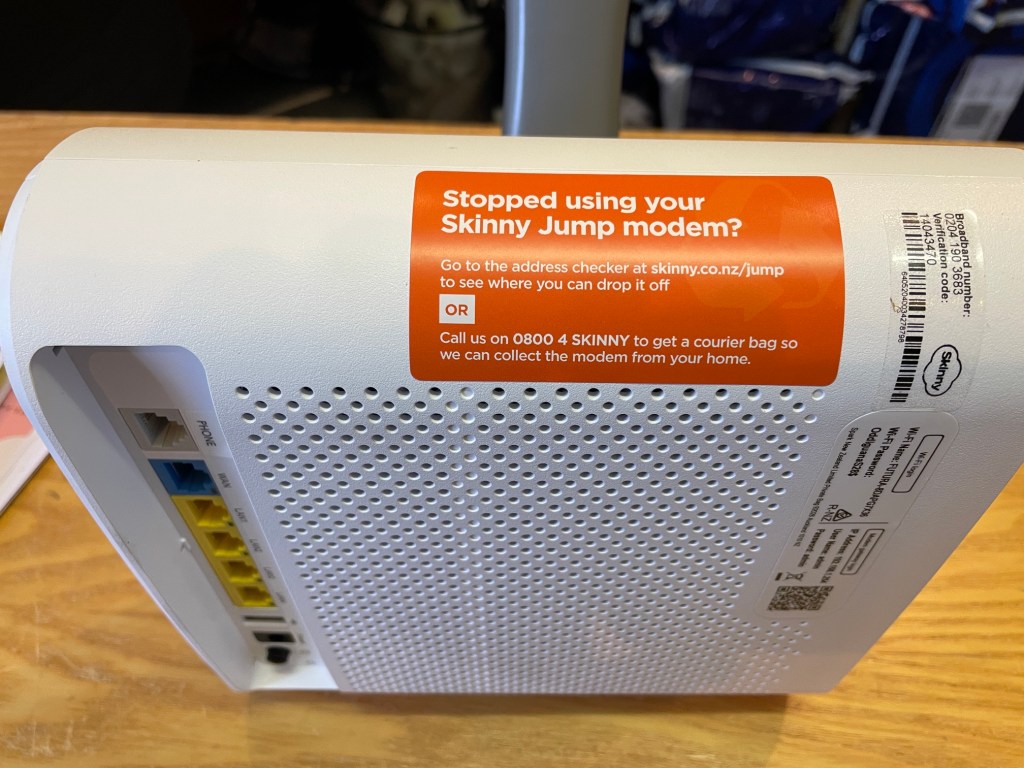
(1) Make sure every modem you issue has the “Stopped using your Skinny Jump Modem” sticker attached.

Maybe you have run out of these? If so, you can order these using the online order form for Jump collateral.

(2) Display the Modem Returns poster, as a reminder to Jump customers. You can also order copies of this poster through the online order form. Note the default quantity is 100; you can change this in the comments field at the bottom of the order form. I suspect you might not have enough wall space to display 100 copies!

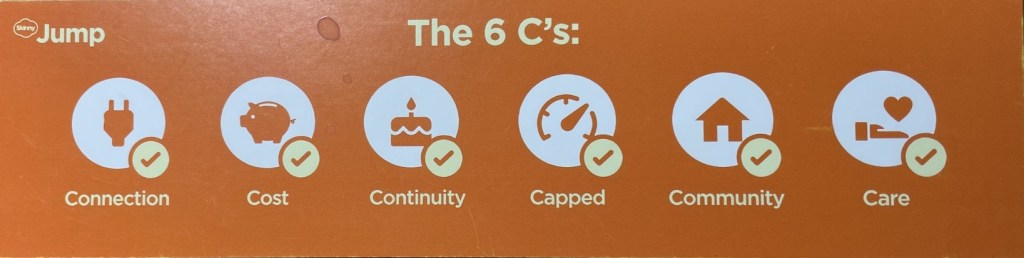
(3) Always stress the importance of returning the modem if not needed any more. This is part of the 6 C’s discussion we expect you to have with every customer receiving a Jump modem. Now here’s a quick test for you – which of the 6 C’s is about modem returns? (answer at bottom of this post).

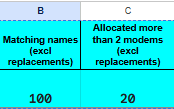
(4) Never issue a replacement modem unless the customer returns their faulty unit. This appears to be part of the problem. We are currently consulting with our 22 largest partners (the ones who issue the most modems) and have discovered that over 1600 modems have been issued without the faulty ones being returned. This doesn’t include modems reported as lost or stolen. Remember that you can monitor this yourself in your Jump Gsheets. Cells B1:C2 report the number of duplicate (or more) issues:

Thank you to the partners who have already responded to my email about this issue and I do understand that it is often difficult to remember whether individuals have already been issued a modem (especially when you have had over 1500 Jump customers in 10 years!). We keep stressing that Jump is a high trust model, where we encourage partners to take applicants at their word, unless you have local knowledge that suggests someone is abusing the opportunity. We don’t want to add any complications into the signup process, like asking customers for ID or requiring staff to pre-check the Jump register before issuing modems. We know that some partners use their ‘book a librarian’ service to assign a timeslot for Jump signups and this does provide an opportunity to check if they are a repeat customer before they arrive. But we also know that some customers can be quite devious using different names and emails to secure additional modems.

I will be compiling a brief report on the feedback from our largest partners and sharing how they are tackling this issue in a further post. But I welcome feedback from any partner with suggestions. I am waiting with baited breath for feedback from one of the top 22 partners, with a stunning record. Despite issuing nearly 1000 modems, their Jump register only reports 7 duplicates and none with 3 or more modems!

Answer to 6 C’s question: Community – returned modems can be reset and re-issued; faulty modems can be repaired; old modems can be recycled. This helps more homes get access to a truly affordable internet service, it keeps Skinny Jump sustainable and it’s good for our environment. Reference pp.4-5 of Partner Guide.

Get ready for Jump stocktake day – tomorrow 30 June

This is just a reminder about our planned modem stocktake tomorrow. Why tomorrow and not today you might be asking?

Simply because we want to make sure our records are fully up to date, so that you are comparing “apples with apples”, so to speak. We will be updating your Jump Gsheets this evening to include all the Profile Forms received today.

Now is a good time to check that you have access to your Jump GSheet so that you can check if the number of modems that you have in stock matches the number in cell E2 (Actual stock on hand). If there is a match, all you need to do is send a brief email to jump@diaa.nz, confirming the match.

If there isn’t a match, you will need to send us an email with the IMEI numbers of the modems you are holding.

I was impressed with one of our Auckland partners who did their stocktake last week, as they were planning to be on leave this week! And I’ve also been impressed with partners who have suddenly realised they don’t have access to their GSheet, often because the person who did have access no longer works there. This is easily fixed too – just drop a line to jump@diaa.nz requesting access. If this request comes from a personal email, as opposed to your work email, I may have to confirm your identity. This is just a precaution to make sure I don’t provide access to unauthorised people.

We are also using the stocktake to make other updates to our records – in particular if someone new is now the main point of contact for Jump. You can check who we have in our records – their name (or names) are in Cell A2 of your GSheet.

We would also like to recover any of the first generation of Jump modems (B315) – our records indicate there are 11 of these still being help in partner stocks – you can check this in Columns Y2:AC3 of your Gsheet (see example below). Please note the IMEI numbers of any B315 modems you are holding in your email to us and we’ll get recovery bags on their way.

SIM SWAPS are only for Jump Customers (not Partners)

When a customer returns a modem to a Jump Partner and says ‘my SIM card has been stolen or lost’, it appears partners are issuing a replacement modem. That is all good.

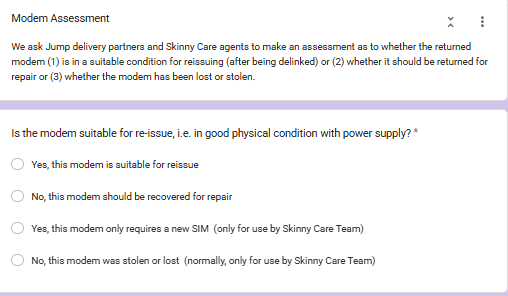
The problem occurs when the Modem Returns form is filled in, requesting a SIM SWAP. It is too late to do this when the modem has been returned to a Partner, especially when a replacement has already been issued. So the correct classification is that the modem is faulty and must be recovered for repair.

The SIM SWAP process only applies when the modem is still with the customer and the customer has reported this to the Skinny Care Team.

The Care Team will make a call whether the modem itself is faulty and must be recovered or whether it is just a matter of sending a replacement SIM. The process involves changing the Broadband number on the new SIM to match the customer’s existing broadband number, so it is a relatively simple process to reactivate the modem without the customer having to set up a new account.

So as a general rule, Partners should never select the “SIM SWAP” option. Once a modem has been returned to a Partner, you really only have two options:

(1) Yes, this modem is suitable for reissue, or

(2) No, this modem should be recovered for repair

Of course there is the “stolen or lost modem” option, but you may recall, we have asked that you never issue a replacement modem unless the customer returns their existing modem. Customer claiming “stolen or lost” must contact the Skinny Care Team.

How can customers change the email linked to their Skinny Jump account?

This interesting question was raised during a recent Community of Practice Jump meeting with Auckland Libraries. A bit of “umming and ahhing” on my part but then I suggested a possible solution.

I then followed this up by checking with our colleagues at Spark and they concurred with my solution, so I thought I should share this with everyone.

But first of all why would someone want to do this? In the Auckland case it was simply a matter of a customer wanting to update their email, as they were no longer using the one they signed up to Jump with. Fair enough, that makes sense.

So, we think the best way to do this is to put the modem through our de-linking process, using the Modem Returns form, but indicate on the form that the replacement modem has the same IMEI and Broadband numbers and is suitable for reissue. When the modem is de-linked it will be like a new modem and the customer can set up a new account with their updated email.

But just a warning, because the customer is changing to a new email, they will not be able to transfer any residual funds on their account, so do suggest they wait until their balance is zero before actioning this.

The other slight problem is that we ask partners to always use their email address on the Modem Returns form, so that you receive notification when the modem has been delinked. In this particular situation though, you could use the customer’s email, so that they get the notification directly. Alternatively, you are welcome to continue using your own email and then alerting your customer when they can set up their new account. They will have the free start-up 35GB when their modem is de-linked, so the transfer should be seamless.

Hoisted by my own petard!

I have to take my hat off to one of our Jump delivery partners who diligently searched my blog posts for the answer to a jump problem she was experiencing. She discovered the answer in one of my posts way back in 2020, but the problem was that this post no longer reflected current procedures.

The advice in the post asked her to email the Skinny Support team to get a modem de-linked. This was the procedure in 2020, but was subsequently changed to align with the “Returns and faulty modems” procedures on page 21 of the November 2024 edition of the Partner how-to Guide, i.e. complete a Modem Returns form.

So I guess this is even worse than institutional memory – my blog post remains in black and white forever!

Needless to say, it took all of 30 seconds to bin the old blog post. But of course the bigger issue is what other outdated advice is lurking in my blog? The safe thing might be to bin all posts whenever a new edition of the Partner Guide is published.

But perhaps, until I get over my “never throw anything away — might come in handy one day” syndrome, perhaps you can just be a tiny bit cautious about any old posts, especially those discussing operational procedures. A good guideline is that anything to do with modem distribution and recovery is a DIAA issue (jump@diaa.nz). Anything to do with the Skinny Jump service is a Care Team responsibility (0800 475 4669).

PS: The story with the partner discovering this problem ended well. She was politely referred to me by the Skinny team.

Jump Modem Returns – Why does the Skinny Care Team keep referring customers to partners?

William Chou from Te Manawa Library in Auckland has recently raised this question and to be fair, he isn’t the first one to do so.

William advised us that there had been at least three instances at Te Manawa during the last two months where the Skinny Care agents had advised customers reporting a faulty Jump modem to go to the library, “as it would be faster”. But as William pointed out, this conflicts with my previous posts (and as it happens, the Jump Partner Guide).

Here’s an extract from my April 2025 post:

It seems that part of the confusion arises when Skinny Care agents mistakenly direct customers to Jump partners for replacements. Please note: Skinny agents should never refer customers to partners for replacement modems. If they confirm the modem is faulty, they should complete the Modem Returns form instead.

So William is quite right to question whether our processes have changed.

The short answer is that our agreed processes have not changed. The challenge that we seem to have is training new Skinny Care agents. The agents are dealing with both regular Skinny products and Skinny Jump, and we do have quite a lot of unique procedures for Jump, especially around the distribution and return of modems, and are regularly making tweaks to Jump processes. I can understand that this could be quite a challenge for Care Agents to keep up to date with.

I know the Jump Squad in Spark provide regular updates and training for Care Agents and all they can really do is keep issuing reminders of the correct procedures.

But we also know that some Jump partners are happy to issue replacement modems. There are problems in doing this, especially around timings for delinking the faulty modems from customers’ accounts. So despite the instructions in the User Guide (does anyone read user guides these days???), customers will keep coming to partners for faulty replacements.

But we want this to be your choice, not feeling that others, e.g. Care Team, are handing on work onto you that they should be dealing with.

How do we fix this? Frankly, I don’t know. Maybe persistence? So please keep alerting me (jump@diaa.nz) to any instances where customers are saying “Skinny told me to come to you for a replacement modem“. In a perfect world it would be great to know the name of the Agent providing this wrong advice, or as a minimum, the day and time of the call.

Yes, it’s Jump stocktake time again

Each year we ask all our Jump partners to do a stocktake of their Jump modems to help us start the new year with a clean slate. If your Jump stock matches the number in cell E2 of your Jump GSheet, please send us a short email confirming this (jump@diaa.nz). If you don’t know how to access your GSheet, send us an email and we’ll remind you.

Check the top few lines of your GSheet – it should look something like this:

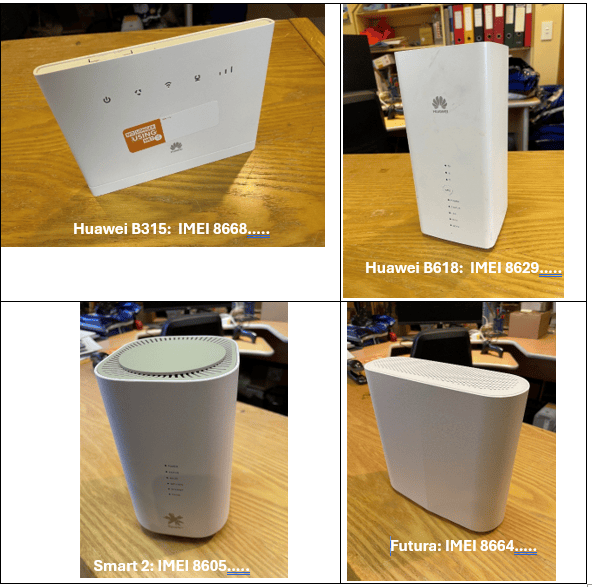
If there is a mismatch with your ‘actual stock on hand’, please email us the IMEI numbers (the numbers beginning with 8668, 8670, 8629, 8605 or 8664) for the ones you are holding and we’ll get your Gsheet back in order.

You will recall that we use the stock data in the GSheet to generate and prioritise new orders, so it is really important to keep these aligned.

Please also check that we have the correct contact name in cell A2 – this is the person we send new modem supplies to. If this is not correct please email us with the new contact person – name, email and contact phone number.

We would like you to confirm these details before Christmas; to help you with this, you might get a call from Georgia or Tori, our two Jump helpers (like Santa’s Christmas Elves).

And one other thing – we know some partners just never seem to be able to find the time to complete Modem Returns forms when a faulty modem is returned. So when you are doing your stocktake, please take a note of any old modems cluttering your cupboards and unsuitable for re-issue, we’ll send you a courier label to recover them. Just tell us the size of the box you will be using so we can get the courier charges right. Or if it is just one or two pesky modems, we can send you a return courier bag.

Where are the courier bags for returning faulty modems?

I am well overdue for a blog post on this topic. This is now the second most frequently asked question by Jump partners. What is the most frequently asked question you might wonder (scroll to the bottom to find the answer).

Back to the main topic of this post – some partners have been waiting for more than four weeks to get a return courier bag. The good news is that there is no great mystery here – it is simply a workload issue. Our goal is to get these to you so they are off your hands within 10 days of lodging a Modem Returns form, but that has been impossible over the last four weeks.

Our DIAA team has been a tiny bit preoccupied during the last month launching three new Digi-Coach programmes in the Waikato, Northland and last week in The Top of the South Island. Next week we are in the Central North Island and a week later in Wellington. With five new Digi-Coach cohorts in operation, that means 50 new Jump Specialists become available in libraries and community organisations throughout these regions five days a week for the 12-week work placements. Take a look at the stunning impact videos featuring Digi-Coaches in the Wellington region during the pilot programme earlier this year.

BUT, I digress. The really good news for return courier bags is that all partners should receive their bags this week. We had 50 on the courier yesterday and we are expecting the remaining 30 or 40 to be out the door this week. We have a new cunning plan to keep on top of this in the future and avoid such a huge backlog.

This has also impacted updates to your Gsheets for delinked modems. Normally these updates happen at least weekly, but they have suffered the same fate as the return bags. This is not such a problem, as partners receive a direct email notification from the Skinny team whenever a modem is delinked and reset for re-issue. So you don’t have to wait until your GSheets are updated before you issue delinked modems. They (your Gsheets) will catch up eventually, as this impacts your stock levels.

And the answer to the most common question is ‘When am I getting more modems? The answer to this question is much more complicated and varies week by week. But as some partners will have noticed, we have now exhausted supplies of the refurbished Smart modems and the latest shipment of over 700 modems was mainly the new Futura modems. The backlog of orders has reduced to 1600, which is the best it has been for most of this year.

From courier bags to modem supplies, the road ahead is looking brighter.

Customers needing replacement modems – it’s your call

Clarifying the Process for Replacement Jump Modems

We regularly receive reports from partners about Jump customers requesting replacement modems — often because their modem has been lost or stolen, or because they’ve been referred by the Skinny Care Team. These situations can put pressure on your staff, especially when customers arrive unannounced and expect an immediate replacement. In some cases, they may become quite insistent or even stroppy.

However, Jump partners do not have the tools or access needed to issue replacement modems on the spot. That’s why our recommended process is for all replacement modem requests to be directed to the Skinny Care Team (0800 475 4669).

The Skinny Care Team has the systems in place to:

  • Check whether a modem is genuinely faulty.
  • Verify the customer’s identity and Jump status.
  • Complete the required Modem Returns form, which triggers the modem de-linking process and a request for DIAA to courier a replacement.

Once the form is submitted:

  • We (DIAA) arrange for a replacement modem to be sent directly to the customer.
  • We also include a prepaid courier bag for returning the faulty modem.
  • The de-linking process takes a few days, ensuring that by the time the new modem arrives, the customer’s account is ready to be activated.

Lost or Stolen Modems

If a modem has been lost or stolen, partners must not issue a replacement under any circumstance. The customer must contact the Skinny Care Team directly to report the issue and begin the verification process.

Incorrect Information from Skinny Care

It seems that part of the confusion arises when Skinny Care agents mistakenly direct customers to Jump partners for replacements. Please note: Skinny agents should never refer customers to partners for replacement modems. If they confirm the modem is faulty, they should complete the Modem Returns form instead.

Managing Customer Expectations

We know it’s not always easy to turn customers away — especially when they show up unannounced. That’s why we strongly encourage all partners to:

  • Clearly communicate to your community the type of support you offer.
  • Decide whether Jump support is provided via:
    • Drop-in sessions,
    • Set times during the day/week,
    • Appointment only.
  • Avoid providing support during staff lunch breaks (12–2pm) or during busy periods such as school holidays, when other programmes may take priority.

Optional Modem Replacement by Partners

If you do choose to issue a replacement modem (e.g., if you have one available and have time to assist), that’s entirely up to you. While this is outside our standard process, we’re happy to support you if you have the capacity.

Just ensure that customers understand:

This is a back-end procedure that cannot be fast-tracked — not by delivery partners, the Skinny Care Team, or DIAA.

The de-linking process cannot happen instantly.

Is there still a problem with Jump modems not being properly de-linked?

Partners trying to reissue returned modems during the last 3 months have experienced numerous problems when they try to use these ‘de-linked’ modems, only to discover they are still linked to the previous owner’s email.

I appreciate that this has been extremely frustrating and appears to have resulted in partners feeling a bit nervous about re-issuing de-linked modems.

We think the problem is because of staff changes in the Skinny Jump team and misunderstandings about the de-linking and resetting processes. We appreciate that there has also been confusion about exactly what is required to de-link, reset and reprovision a Jump modem.

After much discussion between the Jump team in Spark and the Skinny support team, a new de-linking process was introduced on 24 March 2025 that we believe will solve the problem.

We have also used this as an opportunity to be very clear about what is meant by the terms used to describe this process. It is unfortunate that the language used in the new November 2024 Jump Partner Guide is still a bit confusing.

The umbrella term to be used for all returned modems is now “de-linking”, whether the modem is to be reused or sent for repair.

This involves completely deleting the customer account linked to the modem, which both frees up the modem for re-use as well as releasing the customer’s email for reuse should the customer wish to set up a replacement modem.

In the past, we have used the terms “resetting” and “reprovisioning” to explain how delinked modems are readied for reissue with a 35GB start-up data plan, but we are going to stop using these terms, as they are just sub-sets of the de-linking process.

Every modem that is delinked is automatically reprovisioned with a new 35GB start-up data plan, whether the modem is for reuse or repair.

The only exception is modems that are reported as ‘lost’ or ‘stolen’; these are permanently blocked.

The good news is that the new process seems to be working well, with timely notifications to partners as well as excellent tracking of the various components of the de-linking process. The not so good news is that the delinking process is taking a bit longer – up to 3 or 4 days. But in our view if this results in a more robust process it is well worth the wait.

We are going to be watching very closely any modems that have been delinked since 24 March to make sure the new process is working as expected. Partners holding modems that have been reset before this date are welcome to submit them again if you have any concerns that they might not have been de-linked properly.

Footnote: You might also be wondering what happens to any credit on a customer’s account when their old account is deleted. The Skinny team records the amount of this credit on the customer card, so that when a customer calls up and asks for the credit to be transferred to their new account, they can arrange this.