A huge thank you to the 206 partners who responded to our survey. We have now consolidated the responses into a summary report and provided some comment on matters we are following up. We are also planning a Partner workshop in Auckland on 14 October to consider the many excellent suggestions put forward.
Some highlights from the report:
(1) 89% rated their overall satisfaction with 4 or 5 stars
(2) Many respondents were not using or aware of all the Jump resources available
(3) Email is the preferred and most effective communication channel for Jump updates
(4) Demand for printed collateral is low
(5) Many partners never access their Jump registers
(6) 95% rated their satisfaction with modem supply as 4 or 5 stars
(7) 68% rated their satisfaction with the modem return process as 4 or 5 stars, suggesting this is a particular area for improvement
One of our Auckland partners had an interesting request this week – could we provide (a) historical data for their modem issues and (b) demographic analysis of recipients. The answer is yes, and this is dynamically updated every time a modem is issued. The question then is probably – where can I find this information?
Historical Data
This includes monthly issues for the current year, as well as historical annual data, for each Jump partner. You can find this in your Jump register by scrolling across the first GSheet in your Jump Register (with your partner name in the tab) to:
Line 4 in columns I to T record the number of modems issued each month. Don’t be confused by the headings in Line 3 – the months are in Line 2.
Line 4 in columns AD to AM record the number of modems issued each year from 2017 to 2026. Don’t be confused if there is a number in the 2027 column; this will be updated in due course.
Demographic Data
If your Gsheet has a tab called Demographics, then that probably means you can get summarised demographic data for your Jump customers – gender, ethnicity and age. This has been activated for all Auckland and Christchurch library partners, and can be set up for other partners on request to jump@diaa.nz
Comparative Data
The library partner who requested this was pleased the above data was already available, so he threw a curved ball and asked if he could also get comparative data for another similar sized library. With a little bit of GSheet magic this has now been added. So if you want this facility, you just need to tell me the name of the partner you want to compare with and I can add that for you (with stage 2, you will be able to do this yourself, by selecting the name of the partner you want to compare with). I tend to keep the demographic tab locked for editing, to protect the magic formulae, but stage 2 will give you the option to choose a comparative partner in the main GSheet.
Every year, Spark invests millions into the Skinny Jump programme, with one of its largest costs being the purchase of new Jump modems and we want to make sure we are using this generous investment wisely.
Our approach has been to encourage customers who do not need their modems any more to return these so that they can be delinked and reissued in much the same way that libraries issue books. But the main difference of course is that there is no time limit on the Jump ‘loan’ modems; customers are welcome to keep the modem for as long as they need it.
But the challenge is how to encourage customers to return it when they don’t need it. Here are some things you can do to help:
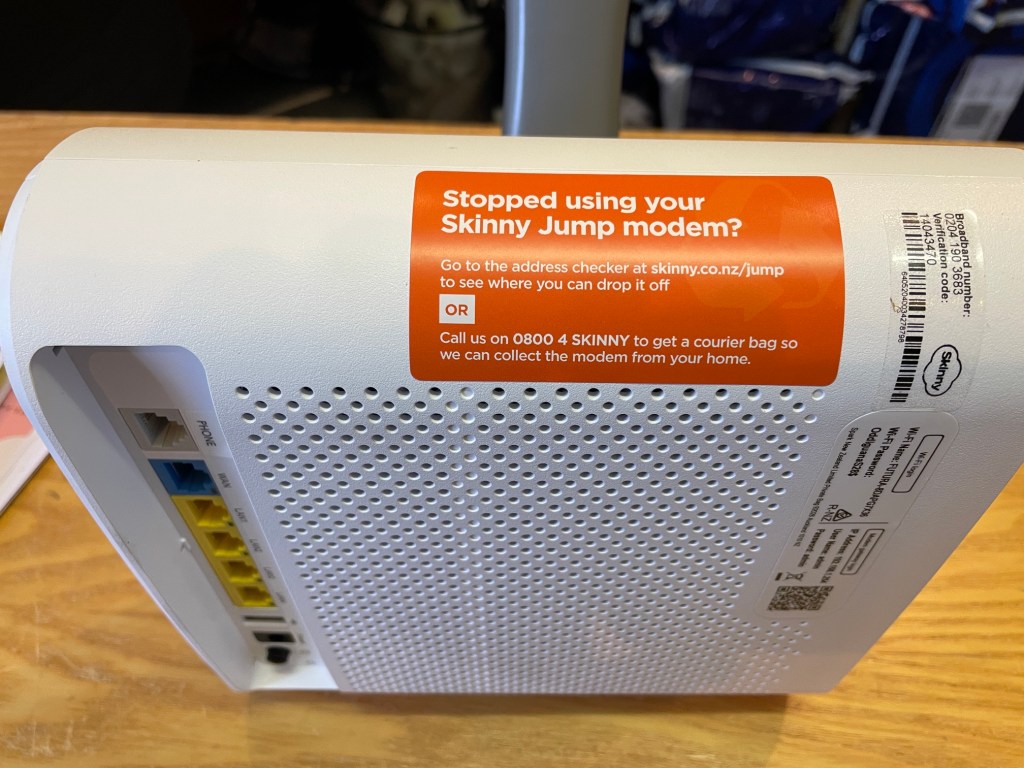
(1)Make sure every modem you issue has the “Stopped using your Skinny Jump Modem” sticker attached.
(2)Display the Modem Returns poster, as a reminder to Jump customers. You can also order copies of this poster through the online order form. Note the default quantity is 100; you can change this in the comments field at the bottom of the order form. I suspect you might not have enough wall space to display 100 copies!
(3) Always stress the importance of returning the modem if not needed any more. This is part of the 6 C’s discussion we expect you to have with every customer receiving a Jump modem. Now here’s a quick test for you – which of the 6 C’s is about modem returns? (answer at bottom of this post).
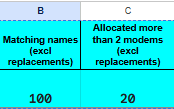
(4) Never issue a replacement modem unless the customer returns their faulty unit. This appears to be part of the problem. We are currently consulting with our 22 largest partners (the ones who issue the most modems) and have discovered that over 1600 modems have been issued without the faulty ones being returned. This doesn’t include modems reported as lost or stolen. Remember that you can monitor this yourself in your Jump Gsheets. Cells B1:C2 report the number of duplicate (or more) issues:
Thank you to the partners who have already responded to my email about this issue and I do understand that it is often difficult to remember whether individuals have already been issued a modem (especially when you have had over 1500 Jump customers in 10 years!). We keep stressing that Jump is a high trust model, where we encourage partners to take applicants at their word, unless you have local knowledge that suggests someone is abusing the opportunity. We don’t want to add any complications into the signup process, like asking customers for ID or requiring staff to pre-check the Jump register before issuing modems. We know that some partners use their ‘book a librarian’ service to assign a timeslot for Jump signups and this does provide an opportunity to check if they are a repeat customer before they arrive. But we also know that some customers can be quite devious using different names and emails to secure additional modems.
I will be compiling a brief report on the feedback from our largest partners and sharing how they are tackling this issue in a further post. But I welcome feedback from any partner with suggestions. I am waiting with baited breath for feedback from one of the top 22 partners, with a stunning record. Despite issuing nearly 1000 modems, their Jump register only reports 7 duplicates and none with 3 or more modems!
Answer to 6 C’s question: Community – returned modems can be reset and re-issued; faulty modems can be repaired; old modems can be recycled. This helps more homes get access to a truly affordable internet service, it keeps Skinny Jump sustainable and it’s good for our environment. Reference pp.4-5 of Partner Guide.
This message is for all ‘avid followers’, not actually ‘fashion’ in this case but Jump Partner GSheets. I know these are not everyone’s cup of tea, but they do play a critical role in our efforts to ensure a smooth flow of modems.
I know that at least one of you is such an avid follower of Jump GSheets that if her one is not updated with any new modem issues by the time she arrives at work each day, she is firing off an email, wondering if there has been a mistake.
Now that was the day (nearly a year ago) when there was an Alistair, who made a point of starting his day at 5am by updating everyone’s Gsheet (transferring the Profile Form data to partner Gsheets). We thought we might have an AI replacement for Alistair by now, but sadly not. Instead we have Tori (Talented, Outstanding, Resourceful and Industrious), who is not an AI engine but a very talented and competent student. Unfortunately, she still at school, and can only work for us on Saturdays.
So this means the Jump Profile data only gets transferred to partner GSheets on Saturdays. But all is well, this is in time to shuffle order priorities for the next week’s orders, which are processed every Thursday.