Managing Jump accounts for whānau and small groups in managed communities

The extension of the Jump eligibility criteria to other digitally disadvantaged groups such as seniors and people with disabilities, as well as the Covid-19 constraints that we have all had to face during the last seven weeks, has made us think about more flexible options for delivering Jump.  Two particular situations have come to light.

  1. 35 year old Jake takes responsibility for setting up a Jump account for his elderly Mum who lives in another town and has health issues. Jake completes an online application for his Mum but uses his own email address, so that he can check all the details such as the courier address were entered correctly.  The home delivery service kicked in and arranged for the modem to be couriered to his Mum.  When the modem arrived, Jake proceeded to set up the Skinny account in his Mum’s name but with his own email address so that he could verify the account when the Skinny email arrived.  The only thing Jake overlooked was that he would need the modem broadband number and the verification code to set up the account, and as the modem was now some hundreds of kilometres away, he could not easily check this.  So he called his mum and asked her for the codes on the base of the modem, but his mum was a bit confused by all the numbers and wasn’t what ones to give him. Lightbulb moment!  “Mum, take a photo of the base and rear of the modem and send them to me!”  Jake was now able to complete setting up the account.  Roll-on 30 days and Jake gets an email from Skinny reminding him that he needs to top up his Mum’s account and renew the $5 plan.   Jake’s Mum lives alone and she uses less than 30GB during the first month, so $5 a month is not really a financial burden for Jake. Remembering to top up every month is a bit of a pain for Jake, so he loads $20 onto his Mum’s account; each month $5 will be deducted, as the plan automatically renews.  Now how easy is that for Jake and his Mum.
  2. Leona works for an organisation that provides support to people with disabilities and wants to provide (and pay for) a Jump connection for 10 people in her community.  She has already procured 10 Chromebooks to set up a library of devices that people can borrow while under Covid-19 restrictions.  The people she wants to support are living at different locations so she opted for the home-delivery service.  However, she asked DIAA to provide her with a schedule of the modems allocated with the IMEI and Broadband numbers, as well as the Verification codes.  This enabled her to set up individual accounts for each recipient.  She also elected to set up a new email and password for each recipient, so that she could initially manage the accounts by paying for the top ups and renewing the Jump plans for each of the 10 people being supported, as required. Her plan is to eventually hand over the accounts to the individuals involved for them to self-manage. To simplify the process of accessing and topping up accounts she selected the Skinny Linked Accounts option.  While this was originally intended for parents to manage their children’s Skinny accounts, it can equally be used for managed community situations like the one described above.  Another organisation similar to Leona’s is happy to arrange for the delivery of the modems to their constituents, but the process is effectively the same.  We are referring to organisations like these as Community Connectors.
Now we are at Level 2, what’s the story with Jump delivery?

A few weeks ago I posted about what might happen to the home-delivery Jump service once we moved to Level 2.  I suggested that this really is in your hands as our delivery partners; we hope that you can continue offering assistance with Jump signups and progressively move back to delivering the modems as well.   But there is no panic.  We realise tomorrow is a new day and for many of you, your first day back in your premises after nearly two months.  While I would like to think that Jump signups are on your priority list, I suspect your managers (and their managers) might have other priorities, like managing social distancing and keeping all your surfaces clean.  So, as I mentioned in my previous post, we will continue to provide the home delivery option.  This means you can continue to help sign people up in your communities and we will courier the modem to them.  However, if you are willing to recommence with local modem deliveries, do let us know at jump@diaa.nz and we will turn on your auto-restocking trigger.

Just one important thing to remember, if you are issuing the modem, please complete the Stepping UP Profile Form.  If you want us to send the modem please complete the Jump Application Form.

Will we be continuing a national home-delivery service for Jump when we move to Level 2?

We recognise that with the move to Covid-19 level 3 today many Jump partners are starting to think about the impact of moving to level 2.  While it is expected that public venues, such as libraries, will be permitted to open under level 2, the one metre distancing rule will make it difficult to offer a full range of services.

Whether or not Jump partners wish to resume offering Jump to their communities under level 2 will be a decision for them to make.  We are able to continue to offer the national self-service Jump option as long as it is required, but we also look forward to the day when all partners are able to resume providing the additional face-to-face support that so many people still require.

I had a message from one of our self-service recipients the other day.  He said in a brief email “OK, I’ve got the modem.  What now?”.  While the Skinny Helpdesk is providing this follow up support, we know many people would much prefer to talk with someone they know in their local communities.

Jump modems – B315 and B618

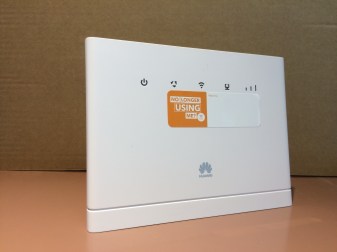
B315First there was the B315, the Jump modem we have all become very familiar with during the last 3 years.  These are still flying out the door and will continue to do so until supplies are exhausted (probably within the next 4-6 weeks).  DIAA, together with our Stepping UP partner network, is the exclusive distribution channel for this product.  Which means we are also the exclusive distribution channel for replacement modems.  B315 customers must report any modems they suspect as faulty to the Skinny Helpdesk.  The Helpdesk team will attempt to fix any faults remotely, but if not, they will log the modem as ‘faulty’ and this triggers a request to DIAA to ship a replacement.  The faulty modems cannot be repaired and customers receiving a replacement modem are requested to return the faulty unit to their nearest Jump delivery partner (when they open up again after the COVID-19 lockdown).  They should be added to the recycling box and eventually returned to Sims for recycling.
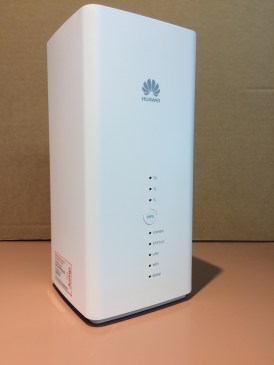
B618Welcome to the B618.  This device is initially being used as part of the Ministry of Education’s internet support package for students without a home broadband connection.  Approximately 3500 of these have been shipped directly from Ingram Micro (Spark’s hardware supplier) to student homes, using a mailing list supplied by the Ministry of Education.  As for the B315’s, customers are to report any faults directly to the Skinny Helpdesk.  They will be logged and a request issued to DIAA to issue a replacement. Unlike the B315’s, a return courier bag will be sent with the replacement modem.  The modems will be returned to DIAA and then forwarded for repair to Telegistics (Spark’s hardware repair company).
We do not expect partners to provide any support, at least at this stage, for the B618 modems.  If you receive any inquiries or requests for support from households with these modems, please direct them to the Skinny Helpdesk (0800 475 4669).

Can the delivery address for the modem be different to the customer’s address?

The short answer is yes.  In fact this has become such a common request during the COVID-19 lockdown that we have added an extra field in the Application Form to cover this situation.  Applicants must still enter the address where they intend to use the Jump modem, as we need this to verify that they do have Skinny wireless coverage, but we have added an optional field as a preferred delivery address.

There are many different circumstances where people may choose a different delivery address, but one of the most common has been in rural communities where gates are locked or there is no delivery letter box.  To make life easier for the courier, people in these situations have suggested a more accessible address belonging to a family member or friend.

Can one person apply for Jump modems on behalf of someone else?

The short answer is yes, but when we receive more than one Jump application from the same email address, this raises a flag in our system for us to investigate further.   In a number of cases we have received a separate email from a representative of an organisation checking out that this is OK.  For example, one situation involved a small retirement village, and another, special housing for people with disabilities.  In both cases, an administrator or support person was preparing the applications on behalf of the people they were caring for.  But as the people are living in separate accommodation and will be responsible for managing their own Skinny accounts, we are happy to supply individual modems.

However, when it comes to activating the modems and setting up Skinny accounts, individual emails will be required for each user. This email and password must be accessible by the person who will be responsible for topping up the Jump account each month.  Normally this would be the person who is using the Jump service, but we have encountered situations where children are taking responsibility for setting up (and paying for!) Jump internet connections for their elderly parents.

Can we send more than one Jump modem to the same physical address?

It is not uncommon for more than one Jump request to come from the same physical address.  This does raise an alert in our system and we take a close look at why this might be happening.  For example, if the request is coming from the same name and email, then we treat this as a duplicate application and simply delete the application. If the application is coming from two different people with the same second name, we suspect this might also be a duplicate and will follow up with a phone call to the family to find out why two modems are required.  Almost invariably we have discovered that this is because two people living in the same household have independently applied for a modem, without the other person knowing.  So this is easily resolved as well by deleting one of the applications.

The other situation we are encountering is for people or communities sharing a physical address, but with multiple residences.  This could be separate accommodation located on the same section or even a family living separately in a caravan (or a tent, as we discovered in one case).  Or it could be like a gated community with separate individual dwellings.

In these cases where different people or families are residing at the same address, we accept individual Jump applications.

Courier delays

Our goal is to courier modems to Jump applicants within 2 – 3 working days, but we have no control over how long it will take for the modems to reach customers.  We have seen some exceptionally good delivery times (next working day) to Opotiki, for example, but some appalling delivery times in Auckland and Wellington (up to 7 days, with some deliveries appearing to get ‘stuck’ in the local courier branch for 2 or more weeks).

We do have a courier tracking code for every modem shipped, so if you have any customers calling you about a modem they think is overdue, please contact Shelley (0800 463 422) and she will be able to provide the tracking code and date shipped.

Once you have the code, we suggest you give this to your customer, so that they can track progress themselves, and follow up directly with the courier company (Post Haste).

Just a brief note on the tracking code.  The full code appears like this:

2TPBMED 0679964111

But in the tracker you need to just enter “MED” in the first box and first 8 digits “06799641” in the second box.

If this doesn’t work, our advice is to tell your customers to move to Opotiki!!

You are amazing!

What an incredible achievement for Jump connections over the last four weeks!  With your support, we have together processed 2871 applications since the start of the COVID-19 lockdown on 25 March. 2545 of these have come through our home delivery self-service model and 326 have been delivered directly by 48 partners, using a range of innovative contact-less delivery methods.  We applaud all 169 Jump partners who are accepting inquiries from their communities and assisting applicants complete the online application form.  We know that these people often call you back when they receive their modems to get over-the-phone help in setting them up.  We appreciate it if can provide this help but do encourage people to contact the Skinny Helpdesk on 0800 475 4669 if there are issues you can’t easily deal with.  This is especially important if it looks like the modem might be faulty, as the Skinny Helpdesk must log this, de-link the modem from the user’s Skinny account and send us (DIAA) a request to issue a replacement modem.

So, well done in helping nearly 3000 new households connect to internet in just one month. Before COVID, we celebrated a successful month when we signed up 300 families in a month.  So while most of the world has been shut for the last four weeks, you have demonstrated that not only are you open for business, but that you responded to the shut-down challenge by expanding Jump deliveries ten-fold.  Thank you!  And of course a special thank-you to the team at the Spark Foundation and Skinny who have made this possible with such a fantastic internet connectivity product.

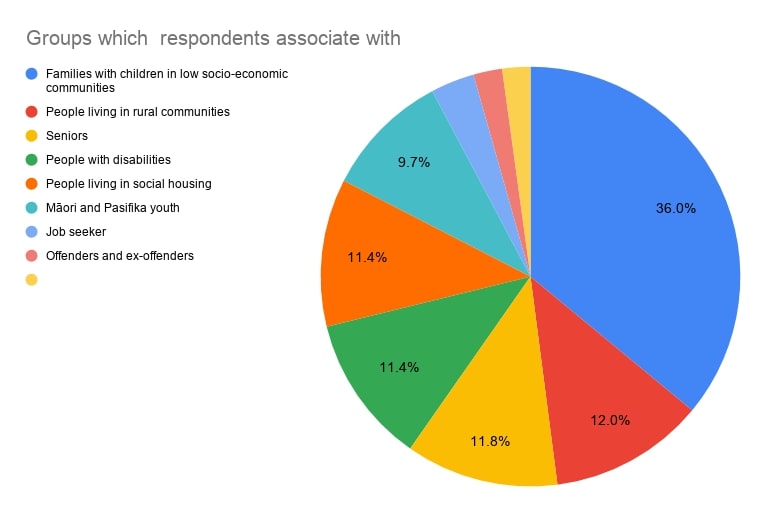
A quick look at the summary statistics about the people who have benefited from a Jump connection over the last month clearly demonstrates that we are supporting the groups who have been identified as being among the most digitally excluded:

Jump orders profile mix (24.4.20)


No phone jack needed for Jump

A Jump customer recently asked if she needed a phone jack to use Jump.  The answer is no!

Jump is a wireless service that uses the Spark 4G mobile network.  Each modem has a unique Sim card, similar to mobile phones, and this manages the connectivity to the Spark network.  However, unlike a mobile phone, a Jump modem must be connected to a 230V power supply.  But no other wires are needed.  The Sim card does the rest.

And this is a good time to remind everyone of the difference between the two wireless connections used with Jump.

  1. The first is the wireless connection between a digital device, (smartphone, tablet, computer) and the Jump modem.  This is the WiFi connection and part of the setup process explains how to connect to the modem’s WiFi (or ask anyone under 40 – this is usually the first question they ask when visiting your home “What’s your WiFi password?”)
  2. The other is the wireless connection from the modem to the internet; as noted above this uses the same 4G network as mobile phones.

It is these wireless connections that make Jump such a great service, without having to wait for a technician to install new cables.