Two partners have raised really interesting questions this week about how to deploy Jump for older people who would have difficulty managing a pre-pay account. Both have been attracted by the low cost pricing structure for Jump and they definitely qualify.
What the people caring for both these older people want is a “set and forget” option in terms of managing ongoing payments and plan renewals. Personally, I think these two older people represent the tip of a growing iceberg – the big D or dementia iceberg.
Case 1: Social worker working with an older woman to try and get her a phone she can use. This enterprising social worker had discovered a phone (in Australia) that she thought would do the trick – AUS$110.
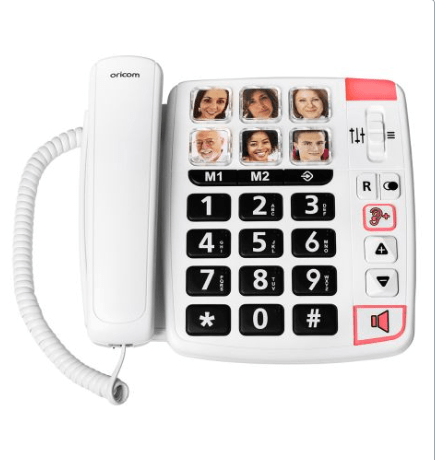
Big buttons, even family pictures with auto dial. So she was then wondering how to organise some automatic billing for a Jump connection.
Alarm bells starting ring!
Skinny Jump does not support normal voice calls; the device she has in mind would need a fibre or copper fixed line connection. She could of course make voice or video calls using WhatsApp or other internet-based services, like Facetime on Apple devices. But this makes things much more complicated than a device where you just push a button to call family or friends.
The next alarm bell comes with the need for a ‘set and forget’ prepay billing arrangement. She could use an auto top-up option to add funds to her Skinny account when the balance gets low, but Jump does not support ‘auto plan renewals’ or ‘set and forget’ options. So she would still be faced with have to login to her account and select a new plan when she needed her next 35GB.
Case 2: Request from a support worker from a supported living organisation for a resident who could not manage the top-up / plan renewal process
The downside of pre-pay services like Skinny Jump for people in this sort of situation is that it is not a ‘set and forget’ service (unless it is someone with a very low data usage, who can live on the free 15GB a month). We have encountered situations where a family member takes responsibility for setting up the account and managing the top-ups and plan renewals – even when they live in another country! But I am not sure a support worker would want to do this.
The solution here is to identify who is going to be responsible for top-ups; they need to take responsibility for setting up the account and linking to the modem with their email. All the person using the service needs to do then is plug the modem in and connect their device to wifi, which I am sure is something support workers could help with.
So thank you to the two partners who raised these issues and for going the extra mile in trying to help. I’d love to hear how things develop with your two customers and their social/support workers.


