And the 6 C’s winner for October is…

Congratulations to Skye Colonna from Tauranga City Library, who is our first winner in the monthly Skinny Jump draws for partners submitting stories about how they are implementing the 6 C’s with their customers in an effort to reduce churn. Skye was selected in a random draw from the entries received between 1 and 31 October. The Jump team will be arranging for your team shout.

Some of the suggestions submitted were:

  1. Provide partners with a handout with brief prompts (otherwise discussion could be quite lengthy)
  2. Could an incentive be provided for returned modems?
  3. We provide a weekly ‘digital drop-in’ at each of our four branches; this provides opportunities to sign up new Jump customers, but also ongoing opportunities for customers to come back to use if they have any issues with their modems.
  4. We offer adult digital classes once a week where customers can upskill themselves to make the most of their internet connection.
  5. We are checking with every customer as they sign up, and ask questions when enquiries are made.
  6. Some larger households have decided to go with fibre connections after we explained the data limitations of Skinny Jump.
  7. We have spent time upskilling our library and admin staff on how to respond to customers who call or walk-in with Skinny Jump issues.
  8. We follow up with customers over the phone the same day that they sign up to check if they need any further help.
  9. We provide in-person help for people needing help with topping up or troubleshooting.
  10. We contact customers from time to time to ensure the modem is working and doing what our customers need.

Thank you everyone for participating and sharing your success stories and ideas for tackling Jump churn. Another draw will be held for entries received between 1 November and 30 November.

So, how much Jump churn is there in my area?

This questions was raised by partners in all five webinars last week. The Jump team has now extracted a shapshot of this data for each delivery partner for the total number of modems they have issued.

The percentage churn is calculated as at August 2022 for the number of customers who were inactive for at least 30 days compared to the total number of modems issued. Being ‘inactive’ means the customer didn’t use any data for 30 days; it has nothing to do with whether they topped up or not.

The number of modems issued is the total number issued by a partner since they first became a Jump partner. For some partners this goes back five years. For other partners, it might only be a couple of months.

The percentage figures range from 0% (typical for relatively new partners) to 100% (typically quite small partners). In recent months, the aggregate churn percentage for all partners has been increasing and is now around 75% in a single month (1000 inactives compared to 1300 new sign ups). But the total for the last five years has a mean churn of around 44%. Our goal is to bring this down to under 40%.

The percentage churn for each Jump partner is now displayed in cell P1 (August 2022) of your Jump GSheet register. We would like to get monthly data, so that you can monitor any changes when you implement the 6 C’s or other strategies, but this is quite a marathon in terms of matching data sets; the data analysis also takes account of modems returned.

So please treat the figures in your GSheets as indicative, rather than precise. We are also thinking that it might be more helpful to simply report the number of inactive customers compared to new sign ups each month.

Jump Churn Feedback invited from 1 October 2022- be in to win!

83 partners joined one of our five ‘Jump Churn’ webinars last week. We would have liked to see more, as this is an extremely important issue – where many Jump customers simply stop using their Jump internet connections and do not return their modems. Not only do these modems cost a lot of money and are provided to Jump customers at no charge, we are currently facing a global shortage of modems. Over 1000 people are signing up to Jump every month, but because of these supply chain issues, customers are having to wait up to 2 months to get connected. If we can recover the thousands of modems that are no longer being used, we would make a lot of new customers very happy.

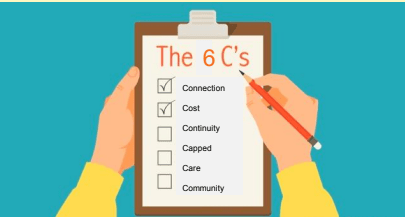
During the webinars the Jump team explained the 6 C’s, a new approach for reducing churn and we are keen to get your feedback on how this is working. The purpose of the 6 C’s is to ensure customers fully understand who Jump is intended for and its limitations. For example, we know that the data cap is not going to work for every household.

If you missed the webinars, you can find a recording of one of these sessions here.

We would like our partners to share their experiences using the 6 C’s conversation guide and provide any customer feedback. We know this could take a bit more time in making sure that Jump suits your customers’ needs, but we hope this will avoid disappointment if they discover the 225GB monthly data cap is simply not enough and also help to reduce the number of modems sitting idle.

The Spark Foundation has offered a monthly partner team prize up the value of $100 each month for the next three months for partners who share their feedback. All responses received each month will be entered into a random draw for the monthly team prize. The winner will be notified by email and published on this blog.

You can find the entry form on our Stepping UP website, on the Jump Partner Resources page here. Click on ‘Churn Feedback Form’.

Don’t miss out on the Jump 6 C’s

This morning, we held the first of five webinars with the Spark Foundation team to explain the 6 C’s. But don’t panic if you missed out – this webinar is being repeated at different times each day this week.

You will need to register on our Stepping UP website to get the link to the webinar. Click on the link above or go to our Stepping UP website > Join a Class > Select ‘Partner Webinars’ in the “All Categories” filter > Register for ‘Skinny Jump Service Updates’.

It is really important for all Jump partners to attend one of these 30-minute sessions to understand how you can help tackle the current modem shortage and improve the Jump experience for your customers.

When are more modems arriving?

This continues to be the ‘most asked’ question by Jump delivery partners. We publish everything we know on your Jump registers, so we would like to encourage you to check this out before asking.

We have also recently updated the presentation of information in your GDocs to make things a bit clearer, but of course you do need to know where to look. So many numbers and colours! I understand how this can be confusing.

The numbers you need to take note of:

Cell G2: this is your trigger level for the supply of further modems. This changes dynamically, depending on the number of modems you are issuing; it currently mirrors the number of modems you have issued during the last six weeks, although we have a pre-set minimum level of 2 modems for partners with low turnovers.

Cell H2: This is a ‘virtual’ stock count. It takes into account the number of modems you are physically holding plus the ones we have on order for you minus the number on your waiting list. This is why waiting lists are so important as they help us take into account the latent demand when re-ordering for you. Make sure you use the following date format when adding people to your waitlist, which can be anywhere below the fields with IMEI numbers: 6-Sep-2022 (and make sure is is ‘Sep’ for September, not ‘Sept’).

Cell W2: This is the actual physical stock that we think you have. If this doesn’t align with reality, please let us know so that we can fix things. The most common cause of our numbers getting out of sync with your reality is when modems are issued without a Profile Form being completed.

Cell X2: This is the number of modems currently on order for you. We place an order for you as soon as you reach your trigger point. You can scroll down column X in your Jump register and find out the date that we placed the order. This when the 6-week countdown starts until they physically arrive at arrive your premises. While they are only being couriered from Auckland, the delay is being caused up the supply chain, all the way back to the manufacturer in China.

Columns Y and Z: Scroll down to see the yellow highlighted fields. These record the NZ Post courier tracker number and the the date of your shipment. Modems generally arrive within 1 or 2 days of this date.

The other thing we often get asked about are the mysterious truncated IMEI numbers, e. 860501, 860502, etc. These are temporary numbers to indicate that modems are on order; they get replaced with the full 15-digit IMEI numbers when we receive the shipping report from the Auckland supplier. We usually experience a couple of days delay after shipping before we get the reports, which generally means the modems arrive with you before we update the GDocs.

Jump modem waiting lists

We are hearing that many partners have taken our advice and have implemented a local waiting list for customers wanting a Jump modem. We would like you to share this with us – just a short email to jump@diaa.nz would help but we have an even better idea. Read on!

We have been trying for the last month or so to target shipments to partners with high turnovers by dynamically adjusting the modem re-supply trigger level. Originally this was based on the number of modems issued during the last 3 weeks, but to try and address the waiting list situation, we have progressively extended the trigger period to 6 weeks. The objective is to ensure partners have enough stock to cover the wait time for new stock (which has now escalated to over 6 weeks).

However, this was based on the assumption that there was no waitlist. Clearly, if partners have no modems, they can’t issue them and therefore it does not truly represent actual demand.

So our cunning plan is to now include your actual waitlist in the calculations. What we would like you to do is record the names of people on your waitlist in your GDoc. Enter their first and last names (columns B & C) immediately underneath the lines with IMEI numbers and the date they joined your waiting list (column E). As modems are allocated to them and profile forms completed we will transfer them from the waiting list to the active customer list.

We know this won’t solve the modem supply chain delays – that is way outside our control – but it might help to further reduce buffer stocks and help get modems to the partners that need them the most.

We also appreciated the pro-active offer from one of our partners who were happy to relocate their slow-moving stock to another partner. We immediately sent them a courier sticker to action the offer.

We also know that some partners with multiple libraries are moving stock between their venues to try and address shortages. We totally endorse this approach, with one provisio, that you send us an email (jump@diaa.nz) advising the source and destination locations and the IMEI numbers of the modems being transferred.

Modem returns from Customers who are not in JUMP coverage

I have been advised this week by partners of two instances where customers are seeking replacement modems but their addresses now fail the Skinny Jump address coverage check.

My advice in both instances has been to provide a replacement modem.

Jump coverage and tower capacity is something that is changing all the time and while we are not permitted to connect new customers at addresses that fail the coverage check, we must give priority to existing customers in replacing faulty modems.

One partner raised a concern that the customer involved could have changed addresses since they were originally connected two years ago. We (DIAA) do not hold records of customer addresses in situations where modems have been issued by partners, so we have no way of checking. The other situation involved the transfer of a modem within the family at the same address.

Our recommended approach is to remind customers that they must always check with the Skinny Care Team (0800 475 4669) before relocating their modems to a new address, but if customers advise that they are at the same address as the one they used when originally connecting to Skinny Jump, then we have to take that at face value and provide whatever assistance we can to keep their connections active.

Customers should be advised that in areas that have reached capacity, the performance of their connections might not meet the standard expected of a broadband service and if they were unhappy with the performance of the replacement modem, they should return it (with packaging) and seek an alternative service.

New process for faulty Jump modems to start on 15 August 2022

We reached agreement with the Skinny Jump team today to proceed in implementing a new process for handling faulty modem replacements. This is an attempt to address the continuing shortage of modems and the re-supply waiting time that has now stretched to 6 weeks.

It has also been prompted by the difficult situation that partners are facing when the Skinny Care Team (Helpdesk) refer a customer to you for a replacement modem, but you are unable to help because your Jump modem cupboard is bare.

What is changing from 15 August is that all replacement modems for faulty units will be supplied from our DIAA Wellington office.

We hold a small stock of modems for customers who are unable to travel to a local Jump partner or when local partners are closed. Now that most partners are open again after the Covid restrictions, our priority will be to support existing customers who need replacement modems.

Jump customers must continue to contact the Skinny Care Team first (0800 475 4669) whenever they are having trouble with their Jump internet connection. This is not changing.

If the Care Team diagnose the problem as a modem fault, and the customer advises that they wish to continue with the Jump service, the Care Team will complete a Modem Return Form with the customer’s contact details (address, email and phone) as well as details of the faulty modem (IMEI and broadband numbers) and a brief description of the fault.

This will the ensure that: (a) the faulty modem is delinked from the customer’s account, so that customers can use the same emails to set up replacement modems and transfer any credit balances, and (b) replacement modems are couriered to customers along with a pre-paid bag to recover faulty modems for repair or recycling.

What this means (at least in theory) is that partners should never have to issue replacements for faulty modems. Customers who do not require a replacement will continue to be encouraged to return their modems to a nearby partner, where partners will be responsible for completing a Modem Return form, as you currently do.

We know that some customers will just turn up with faulty modems, seeking a replacement. If partners have supplies of modems, you are welcome to provide the replacement, noting details on the Modem Return Form. But clearly if you don’t have any stock, your only option is to refer customers to the new process outlined above.

“Just wondering why the stock levels don’t update”

A Jump partner recently sent me a note wondering why the stock levels didn’t update in his Jump Register after he had submitted a couple of Profile Forms.

I was pleased to receive this message because it confirmed that this partner was (a) completing profile forms; and (b) monitoring their Jump register to ensure that the GSheet record aligned with the actual number of modems they were holding.

I suspect his question arose from a misunderstanding about our back-end processes, which in all fairness, we have probably never explained. It’s all about timings.

Alistair schedules this activity into his daily calendar, and on most days, completes everything the same day, but he doesn’t work at the speed of light (like a computer does), so this means it could be up to 24 hours before the updates take effect.

The Profile Form is a Google Form that automatically populates a Google Sheet.

Alistair, one of our DIAA team, works diligently every day transferring selected information from the Jump Profile GSheet to individual Partner Jump registers. This then updates partners’ stock counts. If this triggers a re-order alert, Alistair then places an order for the supply of more modems.

Alistair also drives DORA, our mobile learning centre, and on days when he is moving the bus, he might not get to do the updates until the next day. But he never lets us down and in that sense he is undoubtedly more reliable than a computer.

Confusion about when to order Jump modems online

When two or more partners ask the same question, then it is time for me to post to this blog.

The modem shortage is causing some new issues; we currently have over 900 on order, and it will take at least 3-4 weeks to catch up, by which time we expect to have another 900 on order. As a result of this delay, partners have asked if they should use the home delivery process when they run out of modems.

Our short answer is no! We prefer that you create a waiting list – one partner this week advised us that they have a waiting list of 27! The modems we use for home deliveries come from the same supply pool as that used for partners and our priority for the online pool is for customers who cannot get to a local partner to collect a modem and for replacing faulty modems.

Our guideline for home delivery orders is that partners should only use this for customers who for some reason can not go to a local Jump partner.  We much prefer that they come to a local delivery partner where you can give them help to set up their accounts and make sure they know about the Jump app. 

However, we do encourage you to lodge an online application for people who do not have coverage or are in areas where there is no Jump capacity.  We do double-check that there is in fact no service at this address, but mainly we use this to keep Skinny updated on unsatisfied demand.

So when it is just a case of modem shortages, we encourage you to keep a waiting list, and get back in touch with your customers when further stocks of modems arrive.