Replacement modems for customers with no coverage

I had a call today from a Jump partner who was unsure about whether she could issue a replacement modem for a faulty one, when the coverage checker was indicating no coverage or capacity at her address.

The short answer is ‘Yes, you can’. When it comes to replacing faulty modems, we want to make this as seamless as possible, so there really isn’t any need to do a coverage check at all.

Unless of course if the customer has moved to a new address and not notified Skinny. But if they are at the same address and they already have Jump service, then you should just be as helpful as possible in getting them a replacement modem.

If all Jump customer played by our “rules”, partners should not even be involved in issuing replacement modems – this is for the Skinny Care Team to do when a customer calls them with a suspected faulty modem.

But we know customers don’t always follow the rules, so they turn up on your doorstep and you have to take it from there. C’est la Vie! That’s life!

Possible delays with Jump modem de-linking

The Skinny Care team has advised that there could be some delays in de-linking and resetting modems; some staff have been temporarily diverted to assist with call queues.

Their goal is to action all de-linking/ reset requests lodged through the Modem Return form within 36 hours.

This is just a heads up in case your customers expect you to arrange instant de-linking of faulty and returned modems. Do remind them that the correct procedure is to report the fault to the Care team and this will trigger a replacement modem being couriered to them. By the time it arrives they can be 100% sure that their faulty modem has been de-linked and they can use the same email to set up a new Skinny account with their replacement modem.

When are Jump modems unsuitable for re-issue?

A Jump delivery partner was cleaning out a storage cupboard today and came across three “reset” modems; they were “pretty old and not looking in the best of condition”; one was missing cables and another had very dirty cables. The label with the Broadband number had come off the other modem and had been stuck back on with cellotape.

In her assessment, as well as the person who assigned the modems to the storage cupboard in the first place, these modems were not fit for reissue. Hence they had been assigned to the storage cupboard awaiting a courier bag to return them for repair or recycling. But after about 6 months, when no courier bag had arrived, they were discovered by another staff member.

So what went wrong with our Modem Return process?

When a customer reports a faulty modem to the Skinny Care Team, the agent does their best to fix the problem remotely, but if they determine the modem has a technical fault, they complete a Modem Return form to arrange for a replacement to be sent and the faulty unit recovered.

However if a customer just turns up on a Jump delivery partner’s doorstep with what they claim is a faulty modem, partners have to take this at face value – we do not expect you to try and diagnose the problem or fix it in any way. All we ask partners to do is to complete a Modem Return form and wait for Skinny to reset the modem so that it can be re-issued, or assessed as faulty so that it needs to be returned for repair, e.g. because the SIM card has expired.

Now comes the interesting part. The Skinny Care team can not determine the physical state of the modem; some returned modems have been used as an artist’s canvas (not always to everyone’s taste); others have missing parts and many are physically dirty. Some even come loaded with cockroaches!

So we need Jump partners to make a judgement call – is the modem physically suitable for re-issue? For our library partners, this is something they are used to – at what point are books withdrawn from circulation and send for repair?

Even if the modem gets the green (technical) tick from the Skinny Care Team, partners may need to override the ‘reissue’ judgement with ‘return for repair’, based on a physical assessment.

If it is just a missing ethernet cable or even a missing power supply, we (DIAA), can send you a replacement. But if it is dirty or defaced, then the modem is immediately classified as faulty (based on being unsuitable for re-issue to another customer).

One of the questions asked in the Modem Return form is “Why is the modem to be delinked and reset?”. If you feel the modem is unsuitable for re-issue, please add a comment to this effect. This will result in a recovery courier bag being sent to you. If we don’t have this information, we act on Skinny’s technical evaluation, which often means the modem is relisted in your Google sheet ready for reissue, but in reality it is sitting in a cupboard.

To cut a long story short, please keep an eye on unallocated reset modems in your Google sheets and please advise jump@diaa.nz if the Google sheet does not align with actual stock on hand. And remember, reset modems should always be issued before new stock.
Missing BB stickers on Jump modems (or are they really missing?)

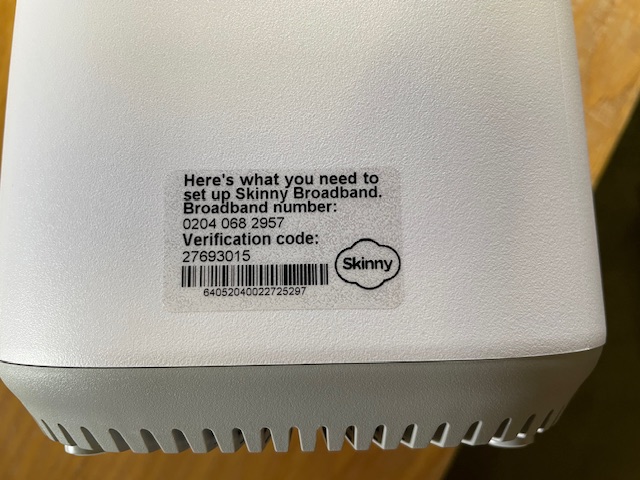
Two partners have been in touch this week, reporting that the transparent stickers with the broadband number and verification code were missing when they removed a new modem from its box.

I encouraged them both to check the box in case the stickers had come off in transit and in one case, this was in fact the case. No such luck with the other one.

So what to do if you discover a missing BB sticker?

First of all, check the box. You might find it stuck to the inside. I have discovered that it can come off when inserting or removing the modem.

If you can’t find the sticker, then clearly you can’t use the modem, so enter whatever details you do have in a Modems Return form and we’ll get a recovery courier bag on its way.

Jump Customers changing address

I had a question today from one of our partners about the process when Jump customers move to a new address. I thought this might be a good opportunity to remind all partners.

Here it is in a nutshell:

  1. Use the address checker to confirm that the customer is moving to an address with Jump coverage.
  2. If so, ask your customer to contact the Skinny Care Team on 0800 475 4669 and inform them of the new address.
  3. The customer can then unplug their modem and take it to their new address.
  4. If customers move their modems to a new address without notifying the Skinny Care Team, they could find their modem gets blocked, as this is a breach of the conditions of use.
  5. If their new address does not have Skinny Jump coverage, then the modem should be returned to the nearest Jump partner for resetting and assigning to a new Jump family, or the customer is welcome to contact the Skinny Care Team and request a pre-paid return courier bag.
  6. What they should not do, is just walk out the door and leave their Jump modem behind for the next tenant.
  7. Transferring to another family member can also be problematic, as the modem is linked to the original user’s email and any new user would require access to this email and the password in order to top up the account and purchase new data plans. So it is much better for the modem to be returned and reset (or if it is unsuitable for reuse, it will be responsibly recycled). The family member is welcome to apply for a new modem using their own email and password (assuming of course that they meet the eligibility criteria).

Another important update for Ciena Partners

It is good to see that nearly half of the Jump Partners who are participating in the Ciena Pilot have now signed up one or more students in their area. Over 80 families with school-aged children are already benefitting.

But as partners sign up their first customers, they are discovering little challenges in remembering exactly what to do in terms of our back-end processes.

Yesterday a partner signed up their first customer and issued a new modem but then discovered the family already had a Jump modem. The family said “thank you very much for the new modem; we’ll bring the old one back”.

Unfortunately, issuing a new modem to family that already has a Jump connection creates a number of problems:

(1) Ciena modems are exactly the same as standard Jump modems; the only difference is the Jump plan (the Ciena Plan) that is applied to the customer’s account linked to the modem.

(2) We have an ongoing national shortage of modems; we do not issue replacement modems when the current one is working perfectly well and in the case of Ciena customers, this is a back-end process in terms of provisioning a new plan on the customer’s account (nothing to do with the hardware).

(3) Customers are unable to activate a replacement modem using the same email address until their old modem goes through our Modem Returns process (where the customer’s account is de-linked from the modem), and this generally takes up to 24 hours.

(4) Customers could use a different email for the replacement modem but then they would not be able to transfer any residual funds from their existing account to their new one.

So, any partner traversing this path is creating a lot of problems for their customer, when all that is needed is a new Profile Form (where the details of the existing modem are recorded) and the Ciena Referral Form. The Skinny Team then works their magic to reprovision the customer’s existing modem for the Ciena Plan. No new accounts to be set up. No new WiFi passwords needed. No modems to be returned. Simple as!

Modem de-linking: spotted by a resourceful librarian

In my enthusiasm to blog on matters relating to Jump, I have been caught out by a resourceful Auckland librarian. He was using his research skills to brush up on the modem delinking process and discovered one of my blog posts from 2020 explaining this. However, when he went to our Stepping UP website he discovered a totally different explanation.

The problem is that things change. Yet old blog posts, like many other online things, tend to hang around well beyond their useful date.   In fact if they hang around too long, I guess they will be picked up by OpenAI systems like ChatGPT or Bard and then get shared as mis-information. So what is the truth? A question I suspect we will be asking a lot more in the future.

While some of the advice in my 2020 post is still relevant, the detailed procedures were replaced by the flow chart on our website around the middle of 2022.  There was a blog post about this change too, but anyone searching on ‘de-linking Jump modems’ wouldn’t find this because it doesn’t use the keyword ‘de-link’. Instead it celebrates the launch of new procedures for handling faulty Jump modems.

Just in case anyone is unsure about current Jump modem fault handling procedures, here it is in a nutshell.

The default procedure is for customers to contact the Skinny Care Team in the first instance if they are having trouble with their modems.  Our back-end processes then take care of themselves with the modem either being fixed remotely or a replacement and recovery courier bag being sent directly to the customer.  The other path involving Jump Delivery Partners is for when customers don’t follow this procedure and turn up with a faulty modem at a delivery partner.  In this case we ask partners to complete the Modem Returns form and await email advice from the Skinny team that the modem has been reset and is available for re-issue, or if it is faulty a courier bag will be sent to the partner for recovery.  It can take up to 24 hours for the old modem to be delinked from the customer’s account and this must happen before the customer can use their same email to set up a new modem.

So as much as I hate to say it, my 2020 blog post is of historical interest only and should be ignored by present day partners.  The new procedures completely replace the need for partners to call the Skinny Care team or send emails to the Skinny support team.

But this is also a challenge for information specialists. In a digital world how do we ‘retire’ old and obsolete information. Does anyone really have the time to keep reviewing the past and correcting these things?

But the really good news is that people, like the Auckland librarian who raised this issue, are still around, and what do they do when they find conflicting information – they seek out the truth.

Don’t worry about Jump packaging

Partners are welcome to issue returned Jump modems without the packaging.

Our goal is keep as many modems in circulation as possible and we certainly want to keep encouraging customers to return unwanted modems. However, we know that many people dispose of packaging materials as soon as modems are activated and we don’t want them to feel they can’t return it because they have sent the box for recycling.

When it comes to re-issuing the modem, the packaging is a ‘nice to have’ rather than a mandatory requirement.

Since July 2022, over 1500 Jump modems have been returned, either because they are faulty or no longer required. Just under 40% of these have been remotely reset by the Skinny team and made available for re-issue within 24 hours. So we don’t want the lack of packaging to result in these modems gathering dust.

To reissue a modem the following items are essential:

(1) the modem itself (provided it is not defaced or physically damaged);

(2) a power supply;

(3) a short ethernet cable (usually yellow or blue);

(4) a User Guide booklet.

We can generally supply spares for items 2, 3 and 4. So just drop us a line at jump@diaa.nz and we’ll get spares on their way to you. If you require a replacement power supply, please specify the IMEI number of the modem as the power units do differ by modem type.

Replacements for faulty Jump modems

It appears that from time to time a Skinny Care agent refers a customer with a faulty modem to a Jump Delivery partner for a replacement modem.

This is not the currently agreed procedure.

During the last six months the Skinny Care Team have correctly processed over 400 requests for replacement modems, but every now and again it appears one or two agents inadvertently advise customers to contact their local Jump partner for a replacement modem.

When this does happen and a customer turns up for a replacement modem after having reported the fault to Skinny, partners are welcome to supply a new one, provided of course that you have stock available. Just complete a Modem Returns form to record both the faulty modem details and those of the replacement.

If you don’t have stock available, please make sure the customer really has reported the fault to Skinny. If so, a replacement will be sent by DIAA directly to the customer along with a pre-paid courier bag to return the faulty unit.

Our standing instruction to the Skinny Care Team is that they never refer a customer to a Jump partner if they require a replacement modem. This will continue until such time that all partners have sufficient modem stocks to start supplying replacement modems again.

Skinny Jump is not a mobile service

Skinny Jump is not a mobile service. This means it can not be used in a vehicle or transferred between houses without the explicit approval of Skinny.

We have heard reports about people trying to connect their modems to the cigarette lighter outlet in their cars, but that seems like a lot of trouble to go to when mobile phones have much easier hotspot functions. We have also heard reports of people temporarily relocating their modem to an alternative address.

Both of these uses are a breach of the Skinny Jump Terms and Conditions.

Some customers are uncertain about whether they can take their modem with them when they move to a new house. The short answer is “yes, they can” provided:

(a) they have checked there is coverage at their new address; and

(b) they have contacted the Skinny Care Team (0800 475 4669) and confirmed their new address.

If service is not available at the new location, the modem must be returned to a Jump partner; the modem can then be reset (using the Modem Returns form) and reissued to another family that is in coverage.