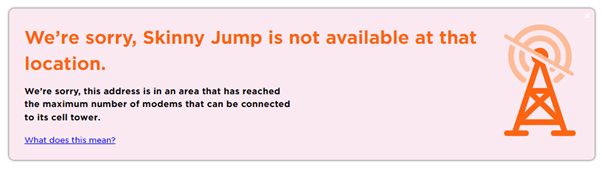
We have arrived at the start of a new month and it’s just as well everyone is taking a long King’s Birthday holiday break as the Jump Address Checker is still down. I know the Skinny team is trying to fix this, so hang in there.
Just one update for my earlier message about using the Skinny address checker. You can continue to use this but beware of the ‘fibre trap’ and the plan availability. Skinny offers both wireless and fibre solutions, so when you use this checker, it reports on the availability of plans for all services potentially available at this address (including fibre). So make sure you are checking the wireless options and scroll down to check that the plan is available.
Note in the example below from the Skinny Address Checker that:
(1) a Wireless Connection is available; and
(2) the wireless plan is available “CHOOSE THIS PLAN”. If it says “NOT AVAILABLE” as for the $55 plan, then this means there is no capacity at this address and you can not proceed with a Jump connection.
Hopefully, by the time you back from your King’s Birthday holiday, this will be old news and the Jump checker will be back in operation.
Vanessa Tedesco from the Fingertip Library in Christchurch alerted me at 8.46am this morning that the Jump address checker was not working. Since then, I have received numerous alerts from other partners.
Usually with issues like this, the software team at Spark is onto it like a shot, and before I can get around to a blog post, the problem has been sorted. But here we are over 8 hours later and when I checked a few minutes ago, the address checker was still not working.
I had a call today from a Jump partner who was unsure about whether she could issue a replacement modem for a faulty one, when the coverage checker was indicating no coverage or capacity at her address.
The short answer is ‘Yes, you can’. When it comes to replacing faulty modems, we want to make this as seamless as possible, so there really isn’t any need to do a coverage check at all.
Unless of course if the customer has moved to a new address and not notified Skinny. But if they are at the same address and they already have Jump service, then you should just be as helpful as possible in getting them a replacement modem.
If all Jump customer played by our “rules”, partners should not even be involved in issuing replacement modems – this is for the Skinny Care Team to do when a customer calls them with a suspected faulty modem.
But we know customers don’t always follow the rules, so they turn up on your doorstep and you have to take it from there. C’est la Vie! That’s life!
I received two inquiries yesterday from partners who are consistently getting the ‘no coverage’ message on the Skinny Jump address checker in some areas of their communities. Both raised the same question – how can we get the capacity boosted on the cell towers serving these communities.
The short answer is that this is outside our (DIAA) control and even outside the control of the Skinny Jump team. The Skinny Jump network is part of the Spark cell network and when towers reach capacity they must await their turn for upgrading.
The Jump address checker is updated with cell tower capacity information every night, and as the customer base is changing all the time, things can change literally overnight. So what can you do about it?
(1) When you encounter a customer in a ‘no coverage’ area, you can complete an online application and this signals to us there is demand at this location. We re-check the address and if it still has no coverage we transfer the application to a ‘no coverage’ database.
(2) We then recheck this address again 1-2 weeks later and if there is still no coverage we send an email to the customer, encouraging them to re-check themselves from time to time in case capacity becomes available.
(3) We aggregate the ‘no coverage’ data by location and share this with the Jump team, who in turn alert the Spark network team. But we know the Spark team will already be aware of towers that have reached capacity and will most likely already have an upgrade plan.
(4) Since the start of this year, we have had 411 customers register through this process, just 3% of all Jump requests. What of course we don’t know is how many customers are turned away without completing an online application form.
(5) The suburbs that have experienced the most cell tower capacity constraints are:
I had a question today from one of our partners about the process when Jump customers move to a new address. I thought this might be a good opportunity to remind all partners.
Here it is in a nutshell:
Use the address checker to confirm that the customer is moving to an address with Jump coverage.
If so, ask your customer to contact the Skinny Care Team on 0800 475 4669 and inform them of the new address.
The customer can then unplug their modem and take it to their new address.
If customers move their modems to a new address without notifying the Skinny Care Team, they could find their modem gets blocked, as this is a breach of the conditions of use.
If their new address does not have Skinny Jump coverage, then the modem should be returned to the nearest Jump partner for resetting and assigning to a new Jump family, or the customer is welcome to contact the Skinny Care Team and request a pre-paid return courier bag.
What they should not do, is just walk out the door and leave their Jump modem behind for the next tenant.
Transferring to another family member can also be problematic, as the modem is linked to the original user’s email and any new user would require access to this email and the password in order to top up the account and purchase new data plans. So it is much better for the modem to be returned and reset (or if it is unsuitable for reuse, it will be responsibly recycled). The family member is welcome to apply for a new modem using their own email and password (assuming of course that they meet the eligibility criteria).
Thank you everyone, for your patience, and we apologise for any inconvenience this has caused in signing up new customers for Jump.
The technical teams at Spark believe they have fixed the root cause of the Skinny Jump address checker issue. Earlier today, the Christchurch Jump team discovered that this appeared to be working again, and we have been testing addresses since then to confirm that all is well.
So, you can now return to ‘business as usual’, but please be aware that the Jump systems are still ‘settling back in, following the outage’ in the words of the Spark Jump team. They have assured us they will be continuing to monitor all the Jump systems to make sure.
And remember that if you do encounter problems with the Skinny Jump address checker, you can use the regular Skinny Broadband checker. Both use the same database for Skinny 4G coverage and availability checks.
If you do discover anything that doesn’t seem to be working as it should, please get in touch with us (jump@diaa.nz or 0800 463422) and we’ll escalate to the Spark Jump team as required.
Skinny technical teams have confirmed an issue with the Jump address checker, as a result of yesterday’s systems outage. Unfortunately, due to the complexity of the issue, they are estimating that it will not be fixed for at least 12 hours.
In the meantime, they have suggested the Skinny Wireless Broadband checker as an alternative workaround until the Jump address checker can be fixed.
I have started processing the Jump online applications and am getting the ‘no coverage’ message for every address. I have alerted the Jump team at Spark, so hopefully, this is a quick fix.
Earlier this week, we encountered a situation where the Skinny Jump address checker wasn’t working and not surprisingly this generated a number of inquiries from Jump partners.
I was probably the first to discover this, as I start processing Jump online applications first thing every morning. By 7.30am I had raised an alert with Alan in Spark’s Jump squad and hoped this might have been fixed while you were still having your breakfast.
Alan was onto this superfast and had his finger poised to do a red alert (I think they call it Priority One alert). Meanwhile many of you had finished your breakfasts and were on the job – did you know that every day Jump partners sign up around 50 Jump customers.
Thank you to everyone who contacted me on our jump@diaa.nz email – you absolutely did the right thing. I’m just sorry that you had customers before the issue was resolved.
At 2:17pm we were notified that the issue had been fixed – it had been caused by an overnight software update.
Should this ever happen again, please do what I did to keep the Jump wheels turning – I went to the Skinny main site (not Jump) and checked the address there (under Broadband tab). This does take a bit of care because almost every address that is typed into the main Skinny site gives the green light. You need to scroll down and look at what broadband services are available and sometimes you will find that a fixed line fibre solution is available, but not the 4G wireless option.
Skinny Jump relies on 4G wireless capacity, so if the main Skinny site says there is no 4G available, then you can safely deduce that Jump is not available either.
Having said all that, this might never happen again – it is some years since we have had any problems with the Jump address checker, so it is good to know there is a work-around should this ever happen again.
Skinny Jump is not a mobile service. This means it can not be used in a vehicle or transferred between houses without the explicit approval of Skinny.
We have heard reports about people trying to connect their modems to the cigarette lighter outlet in their cars, but that seems like a lot of trouble to go to when mobile phones have much easier hotspot functions. We have also heard reports of people temporarily relocating their modem to an alternative address.
Some customers are uncertain about whether they can take their modem with them when they move to a new house. The short answer is “yes, they can” provided:
(a) they have checked there is coverage at their new address; and
(b) they have contacted the Skinny Care Team (0800 475 4669) and confirmed their new address.
If service is not available at the new location, the modem must be returned to a Jump partner; the modem can then be reset (using the Modem Returns form) and reissued to another family that is in coverage.