Faulty and Returned Modem Processes

Spark Foundation and Skinny are currently reviewing their processes for the handling of faulty and returned modems.  While all the details are still being worked through, Skinny has requested that all faulty and returned modems be reported to them using their 0800 number (0800 475 4669).

All JUMP families should be encouraged to call the Skinny Helpdesk whenever they encounter a problem with their modem.  Helpdesk staff will carry out a remote test if possible and provide advice to families about how to fix the problem, or in the case of a faulty modem, families will be asked to return the modem to the place where they set it up.

When families bring in their faulty modems, or even ones they no longer require, it is important to check with the Skinny Helpdesk that the modem has been de-linked from the family’s account before attempting to register a replacement modem using the same email address. Another option is for families to set up a new account using a different email address.

Families must also complete a new Kawa of Care when receiving a replacement modem.

The part of the process still being discussed is what JUMP delivery partners do with returned modems; Skinny would prefer a collection scheme, where modems are held by delivery partners until the end of each month, and then returned using a pre-paid courier pack.  In the meantime, partners are asked to continue completing the modem return form,  and set aside the modems until courier return instructions are received.
Credit on returned JUMP modems can not be transferred

When families return a faulty JUMP modem, some ask about transferring remaining credit on the faulty modem to their new modem.  As the credit is directly associated with the SIM card in the modem, any remaining credit does not transfer to the new modem (which has a different SIM card).  Families will receive a new $10 30GB credit when they are allocated a new modem, so we think this should more than compensate them for any loss of credit on their old modem.

Modem returns and resets

There has been some confusion about the processes for dealing with:

  1. modems being set up for families who are then unable to activate them because they can’t remember their email password to complete the final step of the setup process or they already have a Skinny mobile phone account;
  2. modems returned because they are faulty;
  3. modems returned by families because they are no longer required.

Scenario 1:  New Jump family, first time sign-up

If anything goes wrong during the set-up process, you should contact the Skinny Help Desk by phone:

Ring 0800 4 SKINNY (0800 754 669) Select 9 for Help; 2 for Broadband and 3 for Jump

The Help Desk will be able to delete any registration details that have already been entered, so that you can start the process again. Or in the case of a family with an existing Skinny mobile account, help recover any forgotten passwords.

Scenario 2: Family returns a faulty modem and wants a replacement

  1. Partners should complete the online Modems Return form with details of the fault reported by the family. Skinny will then arrange for a pre-paid courier bag to be sent to the partner for the return of the modem.
  2. The family can be provided immediately with a replacement modem.  This needs to be activated on the Skinny Network (steps 2.1 to 2.5 in DS29 Spark Jump Stepping UP module) and the family must complete a new Kawa of Care.
  3. Partners must then send an email to the Skinny Helpdesk (support-team@skinny.co.nz) requesting that the faulty modem be de-linked from the family’s account and the new modem linked to their account.  You should provide the following details to Skinny:
    • the family’s name and email
    • current home address
    • the modem Broadband number (the one starting with ‘0204’), for both the faulty modem and the new one issued
  4. Partners should then update their Spark Jump Register by entering the family name and date the new modem has been issued.

Scenario 3: Family returns a modem, no longer required

  1. Partners should complete the online Modems Return form (also linked from cell F2 in the Partner Jump Registers) explaining that the modem has simply been returned.  Skinny will then arrange for a pre-paid courier bag to be sent to the partner for the return of the modem.  Please include all the items returned by the family, i.e. modem, power supply, ethernet cable and packaging.
  2. Skinny will arrange for the modem to be de-linked from the family’s account, refurbished as required and reloaded with 30GB of data.  These modems will then be added back into the new modem supply chain.

There appear to be ongoing delays in sending out courier bags for the return of modems – we are continuing to follow this up with the Skinny team.  Please advise us (sparkjump@diaa.nz) if you do not receive a courier bag within 10 days of submitting a Modems Return form.

D-Day for Spark Jump Modem Firmware Upgrades

Today’s the day that Skinny turns off the internet service for anyone who hasn’t completed the firmware upgrade.  This morning, we have already received calls from families in Kaikohe, Whangarei and Rotorua that their service has stopped and the Skinny Helpdesk has confirmed they are are having some problems.

Our advice at this stage is that Spark Jump families who have no internet service:

(1) go the Skinny website and follow the instructions for upgrading their modem’s firmware;  we understand families should still be able to do this as the Skinny website is zero-rated (this is how families top up their accounts even though their data package has expired);

(2) contact the Skinny Helpdesk  0800 4754669 (08004SKINNY) for support; tell families to make sure they choose the right menu options, i.e.

  • for Help, press 9
  • then for Broadband, press 2
  • then Spark Jump customers press 3

(3) contact the library or community centre where they set up their modems and arrange a time to take the modem in for updating.  Partners will need to be able to use one of their computers to WiFi connect to the family’s Spark Jump modem to do the auto update.

Some Modems not have not been set up correctly for Spark Jump

One of our partners has had the unfortunate experience of receiving two boxes of modems (at different times) that are not being recognised as Spark Jump modems.  This means that the modems cannot be registered with Skinny for the Spark Jump service.  If this happens, it pays to check first of all with the Skinny Helpdesk (0800 475 4669) – they will want to know the Broadband number of the modem and they can then quickly tell you if the modem has been initialised for Spark Jump or if there is some other problem.

If Skinny advises that the modem is not recognised as a Spark Jump modem, please advise us at DIAA immediately, including the IMEI number of the modem (sparkjump@diaa.nz or 0800 463 422).  We will contact Spark’s engine room and they will put it right.  If you find one modem in a box like this, then it is highly likely that all five modems will have the same problem.

Whangarei Library wins the Spark Foundation Morning Tea

Congratulations to Whangarei Library which scored the highest number of Spark Jump sign-ups in September.  They win a morning tea for all staff, funded by the Spark Foundation.  Note the count is based on the number of Kawa of Care received; it is most important that families complete their Kawa of Care before they take home their modems.  September results are:

Local Partner Number of modems issued in September 2018
Whangarei Library 11
Buller District Library 8
CKC REAP 8
De Paul House 8
Masterton Library 8
Whanau Resource Centre Pukekohe 7
Central Hawkes Bay Libraries 6
Nga Tai O Te Awa 5
Dunedin Public Library 4
RaWiri Residents Association 4
eLearning Porirua 3
Hastings District Libraries 3
North Harbour Budgeting Services 3
Te Mana o Kupe 3
Glen Innes Library 2
Hutt City Libraries 2
Te Matariki Clendon Community Library 2
Te Takere 2
Timaru District Libraries 2
Whanganui Libraries 2
Addington.net 1
Adult Learning Franklin 1
Grey District Library 1
Invercargill City Libraries 1
Kawerau District Library 1
Linwood Library 1
Manukau City Baptist Church 1
Nelson Public Libraries 1
Panmure Library 1
Sir Edmund Hillary Library (Papakura) 1
Tairawhiti Technology Trust 1
Tauranga City Libraries 1
Valley Baptist Community Centre Dunedin 1
Waitaki Libraries 1


Modem updates – returning old stock to us is an option

Some Spark Jump partners are feeling overwhelmed by the need to update modems they are holding before issuing them, especially if they are holding large numbers.  If this is the case, we are happy to do this for you.

But it will mean sending the modems back to us.  It probably doesn’t make a lot of sense if you only have one or two – we are hoping that you can do the upgrades on these.  But if you have a box full or nearly full (3 or more, say), then we would be happy to send you a courier sticker for each box and a return address label.  We (well, Tom actually) can then do the updates for you and we can re-issue them when they are ready to go.

We  can send you a new updated box in the meantime.  If you would like us to help, please email us at: sparkjump@diaa.nz , tell us how many modems you would like to return and we’ll get some courier stickers on their way to you.

Checking modems for software updates

We have (finally!) worked out how to check whether or not modems that have not yet been activated need a firmware update.  As a general rule, modems received before September 2018 will almost certainly need the software update.  Modems received during September should be up to date, but will need checking.  All modems received from 1 October will already have been updated.

How to check if the firmware is up to date

Step 1:  Break the Skinny seal on the modem box and connect the modem to power.

Step 2:  Connect the yellow ethernet cable from the LAN1 port on the modem to your computer.

Step 3: Open a web browser and enter the modem’s IP address: 192.168.1.254

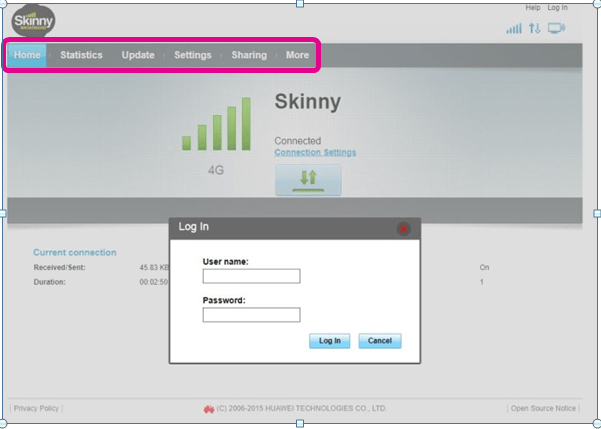
If you receive the screen below, the modem’s firmware is up to date and no further action is required.  Just unplug the modem and repackage it.

Note in particular the two parts of the screen that are highlighted below; if you see something different check out the next step.

No upgrade


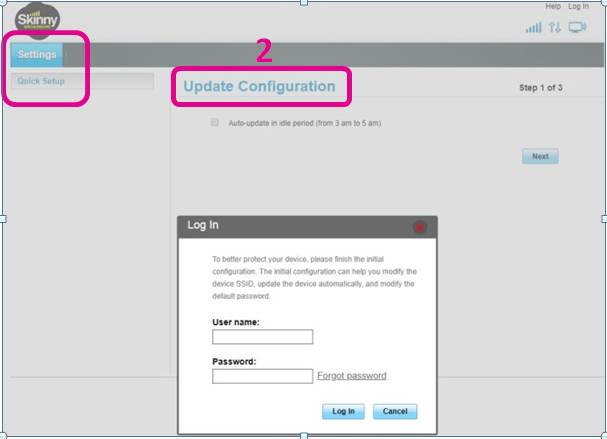
Step 4:  If you see the following screen, this means your firmware will need to be updated.

Note in particular the highlighted area.

Upgrade needed

If you see this screen, you need to follow the instructions on the Stepping UP website to complete the update.  You will need to use Option 3 (Update manually using a computer) for modems that have not yet been activated.

Modem Update – is this a scam?

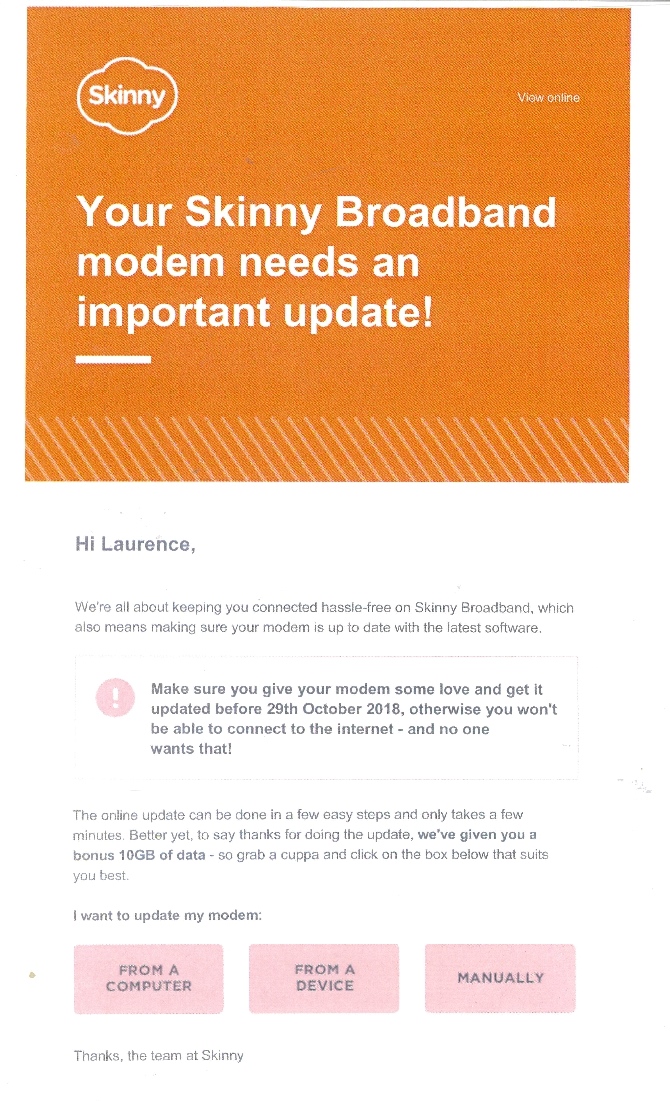
One of our Spark Jump delivery partners received a call yesterday from a concerned Spark Jump family.  They had received the email message from Skinny (see example below) telling them to update to their modem by clicking on a response button.  This set off alarm bells for the family. Recalling their training at the local library where they were instructed to be on the alert for phishing scams and to never click on an email response button unless they were absolutely sure they knew who the sender was, they did the sensible thing and called the library.  As it happened the librarian taking the call did not know about the modem upgrade (he hadn’t been connected to this blog, but now is!) and did the sensible thing to get in touch with us at DIAA.  We of course reassured him that the upgrade is perfectly legitimate and clicking on the email buttons just directs people to the relevant section of the Skinny website.  But, well done to this library on two counts:

(a) for covering online safety as part of their training when setting up modems; and

(b) for checking this out when they received the inquiry.

And accolades to the family for putting into action their training.  We are going to send them some complimentary top-up vouchers as an acknowledgement.

Skinny Notification

More on the modem firmware* updates

*Firmware: permanent software programmed into a read-only memory

This is now underway.  Families requiring the update will have received a message from Skinny with instructions.  If you get any inquiries from families about this it is probably best to suggest they call the Skinny Helpdesk on 0800 475 4669.

For pipeline modems, i.e. ones that you are holding awaiting issue, these may or may not need updating.

We have checked some recently issued ones and these already have the firmware update. So our suggestion is that before issuing any modems that you are currently holding, you do a simple check.  Any modem that’s already on firmware 21.329.01.01.1375 does not need to be updated. 

Instructions for checking the firmware version and for updating the software (if required) can be found here

If you need to update the software, we suggest you work through Option 3 in the update instructions (Update manually using a computer) if the modem has not yet been activated.  Alternatively, you can use Option 1 as part of your setup training (but only after families have set up their accounts and activated their modems). 

We have been testing these processes and not everything has been going as smoothly as we would like, but you are welcome to give it a try and let us know what you think works best.