Urgent update for Jump modem stock take

Congratulations to the 28 Jump partners who have completed their modem stock takes and are now on the Jump ‘nice’ list. I have forwarded your details to the person in the red suit and he has advised that because of global traffic congestion, he is leaving for his Christmas duties at midday tomorrow (Wednesday 20 December). 

So while he has made it clear that he welcomes Jump partners onto the ‘nice’ list at any time during the year, he asked me to send his apologies to anyone who doesn’t make the list by midday tomorrow. He can’t guarantee he’ll meet the Monday deadline, when the world takes a pause.

Jump Modem Summer Stocktake – make sure you are on the Christmas ‘nice’ list!

Once every year, we ask all Jump partners to check that their modem stocks match our GSheet records. A match means that you should never run out of modems. Our modem supply process relies on a customer Profile Form being completed for every modem issued; we then use this information to update your Jump GSheet, which then alerts us when your modem supplies are dropping and we order some more for you.

Easy as! What could possibly go wrong? Many things it seems, but a stocktake can quickly put things right.

We are asking all Jump partners to carry out a simple stocktake over the summer holiday period, so that we start the new year with a clean slate. All you need to do is count the number of modems you have available for issue and check cell W2 (Actual Stock on hand) in your Jump GSheet. If these two numbers are the same – Bingo! You are definitely on Jump’s ‘nice’ Christmas list.

If the numbers differ, just send us an email (jump@diaa.nz) listing the IMEI numbers of the modems you are holding, so that we can mark the others as ‘allocated’ and you are automatically added to the ‘nice’ list.

If you are scratching your head, wondering how to access your Jump Sheet to find cell W2, we have created a mirror copy here that you can check – note columns B, C and D in particular.

We are worried that some partners appear to be still holding the older B315 and B618 modems (columns E and F in the mirror copy) and that might prevent them getting on the ‘nice’ list. Our records indicate there are nearly 200 of these older modems still in partners’ stocks. We know some of these will be reset modems and provided they are suitable for re-issue, that is fine, but we ask you to issue these ahead of any of the newer Smart modems. However, we suspect that in some cases, this could just be a matter of modems being issued without Profile Forms being completed. Your stocktake will solve this problem and you automatically join the ‘nice’ list.

So, just to make sure you make it to the 2023 ‘nice’ list, please send an email to jump@diaa.nz confirming your Jump modem stock matches our records or advising us where there a differences – either way you join the ‘nice’ list for the Jump Summer Stocktake.

And we all know what happens for people on ‘nice’ lists at Christmas!

Skinny Jump stocktake is coming to town

With a little help from ChatGPT!

Ho ho ho! The Jump stocktake’s on its way,
Gathering data to ensure no delay.
For each modem issued, are your forms complete and firm?
Hurry now, the stocktake’s near, it’s time to confirm!

We’re making a list, checking it twice,
Gonna find out who’s been naughty or nice.
So complete your Jump Profile forms right now,
To make the stocktake wow!

So be good for goodness sake,
Don’t delay, there’s a lot at stake.
For every modem that you’ve issued out,
A form’s needed, without a doubt!

You better watch out, stay on your toes,
The Skinny Jump stocktake, everyone knows.
So let’s get those forms filled out right,
Stocktake’s coming, to bring the light!

When are Jump modems unsuitable for re-issue?

A Jump delivery partner was cleaning out a storage cupboard today and came across three “reset” modems; they were “pretty old and not looking in the best of condition”; one was missing cables and another had very dirty cables. The label with the Broadband number had come off the other modem and had been stuck back on with cellotape.

In her assessment, as well as the person who assigned the modems to the storage cupboard in the first place, these modems were not fit for reissue. Hence they had been assigned to the storage cupboard awaiting a courier bag to return them for repair or recycling. But after about 6 months, when no courier bag had arrived, they were discovered by another staff member.

So what went wrong with our Modem Return process?

When a customer reports a faulty modem to the Skinny Care Team, the agent does their best to fix the problem remotely, but if they determine the modem has a technical fault, they complete a Modem Return form to arrange for a replacement to be sent and the faulty unit recovered.

However if a customer just turns up on a Jump delivery partner’s doorstep with what they claim is a faulty modem, partners have to take this at face value – we do not expect you to try and diagnose the problem or fix it in any way. All we ask partners to do is to complete a Modem Return form and wait for Skinny to reset the modem so that it can be re-issued, or assessed as faulty so that it needs to be returned for repair, e.g. because the SIM card has expired.

Now comes the interesting part. The Skinny Care team can not determine the physical state of the modem; some returned modems have been used as an artist’s canvas (not always to everyone’s taste); others have missing parts and many are physically dirty. Some even come loaded with cockroaches!

So we need Jump partners to make a judgement call – is the modem physically suitable for re-issue? For our library partners, this is something they are used to – at what point are books withdrawn from circulation and send for repair?

Even if the modem gets the green (technical) tick from the Skinny Care Team, partners may need to override the ‘reissue’ judgement with ‘return for repair’, based on a physical assessment.

If it is just a missing ethernet cable or even a missing power supply, we (DIAA), can send you a replacement. But if it is dirty or defaced, then the modem is immediately classified as faulty (based on being unsuitable for re-issue to another customer).

One of the questions asked in the Modem Return form is “Why is the modem to be delinked and reset?”. If you feel the modem is unsuitable for re-issue, please add a comment to this effect. This will result in a recovery courier bag being sent to you. If we don’t have this information, we act on Skinny’s technical evaluation, which often means the modem is relisted in your Google sheet ready for reissue, but in reality it is sitting in a cupboard.

To cut a long story short, please keep an eye on unallocated reset modems in your Google sheets and please advise jump@diaa.nz if the Google sheet does not align with actual stock on hand. And remember, reset modems should always be issued before new stock.

The Great Jump BB Mystery continues

This story could become a TV series! My original post suspected a BB number error (as modems were shipped this week with only six digits after the 0204). However, after some testing by the Skinny Jump team, it was confirmed that these broadband numbers are legitimate and modems with the shorter numbers have been provisioned for Jump. My update post sent us on a different path of investigation – looking at how the BB number is being entered.

We now have more evidence from partners that there is nothing wrong with the modems nor the shortened BB numbers. The difference seems to be how the BB number is entered. The Jump App makes it clear that the BB number must be entered without any spaces, i.e. 0204xxxxxx (for the shorter numbers) or 0204yyyyyyy (for the longer numbers).

But two partners have reported that the App now appears to have a mind of its own and in some situations automatically adds spaces to the BB number (see example below). Note the ! triangle in the broadband number field, signifying an invalid BB number. So this suggests a new line of inquiry.

We were first alerted to this issue by Carla at Hastings Library and she explained a workaround that her team discovered:

Re: Registering customers for Skinny or Ciena Jump

The issue:  The app is automatically putting spaces in the broadband number.

While doing the activation for the modem you may come across an issue where the Jump app won’t let you verify and activate the modem. This means you won’t be able to move forward with the activation. You need to:

  1. Huakina (open) a new incognito window on the rorohiko (PC)
  2. Go to Skinny Jump login and get the customer to uru atu (sign-in)
  3. Click on ‘Activate’ and whiriwhiria (select) ‘Broadband
  4. Patopatohia (type) the Broadband number and Verification code
  5. Get the customer to restart their Jump app and uru atu.
  6. Continue with usual sign-up.

Kia aro mai (please note) it might take a few seconds to activate but keep clicking on it until the dashboard shows up.

Thank you, Carla, for sharing your solution. This will help keep the Skinny Jump train moving while the investigation continues to try and understand why some partners are facing the ‘auto-fill’ problem while others are not.

Jump BB numbers – the mystery deepens

Further to my previous post, I may have been hasty in assuming the 10-digit broadband numbers were the problem. While they were a problem in the past, the Skinny team has confirmed that these are legitimate Jump provisioned broadband numbers and they have been able to set up one without any problem.

So, we need to figure out what the Skinny Jump team is doing that is different to what partners are doing to get the error message. The sign up documentation (user and partner guides) simple refer to just entering the BB number, but there are variations in how this is entered, e.g. 64204xxxxxx (11 digits), o204xxxxxxx (also 11 digits), but if you enter 0204xxxxxx (only 10 digits),maybe this causes a problem? The instruction in Step 5 of the App signup explicitly states not to add spaces, but of course if you are only entering 10 digits, then you could inadvertently enter a space.

So those of you who are up for a challenge, I would welcome your help in solving this problem. Please feel free to try setting up one or more of the recent modem shipment (those with 0204 xxx xxx numbers), trying different number formats. You can always put them through the Modem returns process to reset them after your tests.

URGENT ALERT: Missing Digit in Jump BB number

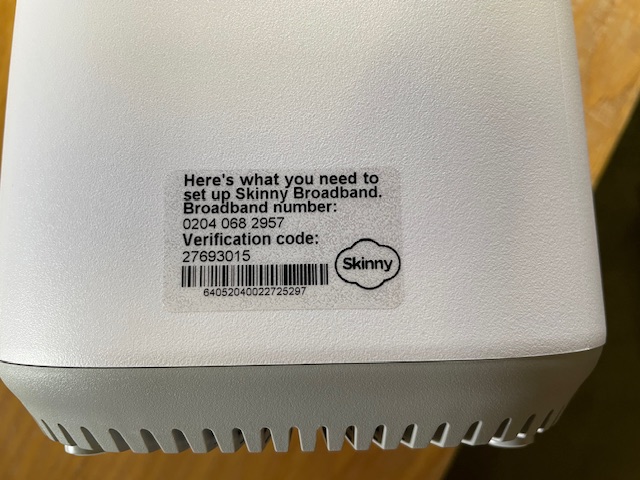
Two partners have reported today that some modems in the latest shipment have a missing digit in the Broadband number, which is printed on the transparent sticker on the side of the modem. This means they can’t be issued – you will receive an error message, as the BB number will not be recognised.

All partners that received a new shipment of modems this week could be affected, so please put aside any modems without 11 digits in the following format “0204 xxx xxxx” until we get this resolved.

I have asked for further shipments to be suspended until we understand how this error is occurring and how we can fix it.

Partners who received modems this week include:

Glen Innes Library; Hastings War Memorial Library; Papatoetoe War Memorial Library; Kaikohe Library; Mangere East Library; Rotorua Library; Otara Library; Otahuhu Library; Dargaville Library; Ranui Library; Hornby Library; HB Williams Memorial Library Gisborne; Grey Lynn Library; Linwood Library; Kaikohe Library; Waverley Library Plus; Te Kete Aronui – Rototuna Library; Glen Eden Library; Porirua Public Library; Dunedin City Library; Onehunga Library; Hamilton Central Library; War Memorial Library Hutt City; Shirley Library; Step Ahead; Highland Park Library; Pukete Neighbourhood House

Missing BB stickers on Jump modems (or are they really missing?)

Two partners have been in touch this week, reporting that the transparent stickers with the broadband number and verification code were missing when they removed a new modem from its box.

I encouraged them both to check the box in case the stickers had come off in transit and in one case, this was in fact the case. No such luck with the other one.

So what to do if you discover a missing BB sticker?

First of all, check the box. You might find it stuck to the inside. I have discovered that it can come off when inserting or removing the modem.

If you can’t find the sticker, then clearly you can’t use the modem, so enter whatever details you do have in a Modems Return form and we’ll get a recovery courier bag on its way.

Managing your Jump Waiting Lists

Thank you to Jump partners who are using the Waiting List process as described in my blog post from August 2022. For the most part this seems to be working very well, although we are aware that some partners have their own processes for doing this.

The benefit of using my suggested process is that we can take into account people on your Waitlist when sending you new supplies. Our objective is to try and keep you stocked with Jump modems so that you never run out. But we can’t do this if we don’t know how big your waitlist is.

We currently have modem orders in the pipeline for over 150 partners and this means that there can be a delay of up to 2 months before new supplies arrive. We are continuing to give priority to Ciena partners and partners with waiting lists recorded in their GDoc registers.

There are currently around 500 people on the Jump waitlists – and these are just the ones we know about. As modems are issued and we receive completed Profile Forms, we add the customer to your GDoc and remove them from your waitlist. This works most of the time, but we would appreciate your assistance in keeping your waitlists ‘real’.

For example, some people have been on a waitlist for over 6 months and we suspect that they might have found other options. If you know of anyone in this situation, please delete their names from your Wait List.

The Auckland Library team has come up with a good process for managing their waitlists: when they receive a new supply of modems, they notify customers on the waitlist that they have 2 weeks to arrange a time to collect a modem. Anyone who does not respond within 2 weeks is removed from the waitlist and the modem becomes available to issue to other customers.

One final point about the waitlists – please make sure you include the date in column E when customers are added to the waitlist, using the following date format: 9-jun-2023. Google Docs can get confused with dates in the following format 9/6/2023 – is this 9 June (NZ format) or 6 September (US format)?

Jump Customers changing address

I had a question today from one of our partners about the process when Jump customers move to a new address. I thought this might be a good opportunity to remind all partners.

Here it is in a nutshell:

  1. Use the address checker to confirm that the customer is moving to an address with Jump coverage.
  2. If so, ask your customer to contact the Skinny Care Team on 0800 475 4669 and inform them of the new address.
  3. The customer can then unplug their modem and take it to their new address.
  4. If customers move their modems to a new address without notifying the Skinny Care Team, they could find their modem gets blocked, as this is a breach of the conditions of use.
  5. If their new address does not have Skinny Jump coverage, then the modem should be returned to the nearest Jump partner for resetting and assigning to a new Jump family, or the customer is welcome to contact the Skinny Care Team and request a pre-paid return courier bag.
  6. What they should not do, is just walk out the door and leave their Jump modem behind for the next tenant.
  7. Transferring to another family member can also be problematic, as the modem is linked to the original user’s email and any new user would require access to this email and the password in order to top up the account and purchase new data plans. So it is much better for the modem to be returned and reset (or if it is unsuitable for reuse, it will be responsibly recycled). The family member is welcome to apply for a new modem using their own email and password (assuming of course that they meet the eligibility criteria).