Some partners are still using the old (20/20 Trust) Kawa of Care

We have noticed that some partners are still directing families to an old version of the Kawa of Care.  We understand how this might be happening if you have set up links on the desktops of your computers to make it easy for families to find.  Please update these links to this one.  You know you have the right one when it lists Digital Inclusion Alliance Aotearoa as the Spark Jump Partner at the top of the online form.  If it says 20/20 Trust, you have an obsolete link.

You can also access the correct link from cell E2 of your Spark Jump Google register or from the Stepping UP website.

Kawa of Care Glitch

Today, we have tracked down a glitch with the processing of some Kawa of Care online forms.   The impact of this is that we have not been copied in on some Kawa of Care, which means that we have not been able to update the GSheet register.  We have been chasing up some partners for an explanation about why Kawa of Care are not being completed and you have been telling us that families did complete them.  So this has been a bit of a challenge to work out what is going on, as some arrive and others don’t.

The good news is that this is not your problem;  I am just sorry that you have had to ask families to complete the Kawa of Care more than once.  The problem is with Spark Foundation’s system that receives the Kawa of Care forms.  And the even better news is that this has been fixed.  So that’s all good going forward.

The team at Spark Foundation has sent me copies of all the ‘unprocessed’ forms – these date back to the beginning of September – and we have updated the GSheets by entering the date received in column G and shading the cell green.

I don’t expect this to re-occur, but please always enter the family name (columns B & C) and the date the modem is issued (column E).  This then provides us with an alert if we don’t receive the Kawa of Care.


Whangarei Library wins the Spark Foundation Morning Tea

Congratulations to Whangarei Library which scored the highest number of Spark Jump sign-ups in September.  They win a morning tea for all staff, funded by the Spark Foundation.  Note the count is based on the number of Kawa of Care received; it is most important that families complete their Kawa of Care before they take home their modems.  September results are:

Local Partner Number of modems issued in September 2018
Whangarei Library 11
Buller District Library 8
CKC REAP 8
De Paul House 8
Masterton Library 8
Whanau Resource Centre Pukekohe 7
Central Hawkes Bay Libraries 6
Nga Tai O Te Awa 5
Dunedin Public Library 4
RaWiri Residents Association 4
eLearning Porirua 3
Hastings District Libraries 3
North Harbour Budgeting Services 3
Te Mana o Kupe 3
Glen Innes Library 2
Hutt City Libraries 2
Te Matariki Clendon Community Library 2
Te Takere 2
Timaru District Libraries 2
Whanganui Libraries 2
Addington.net 1
Adult Learning Franklin 1
Grey District Library 1
Invercargill City Libraries 1
Kawerau District Library 1
Linwood Library 1
Manukau City Baptist Church 1
Nelson Public Libraries 1
Panmure Library 1
Sir Edmund Hillary Library (Papakura) 1
Tairawhiti Technology Trust 1
Tauranga City Libraries 1
Valley Baptist Community Centre Dunedin 1
Waitaki Libraries 1


The Spark Jump Gsheet register challenge!

Some Spark Jump delivery partners have trouble accessing the Google sheet set up to record modem allocations.  This is usually because the partner does not have a Gmail address linked to their normal email.  Partners must have a Gmail address to access and update the Spark Jump Google Sheets.  This affects many libraries in particular where staff have a district council email address.  Check first with your IT team whether it is possible to link a Gmail account to your work email.  If not, we suggest you do what a number of libraries have done and set up a generic library Gmail address such as southland.library@gmail.com and then we can add this email as an authorised user in the Spark Jump register.

More Spark Give vouchers distributed

We have received 451 complimentary $10 Spark Jump vouchers as a result of donations by Spark staff during the third quarter (ending 30 September).  They have been allocated as follows:

  • Canterbury 74
  • Auckland 151
  • Wellington 28
  • Porirua 14
  • Napier 7
  • Northland 28
  • Hutt Valley 28
  • Dunedin 7
  • Gisborne 7
  • Dannevirke 7
  • National 106

These vouchers have been distributed to partners in these regions for use at their discretion to support families with the greatest need.  Partners receiving the vouchers must provide details on the second tab of their Spark Jump registers, indicating how the vouchers have been allocated – refer to the instructions in my previous post.  Further details are also on the Spark Give Information Sheet that we send with each batch of vouchers.

For regions not receiving these vouchers, do encourage anyone you know who works for Spark to nominate your region when they join the Spark Give staff programme.

Modem updates – returning old stock to us is an option

Some Spark Jump partners are feeling overwhelmed by the need to update modems they are holding before issuing them, especially if they are holding large numbers.  If this is the case, we are happy to do this for you.

But it will mean sending the modems back to us.  It probably doesn’t make a lot of sense if you only have one or two – we are hoping that you can do the upgrades on these.  But if you have a box full or nearly full (3 or more, say), then we would be happy to send you a courier sticker for each box and a return address label.  We (well, Tom actually) can then do the updates for you and we can re-issue them when they are ready to go.

We  can send you a new updated box in the meantime.  If you would like us to help, please email us at: sparkjump@diaa.nz , tell us how many modems you would like to return and we’ll get some courier stickers on their way to you.

Checking modems for software updates

We have (finally!) worked out how to check whether or not modems that have not yet been activated need a firmware update.  As a general rule, modems received before September 2018 will almost certainly need the software update.  Modems received during September should be up to date, but will need checking.  All modems received from 1 October will already have been updated.

How to check if the firmware is up to date

Step 1:  Break the Skinny seal on the modem box and connect the modem to power.

Step 2:  Connect the yellow ethernet cable from the LAN1 port on the modem to your computer.

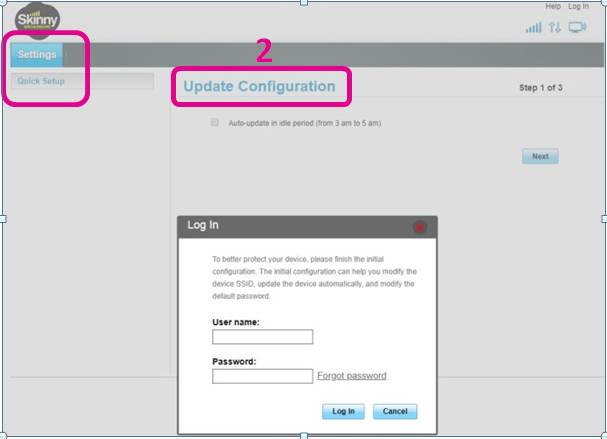
Step 3: Open a web browser and enter the modem’s IP address: 192.168.1.254

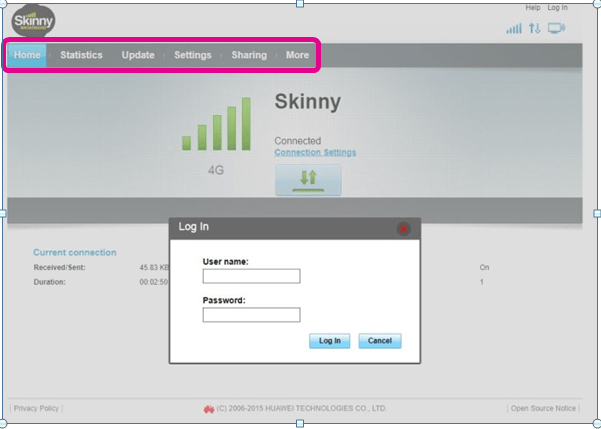
If you receive the screen below, the modem’s firmware is up to date and no further action is required.  Just unplug the modem and repackage it.

Note in particular the two parts of the screen that are highlighted below; if you see something different check out the next step.

No upgrade


Step 4:  If you see the following screen, this means your firmware will need to be updated.

Note in particular the highlighted area.

Upgrade needed

If you see this screen, you need to follow the instructions on the Stepping UP website to complete the update.  You will need to use Option 3 (Update manually using a computer) for modems that have not yet been activated.

Modem Update – is this a scam?

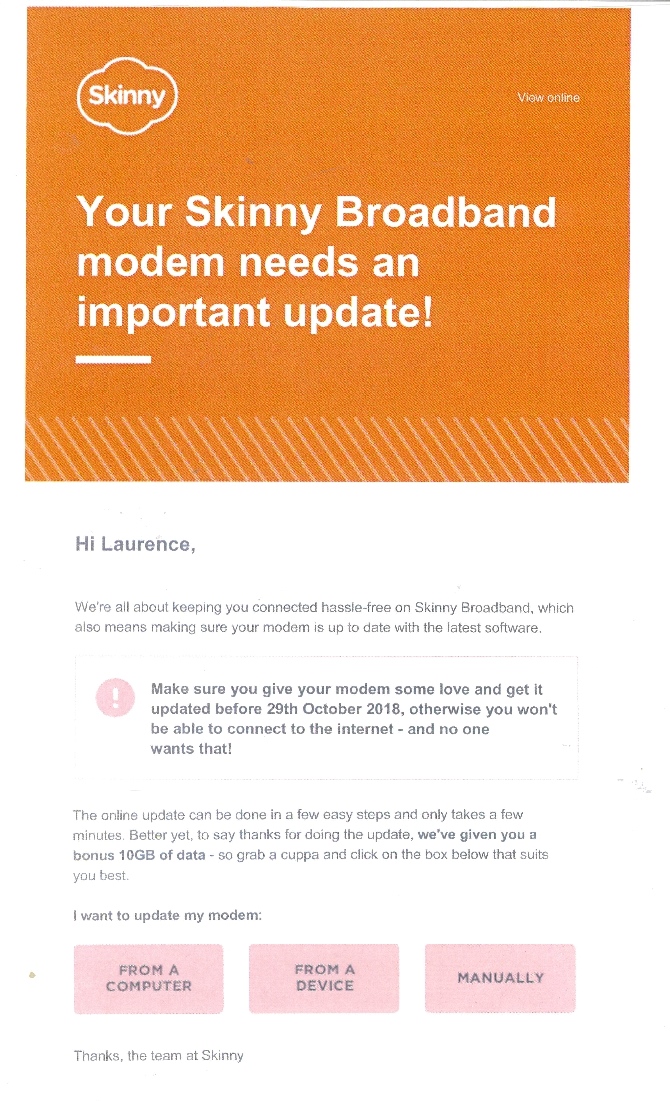
One of our Spark Jump delivery partners received a call yesterday from a concerned Spark Jump family.  They had received the email message from Skinny (see example below) telling them to update to their modem by clicking on a response button.  This set off alarm bells for the family. Recalling their training at the local library where they were instructed to be on the alert for phishing scams and to never click on an email response button unless they were absolutely sure they knew who the sender was, they did the sensible thing and called the library.  As it happened the librarian taking the call did not know about the modem upgrade (he hadn’t been connected to this blog, but now is!) and did the sensible thing to get in touch with us at DIAA.  We of course reassured him that the upgrade is perfectly legitimate and clicking on the email buttons just directs people to the relevant section of the Skinny website.  But, well done to this library on two counts:

(a) for covering online safety as part of their training when setting up modems; and

(b) for checking this out when they received the inquiry.

And accolades to the family for putting into action their training.  We are going to send them some complimentary top-up vouchers as an acknowledgement.

Skinny Notification

More on the modem firmware* updates

*Firmware: permanent software programmed into a read-only memory

This is now underway.  Families requiring the update will have received a message from Skinny with instructions.  If you get any inquiries from families about this it is probably best to suggest they call the Skinny Helpdesk on 0800 475 4669.

For pipeline modems, i.e. ones that you are holding awaiting issue, these may or may not need updating.

We have checked some recently issued ones and these already have the firmware update. So our suggestion is that before issuing any modems that you are currently holding, you do a simple check.  Any modem that’s already on firmware 21.329.01.01.1375 does not need to be updated. 

Instructions for checking the firmware version and for updating the software (if required) can be found here

If you need to update the software, we suggest you work through Option 3 in the update instructions (Update manually using a computer) if the modem has not yet been activated.  Alternatively, you can use Option 1 as part of your setup training (but only after families have set up their accounts and activated their modems). 

We have been testing these processes and not everything has been going as smoothly as we would like, but you are welcome to give it a try and let us know what you think works best.

Spark Jump modems need firmware update

All customers using the Skinny Huawei B315 modems will need to update their modem firmware in order to remain connected to the internet from December 2018.  This includes all Spark Jump families.  Unfortunately this is not something that can be managed remotely and it will involve every user following instructions being sent by email over the next week (starting on 19 September).  We realise this could present a challenge for some families who have relied on support from their library or community centre to get connected in the first place.

Skinny plans to deal with this as follows:

  1. An email will be sent this week to all families needing the upgrade with instructions;
  2. Families who haven’t responded by 27 September will receive a text reminder;
  3. From 8 October, families who still don’t respond will receive a reminder email, explaining they will lose service if they do not update;
  4. From 15 October the Skinny Call Centre staff will start calling families who have not responded and explain how to update;
  5. From 19 October, internet access will be suspended and families will be redirected to a page encouraging them to update their modem.

More details about the upgrade are contained in the Skinny CATM1 Q&A here.

We are hoping that the planned Skinny processes will reach all Spark Jump families, but some families may need assistance from local delivery partners.  We are also checking with Skinny to find out the best process for doing this upgrade during the initial modem set up with families.  While new modems will be supplied with the upgrade, modems currently being held will need updating.