Can we supply a Jump modem to someone who already has an internet connection?

The Jump eligibility criteria make it very clear that Jump is for households without a broadband internet connection.  But this doesn’t stop people applying and putting forward their case.  In most cases we have accepted their application.  The scenarios we have accepted and those we have declined are summarised below.  Most of the 60 (2%) we have declined are because of no Skinny wireless coverage.

Accepted

  1. A senior on a fixed income is struggling to maintain the cost of an ‘on account’ service.
  2. An unemployed person can’t afford to keep a fixed line service.
  3. I am in a self-contained 2-bedroom sleep-out without access to the internet.
  4. Person living in rural community, referred by Health Services Provider, has the internet, but it’s too expensive.
  5. My brother had a Skinny jump modem, but he no longer resides here.
  6. Rural broadband is unreliable and insufficient for work and online learning for kids.
  7. I only have access the the internet from my smartphone.
  8. The other property with owners on site has internet, but I do not and cannot use their internet.
  9. A rural family has a capped Vodafone service that is unreliable and stops working when the cap is reached. Requires a supplementary service for a high school student.
  10. Wifi can not be installed in my Nana’s retirement village under current lockdown conditions. Jump is so much more affordable.
  11. We are moving out of Mum’s house next week.
  12. Previously had Jump modem, but modem lost in burglary.
  13. There is a paid WiFi service in our accommodation but it is cost prohibitive at $100 per month.
  14. Very inconsistent ADSL; not suitable for our needs.
  15. Existing provider disconnected 4 months ago because of overdue fees.
  16. My current internet connection cannot sustain work conference calls.
  17. Broadband connection is very slow and unreliable.  It is not possible for 3 high school children and teacher to use for work/schooling.
  18. I am unable to afford my next internet bill and will be disconnected before the end of the month.
  19. Unable to afford data to join class.
  20. We live in a camping ground.
  21. Social housing tenant paying $129 per month for internet which she is struggling to maintain.
  22. I am currently in a motel and not sure where we will end up after the lockdown.
  23. I am in temporary emergency housing; the signal from the tower provides a very poor signal in my cabin.

Declined

  1. A teacher working from home requires extra data to teach from home.
  2. A migrant worker with an internet connection, but wanting a separate connection for his kids ‘to get online learning’.
  3. Outside Skinny wireless coverage area.

For anyone wanting to switch from an existing service it is important that they understand the full impact of making the change, i.e.

  1. Will they face any costs in terminating their existing connection; there could be an early termination fee if they are on a fixed term contract? Make sure they have contacted their existing provider to understand these costs, e.g. as a minimum there is likely to be a requirement for one month’s notice.
  2. Do they fully understand the extra effort involved in managing a prepay account requiring regular top-ups?
  3. Do they understand the data cap (150GB per month) that applies to Jump connections?
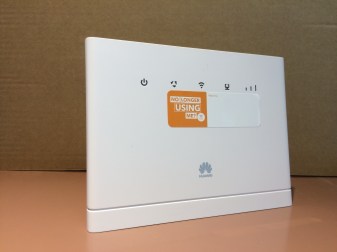
Jump modems – B315 and B618

B315First there was the B315, the Jump modem we have all become very familiar with during the last 3 years.  These are still flying out the door and will continue to do so until supplies are exhausted (probably within the next 4-6 weeks).  DIAA, together with our Stepping UP partner network, is the exclusive distribution channel for this product.  Which means we are also the exclusive distribution channel for replacement modems.  B315 customers must report any modems they suspect as faulty to the Skinny Helpdesk.  The Helpdesk team will attempt to fix any faults remotely, but if not, they will log the modem as ‘faulty’ and this triggers a request to DIAA to ship a replacement.  The faulty modems cannot be repaired and customers receiving a replacement modem are requested to return the faulty unit to their nearest Jump delivery partner (when they open up again after the COVID-19 lockdown).  They should be added to the recycling box and eventually returned to Sims for recycling.
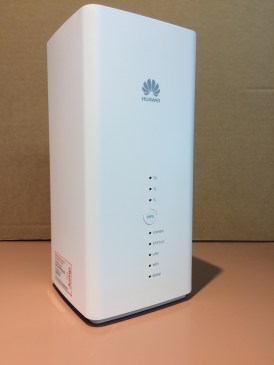
B618Welcome to the B618.  This device is initially being used as part of the Ministry of Education’s internet support package for students without a home broadband connection.  Approximately 3500 of these have been shipped directly from Ingram Micro (Spark’s hardware supplier) to student homes, using a mailing list supplied by the Ministry of Education.  As for the B315’s, customers are to report any faults directly to the Skinny Helpdesk.  They will be logged and a request issued to DIAA to issue a replacement. Unlike the B315’s, a return courier bag will be sent with the replacement modem.  The modems will be returned to DIAA and then forwarded for repair to Telegistics (Spark’s hardware repair company).
We do not expect partners to provide any support, at least at this stage, for the B618 modems.  If you receive any inquiries or requests for support from households with these modems, please direct them to the Skinny Helpdesk (0800 475 4669).

Can we promote Skinny Jump yet?

Some time ago, we asked partners to hold back on actively promoting Jump to the new eligible communities, announced on 25 March 2020.  As this announcement coincided with New Zealand moving to Level 4 of the COVID-19 lockdown, we were uncertain what impact the lockdown would have and how well our support systems, including modem delivery and the Helpdesk support, would cope.  There were also discussions going on between the Ministry of Education and internet service providers about the best way to respond to the temporary shutdown of schools.

Time has now moved on and the Ministry has announced the support it is providing for school students. The demand for new Jump connections has settled to around 100 per day and our systems and processes (DIAA and Skinny Helpdesk) are performing well, despite the extra challenges of the COVID-19 lockdown.

So we are happy for partners to now promote Jump to eligible people in their communities.  If you have interest from local media, you may wish to share some of the high level statistics mentioned in my earlier post.

I am sure Alistair Fraser, our Stepping Up/ Jump Ambassador in Whanganui, would be happy for me to share the media release he prepared for local community media.  You might also want to refer to Spark’s media release here.

Can the delivery address for the modem be different to the customer’s address?

The short answer is yes.  In fact this has become such a common request during the COVID-19 lockdown that we have added an extra field in the Application Form to cover this situation.  Applicants must still enter the address where they intend to use the Jump modem, as we need this to verify that they do have Skinny wireless coverage, but we have added an optional field as a preferred delivery address.

There are many different circumstances where people may choose a different delivery address, but one of the most common has been in rural communities where gates are locked or there is no delivery letter box.  To make life easier for the courier, people in these situations have suggested a more accessible address belonging to a family member or friend.

Can one person apply for Jump modems on behalf of someone else?

The short answer is yes, but when we receive more than one Jump application from the same email address, this raises a flag in our system for us to investigate further.   In a number of cases we have received a separate email from a representative of an organisation checking out that this is OK.  For example, one situation involved a small retirement village, and another, special housing for people with disabilities.  In both cases, an administrator or support person was preparing the applications on behalf of the people they were caring for.  But as the people are living in separate accommodation and will be responsible for managing their own Skinny accounts, we are happy to supply individual modems.

However, when it comes to activating the modems and setting up Skinny accounts, individual emails will be required for each user. This email and password must be accessible by the person who will be responsible for topping up the Jump account each month.  Normally this would be the person who is using the Jump service, but we have encountered situations where children are taking responsibility for setting up (and paying for!) Jump internet connections for their elderly parents.

Can we send more than one Jump modem to the same physical address?

It is not uncommon for more than one Jump request to come from the same physical address.  This does raise an alert in our system and we take a close look at why this might be happening.  For example, if the request is coming from the same name and email, then we treat this as a duplicate application and simply delete the application. If the application is coming from two different people with the same second name, we suspect this might also be a duplicate and will follow up with a phone call to the family to find out why two modems are required.  Almost invariably we have discovered that this is because two people living in the same household have independently applied for a modem, without the other person knowing.  So this is easily resolved as well by deleting one of the applications.

The other situation we are encountering is for people or communities sharing a physical address, but with multiple residences.  This could be separate accommodation located on the same section or even a family living separately in a caravan (or a tent, as we discovered in one case).  Or it could be like a gated community with separate individual dwellings.

In these cases where different people or families are residing at the same address, we accept individual Jump applications.

Courier delays

Our goal is to courier modems to Jump applicants within 2 – 3 working days, but we have no control over how long it will take for the modems to reach customers.  We have seen some exceptionally good delivery times (next working day) to Opotiki, for example, but some appalling delivery times in Auckland and Wellington (up to 7 days, with some deliveries appearing to get ‘stuck’ in the local courier branch for 2 or more weeks).

We do have a courier tracking code for every modem shipped, so if you have any customers calling you about a modem they think is overdue, please contact Shelley (0800 463 422) and she will be able to provide the tracking code and date shipped.

Once you have the code, we suggest you give this to your customer, so that they can track progress themselves, and follow up directly with the courier company (Post Haste).

Just a brief note on the tracking code.  The full code appears like this:

2TPBMED 0679964111

But in the tracker you need to just enter “MED” in the first box and first 8 digits “06799641” in the second box.

If this doesn’t work, our advice is to tell your customers to move to Opotiki!!

Skinny Helpdesk hours

Please continue to advise people in your community signing up for Jump to contact the Skinny Helpdesk for support if they are having trouble setting up their accounts.  It could be a faulty modem.  During the last four weeks, we have recorded 74 faulty modems (out of nearly 3000 shipped);  this can be frustrating for the customers involved, but can be quickly confirmed by a Helpdesk operator. As soon as a Helpdesk operator identifies a faulty modem, they log it in a shared Google Sheet and we swing into action in shipping a replacement (this will take a few days and depending on local courier delays, could take up to a week).

Some Jump customers have also been frustrated in trying to contact the Skinny Helpdesk over the weekend and end up calling you.  The Helpdesk hours are:

8am – 7pm Monday to Friday

9am – 5.30pm on Saturdays

Digital only:  9am – 5.30pm on Sundays and Public Holidays (this means customers will not be able to talk to an operator by phone; they will only be able to use the online chat, which won’t help that much if they are having trouble setting up their modems!)

You are amazing!

What an incredible achievement for Jump connections over the last four weeks!  With your support, we have together processed 2871 applications since the start of the COVID-19 lockdown on 25 March. 2545 of these have come through our home delivery self-service model and 326 have been delivered directly by 48 partners, using a range of innovative contact-less delivery methods.  We applaud all 169 Jump partners who are accepting inquiries from their communities and assisting applicants complete the online application form.  We know that these people often call you back when they receive their modems to get over-the-phone help in setting them up.  We appreciate it if can provide this help but do encourage people to contact the Skinny Helpdesk on 0800 475 4669 if there are issues you can’t easily deal with.  This is especially important if it looks like the modem might be faulty, as the Skinny Helpdesk must log this, de-link the modem from the user’s Skinny account and send us (DIAA) a request to issue a replacement modem.

So, well done in helping nearly 3000 new households connect to internet in just one month. Before COVID, we celebrated a successful month when we signed up 300 families in a month.  So while most of the world has been shut for the last four weeks, you have demonstrated that not only are you open for business, but that you responded to the shut-down challenge by expanding Jump deliveries ten-fold.  Thank you!  And of course a special thank-you to the team at the Spark Foundation and Skinny who have made this possible with such a fantastic internet connectivity product.

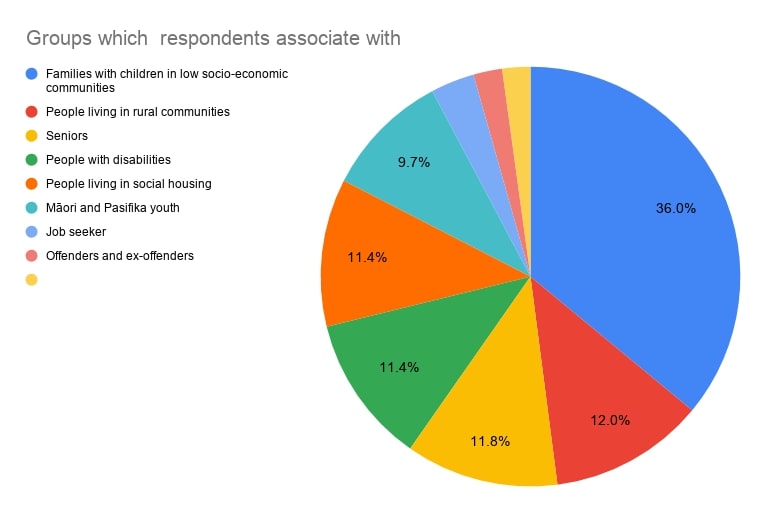
A quick look at the summary statistics about the people who have benefited from a Jump connection over the last month clearly demonstrates that we are supporting the groups who have been identified as being among the most digitally excluded:

Jump orders profile mix (24.4.20)


No phone jack needed for Jump

A Jump customer recently asked if she needed a phone jack to use Jump.  The answer is no!

Jump is a wireless service that uses the Spark 4G mobile network.  Each modem has a unique Sim card, similar to mobile phones, and this manages the connectivity to the Spark network.  However, unlike a mobile phone, a Jump modem must be connected to a 230V power supply.  But no other wires are needed.  The Sim card does the rest.

And this is a good time to remind everyone of the difference between the two wireless connections used with Jump.

  1. The first is the wireless connection between a digital device, (smartphone, tablet, computer) and the Jump modem.  This is the WiFi connection and part of the setup process explains how to connect to the modem’s WiFi (or ask anyone under 40 – this is usually the first question they ask when visiting your home “What’s your WiFi password?”)
  2. The other is the wireless connection from the modem to the internet; as noted above this uses the same 4G network as mobile phones.

It is these wireless connections that make Jump such a great service, without having to wait for a technician to install new cables.