Even more Q&A from the Jump Churn briefings (22 September 2022)

Q: Do blocked modems count towards the churn number? i.e. when a customer moves it without notifying Skinny or removes the SIM

A: Yes – if the modem is blocked by Skinny Care and is not used on the network for a period of 30 days, it will show is inactive.

Q: I’ve been working with an elderly lady who wants to connect to Facebook and wanted Skinny Jump. She would have never set it up on her own; I set up modem, showed her how to top up, got her on Facebook and using her Gmail. The elderly when getting Jump really need a lot of time to get their confidence up and understand what to do. I’ve been around 3 times and I will go again to get her to a place where she can use it well.

A: Wonderful example of going above and beyond. This could be used as your monthly draw submission.

Q: When having the conversation with potential customers are we then able to suggest that they are not suitable for Skinny Jump – ie., turn them down on the basis that, say, they might use too much data?

A: Yes, that is the point of the 6 C’s conversation – to help make sure that Jump is the right product for them.  Hopefully, by the end of your conversation with them, they will recognise for themselves that Jump might not be the right product for them.

Q: How do we get the stats as a partner to what ones are inactive, so we have a starting % point and can work to improve this?

A: As a first step, Skinny is exploring the best way to share churn rates with Jump delivery partners and provide regular updates.  These will be added to partner GSheet registers when they are available. There are privacy issues in sharing individual customer churn details with delivery partners, although follow up support from partners would be welcomed.  We must first work out the best way to do this without breaching customers’ privacy.

Q: Is it a good idea to phone them a few days after issuing modem and see how they are going and that they have got it going and using it?

A: A: Skinny Jump is planning to introduce seven touch points (by email) during the first 12 months of each new Jump customer’s journey, to provide helpful tips and solicit feedback. This will identify any challenges that customers might be having with their Jump connection. However, partners are welcome to follow up with customers as they wish; however, care needs to be taken to check first that the customer has agreed to follow up calls.  These permissions are captured in the Profile forms, as well as the contact phone number; we will have to work out a way to share these data fields with partners, as they are not currently included in the partner GSheets.

Q: We had a few people trying to sign up for their holiday homes. They answer truthfully that they have no internet connection at that address.

A: The new 6 C’s conversation should help to make it clear that Jump is not for holiday homes. There are commercial month to month or open term broadband options available to them.

Q: A lot of our customers may need more data than Jump but they have bad credit so Jump is their only option

A: That’s a tricky conversation to have as we don’t want partners to start checking on customers’ credit ratings.  Just do your best to explain the data cap limitations of Jump, so customers can adapt their internet usage to suit.

Q: Great webinar, thank you so much. It has made me more aware of the issue with churn and will work to try and improve these stats as a partner

A: Thanks you; we appreciate all that you do for Jump and your help in reducing churn.

Q: Are we allowed to do a display asking for modem returns?

A: Absolutely, yes.  There are some handout flyers coming soon for all new customers.  These include a ‘punch-out’ sticker for customers to attach to their modems, reminding them to return their modems when they no longer need them.

Q: I’m going to put it on our Facebook page

A: Excellent idea
Jump Universal login is even better than we thought

The really really good news with the Jump universal login is that once an account has been set up (either through the Jump dashboard on a computer, or using the Jump App) it can be accessed using either method (without having to do a second setup). Just go to the login page and enter the common email and password and Bob’s your uncle! And better still, it doesn’t matter which process you use to first set up the account (dashboard or App).

However (and there’s always a ‘however’) if you are a Skinny phone user, you must use a different email for your Jump account. Nothing has changed here; this is the way it has always been.

Jump Universal login now live!

The Skinny team has been working for some time to link the Jump login process between Web Dashboard logins and App logins. Yesterday, this went live. So now Jump customers must use the same login details (email and password) for both ways of accessing their Skinny account.

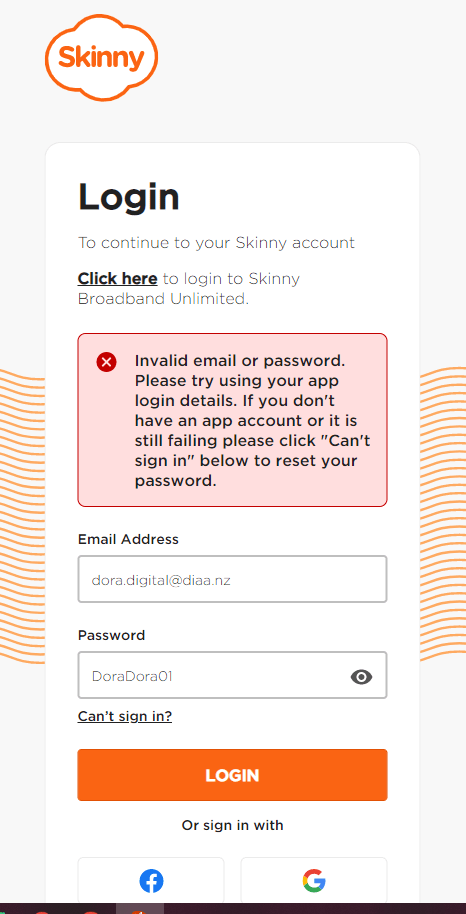
The downside is that there could be some confusion for customers when they now try and sign in using their Web Dashboard and get the message below. But this is easily fixed if they follow the on-screen instructions and click on “can’t sign in”. This allows users to reset their password to be the same as their App or choose a new one, noting the more stringent requirements now required for Jump passwords (8 characters, including at least one capital letter, one number and one special character). App users will be familiar with this, as this is something the App has always required.

More follow up to the 5 C’s briefings: notes from 21 September 2022

Thanks you to the participants in today’s briefing for your thoughtful questions and suggestions. As for yesterday’s briefing I have compiled a set of Q & A’s, some of which Alan was able to address during the Zoom call. Other questions I have followed up with him subsequent to the meeting.

Q: Can you send us the slides at the end?

A: You can find the slides here: https://steppingup.nz/partner-resources-hub/skinny-jump-partner-resources/

Q: Would there be a benefit to having conversations around returns – no value judgement but framed as beneficial to others when you no longer need the connection?

A: Most definitely, it’s an important part of the sign-up conversation. We will make this more explicit in the next version of the Jump Partner manual.

Q: Would it be easier to have a return envelope or drop off at your local library?

A: Yes, that’s an option.  The Spark Foundation team is discussing this with other organisations as well as Jump delivery partners (who are already doing this with the pre-paid courier bags that DIAA sends for recovering faulty and obsolete modems).

Q: Could you clarify if a customer still needs to top-up each month? Does the 15GB free monthly top-up count if they are just a low user?

A: No, customers only need to top up if they need more than the free 15GB data in any calendar month.  15GB meets the needs of around 17% of all Jump customers who never need to top up; effectively they are getting a totally free service.

Q: Is there an ETA on when we will have more modems?

A: This is difficult to predict, because of continuing global challenges with the modem supply chain.  Skinny is trying to increase buffer stocks, but at this stage demand continues to outstrip supply.  Our suggestion is to add customers to the waiting list in your Jump GSheet register.  This helps us understand the true nature of the demand, so that we can keep pressure on our suppliers.

Q: Would it be useful for you to list some of the issues and the potential solutions? E.g. I don’t know anything about what is available out there commercially and I suspect many customers aren’t aware either?

A: As a not-for-profit organisation, the Spark Foundation is not permitted to recommend specific commercial products. However, DIAA could develop some guidelines on where to direct people who do not meet the 6 C’s criteria.

Q: We’d be interested to know the churn for our District when the info is available.

A: As a first step, Skinny is exploring the best way to share churn rates with Jump delivery partners and provide regular updates.  These will be added to partner GSheet registers when they are available. There are privacy issues in sharing individual customer churn details with delivery partners, although follow up support from partners would be welcomed.  We must first work out the best way to do this without breaching customers’ privacy.

Q: Currently, the questions to ask the customers to see if they qualify are located at the end of the sign up in the profile questions. Sorry if I missed it but does this mean we should be having this conversation before signing up?

A: We envisage that the six C’s will be conversation starters to determine if Jump is the right fit for the customer, so yes, it does make sense for this checklist to be up front.  Note the first point on the Partner Checklist in the Partner Guide (Page 5) is to establish whether customers are eligible for Skinny Jump. It makes sense to perhaps change this to “Is Jump the right service for you?”.  We will also be reviewing the Profile Form and the Online Application Form to take account of the 6 C’s.

Q: Does anyone make contact with the customers to assess how they going with their modems? This maybe the opportunity to check.

A: Skinny Jump is planning to introduce seven touch points (by email) during the first 12 months of each new Jump customer’s journey, to provide helpful tips and solicit feedback. This will identify any challenges that customers might be having with their Jump connection.

Q: Could partners contact people they have signed up to do this follow up, especially for people who have stopped using Jump?

A: We would welcome this support from partners, but we appreciate this could involve a huge amount of effort, especially for partners who are signing up more than one a day.  For privacy reasons, Skinny is not able to share individual customer data with partners (or anyone else for that matter).  So, any follow up calls would involve contacting everyone who ticks the box saying they are happy to be contacted.  DIAA would be happy to work with a partner to test this process, using a conversational approach based on the current surveys.

Q: We usually follow up with our customers to ensure they have connected successfully.

A: We would recommend a call after 2-4 weeks.  We have noticed some customers return their modems within the first couple of weeks; we do not fully understand why they change their minds so quickly.  We are concerned that many others may also change their mind but don’t bother returning the modem.

Follow up to Jump 6 C’s Briefing on 20 September 2022

We ran out of time during Tuesday’s briefing to answer everyone’s questions, so I have compiled a Q & A below. This might also answer questions on other Jump partners’ minds. And remember it is not too late to register for one of these briefings – two more to go – at 9am on Thursday 22nd and 2pm on Friday 23rd. Register here.

Q: Can we please be sent the 6 C’s slides?

A: A copy of the slide deck will be added to the Partner Resources Hub for Skinny Jump on the Stepping UP website.  https://steppingup.nz/partner-resources-hub/skinny-jump-partner-resources/

Q: What about those that live in house buses etc?

A: This depends on how frequently the house bus is moved.  Skinny Jump customers may relocate their Jump modem to a new address provided they contact the Skinny Care team in advance to verify that there is coverage and capacity at the new location.  Customers who change address without notifying the Care team will have their service blocked.

Q: We have a person who travels around the district in her house bus with her jump modem. She comes in to us to check which possible locations have Jump available using Check my Address. So she shouldn’t have a modem?

A: Not necessarily. It is good that she is getting you to check addresses for coverage and capacity in advance, but unless she is also notifying the Skinny Care Team, she will appear in a breach report, which could lead to her service being blocked.

Q: Is anyone from Skinny Jump making contact with the inactive users or asking the partner that the user signed up with to try to contact them to discuss their inactivity?  This could increase the return of modems to be given to others.

A: Skinny is planning to introduce seven touch points (by email) during the first 12 months of each new Jump customer’s journey, to provide helpful tips and solicit feedback. This will identify any challenges that customers might be having with their Jump connection.

Q: Are all those points of contact digital?

A: At this stage, yes. By email.

Q: This might be better with a phone call as a lot of our JUMP people start a new email address just for JUMP. This is often because they don’t remember their password or have lost the phone so can’t reset it.

A: With over 1000 new customers every month, making contact by phone would be a huge task. We have tested phone follow-up but have discovered a large percentage have either changed their phone number or do not answer their phones.  Of the people who do answer, by far the majority are actively using the service. 

Q: A Skinny Jump customer recently told me that he saw that Skinny had a deal for unlimited data for anyone with a Skinny Mobile plan of $16 or more. He missed out on this deal but with 2 school aged children, he is finding that he is needing more data above the capped amount.  Are Skinny considering doing this deal again for those customers that also have a Skinny mobile plan?

A: Skinny, like other ISPs, does offer special deals from time to time to understand what works best for their customers.  The unlimited deal linked to Skinny mobile phones was a special 2-week promotion, but it is likely that there will be other promotions in the future.

Q: Is it possible to obtain a list of those in our churn rate so we can contact?

A: As a first step, Skinny is exploring the best way to share churn rates with Jump delivery partners and provide regular updates.  These will be added to partner GSheet registers when they are available. There are privacy issues in sharing individual customer churn details with delivery partners, although follow up support from partners would be welcomed.  We must first work out the best way to do this without breaching customers’ privacy.

Jump App Glitch being fixed

Last week, Leah from Chartwell Library in Hamilton encountered a problem during training with the Jump App using the library iPad. Things went fine to start with; she received the authentication code and entered a password. But when she tried to log into the account, she received the following error message:

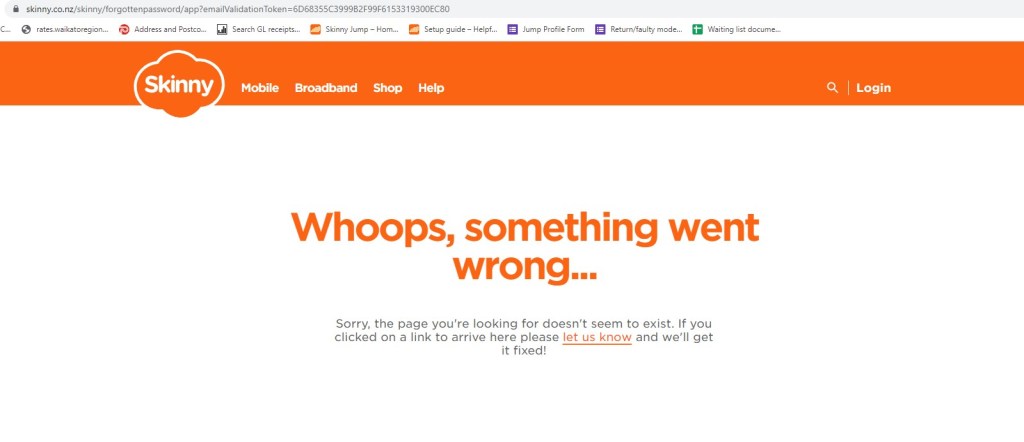
She then tried the “Forgot Password” link, but ended up with the following screen shot:

The Skinny Team ask Leah to confirm the device model (iPad Mini 5), the operating system on the iPad (15.7) and Jump App Version Number (1.0.6). Armed with this information the App developers were then able to replicate the problem and design a fix. Testing is now in progress, and an update will be loaded to the App Store later this week.

Thanks Leah, for providing such a clear explanation, that has allowed this glitch to be sorted. And thanks, Alan, from the Jump team, who followed this up so quickly.

Don’t miss out on the Jump 6 C’s

This morning, we held the first of five webinars with the Spark Foundation team to explain the 6 C’s. But don’t panic if you missed out – this webinar is being repeated at different times each day this week.

You will need to register on our Stepping UP website to get the link to the webinar. Click on the link above or go to our Stepping UP website > Join a Class > Select ‘Partner Webinars’ in the “All Categories” filter > Register for ‘Skinny Jump Service Updates’.

It is really important for all Jump partners to attend one of these 30-minute sessions to understand how you can help tackle the current modem shortage and improve the Jump experience for your customers.

Skinny Jump operates on a high trust model

A partner recently raised a concern about some customers who appear to be swapping their existing internet connection for a Jump connection (including some library staff), simply because it is cheaper; they felt this went against the spirit of the programme, especially at a time when we have a shortage of Jump modems.

Alan Bucheler, who is the Skinny Jump programme lead at the Spark Foundation, responded with an excellent explanation – I am repeating it below:

As the cost of living increases, we know that for some people paying for an internet connection may seem like a luxury they need to go without, so that they can still afford essentials like food, petrol or rent.  This is why Skinny Jump exists – so that anyone who finds that cost is a barrier to having an internet connection at home can still participate in an increasingly digital world. This is why we operate on a high trust model rather than income testing customers when signing them up to Skinny Jump –  to remove any barriers to people getting connected.  

Jump has a wide range of customers who include families with children, people living in social housing, seniors, refugees and new migrants, people with disabilities, and people on low incomes. Affordability looks different for everyone, which means that some library staff and their households could meet the Skinny Jump eligibility criteria. 

Jump is capped at 210GB a month, which allows customers to do the essentials – like applying for jobs, online learning, banking and emails. However, 210GB is not enough data for streaming services or gaming, and we believe that this data cap acts as a deterrent for customers who are just looking for a cheaper deal on an internet connection. Skinny has a number of commercial plans in market for customers looking for low-cost internet options, that might better suit their needs.” 

When are more modems arriving?

This continues to be the ‘most asked’ question by Jump delivery partners. We publish everything we know on your Jump registers, so we would like to encourage you to check this out before asking.

We have also recently updated the presentation of information in your GDocs to make things a bit clearer, but of course you do need to know where to look. So many numbers and colours! I understand how this can be confusing.

The numbers you need to take note of:

Cell G2: this is your trigger level for the supply of further modems. This changes dynamically, depending on the number of modems you are issuing; it currently mirrors the number of modems you have issued during the last six weeks, although we have a pre-set minimum level of 2 modems for partners with low turnovers.

Cell H2: This is a ‘virtual’ stock count. It takes into account the number of modems you are physically holding plus the ones we have on order for you minus the number on your waiting list. This is why waiting lists are so important as they help us take into account the latent demand when re-ordering for you. Make sure you use the following date format when adding people to your waitlist, which can be anywhere below the fields with IMEI numbers: 6-Sep-2022 (and make sure is is ‘Sep’ for September, not ‘Sept’).

Cell W2: This is the actual physical stock that we think you have. If this doesn’t align with reality, please let us know so that we can fix things. The most common cause of our numbers getting out of sync with your reality is when modems are issued without a Profile Form being completed.

Cell X2: This is the number of modems currently on order for you. We place an order for you as soon as you reach your trigger point. You can scroll down column X in your Jump register and find out the date that we placed the order. This when the 6-week countdown starts until they physically arrive at arrive your premises. While they are only being couriered from Auckland, the delay is being caused up the supply chain, all the way back to the manufacturer in China.

Columns Y and Z: Scroll down to see the yellow highlighted fields. These record the NZ Post courier tracker number and the the date of your shipment. Modems generally arrive within 1 or 2 days of this date.

The other thing we often get asked about are the mysterious truncated IMEI numbers, e. 860501, 860502, etc. These are temporary numbers to indicate that modems are on order; they get replaced with the full 15-digit IMEI numbers when we receive the shipping report from the Auckland supplier. We usually experience a couple of days delay after shipping before we get the reports, which generally means the modems arrive with you before we update the GDocs.

Jump modem waiting lists

We are hearing that many partners have taken our advice and have implemented a local waiting list for customers wanting a Jump modem. We would like you to share this with us – just a short email to jump@diaa.nz would help but we have an even better idea. Read on!

We have been trying for the last month or so to target shipments to partners with high turnovers by dynamically adjusting the modem re-supply trigger level. Originally this was based on the number of modems issued during the last 3 weeks, but to try and address the waiting list situation, we have progressively extended the trigger period to 6 weeks. The objective is to ensure partners have enough stock to cover the wait time for new stock (which has now escalated to over 6 weeks).

However, this was based on the assumption that there was no waitlist. Clearly, if partners have no modems, they can’t issue them and therefore it does not truly represent actual demand.

So our cunning plan is to now include your actual waitlist in the calculations. What we would like you to do is record the names of people on your waitlist in your GDoc. Enter their first and last names (columns B & C) immediately underneath the lines with IMEI numbers and the date they joined your waiting list (column E). As modems are allocated to them and profile forms completed we will transfer them from the waiting list to the active customer list.

We know this won’t solve the modem supply chain delays – that is way outside our control – but it might help to further reduce buffer stocks and help get modems to the partners that need them the most.

We also appreciated the pro-active offer from one of our partners who were happy to relocate their slow-moving stock to another partner. We immediately sent them a courier sticker to action the offer.

We also know that some partners with multiple libraries are moving stock between their venues to try and address shortages. We totally endorse this approach, with one provisio, that you send us an email (jump@diaa.nz) advising the source and destination locations and the IMEI numbers of the modems being transferred.