It is good to see that nearly half of the Jump Partners who are participating in the Ciena Pilot have now signed up one or more students in their area. Over 80 families with school-aged children are already benefitting.
But as partners sign up their first customers, they are discovering little challenges in remembering exactly what to do in terms of our back-end processes.
Yesterday a partner signed up their first customer and issued a new modem but then discovered the family already had a Jump modem. The family said “thank you very much for the new modem; we’ll bring the old one back”.
Unfortunately, issuing a new modem to family that already has a Jump connection creates a number of problems:
(1) Ciena modems are exactly the same as standard Jump modems; the only difference is the Jump plan (the Ciena Plan) that is applied to the customer’s account linked to the modem.
(2) We have an ongoing national shortage of modems; we do not issue replacement modems when the current one is working perfectly well and in the case of Ciena customers, this is a back-end process in terms of provisioning a new plan on the customer’s account (nothing to do with the hardware).
(3) Customers are unable to activate a replacement modem using the same email address until their old modem goes through our Modem Returns process (where the customer’s account is de-linked from the modem), and this generally takes up to 24 hours.
(4) Customers could use a different email for the replacement modem but then they would not be able to transfer any residual funds from their existing account to their new one.
So, any partner traversing this path is creating a lot of problems for their customer, when all that is needed is a new Profile Form (where the details of the existing modem are recorded) and the Ciena Referral Form. The Skinny Team then works their magic to reprovision the customer’s existing modem for the Ciena Plan. No new accounts to be set up. No new WiFi passwords needed. No modems to be returned. Simple as!
In my enthusiasm to blog on matters relating to Jump, I have been caught out by a resourceful Auckland librarian. He was using his research skills to brush up on the modem delinking process and discovered one of my blog posts from 2020 explaining this. However, when he went to our Stepping UP website he discovered a totally different explanation.
The problem is that things change. Yet old blog posts, like many other online things, tend to hang around well beyond their useful date. In fact if they hang around too long, I guess they will be picked up by OpenAI systems like ChatGPT or Bard and then get shared as mis-information. So what is the truth? A question I suspect we will be asking a lot more in the future.
While some of the advice in my 2020 post is still relevant, the detailed procedures were replaced by the flow chart on our website around the middle of 2022. There was a blog post about this change too, but anyone searching on ‘de-linking Jump modems’ wouldn’t find this because it doesn’t use the keyword ‘de-link’. Instead it celebrates the launch of new procedures for handling faulty Jump modems.
Just in case anyone is unsure about current Jump modem fault handling procedures, here it is in a nutshell.
The default procedure is for customers to contact the Skinny Care Team in the first instance if they are having trouble with their modems. Our back-end processes then take care of themselves with the modem either being fixed remotely or a replacement and recovery courier bag being sent directly to the customer. The other path involving Jump Delivery Partners is for when customers don’t follow this procedure and turn up with a faulty modem at a delivery partner. In this case we ask partners to complete the Modem Returns form and await email advice from the Skinny team that the modem has been reset and is available for re-issue, or if it is faulty a courier bag will be sent to the partner for recovery. It can take up to 24 hours for the old modem to be delinked from the customer’s account and this must happen before the customer can use their same email to set up a new modem.
So as much as I hate to say it, my 2020 blog post is of historical interest only and should be ignored by present day partners. The new procedures completely replace the need for partners to call the Skinny Care team or send emails to the Skinny support team.
But this is also a challenge for information specialists. In a digital world how do we ‘retire’ old and obsolete information. Does anyone really have the time to keep reviewing the past and correcting these things?
But the really good news is that people, like the Auckland librarian who raised this issue, are still around, and what do they do when they find conflicting information – they seek out the truth.
A couple of questions have been raised about Ciena sign-ups.
Q: Can we proactively ring existing Jump customers to ask if they have school-aged kids and then invite them to switch to the Ciena plan?
A: The focus for Ciena is definitely not meant to be on existing Skinny Jump customers. If an existing customer hears about the Ciena programme and comes in to ask to swap, then it is fine to swap them over if you’re confident they have school aged children. They don’t need a form from the school to do this necessarily but you should complete one with them on the spot at the library to have on record. We don’t want you to be proactively reaching out to existing Skinny Jump customers to ask if they want to swap, the focus is intended to be on completely new sign ups. It’s also an issue with privacy as we are very limited in our ability to share customer data and there are many customers that have not opted in to be contacted so this also needs to be considered.
Q: Filling out the Stepping UP [Profile]form is supposed to be for a high school student details so perhaps this should come before actually assigning the modem to the parent who has come in and registered in their own name?
A: No, the Profile Form should be in a parent’s name; the same name as the parent signing off on the Ciena referral form. The Ciena Plan is open to all families with school-aged children and this can include very young children who clearly can not be the point of contact for any ongoing communications. The email used for all Jump signups (and the Profile Form) should belong to a responsible adult in the household. This email will be used to communicate with the family later in the year to explain their options when the 2023 funded year comes to an end.
Q: If a family already has a Jump modem, do they need to complete a new Jump Profile Form to transfer to the Ciena Plan?
A: Yes, everyone applying for the Ciena Plan must complete the standard Jump Profile form as well as the ‘Ciena Jump for Students Fund’ referral form. The Jump Profile Form was updated with an option to switch from standard Jump to the Ciena Plan when applications opened for 2023 on 31 January. But also note the response to the first question above; partners should not pro-actively encourage existing Jump customers to switch, but can do so if asked.
Q: Children in this family spend time with parents living at two different locations each week. Can both households have a Ciena Plan?
A: While both households are welcome to have a standard Jump connection (provided of course they are both in Jump coverage areas), only one can participate in the Ciena Plan. We suggest the family select the household where the children spend most of their time.
Partners are welcome to issue returned Jump modems without the packaging.
Our goal is keep as many modems in circulation as possible and we certainly want to keep encouraging customers to return unwanted modems. However, we know that many people dispose of packaging materials as soon as modems are activated and we don’t want them to feel they can’t return it because they have sent the box for recycling.
When it comes to re-issuing the modem, the packaging is a ‘nice to have’ rather than a mandatory requirement.
Since July 2022, over 1500 Jump modems have been returned, either because they are faulty or no longer required. Just under 40% of these have been remotely reset by the Skinny team and made available for re-issue within 24 hours. So we don’t want the lack of packaging to result in these modems gathering dust.
To reissue a modem the following items are essential:
(1) the modem itself (provided it is not defaced or physically damaged);
(2) a power supply;
(3) a short ethernet cable (usually yellow or blue);
(4) a User Guide booklet.
We can generally supply spares for items 2, 3 and 4. So just drop us a line at jump@diaa.nz and we’ll get spares on their way to you. If you require a replacement power supply, please specify the IMEI number of the modem as the power units do differ by modem type.
Earlier this week, we encountered a situation where the Skinny Jump address checker wasn’t working and not surprisingly this generated a number of inquiries from Jump partners.
I was probably the first to discover this, as I start processing Jump online applications first thing every morning. By 7.30am I had raised an alert with Alan in Spark’s Jump squad and hoped this might have been fixed while you were still having your breakfast.
Alan was onto this superfast and had his finger poised to do a red alert (I think they call it Priority One alert). Meanwhile many of you had finished your breakfasts and were on the job – did you know that every day Jump partners sign up around 50 Jump customers.
Thank you to everyone who contacted me on our jump@diaa.nz email – you absolutely did the right thing. I’m just sorry that you had customers before the issue was resolved.
At 2:17pm we were notified that the issue had been fixed – it had been caused by an overnight software update.
Should this ever happen again, please do what I did to keep the Jump wheels turning – I went to the Skinny main site (not Jump) and checked the address there (under Broadband tab). This does take a bit of care because almost every address that is typed into the main Skinny site gives the green light. You need to scroll down and look at what broadband services are available and sometimes you will find that a fixed line fibre solution is available, but not the 4G wireless option.
Skinny Jump relies on 4G wireless capacity, so if the main Skinny site says there is no 4G available, then you can safely deduce that Jump is not available either.
Having said all that, this might never happen again – it is some years since we have had any problems with the Jump address checker, so it is good to know there is a work-around should this ever happen again.
46 Jump delivery partners have agreed to assist students at schools in their area sign up for the Ciena Plan. These partners are identified on the Jump website as a Ciena Partner. Schools need to refer students to one on these partners to get their Jump connections provisioned for the Ciena Plan.
Akaroa Library Ashburton Library Buller District Library DIGITS Epsom Library Greater Christchurch Schools Network Geraldine Library Glen Eden Library Glen Innes Library Glenview Community Centre Hamilton Central Library Hastings War Memorial Library Hornby Library Kawakawa Library Linwood Library Mangakino Central Charitable Trust Mangere East Library Manukau Library Manurewa Library Motueka Library New Brighton Library Onehunga Library Otahuhu Library Otara Library Porirua Library Ranui Library Richmond Library Shannon Library Shirley Library Stratford Library Takaka Library Tararua Library Te Awahou Nieuwe Stroom Foxton Te Manawa (pending) Te Matariki Clendon Te Takere Levin Temuka Library Thames Library Timaru Library Tolaga Bay Innovation (pending) Upper Hutt City Library Wainuiomata Community Library Wairoa Library Waiuku Library Waitakere Central Library Wellsford War Memorial Library Whanganui Davis Library ZEAL
It appears that from time to time a Skinny Care agent refers a customer with a faulty modem to a Jump Delivery partner for a replacement modem.
This is not the currently agreed procedure.
During the last six months the Skinny Care Team have correctly processed over 400 requests for replacement modems, but every now and again it appears one or two agents inadvertently advise customers to contact their local Jump partner for a replacement modem.
When this does happen and a customer turns up for a replacement modem after having reported the fault to Skinny, partners are welcome to supply a new one, provided of course that you have stock available. Just complete a Modem Returns form to record both the faulty modem details and those of the replacement.
If you don’t have stock available, please make sure the customer really has reported the fault to Skinny. If so, a replacement will be sent by DIAA directly to the customer along with a pre-paid courier bag to return the faulty unit.
Our standing instruction to the Skinny Care Team is that they never refer a customer to a Jump partner if they require a replacement modem. This will continue until such time that all partners have sufficient modem stocks to start supplying replacement modems again.
Earlier this week, Jo Cocker, Auckland Libraries’ Digital Literacy Specialist, convened a webinar for Auckland Library Jump partners engaging in the new Ciena Jump delivery processes. This generated a number of excellent questions that could be on the minds of other partners who have signed up to support this expanded initiative.
Q: How do we find out which schools are already participating in the CIENA programme?
A: Most of the schools already participating in the Ciena programme are in Auckland and Christchurch. You can find a schedule of both existing and potential Ciena schools here, together with their nearest Jump partner. In Christchurch this has been managed to date by the Greater Christchurch Schools Network (GCSN). From 31 January 2023, the sign-up process changed with modems now being issued by 37 selected (for the trial) Jump partners. Students seeking to participate must have a referral from their school or Jump partner as well as parent/guardian permission.
Q: Who initiates the process to sign students up for the Ciena plan?
A: From 31 January 2023, existing Ciena schools have been asked to send all student referrals to a nearby Ciena Jump Delivery Partner to get a Jump modem and complete the online signup processes (Skinny Jump and the Jump Profile Form (2023 version). Late in 2022, all Jump partners were invited to consider becoming a Ciena Jump Delivery Partner, and just under 40 partners were selected for the trial. These partners identified schools where they believed there would be students who could benefit from the Ciena assistance. It is now up to the partners to approach schools and explain the opportunity. We encourage partners to start with one or two schools in their community, as we are uncertain about how much demand there will be, but the programme is open to all schools (primary and intermediate as well as secondary). Briefing materials (including referral forms for distributing to schools) have now been sent to partners and the first signups are underway.
Q: If a student moves from a CIENA-school to a non-CIENA school, can they still be part of the programme?
A:Yes. The CIENA plan is associated with an individual household (not a school) where the student lives. If the family moves to a new address, they must follow standard Jump protocol, i.e. check that their new address has Jump coverage and then notify the Skinny Care Team (0800 475 4669).
Q: How many schools can we support with this CIENA offer?
As many as you like, but giving priority to secondary school students. While the internet can be important for learning at all levels, secondary school students face special challenges with assessments such as NCEA and the more successful they are during their school years, the more choices they will have in moving to tertiary studies or into the workforce.
Q: Will existing CIENA schools already have helped all their students get access to the internet, so should we focus on other schools?
A: All schools have new students arriving every year; many of these might be from households that can’t afford commercial internet plans, so it is better to not make any assumptions and just help raise awareness of the CIENA opportunity in schools and families in your community.
Q: What happens when the scheme ends in December 2023?
CIENA families will have the option of retaining the Jump modems and migrating to a standard Skinny Jump service (currently capped at 225GB with 6 $5 x 35GB top ups) or returning their modems to a Jump partner.
Q: What happens if CIENA families use all their 210GB allowance before the end of each calendar month?
A: The internet will stop working until the next monthly 210GB allowance is added to their accounts on the first day of the next month. We know that some households do use more than 210GB each month, especially households with a large number of family members. If this becomes a problem, we need to make it clear to participants that there is no penalty in terminating their Ciena Jump connection; we only ask that the modem be returned to a Jump partner so that it can be reprovisioned for another family.
Q: There is no provision on the Referral Form for a teacher or staff member to ‘authorise’ a student’s eligibility, yet the Profile Form requires the student to name the person who invited them to join the Ciena plan.
A: This is a question we expect partners to ask applicants before issuing a modem – who provided them with the Referral Form? This should be a named person from the student’s school or can be a Jump partner staff member. This is an extra step to validate the application, especially if there are any concerns about the student’s eligibility. We may contact this person if we have any concerns before provisioning the modem for Ciena. The important thing is to provide an actual name, not a generic position.
Q: I am doing a regular Jump sign-up and am aware that the applicant family could benefit from the CIENA plan. Can I sign them up or do I need to get approval from their school?
A: Any CIENA Jump Partner with access to the CIENA Referral forms can give approval and simply enter the name of the staff member completing the application on the Profile Form.
Q: How do families know their modem has been provisioned for CIENA?
A: This will generally happen within 1 working day of the modem being issued and the Profile Form and Referral Form being submitted. An email will be sent to the customer by DIAA confirming that their modem has been provisioned for Ciena and customers will notice the data bar on their dashboards change from the startup 35GB to 210GB.
Q: How do schools and the general public know where to find a CIENA Jump Delivery Partner?
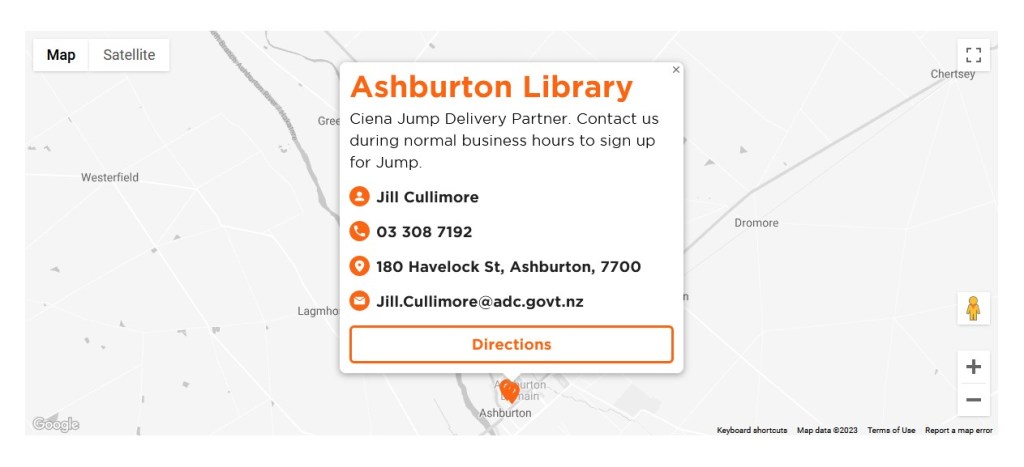
The Skinny Jump website has been updated identifying trial partners as Ciena Jump Delivery partners, as per the example below: