Jump coverage checker updates

Partners may have noticed some changes in the messages they receive when the Skinny Jump address checker returns a negative result.

There are now three different messages you may receive when checking a customer’s address for Jump availability:

(1) No coverage or low coverage: this means the customer is totally outside a Spark 4G coverage area or is on the fringes. This means that customers would receive no service or a very poor service.

(2) No capacity: this means that the cell tower serving this location is at capacity and Skinny is not legally allowed to connect further customers; if they do so, existing customers would experience a degradation in service that could lead to complaints to the Government regulator.

(3) Antenna plan only: this is not available to Jump customers as there are significant costs in installing a wireless antenna. The purpose of the antenna, which connects to some modem types, is to boost the signal to a level that ensures reliable internet speeds. This service is only available to regular Skinny customers, who may be willing to pay the extra costs.

The good news in all this is that coverage and capacity is improving all the time, so customers should continue to be encouraged to check for any changes from time to time.

Resetting Jump Smart Modems

As part of the fault assessment process, The Skinny Care Team may ask a customer to do a ‘factory reset’ of their Jump modem. This involves using a SIM eject tool or a paperclip to push in the Reset button (located just below the two small black buttons on the back of the modem). The Reset button must be held down for up to 10 seconds, while all the lights on the front of the modem turn themselves off. When the Reset button is released, the lights will progressively turn back on.

This process is what is termed a ‘factory reset’, when all the settings are returned to their original state. If the Wi-Fi password or Username have been changed, they will revert to the default password and username printed on the modem.

If none of the lights come back on make sure the modem is plugged into mains power and the power on/off button (also on the rear of the modem) is “on”, i.e. pushed into the ‘in’ position. If the green power light on the front of the modem doesn’t come on, this would suggest a problem with the power supply.

Jump App glitch fixed!

Good news! The problem for Android users with the Jump App that was raised a few days ago has been fixed.

The Skinny Jump App team has released an update to the Google Play store and this is now available. If partners receive any inquiries from customers about this, please ask them to check that they have the latest version of the Jump App (1.0.7).

Any customers who provided feedback on this issue in the Play store will already have received a notification of this update.

Date formats matter for Jump modem counts

Everyone has their own way of writing dates, e.g. 5-Jul-2022, 05/07/22 (or if you are of North American heritage 07/05/22), 5 July 2022, 5-7-22, etc.

And for most things to do with Jump, you have been free to choose whatever format you prefer when entering dates in your Google registers.

But our new cunning plan to dynamically adjust your modem re-order triggers to reflect the number of modems you have issued during the last few weeks does care about date formats. We wondered why the trigger formula wasn’t working for some partners, when everyone had identical formulae.

A bit of detective work revealed the date problem – only dates in the 5-Jul-2022 format (our preferred format) were being recognised, so partners using other formats to record dates when modems were issued were being ignored.

Now I would like to say that this is the only reason why 80 partners are waiting for further modem supplies – but that is not the case. We have identified a small number who were using different date formats and have corrected these.

But the main problem continues to be with the supply chain, stretching right back to the manufacturer in China. It is now 3 weeks since the last batch of modems were supplied, which means many of you will have run out. I’m afraid the solution is not just a simple matter of correcting date formats.

Over 1000 modems are being supplied every month, but we know this is currently not enough to keep everyone stocked at an optimum level. We are hoping our new dynamic trigger system will help to direct modems to partners who have the highest turnover, but there are still mitigating circumstances outside our control.

So, please instruct all staff issuing Jump modems to make sure they use the preferred date format (5-Jul-2022) when recording the date of issue in your Jump Google registers.

Glitch with Jump App for Android

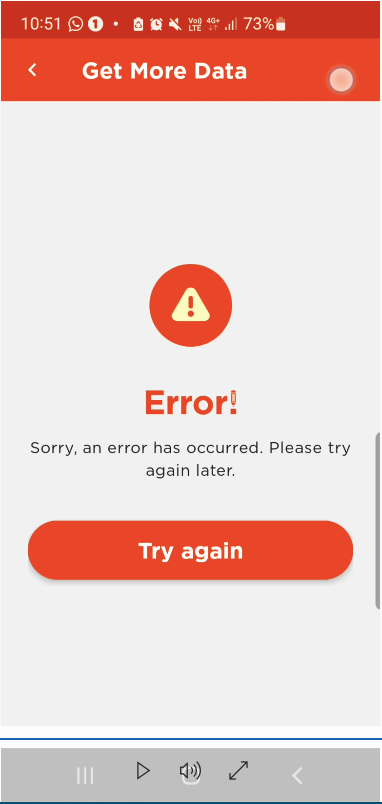
Some partners reported an issue with the Jump App on Android devices and we escalated this to the Skinny team to investigate. They have been able to replicate the problem and are actively working with the App development team to apply a fix.

Customers who have topped up their accounts and have available credit (and Jump data packs available to purchase, i.e. within the 6 allowable renewals each month) have discovered that they are unable to purchase a pack. They receive the following screen:

Until this issue is resolved please advise customers to call the Skinny Care Team and they will be able to assist them purchase a Jump pack.

We will provide an update as soon as this is resolved. Note that this doesn’t affect iOS (Apple) customers.

And the winner is…..

What a great response from partners with your 1 June Skinny Jump Refresh displays. What was particularly impressive was the amount of effort you put into your displays – orange was definitely the colour of day, balloons, jumpsuits, wigs, masks, glasses, hi-vis vests, traffic cones and even an orange teddy bear. And all that Jumping! Good exercise I suppose. I hope we don’t get into trouble with your bosses for creating this distraction!

And the winner is: Sarah Tansley from Marlborough Libraries.

The Marlborough Libraries entry was selected from all the entries received, using a random number generator. Dinner for your Jump team is your reward, thanks to the Spark Foundation.

Shelley has put together a slide show from the entries received. You can find this here (as this is a rather large file, it works best if you download it before playing).

Towards a better approach for supplying Jump modems

Every day I receive emails from at least one of our 300+ Jump delivery partners saying they have run out of modems. Our goal is for this never to happen and despite the supply chain challenges caused by Covid, we have tried a variety of approaches to smooth the flow.

We appreciated the support of many of our partners in March this year to redistribute modems they were holding to partners who were desperate for further supplies. But after a month of modem shuffles we became reliant again on the supply of new stock from Ingram Micro.

At any point we have up to 2000 modems in the pipeline, between the time of ordering and the time they arrive at a delivery partner. The challenge is to ensure that supplies arrive, where they are needed and when they are needed, without spending too much time sitting on partners’ shelves.

So today, we have implemented a new approach, called dynamic triggering. Historically our approach has been to set fixed re-supply trigger levels – when a partner’s stock dropped to the trigger level, we automatically placed an order for more supplies. This worked reasonable well when re-supply times were measured in terms of days, but now that we face up to 3 weeks (or at times even longer) to replenish stocks, this approach is not working that well.

Our new approach is to continuously adjust the trigger level, based on historical data. The trigger level for each delivery partner is now based on the number of modems they have issued during the last 3 weeks. For example if a partner has issued 10 modems during the last three weeks, their trigger level becomes 10. Assuming a relatively smooth distribution of modems, the partner should have adequate supplies to last for a further 3 weeks. If delivery times reduce, we can adjust the trigger level to a shorter period, say 2 weeks.

Partners can monitor this themselves in their Jump registers by viewing cell G2 (the dynamic trigger point) compared to their current stock levels (cell H2). When the stock level equals the trigger point, a new order is generated.

We recognise that customer demand will not always be as smooth as the above algorithm requires, but we think this is worth a shot. In particular we expect this will drive supplies to the partners with high turnovers, while minimising the amount of stock held by partners with low turnovers.

BUT, and there is one very big BUT, this does depend on partners ensuring that Profile Forms are completed for every modem issued. We need these to record the number of modems issued, which directly impacts when new orders are placed.

My measure of success will be the drop in emails to jump@diaa.nz requesting further supplies.

1 June nearly here with Jump refresh

What a fantastic turnout from our Jump partners for last week’s webinars with the Spark Foundation team, explaining the key changes to Jump that take effect on 1 June 2022. In case you missed one of the briefings, the changes are:

  1. $5 data package increases to 35GB (up from 30GB)
  2. Number of monthly plan renewals increases to 6 (up from 5)
  3. Monthly free 15GB is here to stay (applied on the first day of every calendar month)
  4. 6GB daily boost ends on 31 May 2022

These changes take effect on 1 June 2022 for all Skinny Jump customers – existing and new.

All partners are asked to replace all collateral, including posters, flyers, etc. on Wednesday 1 June.

Send us a photo of your new Jump display by 6 June and you are in the draw to win a dinner shout for your whole Jump team. All entries to be sent to Shelley at jump22@diaa.nz

Please do not send Jump modem inquiries to Skinny

Some partners are continuing to contact Skinny when they have a question about the supply of modems, and as we are currently experiencing 2-3 week delays in the shipment of modems, these inquiries seem to be on the rise.

Please do not contact Skinny or the Spark Foundation (or Sue Kini for that matter) if you have a question about modem supplies. All these inquiries must go to jump@diaa.nz

Most of these inquiries relate to partners running out of modems. We clearly want to avoid this situation if at all possible. Part of the problem seems to be caused if modems are issued without Profile Forms being completed. Almost invariably, we find that when a partner reports ‘no stock’, their Google register indicates a number supposedly being available. We rely totally on the Profile Forms to update your Jump registers – when your stock drops to the pre-set trigger level (cell G2), we automatically generate a new order for you.

We aim to set the trigger level equivalent to 2-3 weeks of your turnover; if we get this right and you always complete the Profile Forms, you should never run out of modems.

This is not an exact science of course, but we do our best to smooth things out. At any point in time we have up to 2000 modems in what we call the pipeline – between the supplier and the end customer through a local delivery partner. This only represents an average of around 6 modems per partner. The combined value of this stock is around $500,000, so we try and keep the pipeline as trim as possible.

We are happy to adjust your trigger levels if you are consistently running out of modems, so please do get in touch (jump@diaa.nz) and we’ll see if we can improve things for you.

Not too late to register for the Jump Update webinars

Thank you to the 150 partners who have already registered for the Jump Service Update briefings next week. There are important changes that take effect on 1 June 2022 and we do need a representative from all our 318 Jump delivery partners to attend, so please do register using the link above.

We have five scheduled times, one each day from 23 May and each briefing is just 30 minutes. We are trying to make it easy for everyone to fit this into their schedules. Be careful when registering to choose the Service Update New Information briefings, not the New Partner briefings. New partners or new staff involved in delivering the Jump programme are of course welcome to register for the New Partner Briefings as well.