Something new every day!

Well, would you believe it! Next year with be the 10th anniversary of the Skinny Jump internet service (originally call Spark Jump). And what is even more surprising is that there are still things to learn about this remarkable service.

Today’s questions came from Phoebe Wang at Ashburton Library at 10:10 am. I can feel a Kahoot coming on, but maybe Jump delivery partners can use this as a rapid fire test for all their staff involved in issuing Jump modems:

  1. Do customers get a reminder when their data is about to run out?
  2. If so, is this a text message, a Jump app notification or an email?
  3. How much data is left when you get the notification?
  4. Can you top up after you have run out of data?

Well, who knows the answers?

To start with I asked myself – surely after nearly 10 years I should know some basic stuff like this. Well I scored a miserable 1/4 and even that missed a very important option – think IVR (see below)!

So I turned to our DIAA expert in all things Jump – Sue Kini; she has been producing Jump training materials for most of the last 10 years, and what’s more, collaborating with the Spark team that developed the Jump Partner Pathway training modules. She has also been the creator of challenging Jump exams (called Kahoots). Surely she would know. Ummm….. maybe not. It is Friday after all.

So next up I thought I’d check with Shelley Struthers, who spends much of her day helping Jump partners around the country with all their day-to-day problems. But, oops… Friday is Shelley’s day off, so I thought better of disturbing her.

OK, so I need to elevate this to the one person I send all my “Jump don’t knows” to – Mel Manueli. Mel has a new job title Digital Equity Partner (Skinny Jump – Digital and Operations). Fortunately, she’s the same Mel who handles all our “don’t knows”. So, at 10:37am I toss the ball to Mel.

And at 14:14, bingo! Mel produces the goods! She explains that there are some default settings that can be viewed through the web dashboard sign-in, but not the Jump App:
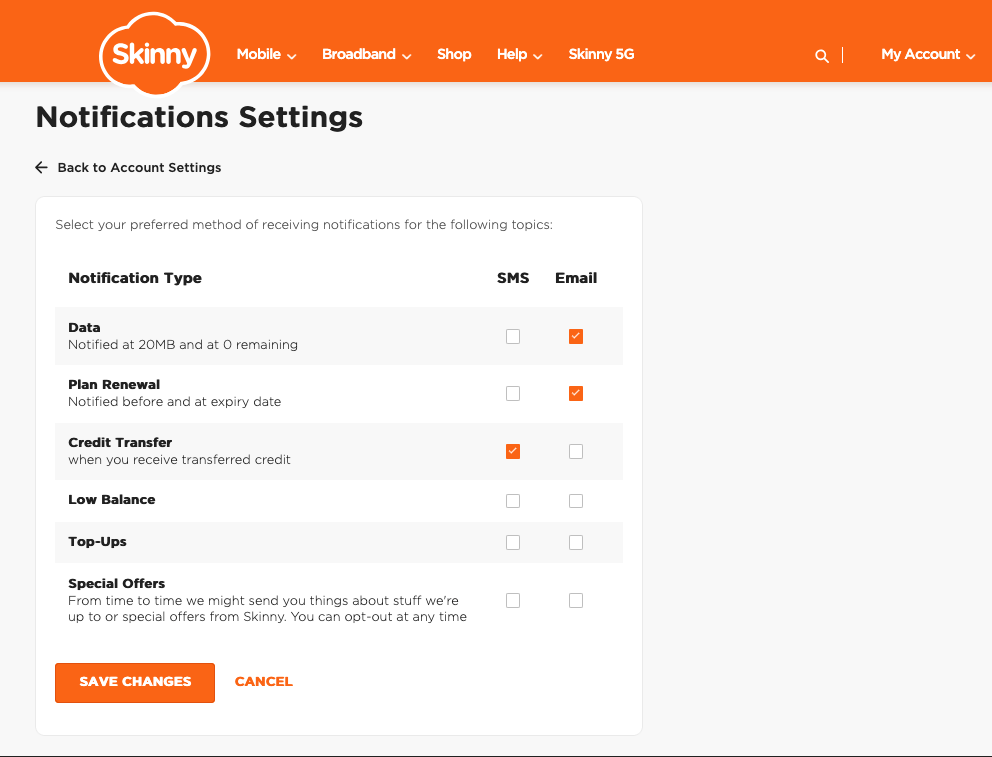
This default setting means that Standard Jump customers will automatically receive an email:

  • When they are at 20MB of data (for their current plan) left
  • When they are at 0MB of data (for their current plan)

To be able to receive Email notifications for successful Top-Ups – they’ll need to go into these settings: My Account / Dashboard > Account Settings > Notification Settings and tick/untick the options based on their preference.

Things to note

  • The above controls/settings can only be accessed and updated when a customer logs in via a web browser (can be on their phone or desktop), but not on the Jump App
  • These settings are the same for Mobile customers – so unfortunately the ‘SMS’ option is not able to be setup for Jump customers

Mel also reminded us of the IVR option if customers have no data available and want to top up.:
Call 0800 4 Skinny > Press ‘3’ > Enter BB Number & Modem Verification Code > Top-Up

I’m not sure if Mel just knows this stuff or whether she has a higher order knowledge partner who she sends her “don’t knows” to. But do we care – Phoebe has her answer and to close the loop at 16:22 she replies:

“Thank you so much for your prompt reply, you* are amazing as always. The customer is happy with the answers, it ease his worry. Have a good weekend.” 😊

*Footnote: to be clear Phoebe’s reference to “you” is the ‘royal you’, i.e. everyone involved in delivering and supporting such a fantastic service!

Jump Profile Form Updates

Some partners have asked for clarification about why the Jump Profile form is now asking for contact details of the person completing the Profile Form. This was implemented a few weeks ago because of recurring errors by people completing the form; we want to identify these people so that we can contact them and offer further support.

But some partners questioned the need for this, especially as a copy of the form was automatically being emailed to the customer. So this caused us to re-think why customers needed an email copy.

The form was created many years ago on the assumption that customers would be filling this in themselves, with guidance from a partner as part of the modem setup process. But after consulting with some partners it is clear that this is not the way things are happening; most partners have their own staff completing this form. So if we take this as the ‘norm’, we can make some changes.

As of this morning, we have stopped emailing a copy of the form to the customer.

This was originally intended for customers to check that the information they had provided was correct and on a few occasions, customers did do this. But this is very rare and there doesn’t appear to be any other benefit in sharing the form with them. So we have stopped sending a copy to the customer. You will notice that you no longer need to enter the email address of the customer at the start of the form; this was the entry that triggered the auto-send. We still need their email, but this now comes later in the form along with other contact details.

We have noted the concern of some partners about including staff details in the Profile Form. By not sharing these with customers, we hope this addresses the main concern. We are happy for staff to just use their first name (we understand with most library partners, staff display their first name on a name badge) and a generic email if they prefer.

The Profile Form is confidential to the DIAA Jump team. This is not shared with the Skinny Care Team nor with partners; we use this to update individual partner GSheets, so that we can track modem issues and arrange a resupply of modems when required. Most of the data collected, especially around demographics and target user groups is aggregated and used for high level programme reporting.

New Jump Partner guides – coming this week

As discussed during the recent Jump webinars, new copies of the Jump Partner Guide are being shipped this week, along with a new supply of the ‘Stopped Using Your Jump modem’ stickers.

Some partners will be receiving more than one copy of the Partner Guide – one copy is for general use; the others are individual copies for each Jump Specialist.

So if you are the person opening the courier pack, please make sure these extra copies find their way to your specialists – while they have completed all the Partner Pathway modules and received a Jump Specialist badge, it is especially important that they continue to have access to the most up-to-date information.

You will also find a few copies of the new Customer Guides. These are to be used when returned modems are reset and become available for re-issue.

Jump training for new staff

I had a call this week from a staff member in one of our Jump partners who had been asked to take over managing the Jump programme because the person who had been managing this had left. Not surprisingly, she had a number of questions about our processes.

Staff changes in our Jump delivery partner network are not unusual. We met with the Skinny Jump team this week and spent some time discussing the on-boarding process for new Jump partners. But what we quickly realised that everything we were discussing applied equally to new people joining the Jump delivery network.

We have some excellent resources for supporting new Jump delivery staff, but the challenge is to work out how to engage with them and let them know what is available. So here are a few questions for you – if you are reading this, then you are probably an experienced Jump delivery partner and can help connect us with Jump newbies.

  1. Do you know that there are three types of Jump delivery partner?
    • Jump referral partner, knows about Jump but is not involved in the issuing of modems;
    • Jump connector, issues modems and helps customers set up their Skinny Jump accounts and understand the top-up process;
    • Jump specialist, understands all the Jump processes, including modem supply and recovery of returned modems.
  2. Have you completed a Jump Partner Pathway online course?
    • Course 1 is for everyone involved in the Jump delivery process (referral, connector and specialist);
    • Course 2 is for everyone involved with the issue of modems (connectors and specialists);
    • Course 3 is for at least one person in each delivery partner organisation (specialists)
  3. Do you know who to contact for support with Jump processes?
    • Sue for training and promotion,
    • Shelley for day-to-day operations, and
    • Laurence for modem supply and recovery
  4. How should you contact the Skinny Jump team?
    • As a delivery partner, you shouldn’t contact the Skinny team directly
    • Partners should contact the DIAA team for any support required (jump@diaa.nz for modem supply issues; 0800 463 422 for other day-to-day operational issues; sue@diaa.nz for training and promotional resources)
    • Customers should be encouraged to contact Skinny directly if they have a problem using their modem, topping up their accounts and for reporting faults
  5. What are the most important tools for Jump partners?
    • Jump Partner how-to guide and FAQ, February 2023 edition
    • Skinny Jump Partner Resources, incl Partner Pathway training modules
      • Jump Profile Form, to be completed for every modem issued (except replacements for faulty modems)
      • Modem Returns Form, to be completed for every returned modem or when partners encounter a problem during the modem setup process
      • Partner Google Sheets, activity record for each partner (key document for managing supply of modems); contact Laurence or Shelley if you can’t access your GSheet.

And a final word – if you are planning to move to a new role, please let the team at DIAA know (contact Laurence, Shelley or Sue) so that we can update our records and help the team member replacing you get up to speed with Jump.

Partner Pathways a hit!

Did you miss Sue Kini’s Jump eNewsletter sent earlier this week? We know that half of all Jump partners have read the exciting news about the Partner Pathways now being live, but maybe the other half are still on holiday and just catching up with their emails?

Anyway, this is absolutely something you don’t want to miss, especially for partners where new team members are helping with Jump sign-ups. 

Just one day after the new online training materials were launched, 83 Jump partners had registered. We want to see all 312 active Jump partners register by 23 February and have a chance to win some treats (check out Sue’s Newsletter to find out more about these treats).

And the feedback coming from partners who have dipped into Partner Pathways is fantastic:

“I think that the information around the 3 C’s was excellent, as it really explains the ethos and how to approach conversations with care, compassion and empathy, while also being firm to ensure that those who need it most are most likely to receive service”

“I absolutely love this new portal, and think that this will be a truly invaluable tool for all jump partner organizations to keep on top of training! I would love to have the opportunity to help if at all possible.”

“I feel completing the course will improve my delivery of Skinny Jump to customers.”

Keep it coming – we love getting your feedback – the good and the bad!

Now to get to the point of my post this morning – next week, starting on Tuesday 30 January, Sue and Tawera are hosting a short webinar every day at 11.00am for any partners who have questions about the new Jump training programme. Sign up here to join one of these sessions and we’ll send you the zoom link.