Now Here’s a How-de-do!

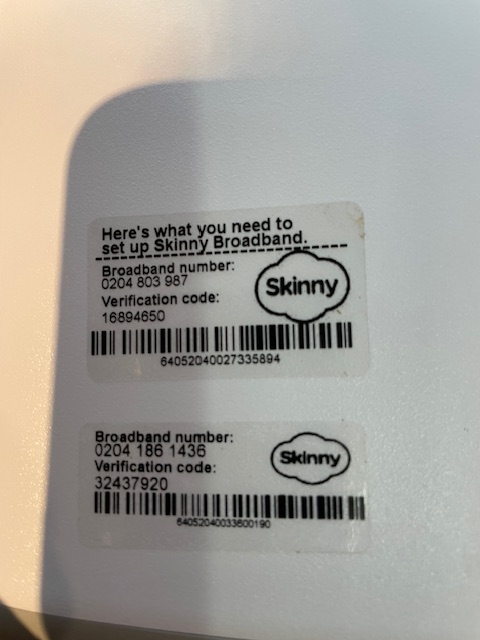
Just imagine, you are sitting in your cosy office on a cold Matariki weekend holiday, packaging modems for all those lonely souls without a Jump internet connection and you are confronted with this:

Two Broadband stickers on a Jump modem!! What a dilemma! What a How-de-do! (If this is a new term for you, let me politely suggest it is time to brush up on Ko-Ko’s dilemma in Gilbert and Sullivan’s The Mikado.

Now some of you might be familiar with Kahoot- the best place to go to get answers. What to do? Choose from the options below:

  1. Stop issuing modems immediately;
  2. Decide that this is a faulty modem and race to complete a Modem Returns Form;
  3. Call the Skinny Care Team for help;
  4. Remove both labels so that your customer doesn’t get confused;
  5. Of if all else fails, have a hissy fit.

OR maybe you might stop and think about this for just a minute. Maybe one of the broadband labels is correct and the other one has inadvertently attached itself. But here’s the next ‘How-de-do’. Which is the right one?

Aha! let me take a look to see if the Broadband number is on the SIM card. Carefully remove the SIM card and inspect (only suitable for those with excellent eye sight). No BB number, but there is another number, not one that we normally use – the SIM ID number. Can we get a match with the bar coded number on the BB sticker. Bingo!

Oops, another modem with two stickers (and not immediately visible as in my photo above – they have been attached on opposite sides of the modem). Bit of a pain having to remove the SIM card every time. Take another look at the photo and it is clear the two stickers are different sizes. If you have been particularly observant in recent months you will have noticed that the BB stickers are now smaller than they used to be.

And another Aha! moment. Consider that we have been using refurbished modems for the last six months and just maybe some of the CEVA team are having a bad day and forgot to remove the old sticker.

Here comes modem number 3 and yes, Bingo again, the SIM card matches the number on the smaller BB sticker. So now I am up to the fifth modem with two stickers and without even checking, I am simply removing the larger sticker and because I have trouble throwing things away, they are lining up neatly on the side of my monitor (just in case I have got this horribly wrong).

And if you are fed up with broadband numbers, have a sing along with Ko-Ko, Yum-Yum and Nanki-Poo. The Mikado was first performed at the Savoy Theatre in London on 14 March 1885, and who hasn’t been part of a school performance!

KO-KO:
Here’s a how-de-do!
If I marry you,
When your time has come to perish,
Then the maiden whom you cherish
Must be slaughtered too!
Here’s a how-de-do!

YUM-YUM:
Here’s a pretty mess!
In a month, or less,
I must die without a wedding!
Let the bitter tears I’m shedding
Witness my distress;
Here’s a pretty mess!

NANKI-POO:
Here’s a state of things
To her life she clings!
Matrimonial devotion
Doesn’t seem to suit her notion —
Burial it brings!
Here’s a state of things!

ENSEMBLE (together):
With a passion that’s intense
I worship and adore,
But the laws of common sense
We oughtn’t to ignore.
If what he says is true,
’Tis death to marry you!
Here’s a pretty state of things!
Here’s a pretty how-de-do!

ChatGPT’s response to my ‘cunning plan’

A Cunning Plan (Jump Modem Edition)

“Wait, my lord, do not despair,
For I have a cunning plan to share!”
So whispered Baldrick, full of pride,
With hope that fortune’s on our side.

The modems stalled, the shelves ran bare,
Partners waiting everywhere.
But last week marked a turning tide,
As 396 were set to glide.

No longer thirty in one big stack —
Just twelve or six in every pack.
High-turnover partners get smaller loads,
But restocked faster down the road.

The goal? To spread supply more wide,
To every partner far and wide.
No more giant boxy heaps,
No modem droughts, no stockpile weeps.

Let’s hope this plan will smoothly run,
Unlike Baldrick’s — which came undone.
But if it flops, as Baldrick’s tend,
I know you’ll tell me in the end!

“Wait my lord, do not despair. For I have a cunning plan.”

Fans of Blackadder will be all too familiar with this phrase that frequently popped out of the mouth of Baldrick. Most of Baldrick’s “cunning plans” ended up in disaster, but I am hoping for better things with my latest cunning plan to get Jump modems flowing again.

Last week was a milestone (I hope) in freeing-up the Jump modem supply chain. Orders were placed on CEVA for 396 modems and 204 of these had been shipped by Friday. But while these volumes still fall well short of our targets, we are trying a new approach (“cunning plan”) to keep more partners supplied.

29 partners have either already received a shipment from last week’s batch or will do early next week. This contrasts with an average of only 9 partners receiving shipments each week for the rest of May.

So what is our cunning new plan? Put simply, this involves limiting individual partner shipment quantities to no more than 12 (previously 30). So all last week’s shipments were for 6 or 12 modems, 6 for partners with low turnover and 12 for those with high turnover.

At month end (yesterday), partners were holding 1613 modems in stock; a few are well stocked having recently received a new supply of 30, while over 200 partners have 2 or fewer modems. So the new ‘cunning’ plan is to get modems flowing to more partners.

Those with very high turnovers will not miss out; it just means supplies will arrive more frequently in smaller quantities. Some partners might even think this is a better idea, avoiding the need to find storage space when five boxes of modems arrive at the same time!

So let’s hope this ‘cunning plan’ does not end up like Baldrick’s ones. If it does, I have no fear that you will let me know!

Jump Profile Form Updates

Some partners have asked for clarification about why the Jump Profile form is now asking for contact details of the person completing the Profile Form. This was implemented a few weeks ago because of recurring errors by people completing the form; we want to identify these people so that we can contact them and offer further support.

But some partners questioned the need for this, especially as a copy of the form was automatically being emailed to the customer. So this caused us to re-think why customers needed an email copy.

The form was created many years ago on the assumption that customers would be filling this in themselves, with guidance from a partner as part of the modem setup process. But after consulting with some partners it is clear that this is not the way things are happening; most partners have their own staff completing this form. So if we take this as the ‘norm’, we can make some changes.

As of this morning, we have stopped emailing a copy of the form to the customer.

This was originally intended for customers to check that the information they had provided was correct and on a few occasions, customers did do this. But this is very rare and there doesn’t appear to be any other benefit in sharing the form with them. So we have stopped sending a copy to the customer. You will notice that you no longer need to enter the email address of the customer at the start of the form; this was the entry that triggered the auto-send. We still need their email, but this now comes later in the form along with other contact details.

We have noted the concern of some partners about including staff details in the Profile Form. By not sharing these with customers, we hope this addresses the main concern. We are happy for staff to just use their first name (we understand with most library partners, staff display their first name on a name badge) and a generic email if they prefer.

The Profile Form is confidential to the DIAA Jump team. This is not shared with the Skinny Care Team nor with partners; we use this to update individual partner GSheets, so that we can track modem issues and arrange a resupply of modems when required. Most of the data collected, especially around demographics and target user groups is aggregated and used for high level programme reporting.

Ciena – and the winner is….

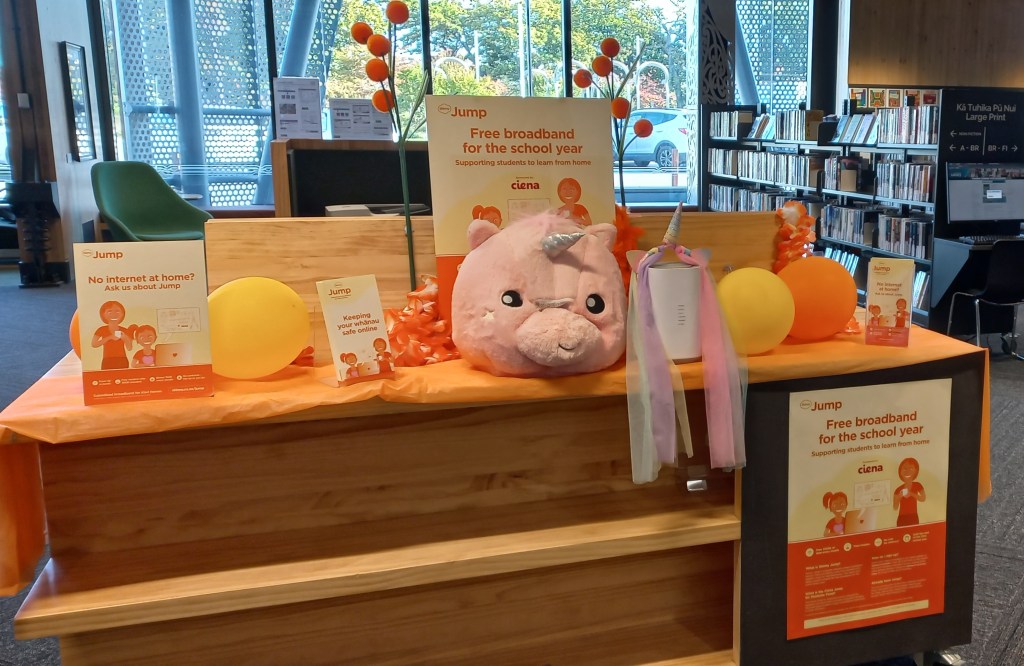
Ashburton Library, with their stunning Ciena display! I understand some goodies will be winging your way soon.

A reminder to all our Jump partners – you too can be a winner and sign up families with school-aged children in your community for the Ciena plan – free internet for the rest of the year.

All Jump partners can be Ciena partners; you just need to register with Sue (sue@diaa.nz) or Shelley (shelley@diaa.nz) and they will explain the process.

216 new families have already joined the Ciena family this year, but we still have room for another 384! 45 partners have already signed a family up so far this year – the leaders are in the table below. Over 25% of all the signups are in just one city – it probably isn’t too hard for you to work out which one this is! And I am sure they won’t mind me sharing their secret weapon – everyone signing up for Skinny Jump is asked if they have school-aged children and if so, would they like the Ciena plan (210GB free data every month).

Jump PartnerTotal Ciena Plan
Shirley Library26
Ranui Library17
Hastings War Memorial Library16
Linwood Library15
Flaxmere Library9
Matatiki Hornby Centre9
New Brighton Library9
Te Takeretanga o Kura-hau-po Levin8
Glen Eden Library7
Glenfield Library7
Ashburton Library6
Mt Roskill Library6
Glenview Community Centre5
Marlborough Library5
Pukete Neighbourhood House5
Dargaville Library4
Glen Innes Library4
Highland Park Library4
Onehunga Library4
Otara Library4
Pakuranga Library4
Smart Newtown4
Avondale Library3
Kaiapoi Library3
Northcote Library3
Te Atatu Peninsula Library3
Havelock North Library2
New Lynn Library2
Papatoetoe War Memorial Library2
TaiTech2
Taupo Budget Advisory Service2
Waitakere Library2
Wellsford War Memorial Library2

Making things stick!

This would make a good Kahoot Quiz question – What do the two images above have in common?

You may recall my earlier post about refurbished modems making their way into the supply chain. Well this is one of them – this looks just like a regular Smart modem, and it is, but some partners have pointed out a problem in getting the Modem Return sticker to stick. It appears that the cleaning substance used by the modem refurbisher is making the surface of the modem slippery, so that the orange sticker will not attach.

Well done, you guessed it! The solution lies in the image on the left. A quick wipe with some methylated spirits cleans the mystery substance and hey presto – we have stickage! Sorry about this inconvenience, but in terms of the bigger picture – every refurbished modem helps save the earth. So, thank you!

Customers needing replacement modems – it’s your call

Clarifying the Process for Replacement Jump Modems

We regularly receive reports from partners about Jump customers requesting replacement modems — often because their modem has been lost or stolen, or because they’ve been referred by the Skinny Care Team. These situations can put pressure on your staff, especially when customers arrive unannounced and expect an immediate replacement. In some cases, they may become quite insistent or even stroppy.

However, Jump partners do not have the tools or access needed to issue replacement modems on the spot. That’s why our recommended process is for all replacement modem requests to be directed to the Skinny Care Team (0800 475 4669).

The Skinny Care Team has the systems in place to:

  • Check whether a modem is genuinely faulty.
  • Verify the customer’s identity and Jump status.
  • Complete the required Modem Returns form, which triggers the modem de-linking process and a request for DIAA to courier a replacement.

Once the form is submitted:

  • We (DIAA) arrange for a replacement modem to be sent directly to the customer.
  • We also include a prepaid courier bag for returning the faulty modem.
  • The de-linking process takes a few days, ensuring that by the time the new modem arrives, the customer’s account is ready to be activated.

Lost or Stolen Modems

If a modem has been lost or stolen, partners must not issue a replacement under any circumstance. The customer must contact the Skinny Care Team directly to report the issue and begin the verification process.

Incorrect Information from Skinny Care

It seems that part of the confusion arises when Skinny Care agents mistakenly direct customers to Jump partners for replacements. Please note: Skinny agents should never refer customers to partners for replacement modems. If they confirm the modem is faulty, they should complete the Modem Returns form instead.

Managing Customer Expectations

We know it’s not always easy to turn customers away — especially when they show up unannounced. That’s why we strongly encourage all partners to:

  • Clearly communicate to your community the type of support you offer.
  • Decide whether Jump support is provided via:
    • Drop-in sessions,
    • Set times during the day/week,
    • Appointment only.
  • Avoid providing support during staff lunch breaks (12–2pm) or during busy periods such as school holidays, when other programmes may take priority.

Optional Modem Replacement by Partners

If you do choose to issue a replacement modem (e.g., if you have one available and have time to assist), that’s entirely up to you. While this is outside our standard process, we’re happy to support you if you have the capacity.

Just ensure that customers understand:

This is a back-end procedure that cannot be fast-tracked — not by delivery partners, the Skinny Care Team, or DIAA.

The de-linking process cannot happen instantly.

Is there still a problem with Jump modems not being properly de-linked?

Partners trying to reissue returned modems during the last 3 months have experienced numerous problems when they try to use these ‘de-linked’ modems, only to discover they are still linked to the previous owner’s email.

I appreciate that this has been extremely frustrating and appears to have resulted in partners feeling a bit nervous about re-issuing de-linked modems.

We think the problem is because of staff changes in the Skinny Jump team and misunderstandings about the de-linking and resetting processes. We appreciate that there has also been confusion about exactly what is required to de-link, reset and reprovision a Jump modem.

After much discussion between the Jump team in Spark and the Skinny support team, a new de-linking process was introduced on 24 March 2025 that we believe will solve the problem.

We have also used this as an opportunity to be very clear about what is meant by the terms used to describe this process. It is unfortunate that the language used in the new November 2024 Jump Partner Guide is still a bit confusing.

The umbrella term to be used for all returned modems is now “de-linking”, whether the modem is to be reused or sent for repair.

This involves completely deleting the customer account linked to the modem, which both frees up the modem for re-use as well as releasing the customer’s email for reuse should the customer wish to set up a replacement modem.

In the past, we have used the terms “resetting” and “reprovisioning” to explain how delinked modems are readied for reissue with a 35GB start-up data plan, but we are going to stop using these terms, as they are just sub-sets of the de-linking process.

Every modem that is delinked is automatically reprovisioned with a new 35GB start-up data plan, whether the modem is for reuse or repair.

The only exception is modems that are reported as ‘lost’ or ‘stolen’; these are permanently blocked.

The good news is that the new process seems to be working well, with timely notifications to partners as well as excellent tracking of the various components of the de-linking process. The not so good news is that the delinking process is taking a bit longer – up to 3 or 4 days. But in our view if this results in a more robust process it is well worth the wait.

We are going to be watching very closely any modems that have been delinked since 24 March to make sure the new process is working as expected. Partners holding modems that have been reset before this date are welcome to submit them again if you have any concerns that they might not have been de-linked properly.

Footnote: You might also be wondering what happens to any credit on a customer’s account when their old account is deleted. The Skinny team records the amount of this credit on the customer card, so that when a customer calls up and asks for the credit to be transferred to their new account, they can arrange this.

Reburbished Jump modems making their way back to customers

You might be wondering what happens to all those faulty modems you send back to us for repair. Some are beyond repair and are extracted for recycling, but others are returned to ‘as new’ and are now being distributed with regular shipments to partners. The first batch of 173 refurbished Smart modems were distributed in recent shipments.

You might notice marks on the modem case or other slight imperfections, but don’t be fooled, the inside electronics are in top working condition. Some of us think refurbished modems are in even better condition than new ones. Each has been individually repaired and tested while new ones are often sample tested, resulting in some being faulty right out of the box.

So if you spot a refurbished Jump modem, do tell your customer how lucky they are to not only receive a unit that has been individually tested but also for making a positive contribution to the environment.