Things changed on 25 March (not just the Covid-19 lockdown!) with the expansion of the criteria for Jump. When we introduced the home-delivery option (that has now reached nearly 4000 people), we abandoned the Kawa of Care form that we used to update the Jump registers in GDocs and replaced this with a Stepping UP Profile form which is to be used by partners when issuing Jump modems. We also plan to progressively use this for other DIAA digital inclusion programmes, to create a more comprehensive picture of the people who are participating.
For the home-delivery Jump option, we created a new form (Skinny Jump Application Form), based on the Stepping UP profile form, but with some additional contact information, such as a physical address so that we can check Skinny Jump coverage and courier modems to applicants.
For modems issued by partners, we are continuing to update the individual partner Jump register GDocs, using information captured in the Stepping UP profile form, but we are only including name and date information (linked to IMEI and BB numbers). The remaining data is consolidated in a national database where we can analyse the profile of people participating. The advice we received from privacy lawyers was that we were exposing ourselves and our partners to possible privacy breaches by recording participant details in a GDoc that could be easily shared and copied.
Our main reason for maintaining the individual partner GDocs is for stock control purposes, so that we can re-issue modems as required. Partners are welcome to continue to have access to this if they find it helpful.
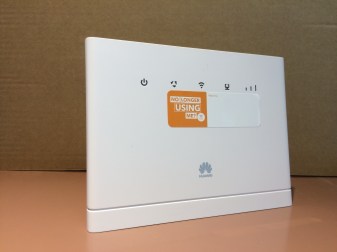 First there was the B315, the Jump modem we have all become very familiar with during the last 3 years. These are still flying out the door and will continue to do so until supplies are exhausted (probably within the next 4-6 weeks). DIAA, together with our Stepping UP partner network, is the exclusive distribution channel for this product. Which means we are also the exclusive distribution channel for replacement modems. B315 customers must report any modems they suspect as faulty to the Skinny Helpdesk. The Helpdesk team will attempt to fix any faults remotely, but if not, they will log the modem as ‘faulty’ and this triggers a request to DIAA to ship a replacement. The faulty modems cannot be repaired and customers receiving a replacement modem are requested to return the faulty unit to their nearest Jump delivery partner (when they open up again after the COVID-19 lockdown). They should be added to the recycling box and eventually returned to Sims for recycling.
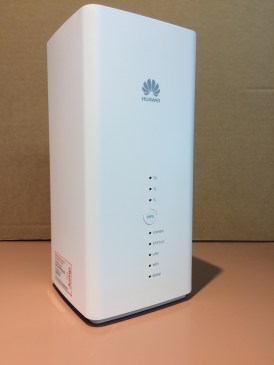 Welcome to the B618. This device is initially being used as part of the Ministry of Education’s internet support package for students without a home broadband connection. Approximately 3500 of these have been shipped directly from Ingram Micro (Spark’s hardware supplier) to student homes, using a mailing list supplied by the Ministry of Education. As for the B315’s, customers are to report any faults directly to the Skinny Helpdesk. They will be logged and a request issued to DIAA to issue a replacement. Unlike the B315’s, a return courier bag will be sent with the replacement modem. The modems will be returned to DIAA and then forwarded for repair to Telegistics (Spark’s hardware repair company).
 Digital Inclusion Alliance Aotearoa