Jump sign-ins must use single names

Two of our partners discovered a quirk with the new Universal Login Access (ULA) Jump registration process this week; they had customers with two first names such as ‘Ann Louise’ or a two part last name such as ‘de Beer’. Both registrations failed to progress, instead they got that annoying little red prohibition sign:

It turns out that this is a known limitation of the new sign-in process. It is a character lock that does not accept special characters, including hyphens and spaces. So the solution is simple, stick with just one first name and one last name.

For the above examples, ‘AnnLouise’ would be fine, as would ‘deBeer’.

And now for something completely different!

I appreciate that I have been flooding this blog with Jump updates, so I thought you might appreciate something completely different. If you are interested in providing digital literacy training to seniors in your community read on. Otherwise, have a cup of coffee and wait for the next exciting Jump instalment.

On 27 September 2022, the Office for Seniors (part of the Ministry of Social Development) released a Request for Proposals (RFP), inviting parties interested in providing digital literacy training for 5000 seniors to submit a contestable bid by 28 October 2022. the funding is for three years, commencing in January 2023.

DIAA intends to submit a bid for expanding the Better Digital Futures for Seniors programme in partnership with our rapidly expanding delivery partner network. So we are inviting expressions of interest from the 70 partners that are currently delivering Better Digital Futures for Seniors, but would also welcome any interest from other partners who may be working with seniors.

The Office for Seniors recognises anyone in the 65+ age bracket as a senior, except for Māori and Pasifika who must be 55+. Māori and Pasifika are amongst the more digitally excluded, especially for older people, and this difference in eligibility is an enlightened step towards achieving greater equity.

Note that new Government funding is a contestable bid and there is no guarantee of funding for any particular parties at this stage.  If our bid is successful, we will give priority to partnering with the organisations that have submitted an Expression of Interest and best meet the Office for Seniors requirements.  

We have prepared a brief response form for you to let us know about your interest and capacity to provide face-to-face digital skills training for seniors. You can find the form here: https://bit.ly/3rlWp2j

Please make sure you submit this form no later than 20 October 2022 to ensure we have time to include your feedback in the bid.

So, how much Jump churn is there in my area?

This questions was raised by partners in all five webinars last week. The Jump team has now extracted a shapshot of this data for each delivery partner for the total number of modems they have issued.

The percentage churn is calculated as at August 2022 for the number of customers who were inactive for at least 30 days compared to the total number of modems issued. Being ‘inactive’ means the customer didn’t use any data for 30 days; it has nothing to do with whether they topped up or not.

The number of modems issued is the total number issued by a partner since they first became a Jump partner. For some partners this goes back five years. For other partners, it might only be a couple of months.

The percentage figures range from 0% (typical for relatively new partners) to 100% (typically quite small partners). In recent months, the aggregate churn percentage for all partners has been increasing and is now around 75% in a single month (1000 inactives compared to 1300 new sign ups). But the total for the last five years has a mean churn of around 44%. Our goal is to bring this down to under 40%.

The percentage churn for each Jump partner is now displayed in cell P1 (August 2022) of your Jump GSheet register. We would like to get monthly data, so that you can monitor any changes when you implement the 6 C’s or other strategies, but this is quite a marathon in terms of matching data sets; the data analysis also takes account of modems returned.

So please treat the figures in your GSheets as indicative, rather than precise. We are also thinking that it might be more helpful to simply report the number of inactive customers compared to new sign ups each month.

Jump Churn Feedback invited from 1 October 2022- be in to win!

83 partners joined one of our five ‘Jump Churn’ webinars last week. We would have liked to see more, as this is an extremely important issue – where many Jump customers simply stop using their Jump internet connections and do not return their modems. Not only do these modems cost a lot of money and are provided to Jump customers at no charge, we are currently facing a global shortage of modems. Over 1000 people are signing up to Jump every month, but because of these supply chain issues, customers are having to wait up to 2 months to get connected. If we can recover the thousands of modems that are no longer being used, we would make a lot of new customers very happy.

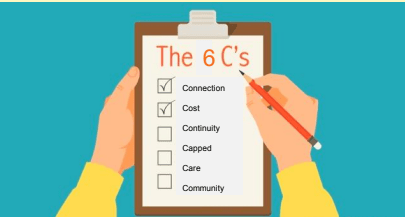
During the webinars the Jump team explained the 6 C’s, a new approach for reducing churn and we are keen to get your feedback on how this is working. The purpose of the 6 C’s is to ensure customers fully understand who Jump is intended for and its limitations. For example, we know that the data cap is not going to work for every household.

If you missed the webinars, you can find a recording of one of these sessions here.

We would like our partners to share their experiences using the 6 C’s conversation guide and provide any customer feedback. We know this could take a bit more time in making sure that Jump suits your customers’ needs, but we hope this will avoid disappointment if they discover the 225GB monthly data cap is simply not enough and also help to reduce the number of modems sitting idle.

The Spark Foundation has offered a monthly partner team prize up the value of $100 each month for the next three months for partners who share their feedback. All responses received each month will be entered into a random draw for the monthly team prize. The winner will be notified by email and published on this blog.

You can find the entry form on our Stepping UP website, on the Jump Partner Resources page here. Click on ‘Churn Feedback Form’.

Glitch with Jump web registration process has been fixed!

That’s the good news. The not so good news is that the web-based signup instructions in the Partner Manual and the User Guide are now incorrect. It will take some time before these print materials are updated and distributed, so we are planning a couple of short term measures:

(1) an updated page for your Partner Manuals – we will load this to the Jump Resources page of our Stepping UP website and let you know when it is available to download

(2) step by step instructions will be inserted with every modem that we (DIAA) ship for home delivery

Since partners are helping customers with their Skinny account setups, we are not so worried about the incorrect instructions in the User Guides that come with every modem. They will of course be updated with the next reprint.

So what are the registration steps? They are set out below, noting that this is only for signups using the web registration process. Nothing has changed for signups using the App.

  • Go to skinny.co.nz/jump and select login
  • Select Register (underneath the Facebook and Google sign in icons)
  • Enter email address & password ➡️ Next
  • Enter First Name & Last Name ➡️ Register
  • Navigate to email inbox and retrieve 6 digit verification code
  • Enter 6 digit verification code ➡️ Verify
  • Select Return to login
  • Enter email address & password ➡️ Login
  • Select Activate Account
  • Select Broadband sub tab
  • Enter Skinny Jump Broadband Number & Verification Code ➡️ Activate

Registration complete and customer will be greeted with this screen:

Desktop signup problems are expected to be resolved by the weekend

The Skinny Jump team has been able to replicate the issues raised by partners today and has assigned a Priority One brief to the website developers. This means that issues could be resolved within 24 hours, but are more likely to take a couple of days, given current workloads.

These issues have arisen as a direct result of moving to the universal login. Please be patient; if this is creating problems for your team in signing up new customers, you are welcome to suspend signups until this is resolved, or alternatively, you can use the App for new signups.

Problems with desktop signups for new Jump customers

We have received a number of reports from partners about problems they are having when signing up (registering) new customers for Jump using the desktop process. The symptoms appear to be that customers are not being asked to enter their physical address or in some cases, the broadband number of the modem.

We have tested this ourselves and agree that all is not well. But we are at a bit of a loss to work out why, so this has been escalated to the Skinny Jump team. The link I provided in my previous post added further confusion as this went to the Skinny login page rather than the Jump login page. But we don’t think this is what is causing the problem. I have updated the link in my previous post just in case.

We are hoping to have an update later today, but in the meantime we suggest you use the App to sign new customers up.

New link for signing customers up for Jump

The change to a universal login this week has resulted in a new URL for the sign-up web page. This has confused a number of partners, who (sensibly) keep a link to the Jump sign-up page as a shortcut on their desktops. It is important to update the link on any desktops where you sign customers up.

The new link is: https://signin.skinny.co.nz/?logobrand=skinnyjump

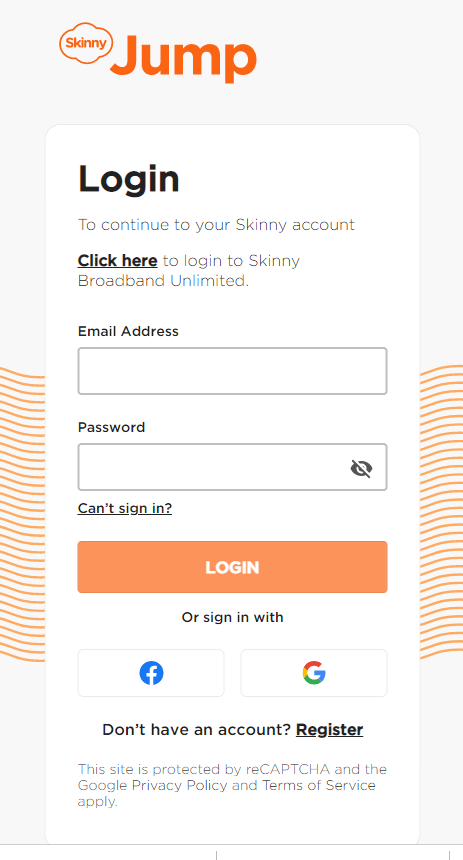
This takes you to a page that looks like this:

Note that for new customers, you have to scroll down below the Facebook and Google logos to find: “Don’t have an account? Register “. Some partners have reported that they can’t see the ‘Register’ link on this screen; it appears to get covered up by the Facebook and Google logos. This fault seems to be browser dependent, so do let us know if this happens for you and tell us what browser and what device you are using. We’ll pass this on to the web developers. Clicking on ‘Register’ takes you to this page:

Note also the more stringent requirements for the password. Partners familiar with the Jump App (as most are) will recognise this.

Does the universal Jump login change anything for customers with Skinny phones?

This is a question raised by one of our partners. You may recall that customers with a Skinny mobile phone plan must use a different email to sign up for Skinny Jump.

The universal login for Jump doesn’t change this. The Skinny system has been set up to link the phone and broadband accounts for regular Skinny customers. This enables discounts to be applied when customers select both services.

But, while Jump uses the same Skinny platform, Jump customers are managed separately. This means that if a new Jump customer already has a Skinny phone account, they cannot use the same email address for their Jump account.

For existing Skinny phone customers, the Skinny broadband plans are certainly worth checking out, especially for Jump applicants who have concerns about the data cap of 225GB. There are attractive discounts when regular Skinny customers choose both services.

And here’s the last Q&A from today’s Jump Churn briefing (23 September 2022)

Q: Is it possible to share this PowerPoint presentation? send to email?

A: You can find the slides here: https://steppingup.nz/partner-resources-hub/skinny-jump-partner-resources/

Q: How would you ask if they’re high data users without potentially offending patrons?

A: The context for the question is to help customers understand the data cap limitation.  They might not understand what they can get with 35GB – some examples are included on page 18 of the Partner Guide and on page 23 of the User Guide.  Customers with large families and especially where users spend hours online each day gaming or watching movies might be disappointed to find they reach the data cap quite quickly.  Every week, we see Jump modems being returned because customers want more data, so it is helpful to set expectations up front.

Q: The Skinny website is coming up with an error message when signing up a patron.

A: The Jump website has been updated this week to introduce a universal login, where users can now use the same email and password to access their Skinny accounts.  This has caused some disruption for partners who rely on shortcuts and bookmarks to access the Skinny Jump website.  The URL for the Skinny Jump homepage has changed, so any partners who rely on a bookmarked link will find this eventually leads to an error page.  Our advice is to update any bookmarks with the new URL:  https://signin.skinny.co.nz/?goto=https://www.skinny.co.nz/dashboard/sub?from=skinny-ula

Q: When will we be able to see our churn stats?

A: As a first step, Skinny is exploring the best way to share churn rates with Jump delivery partners and provide regular updates.  These will be added to partner GSheet registers when they are available. There are privacy issues in sharing individual customer churn details with delivery partners, although follow up support from partners would be welcomed.  We must first work out the best way to do this without breaching customers’ privacy.

Q: If after using the 6 Cs it doesn’t seem like the programme would be suitable for the patron are we meant to say no to signing them up? How would we do this?

A: The key underlying strategy is try and reduce churn, especially from people who do not return unwanted modems.  We want to make sure that Jump is going to meet the needs of customers and we think the 6 C’s conversation might help customers work out for themselves whether the product is suitable or not, rather than feel let down when for one reason or another it doesn’t meet their expectations.  The 6 C’s are a conversation guide, and are not intended to be perceived as a barrier for people signing up for Jump.  Partners have always had the discretion to say ‘no’ if they suspect anything untoward about the applicant, e.g. people who might not be telling the truth about where they live.  But in the end, Jump operates as a high trust model; we do not expect partners to ‘means test’ applicants, although at times this can be blatantly obvious.  I am aware of one partner who quite rightly turned down a customer who arrived at the library in a late model Mercedes Benz wanting a Jump modem for her bach. 

We expect the 6 C’s could lead to a customer saying: “OK then, it doesn’t seem that Jump is right for me”.  If there is some uncertainty and a customer is insisting that Jump is right for them, partners should emphasise the importance of returning the modem if the customer discovers otherwise.