Concerns about possible ‘scamming’ practices with Jump

From time to time I get approached by a partner who suspects that one of their customers is ‘scamming’ the Jump modem process. When this happens we try and work out a strategy to handle this on a case by case basis, so that partners and their staff are not having to face confrontational situations. Staff safety is paramount and we are happy to provide whatever support we can to ensure that the Jump delivery experience remains a positive one.

I have summarised a few scenarios below, as reported by partners and suggested some possible responses.

  1. More than one modem requested by people living at the same address. There are many situations where this is totally okay. The most common example is social housing units (although these typically have separate apartment numbers), but we also encounter this where people are living in different dwellings at the same physical address (this is quite common in many rural properties for example). But is also occurs when someone is living in a cottage separate to the main dwelling where the distance is too great for the WiFi signal. In some situations, two or more families are living in the same house, and provided they are not part of the same family unit, then they can be supplied with separate modems. Suggestion: For online applications I get an alert whenever a duplicate address shows up; I then check the applicant’s name, phone and email and if necessary view the property on Google Maps street view to determine if it is a single or multiple dwelling site. If I have any concerns I suspend the delivery until Shelley contacts the applicant to find out more. What is interesting is that most people do not respond to Shelley’s text inquiry (which in itself suggests there could be something fishy) and the application expires after 10 days. It is difficult for partners to do this sort of checking, but the principle really is to query anything that looks odd; if you are satisfied with the explanation, then you can proceed to issue a modem. But if you are not, then you have the discretion to decline the application.
  2. Same person requests a second modem within a short time. This definitely needs an explanation before a further modem is issued. If you are not satisfied, then you have the discretion to decline the application. One of our partners discovered repeated applications by the same family and the same address; they were shopping around, getting modems from different libraries in the same city. Staff became aware of this and created an informal ‘black list’ as an alert for any future applications. The exception of course is when the modem is faulty. Suggestion: Before issuing a modem to someone who claims their modem is faulty, make sure they have reported the fault to the Skinny Care Team or they have returned the faulty unit to you. Partners can also check their Jump GSheets to identify repeat applicants. Simple do a search (Ctl F) for the applicant’s name to identify duplicates.
  3. People who miraculously change their address when the address checker indicates ‘no coverage’. This is a bit more challenging. Skinny Jump does operate on a ‘high trust’ basis, but if there is clear evidence that someone is providing a false address, then partners have the discretion to decline the application. For online applications, we frequently get people at addresses that pass the coverage test, but then ask for the modem to be sent to a different address (which 9 times out of 10 fails the coverage check). Suggestion: For online applications we automatically decline any applications where the requested delivery address is not in Jump coverage. We then contact the applicant to find out why they want it sent to an address where the modem cannot be used. In most cases, we never hear back from those who are possibly scamming the system; people who do have a genuine reason always respond.
  4. People who ‘give’ their modems to someone else and then want another one. This is a bit strange and partners who have reported this have advised that they suspect the modems might have been on-sold (as opposed to ‘given’). It is a breach of the Jump conditions of service for anyone to sell or otherwise dispose of a Jump modem. The Terms and Conditions state: “You may not sell, lease, dispose of, lend or otherwise part with possession of, or modify the Modem in any way“. Suggestion: In this situation, we would advise partner to respectively decline to issue another modem, unless there is an incredibly good explanation. An exception we have encountered is where two people living together have split and one person has taken the modem with them, even though it was registered under the other person’s name. In this case, we treated the modem as ‘stolen’ and asked the Skinny team to block it and delink, so the customer could set up with a new modem.
  5. My modem has been stolen or lost. Regrettably, this is a very common issue. Almost every day at least one Jump modem is reported as ‘lost’ or ‘stolen’. Suggestion: Customers must be directed to the Skinny Care team, so that the modem can be identified and blocked before a replacement is issued. Partners should never replace a modem unless the old one has been returned.
  6. Other situations? Do send me an email (jump@diaa.nz) if you are encountering any other ‘suspicious’ behaviour.
Replacements for faulty modems can be re-provisioned for Ciena

A partner has raised a question about whether a Ciena customer can continue on the programme if their modem becomes faulty.

The short answer is, YES.

There is a provision on the Modem Return form to indicate if the customer reporting the faulty modem is on a sponsored plan, such as Ciena or OCHT. Partners should make sure this option is selected and this will trigger an action to get the replacement modem re-provisioned for Ciena or OCHT.

EDOS to end 30 June 2024

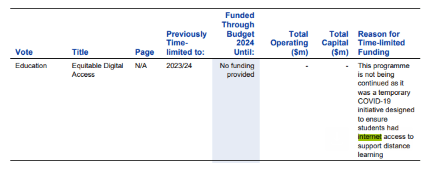
The Ministry of Education’s Equitable Digital Access (EDOS) programme is definitely ending on 30 June 2024. Some were hoping there would be a further extension announced in yesterday’s Budget, as there was last year.

But here is the decision in black and white in the Budget documents:

The Ministry is currently finalising an offer for households that are currently part of the programme and expects this to be finalised next week. In the meantime, any inquiries should be directed to EDOS on 0800 441 844.

What does this mean for Jump customers who have been part of EDOS?

Yesterday, the Skinny Jump team notified all EDOS households with an MOE-sponsored Jump connection that the sponsorship will end in 30 days and their Jump connections will revert to standard Skinny Jump. This will happen automatically unless customers contact Skinny to advise that they wish to terminate their connection.

Customers who want to terminate their service will be encouraged to return their unwanted Jump modem to their nearest Jump partner and this can be processed through our standard modem returns process.

We do not know the details of what the Ministry will be offering other EDOS households, but it could lead to some choosing to switch to Jump. They are of course welcome to do this, subject to normal Jump coverage and eligibility criteria.

Please encourage them to also return any unwanted modems; we can arrange collection and send them for recycling. If it is not a Skinny Jump modem then it shouldn’t be managed through our standard Modem Returns process; please just set them aside and let us know (jump@diaa.nz) so that we can send you a return courier bag or label.

Contacting the Skinny Care Team

We love the new tools that the Skinny team has put in place for getting Jump help – interactive voice response (IVR), online chats, email, facebook messaging, – and during March 2024, 60% of all the Care Team contacts by Jump customers used these tools.

But there are times when you really really need to talk to a human. And this is proving challenging for some Jump users. One elderly customer recently gave up trying to navigate the IVR when they were asked to enter their broadband number and verification code, so they called in to see their local Jump partner.

The partner tried to navigate the Jump IVR for this customer to find a way to get around the looped response if you don’t know these details – and failed! Unless a broadband number and verification code is entered, callers are returned to the IVR menu.

I did discover that if you don’t press ‘3’ for Jump, then you do get a press ‘9’ option to talk to a Care Agent, but what this means is that you then join the regular Skinny broadband queue. This is also so counter-intuitive that it would be impossible to explain to customers.

So the advice from the Jump Squad is to explain to customers that even if they don’t know their broadband number and verification code, they must attempt to enter some numbers. When these are entered, the system will detect them as invalid numbers and present the customer with a press ‘9’ option to talk to an agent.

I am aware that some IVR systems default to a live operator if customers reach a dead end and simply wait for 10 seconds. At this stage, the Jump IVR has not been set up this way, but changes could be made in the future.

Stolen Modems – unknown broadband number?

We get regular reports about Jump modems being lost or stolen. This presents a slight dilemma for customers when calling the Skinny Care Team to request a replacement. The IVR for Jump (press ‘3’ when calling 0800 475 4669) asks callers to enter their broadband number and verification code. But this is pretty difficult to do if the modem has been lost or stolen, or in some cases the transparent sticker with these details has been removed.

The good news is that Skinny Jump Care Agents can retrieve these details if they are sure the person calling is who they say they are. Normally, they would request the broadband number and verification code, printed on sticker on the side of the modem. Or they may ask the customer to retrieve these details from their Jump app.

In the absence of these details, the Skinny Jump agents may request the following details to verify the caller:

(1) registered email address;

(2) service address; or

(3) last top-up.

Once the Care Agent is satisfied they are talking to the right person, they will retrieve the modem details and complete a Modem Returns form, including a request for a replacement modem to be sent if this is what the customer wants.

Of course, all this assumes that the customer has been able to reach a Skinny Care agent. If they choose the IVR path (press ‘3’), they will get caught in a never-ending loop, unless they attempt to enter a broadband number and verification code; if these numbers are invalid they will then be given the option to press ‘9’ to talk to a Care Agent. More on this in my next post.

Reset modems – to box or not to box?

Two partners have been in touch this week (and it’s only Tuesday!) about handling modems that have been returned and then reset remotely by Skinny for re-issue.

The dilemma they face (which I am sure is shared by many other partners) is whether to issue the modem without its packaging. As one partner pointed out, it is not very professional to issue a modem and its extras – power supply, ethernet cable, user guide, modem return flyer and ‘keeping your whānau safe’ pamphlet- without some form of packaging. They have used library bags in the past, but these are no more.

Our approach to date has been to encourage partners to issue reset modems without packaging, but we really didn’t think about all the tag-along bits and pieces.

We have raised this with the Skinny Jump team at Spark to see if we could get supplies of new packaging but a good interim step was suggested by another partner – set aside any packaging returned by customers rather than send it back to us.

We are going to do this as well, at least in the meantime – we recover an average of 30 faulty modems every week, and many of these include their packaging; we are going to start retaining the packaging so that we can send some to partners as required.

Couriering a single empty box is probably a bit over the top, but we could possibly package six Smart Modem boxes using the same boxes that the modems arrive in.

If anyone has a better idea, please shout it from the rooftops!

Do not replace old Jump modems if they are still working

I have had a few questions from partners about whether they can replace the older style Jump Modems (B315 and B618) with a new Smart Modem, even if the old modem is still working.

The short answer is NO. In our experience the older modems are more reliable and some customers have even asked us to replace their Smart modem for an older version because they think they work better!

If the customer thinks their modem is faulty, they should contact the Skinny Care team to discuss why they think it is faulty. The Care team will then assess whether the modem needs to be replaced or not.

The moral of this story is that “newer is not necessarily better”.

Annual modem stock-take: who is Georgia?

Over the last few days many Jump partners have received a polite (I hope) call from Georgia to remind you about completing your modem stocktake before 31 January.

Georgia is a 14-year old secondary student, who has had more impact in getting responses from partners than I ever get from my blog posts! 

So thank you to everyone who responded so positively to her request – to those who did an on-the-spot check and relayed the modem IMEIs to her immediately, to those who promised to follow up with an email to jump@diaa.nz with the IMEI numbers of their stock and have already done this, to those who promised to do this over the next couple of days and to those who have cleared their voicemails and will be responding with the IMEI numbers of their stock by 31 January 2024.

Partners who had stock levels that matched our Google doc records were a very small minority – congratulations to you for an impeccable record in ensuring a Profile Form is completed for every modem issued.

Remember it is the Profile Form that manages stock levels and determines when we send you more modems, so if a profile form is missed, then you are inadvertently delaying your next shipment of modems. As a result of Georgia’s calls we have so far discovered 16 partners with zero or very low stocks – one had been patiently waiting since August 2023; another had zero stock, yet our records indicated 17 modems available for issue. We have immediately lodged re-supply orders for these partners.

The good news is that Spark has totally caught up with the lengthy backlogs in the supply of modems; during January, many of our re-supply orders are being processed the same day and shipped the next. So there is no reason why any partner should run out of modems.

I can understand why partners have learnt to be patient when we were experiencing a 2-month lag in modem supply, but hopefully that is behind us, so if for any reason you run out of modems or you find your stock getting precariously low, check your Google sheet to see if more are on order, in which case you can relax as these modems should arrive within 7 days. 

However if you are out of stock and you discover that no more have been ordered, this will mean that some of your team are issuing modems without completing Profile Forms, so do encourage them to engage with Tawera’s fantastic Partner Pathways online modules and get a refresher on the correct procedures. But you can also let us know by emailing jump@diaa.nz and we’ll take urgent action to get some more on their way.

Our objective is that you should never run out of modems; we would like to abandon our waiting list process – this is still reporting 225 waiters across the country and this is not now because of a modem shortage, we understand it is mainly because of the reluctance of many customers to answer their phones or texts and visit a Jump partner when you notify them. 

Our suggestion is that people who do not respond to your notification that you have stock available are removed from the waiting list after 7 days.

Urgent update for Jump modem stock take

Congratulations to the 28 Jump partners who have completed their modem stock takes and are now on the Jump ‘nice’ list. I have forwarded your details to the person in the red suit and he has advised that because of global traffic congestion, he is leaving for his Christmas duties at midday tomorrow (Wednesday 20 December). 

So while he has made it clear that he welcomes Jump partners onto the ‘nice’ list at any time during the year, he asked me to send his apologies to anyone who doesn’t make the list by midday tomorrow. He can’t guarantee he’ll meet the Monday deadline, when the world takes a pause.

Jump Modem Summer Stocktake – make sure you are on the Christmas ‘nice’ list!

Once every year, we ask all Jump partners to check that their modem stocks match our GSheet records. A match means that you should never run out of modems. Our modem supply process relies on a customer Profile Form being completed for every modem issued; we then use this information to update your Jump GSheet, which then alerts us when your modem supplies are dropping and we order some more for you.

Easy as! What could possibly go wrong? Many things it seems, but a stocktake can quickly put things right.

We are asking all Jump partners to carry out a simple stocktake over the summer holiday period, so that we start the new year with a clean slate. All you need to do is count the number of modems you have available for issue and check cell W2 (Actual Stock on hand) in your Jump GSheet. If these two numbers are the same – Bingo! You are definitely on Jump’s ‘nice’ Christmas list.

If the numbers differ, just send us an email (jump@diaa.nz) listing the IMEI numbers of the modems you are holding, so that we can mark the others as ‘allocated’ and you are automatically added to the ‘nice’ list.

If you are scratching your head, wondering how to access your Jump Sheet to find cell W2, we have created a mirror copy here that you can check – note columns B, C and D in particular.

We are worried that some partners appear to be still holding the older B315 and B618 modems (columns E and F in the mirror copy) and that might prevent them getting on the ‘nice’ list. Our records indicate there are nearly 200 of these older modems still in partners’ stocks. We know some of these will be reset modems and provided they are suitable for re-issue, that is fine, but we ask you to issue these ahead of any of the newer Smart modems. However, we suspect that in some cases, this could just be a matter of modems being issued without Profile Forms being completed. Your stocktake will solve this problem and you automatically join the ‘nice’ list.

So, just to make sure you make it to the 2023 ‘nice’ list, please send an email to jump@diaa.nz confirming your Jump modem stock matches our records or advising us where there a differences – either way you join the ‘nice’ list for the Jump Summer Stocktake.

And we all know what happens for people on ‘nice’ lists at Christmas!