Christmas is coming and so is our annual Jump modem stocktake!

๐ŸŽถ Time to stocktake, letโ€™s get it right,
2024 Jump modems in sight,
Partners, count what you’ve got, check it with care,
Look at cell W2, compare what’s there! ๐ŸŽถ

๐ŸŽถ If the numbers don’t match, don’t you delay,
List those IMEIs and send them our way,
We’re updating records, letโ€™s make them shine,
Jump modem stocktake โ€“ it’s audit time!* ๐ŸŽถ

Last year it took over 3 months to hear back from all our partners; this year our goal is 2 months, ie. by 30 November 2024. This helps us to start the new year with a clean slate. If your Jump stock matches the number in cell W2, please send us a short email confirming this (jump@diaa.nz). If you don’t know how to access your GSheet, send us an email and we’ll remind you.

Our most frequent request from partners is about modem supply “we’ve run out of modems”. We do our best to try and avoid this but if your Jump GSheet is showing unallocated modems, we give priority to those who have run out. The most common problem is that someone has simply overlooked completing a Profile Form when issuing a modem. So the stocktake is really important in keeping the Jump wheels turning.

Of course, you don’t have to wait until this becomes a problem. At any time during the year, you can check that your stock in hand matches the number in cell W2 in your Jump register. If not, just send us an email (jump@diaa.nz) with the IMEIs of the modems on hand and we’ll update your records.

Supplies of Jump Collateral

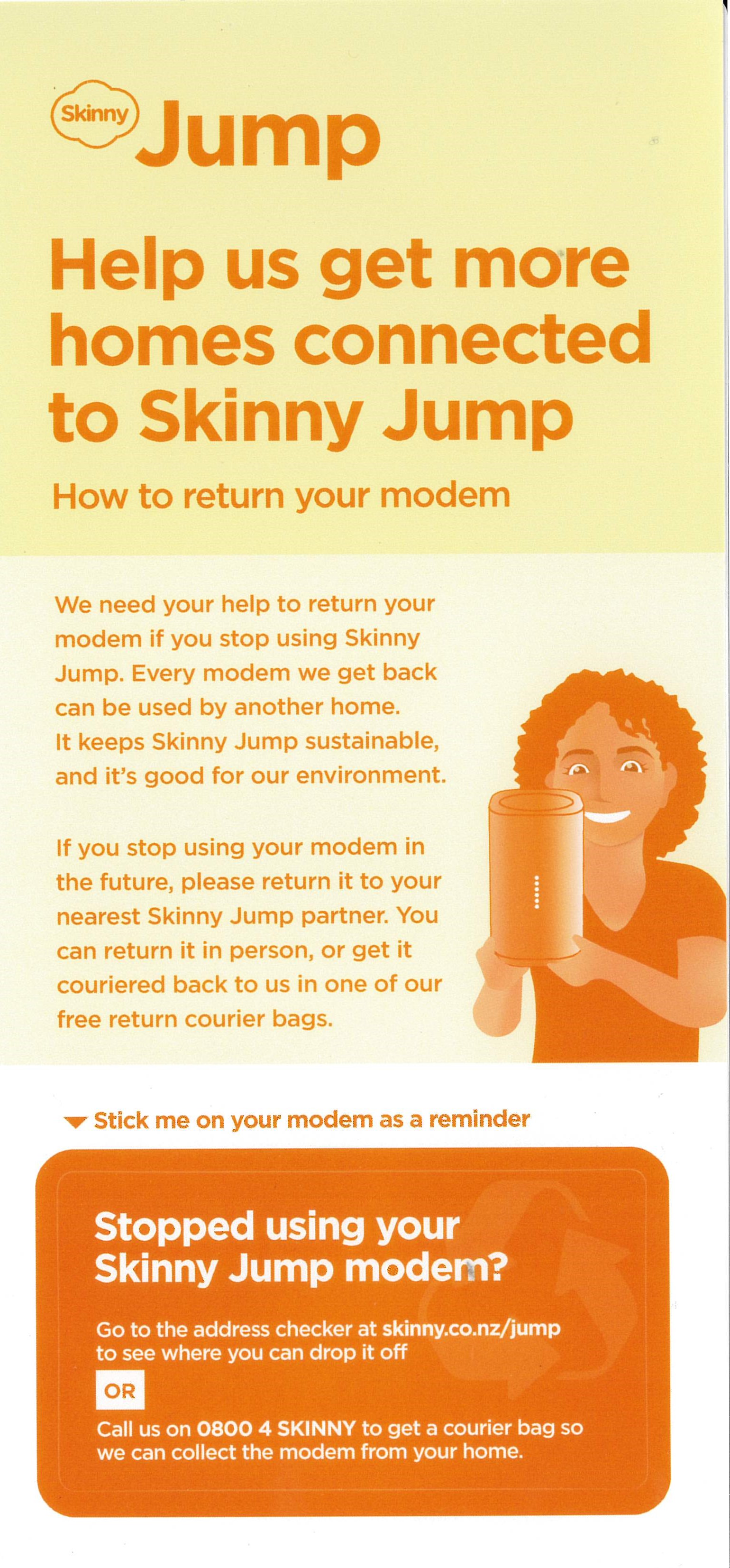
I am starting to receive requests for more supplies of the above “Stopped Using your Skinny Jump Modem” stickers; I suspect that this could mean other partners are also running out. We (DIAA) have a reasonable supply of these and can supply further copies (they come in bundles of 10). We are planning a further bulk supply over the coming months, but we can hopefully keep you stocked in the meantime. Remember to attach this sticker to every modem that you issue.

If you need more copies please send your requests to Shelley (shelley@diaa.nz) and she’ll get some on the courier for you.

And while we are talking about Jump collateral, do remember that you can order this online through our Stepping UP website: Stepping UP>Partner Resources Hub>Skinny Jump Partner Resources> scroll down to: Skinny Jump Promotional Materials

More on Jump modem packaging

We continue to get requests from partners for empty Jump boxes, so that returned modems, when reset, can be issued to new customers with the packaging. My previous posts explained that this is not a requirement; modems can be issued without packaging – the essentials are a power supply, an ethernet cable and a user guide.

My April blog post indicating that we could send partners boxes of empty boxes is no longer a viable option. For the last 2 – 3 years we have had courier sponsorship from NZ Post through their Delivering for Good programme and this made it possible for us to send out empty boxes, but this sponsorship unfortunately came to an end on 30 June.

Certainly, partners still have the option to retain some packaging that is returned with faulty modems; this could then be re-used with reset modems. Some library partners have ‘library bags’ for use by customers to carry home books; these would be a good sustainable option.

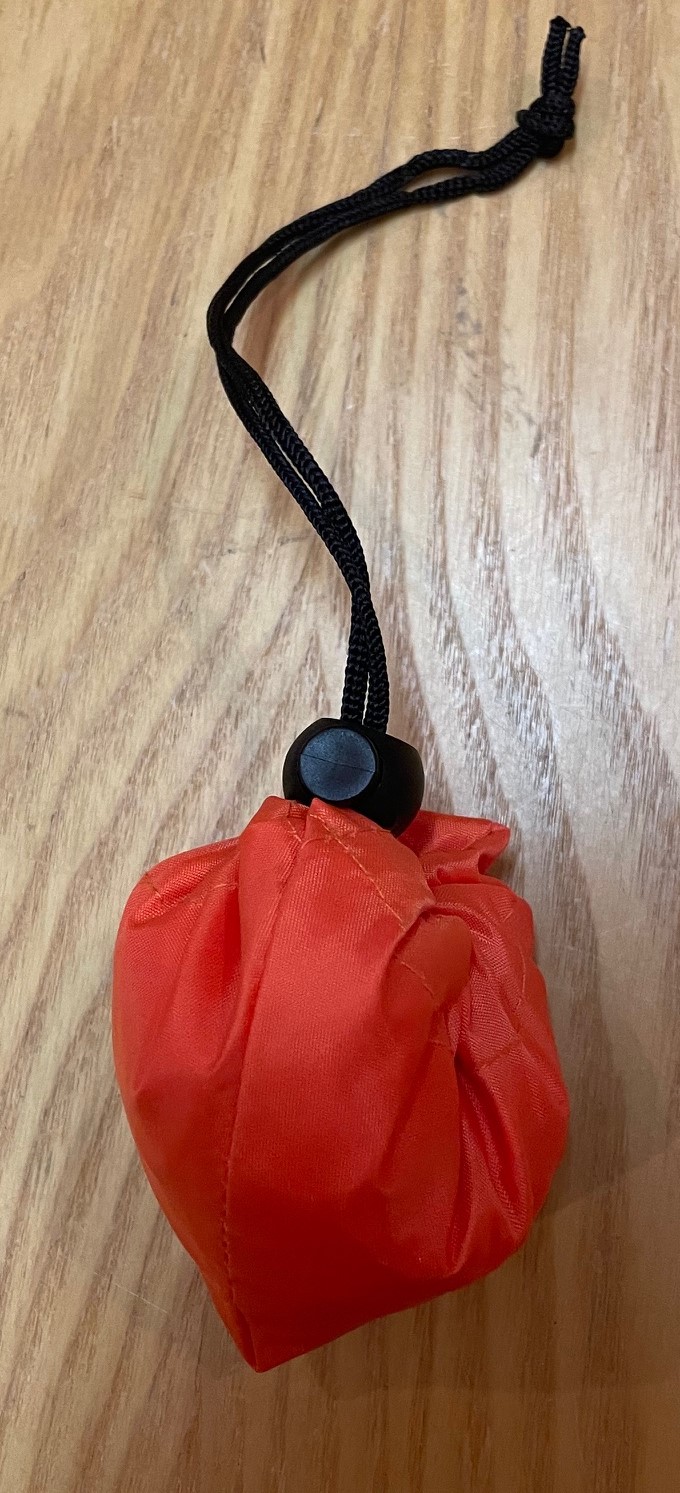
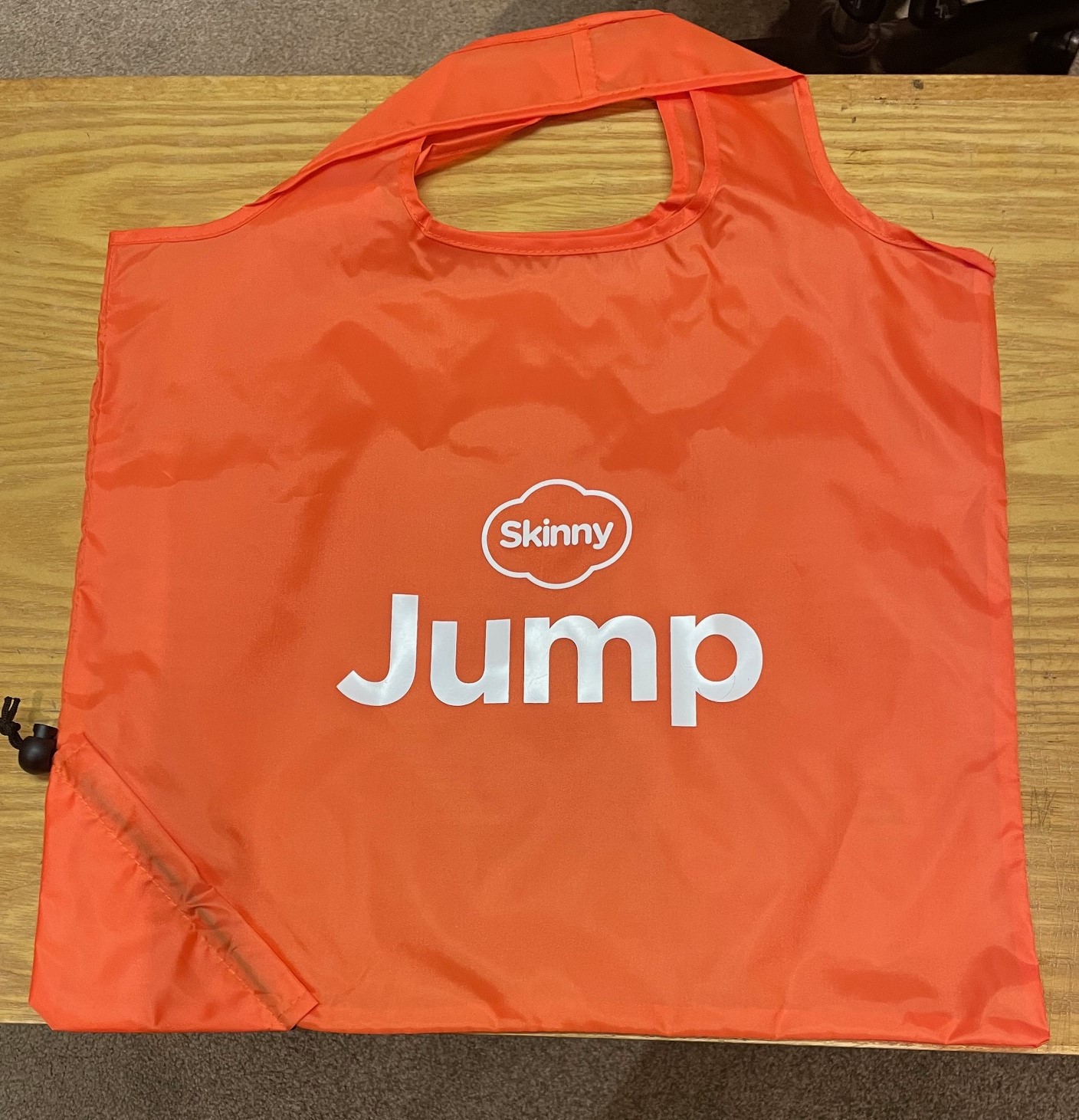
The Skinny Jump team has offered another solution – their Skinny Jump ‘zero’ bags – these are tough re-usable carry bags that scrunch up to almost nothing – see photos below.

We don’t have huge supplies, so we will only be sending these on request; please contact jump@diaa.nz with any requests.

Why we ask you to return all unwanted modems

During the week a partner notified us that a Skinny Jump modem had been returned in a very poor condition and questioned whether it was worth the cost of a courier package to return it.

While the primary motivation in recovering unwanted modems is to refurbish them so that they can be used for another family, equally important is the need to keep electronic waste out of landfills.

I am not sure how the partner who raised this issue was planning to dispose of the modem, but New Zealand is still facing many challenges in having robust ways for us to dispose of our e-waste. There are three particular challenges:

  1. where do you take your e-waste;
  2. what does the organisation accepting your e-waste do with it; and
  3. who pays?

There is a solution, called Product Stewardship, were suppliers of electronic goods are required to not only pay for the recovery and processing of e-waste, but also meet robust environmental standards for the processing and disposal of recycled materials.

Most manufacturers of electronic goods are happy to pay these costs; they simply add recycling costs to the price of new goods, so the consumer actually pays. But, in countries where they do this, they insist that governments create mandatory product stewardship regulations. This ensures a level playing field for all suppliers. And this is what is missing in New Zealand. There have been calls for this for nearly 20 years, but successive governments have failed to get this across the line.

The previous government made some progress and there are hopes we could see mandatory e-waste product stewardship schemes in operation within the next couple of years.

In the meantime, we rely on suppliers to take responsibility on a voluntary basis. Some already do this, but it is not that straightforward when most of the electrical and electronic equipment used in New Zealand is imported. We then rely on local equipment distributors or local authorities to assist with recovery and recycling.

Spark NZ has made a commitment to take responsibility for the recovery and refurbishment or recycling of all Skinny Jump modems. They can then ensure that no unwanted equipment ends up in landfills or with recyclers who do not comply with good environmental practices.

So, yes, it is worth paying the courier charges to recover all unwanted modems.

Jump training for new staff

I had a call this week from a staff member in one of our Jump partners who had been asked to take over managing the Jump programme because the person who had been managing this had left. Not surprisingly, she had a number of questions about our processes.

Staff changes in our Jump delivery partner network are not unusual. We met with the Skinny Jump team this week and spent some time discussing the on-boarding process for new Jump partners. But what we quickly realised that everything we were discussing applied equally to new people joining the Jump delivery network.

We have some excellent resources for supporting new Jump delivery staff, but the challenge is to work out how to engage with them and let them know what is available. So here are a few questions for you – if you are reading this, then you are probably an experienced Jump delivery partner and can help connect us with Jump newbies.

  1. Do you know that there are three types of Jump delivery partner?
    • Jump referral partner, knows about Jump but is not involved in the issuing of modems;
    • Jump connector, issues modems and helps customers set up their Skinny Jump accounts and understand the top-up process;
    • Jump specialist, understands all the Jump processes, including modem supply and recovery of returned modems.
  2. Have you completed a Jump Partner Pathway online course?
    • Course 1 is for everyone involved in the Jump delivery process (referral, connector and specialist);
    • Course 2 is for everyone involved with the issue of modems (connectors and specialists);
    • Course 3 is for at least one person in each delivery partner organisation (specialists)
  3. Do you know who to contact for support with Jump processes?
    • Sue for training and promotion,
    • Shelley for day-to-day operations, and
    • Laurence for modem supply and recovery
  4. How should you contact the Skinny Jump team?
    • As a delivery partner, you shouldn’t contact the Skinny team directly
    • Partners should contact the DIAA team for any support required (jump@diaa.nz for modem supply issues; 0800 463 422 for other day-to-day operational issues; sue@diaa.nz for training and promotional resources)
    • Customers should be encouraged to contact Skinny directly if they have a problem using their modem, topping up their accounts and for reporting faults
  5. What are the most important tools for Jump partners?
    • Jump Partner how-to guide and FAQ, February 2023 edition
    • Skinny Jump Partner Resources, incl Partner Pathway training modules
      • Jump Profile Form, to be completed for every modem issued (except replacements for faulty modems)
      • Modem Returns Form, to be completed for every returned modem or when partners encounter a problem during the modem setup process
      • Partner Google Sheets, activity record for each partner (key document for managing supply of modems); contact Laurence or Shelley if you can’t access your GSheet.

And a final word – if you are planning to move to a new role, please let the team at DIAA know (contact Laurence, Shelley or Sue) so that we can update our records and help the team member replacing you get up to speed with Jump.

We’ve run out of modems!

This is probably the most frequent message we get from Jump delivery partners – and while I have your attention, please send these messages (in fact any messages relating to modem supply or returns) to jump@diaa.nz.

Do not send messages about modems to others on our DIAA team or to the Skinny Jump team. This just adds to email overload and delay in responding to your request.

Our goal is that partners should never have to send us any messages like this. The modem supply process depends on Profile Forms being completed for every modem issued – the only exception is when replacements are issued for faulty modems. Provided the replacement modem details (IMEI and BB number) are included in the Modem Returns form, there is no need for partners to complete a new Profile Form. We update your GSheets using the information you provide in the Modem Returns form.

If you don’t complete a Profile Form, we have no record of the modem being issued. Skinny knows when modems have been activated, but for privacy reasons, they cannot share this information with us, so we totally rely on the profile forms. So, we think you still have the modem and this suppresses (or at best delays) further supplies being sent.

Our stock replenishment process tries to estimate your likely demand for the next four- five weeks, as this is the current lag in modem supply. At any point in time we have as many as 1000 modems in the supply pipeline. When re-ordering, we also take into account the number of people on your waitlist, as recorded below the blue line in your Jump GSheet.

We know some partners keep a separate record of people waiting for a Jump modem, but unfortunately, if we don’t have this information, we can’t take that into account when re-ordering, so this creates an ongoing problem for you in always running out of modems.

But having said all that, we still prefer that you contact us and let us know when your stocks are running low. Please check your Gsheets first as we record modems on order for you there, including the date that we placed the order. You can expect new supplies to arrive 4-5 weeks after the recorded date.

Jump Modems without Broadband stickers

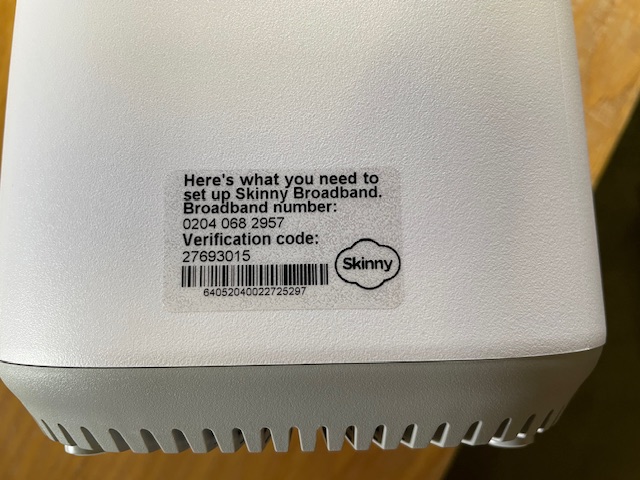
A number of Jump delivery partners are reporting an increasing frequency of new modems being supplied without a broadband sticker – that’s the clear plastic sticker on the side of the modem:

I posted about this in September 2023 when I first discovered that the most common problem was that the stickers had come off the modem and attached themselves to the inside of the box, so it pays to keep checking this first. We have raised this issue with CEVA, the company that ships the modems, seeking their assistance in ensuring that the stickers do not become detached when the modems are being boxed.

But if there is no sign of the sticker, the modem needs to be classified as faulty and a Modem Returns form completed. Explain on the form that the modem has no BB sticker and we will send you a courier bag to recover it for repair.

Concerns about possible ‘scamming’ practices with Jump

From time to time I get approached by a partner who suspects that one of their customers is ‘scamming’ the Jump modem process. When this happens we try and work out a strategy to handle this on a case by case basis, so that partners and their staff are not having to face confrontational situations. Staff safety is paramount and we are happy to provide whatever support we can to ensure that the Jump delivery experience remains a positive one.

I have summarised a few scenarios below, as reported by partners and suggested some possible responses.

  1. More than one modem requested by people living at the same address. There are many situations where this is totally okay. The most common example is social housing units (although these typically have separate apartment numbers), but we also encounter this where people are living in different dwellings at the same physical address (this is quite common in many rural properties for example). But is also occurs when someone is living in a cottage separate to the main dwelling where the distance is too great for the WiFi signal. In some situations, two or more families are living in the same house, and provided they are not part of the same family unit, then they can be supplied with separate modems. Suggestion: For online applications I get an alert whenever a duplicate address shows up; I then check the applicant’s name, phone and email and if necessary view the property on Google Maps street view to determine if it is a single or multiple dwelling site. If I have any concerns I suspend the delivery until Shelley contacts the applicant to find out more. What is interesting is that most people do not respond to Shelley’s text inquiry (which in itself suggests there could be something fishy) and the application expires after 10 days. It is difficult for partners to do this sort of checking, but the principle really is to query anything that looks odd; if you are satisfied with the explanation, then you can proceed to issue a modem. But if you are not, then you have the discretion to decline the application.
  2. Same person requests a second modem within a short time. This definitely needs an explanation before a further modem is issued. If you are not satisfied, then you have the discretion to decline the application. One of our partners discovered repeated applications by the same family and the same address; they were shopping around, getting modems from different libraries in the same city. Staff became aware of this and created an informal ‘black list’ as an alert for any future applications. The exception of course is when the modem is faulty. Suggestion: Before issuing a modem to someone who claims their modem is faulty, make sure they have reported the fault to the Skinny Care Team or they have returned the faulty unit to you. Partners can also check their Jump GSheets to identify repeat applicants. Simple do a search (Ctl F) for the applicant’s name to identify duplicates.
  3. People who miraculously change their address when the address checker indicates ‘no coverage’. This is a bit more challenging. Skinny Jump does operate on a ‘high trust’ basis, but if there is clear evidence that someone is providing a false address, then partners have the discretion to decline the application. For online applications, we frequently get people at addresses that pass the coverage test, but then ask for the modem to be sent to a different address (which 9 times out of 10 fails the coverage check). Suggestion: For online applications we automatically decline any applications where the requested delivery address is not in Jump coverage. We then contact the applicant to find out why they want it sent to an address where the modem cannot be used. In most cases, we never hear back from those who are possibly scamming the system; people who do have a genuine reason always respond.
  4. People who ‘give’ their modems to someone else and then want another one. This is a bit strange and partners who have reported this have advised that they suspect the modems might have been on-sold (as opposed to ‘given’). It is a breach of the Jump conditions of service for anyone to sell or otherwise dispose of a Jump modem. The Terms and Conditions state: “You may not sell, lease, dispose of, lend or otherwise part with possession of, or modify the Modem in any way“. Suggestion: In this situation, we would advise partner to respectively decline to issue another modem, unless there is an incredibly good explanation. An exception we have encountered is where two people living together have split and one person has taken the modem with them, even though it was registered under the other person’s name. In this case, we treated the modem as ‘stolen’ and asked the Skinny team to block it and delink, so the customer could set up with a new modem.
  5. My modem has been stolen or lost. Regrettably, this is a very common issue. Almost every day at least one Jump modem is reported as ‘lost’ or ‘stolen’. Suggestion: Customers must be directed to the Skinny Care team, so that the modem can be identified and blocked before a replacement is issued. Partners should never replace a modem unless the old one has been returned.
  6. Other situations? Do send me an email (jump@diaa.nz) if you are encountering any other ‘suspicious’ behaviour.

Replacements for faulty modems can be re-provisioned for Ciena

A partner has raised a question about whether a Ciena customer can continue on the programme if their modem becomes faulty.

The short answer is, YES.

There is a provision on the Modem Return form to indicate if the customer reporting the faulty modem is on a sponsored plan, such as Ciena or OCHT. Partners should make sure this option is selected and this will trigger an action to get the replacement modem re-provisioned for Ciena or OCHT.

EDOS to end 30 June 2024

The Ministry of Education’s Equitable Digital Access (EDOS) programme is definitely ending on 30 June 2024. Some were hoping there would be a further extension announced in yesterday’s Budget, as there was last year.

But here is the decision in black and white in the Budget documents:

The Ministry is currently finalising an offer for households that are currently part of the programme and expects this to be finalised next week. In the meantime, any inquiries should be directed to EDOS on 0800 441 844.

What does this mean for Jump customers who have been part of EDOS?

Yesterday, the Skinny Jump team notified all EDOS households with an MOE-sponsored Jump connection that the sponsorship will end in 30 days and their Jump connections will revert to standard Skinny Jump. This will happen automatically unless customers contact Skinny to advise that they wish to terminate their connection.

Customers who want to terminate their service will be encouraged to return their unwanted Jump modem to their nearest Jump partner and this can be processed through our standard modem returns process.

We do not know the details of what the Ministry will be offering other EDOS households, but it could lead to some choosing to switch to Jump. They are of course welcome to do this, subject to normal Jump coverage and eligibility criteria.

Please encourage them to also return any unwanted modems; we can arrange collection and send them for recycling. If it is not a Skinny Jump modem then it shouldn’t be managed through our standard Modem Returns process; please just set them aside and let us know (jump@diaa.nz) so that we can send you a return courier bag or label.