Why do I need to complete a Jump Profile Form?

I received an email from a partner yesterday who had just completed a mini stock-take and discovered 3 modems listed on their GSheet that they no longer had. He thought this was probably because Profile Forms had not been completed by some staff members when the modems were issued.

So this led him to ask was: “what is the impact of us not completing the profile form?” He wanted a compelling reason to explain to staff issuing modems why this is important. Fair enough, I thought.

Sure, we ask for a lot of demographic information – this is used in our annual report to programme funders, providing evidence that the modems are reaching the target groups. But that is not the most important thing.

We ask for the address where the modem is going to be used, so that we can avoid issuing more than one modem to the same household. But that is not the most important thing either.

We also use the address information to provide summary reports by town and region to provide evidence that Jump is reaching the most digitally disadvantaged communities. But that is not the most important thing either.

We ask customers to tell us who is helping them set up their Jump modems. We think the support provided by libraries and local community partners is absolutely critical to the ongoing success of Jump, and this helps provide the evidence. But this is not the most important thing either.

We ask customers if they have school-aged children and therefore qualify for free internet connections with programmes like Ciena. But that is not the most important thing either.

We ask for the phone contact details of the customer and their explicit approval for any follow up calls to get feedback on how Jump is helping them. But that is not the most important thing either.

OK, enough, I hear you cry! What then is the most compelling reason for completing a Skinny Jump Profile Modem??

Quite simply, so that we know when to send you more modems!

We (DIAA) manage the modem supply process for Jump, and for probably rather obvious reasons, we do not have access to Skinny’s customer database. So we rely on the Profile Form to update us on the modems being issued. We closely monitor all partners’ stock levels and each week, prioritise deliveries to those with low stock. So if partners issue a modem without completing a Profile Form, we think you still have this modem, and you move down the re-order priorities.

We strongly recommend that all partners periodically do a stock check and confirm that the number of modems they actually have aligns with the number in cell E2 (Actual Stock on hand) of your Jump GSheet.

If there is a mismatch please send a schedule of the IMEI numbers of the modems you are holding to jump@diaa.nz and we will update your GSheet accordingly.

The good news for the partner who raised this issue was that when his Gsheet was corrected, it immediately flagged the need for a new order, which we have actioned.

Are you an avid follower of fashion?

This message is for all ‘avid followers’, not actually ‘fashion’ in this case but Jump Partner GSheets. I know these are not everyone’s cup of tea, but they do play a critical role in our efforts to ensure a smooth flow of modems.

I know that at least one of you is such an avid follower of Jump GSheets that if her one is not updated with any new modem issues by the time she arrives at work each day, she is firing off an email, wondering if there has been a mistake.

Now that was the day (nearly a year ago) when there was an Alistair, who made a point of starting his day at 5am by updating everyone’s Gsheet (transferring the Profile Form data to partner Gsheets). We thought we might have an AI replacement for Alistair by now, but sadly not. Instead we have Tori (Talented, Outstanding, Resourceful and Industrious), who is not an AI engine but a very talented and competent student. Unfortunately, she still at school, and can only work for us on Saturdays.

So this means the Jump Profile data only gets transferred to partner GSheets on Saturdays. But all is well, this is in time to shuffle order priorities for the next week’s orders, which are processed every Thursday.

A reminder about Jump waiting lists (and the price of fish)

I had a call today from a couple of Jump partners asking about our Waiting List process and how this “affects the price of fish”. Well to be fair, they didn’t actually use this expression, but I think what they wanted to understand was why do Jump waiting lists matter. If you want to know more about the origins of ‘the price of fish’, ask ChatGPT.

First of all where do you find your Jump waiting lists? I know some partners like to keep these in their top drawer, and this might be helpful as a local reminder, but the down side is that we (DIAA) have no access to your top drawer and therefore your waiting list has no impact on modem deliveries.

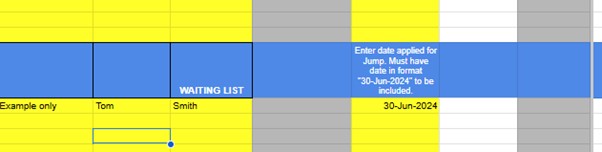
So scroll down your GSheet to the blue line. Waiters should be added below the blue line, as in the example below:

And how does affect the price of fish, I hear you ask. Well, we count the number of dates below the blue line in column E and take this into account when placing new orders. We aim to supply you with enough modems to cover your waitlist as well as enough for the next 4 weeks, based on the number issued over the last weeks.

If customers hang around on your waitlist for too long (over 3 months), we assume this is because they no longer want Jump, and as such they should be removed for the waitlist, or if you do want to keep a record of their interest, the application date must be moved from Column E (we suggest you put this in Comments – column H – along with any other relevant notes). Some partners like to keep the customer’s contact details here as well and you are welcome to do this – please use columns I to N.

Do I include customers who don’t currently have Jump coverage on my waitlist? Another good question. You are welcome to do this, but you must not include any date in column E (use column H), as dates here do affect the price of fish, or in our case, the delivery of modems. If we ever find dates in column E with a note in column H, saying this customer does not have coverage, we transfer the date out of column E.

We do encourage partners to actively manage their own waiting lists in their Partner GSheets, but if when processing the Jump Profile Forms we discover a modem has been issued to a customer who is on the waiting list we will delete them from the waiting list.

Jump Profile Form Updates

Some partners have asked for clarification about why the Jump Profile form is now asking for contact details of the person completing the Profile Form. This was implemented a few weeks ago because of recurring errors by people completing the form; we want to identify these people so that we can contact them and offer further support.

But some partners questioned the need for this, especially as a copy of the form was automatically being emailed to the customer. So this caused us to re-think why customers needed an email copy.

The form was created many years ago on the assumption that customers would be filling this in themselves, with guidance from a partner as part of the modem setup process. But after consulting with some partners it is clear that this is not the way things are happening; most partners have their own staff completing this form. So if we take this as the ‘norm’, we can make some changes.

As of this morning, we have stopped emailing a copy of the form to the customer.

This was originally intended for customers to check that the information they had provided was correct and on a few occasions, customers did do this. But this is very rare and there doesn’t appear to be any other benefit in sharing the form with them. So we have stopped sending a copy to the customer. You will notice that you no longer need to enter the email address of the customer at the start of the form; this was the entry that triggered the auto-send. We still need their email, but this now comes later in the form along with other contact details.

We have noted the concern of some partners about including staff details in the Profile Form. By not sharing these with customers, we hope this addresses the main concern. We are happy for staff to just use their first name (we understand with most library partners, staff display their first name on a name badge) and a generic email if they prefer.

The Profile Form is confidential to the DIAA Jump team. This is not shared with the Skinny Care Team nor with partners; we use this to update individual partner GSheets, so that we can track modem issues and arrange a resupply of modems when required. Most of the data collected, especially around demographics and target user groups is aggregated and used for high level programme reporting.

Christmas is coming and so is our annual Jump modem stocktake!

🎶 Time to stocktake, let’s get it right,
2024 Jump modems in sight,
Partners, count what you’ve got, check it with care,
Look at cell W2, compare what’s there! 🎶

🎶 If the numbers don’t match, don’t you delay,
List those IMEIs and send them our way,
We’re updating records, let’s make them shine,
Jump modem stocktake – it’s audit time!* 🎶

Last year it took over 3 months to hear back from all our partners; this year our goal is 2 months, ie. by 30 November 2024. This helps us to start the new year with a clean slate. If your Jump stock matches the number in cell W2, please send us a short email confirming this (jump@diaa.nz). If you don’t know how to access your GSheet, send us an email and we’ll remind you.

Our most frequent request from partners is about modem supply “we’ve run out of modems”. We do our best to try and avoid this but if your Jump GSheet is showing unallocated modems, we give priority to those who have run out. The most common problem is that someone has simply overlooked completing a Profile Form when issuing a modem. So the stocktake is really important in keeping the Jump wheels turning.

Of course, you don’t have to wait until this becomes a problem. At any time during the year, you can check that your stock in hand matches the number in cell W2 in your Jump register. If not, just send us an email (jump@diaa.nz) with the IMEIs of the modems on hand and we’ll update your records.

We’ve run out of modems!

This is probably the most frequent message we get from Jump delivery partners – and while I have your attention, please send these messages (in fact any messages relating to modem supply or returns) to jump@diaa.nz.

Do not send messages about modems to others on our DIAA team or to the Skinny Jump team. This just adds to email overload and delay in responding to your request.

Our goal is that partners should never have to send us any messages like this. The modem supply process depends on Profile Forms being completed for every modem issued – the only exception is when replacements are issued for faulty modems. Provided the replacement modem details (IMEI and BB number) are included in the Modem Returns form, there is no need for partners to complete a new Profile Form. We update your GSheets using the information you provide in the Modem Returns form.

If you don’t complete a Profile Form, we have no record of the modem being issued. Skinny knows when modems have been activated, but for privacy reasons, they cannot share this information with us, so we totally rely on the profile forms. So, we think you still have the modem and this suppresses (or at best delays) further supplies being sent.

Our stock replenishment process tries to estimate your likely demand for the next four- five weeks, as this is the current lag in modem supply. At any point in time we have as many as 1000 modems in the supply pipeline. When re-ordering, we also take into account the number of people on your waitlist, as recorded below the blue line in your Jump GSheet.

We know some partners keep a separate record of people waiting for a Jump modem, but unfortunately, if we don’t have this information, we can’t take that into account when re-ordering, so this creates an ongoing problem for you in always running out of modems.

But having said all that, we still prefer that you contact us and let us know when your stocks are running low. Please check your Gsheets first as we record modems on order for you there, including the date that we placed the order. You can expect new supplies to arrive 4-5 weeks after the recorded date.

Annual modem stock-take: who is Georgia?

Over the last few days many Jump partners have received a polite (I hope) call from Georgia to remind you about completing your modem stocktake before 31 January.

Georgia is a 14-year old secondary student, who has had more impact in getting responses from partners than I ever get from my blog posts! 

So thank you to everyone who responded so positively to her request – to those who did an on-the-spot check and relayed the modem IMEIs to her immediately, to those who promised to follow up with an email to jump@diaa.nz with the IMEI numbers of their stock and have already done this, to those who promised to do this over the next couple of days and to those who have cleared their voicemails and will be responding with the IMEI numbers of their stock by 31 January 2024.

Partners who had stock levels that matched our Google doc records were a very small minority – congratulations to you for an impeccable record in ensuring a Profile Form is completed for every modem issued.

Remember it is the Profile Form that manages stock levels and determines when we send you more modems, so if a profile form is missed, then you are inadvertently delaying your next shipment of modems. As a result of Georgia’s calls we have so far discovered 16 partners with zero or very low stocks – one had been patiently waiting since August 2023; another had zero stock, yet our records indicated 17 modems available for issue. We have immediately lodged re-supply orders for these partners.

The good news is that Spark has totally caught up with the lengthy backlogs in the supply of modems; during January, many of our re-supply orders are being processed the same day and shipped the next. So there is no reason why any partner should run out of modems.

I can understand why partners have learnt to be patient when we were experiencing a 2-month lag in modem supply, but hopefully that is behind us, so if for any reason you run out of modems or you find your stock getting precariously low, check your Google sheet to see if more are on order, in which case you can relax as these modems should arrive within 7 days. 

However if you are out of stock and you discover that no more have been ordered, this will mean that some of your team are issuing modems without completing Profile Forms, so do encourage them to engage with Tawera’s fantastic Partner Pathways online modules and get a refresher on the correct procedures. But you can also let us know by emailing jump@diaa.nz and we’ll take urgent action to get some more on their way.

Our objective is that you should never run out of modems; we would like to abandon our waiting list process – this is still reporting 225 waiters across the country and this is not now because of a modem shortage, we understand it is mainly because of the reluctance of many customers to answer their phones or texts and visit a Jump partner when you notify them. 

Our suggestion is that people who do not respond to your notification that you have stock available are removed from the waiting list after 7 days.

Jump Modem Summer Stocktake – make sure you are on the Christmas ‘nice’ list!

Once every year, we ask all Jump partners to check that their modem stocks match our GSheet records. A match means that you should never run out of modems. Our modem supply process relies on a customer Profile Form being completed for every modem issued; we then use this information to update your Jump GSheet, which then alerts us when your modem supplies are dropping and we order some more for you.

Easy as! What could possibly go wrong? Many things it seems, but a stocktake can quickly put things right.

We are asking all Jump partners to carry out a simple stocktake over the summer holiday period, so that we start the new year with a clean slate. All you need to do is count the number of modems you have available for issue and check cell W2 (Actual Stock on hand) in your Jump GSheet. If these two numbers are the same – Bingo! You are definitely on Jump’s ‘nice’ Christmas list.

If the numbers differ, just send us an email (jump@diaa.nz) listing the IMEI numbers of the modems you are holding, so that we can mark the others as ‘allocated’ and you are automatically added to the ‘nice’ list.

If you are scratching your head, wondering how to access your Jump Sheet to find cell W2, we have created a mirror copy here that you can check – note columns B, C and D in particular.

We are worried that some partners appear to be still holding the older B315 and B618 modems (columns E and F in the mirror copy) and that might prevent them getting on the ‘nice’ list. Our records indicate there are nearly 200 of these older modems still in partners’ stocks. We know some of these will be reset modems and provided they are suitable for re-issue, that is fine, but we ask you to issue these ahead of any of the newer Smart modems. However, we suspect that in some cases, this could just be a matter of modems being issued without Profile Forms being completed. Your stocktake will solve this problem and you automatically join the ‘nice’ list.

So, just to make sure you make it to the 2023 ‘nice’ list, please send an email to jump@diaa.nz confirming your Jump modem stock matches our records or advising us where there a differences – either way you join the ‘nice’ list for the Jump Summer Stocktake.

And we all know what happens for people on ‘nice’ lists at Christmas!

Skinny Jump stocktake is coming to town

With a little help from ChatGPT!

Ho ho ho! The Jump stocktake’s on its way,
Gathering data to ensure no delay.
For each modem issued, are your forms complete and firm?
Hurry now, the stocktake’s near, it’s time to confirm!

We’re making a list, checking it twice,
Gonna find out who’s been naughty or nice.
So complete your Jump Profile forms right now,
To make the stocktake wow!

So be good for goodness sake,
Don’t delay, there’s a lot at stake.
For every modem that you’ve issued out,
A form’s needed, without a doubt!

You better watch out, stay on your toes,
The Skinny Jump stocktake, everyone knows.
So let’s get those forms filled out right,
Stocktake’s coming, to bring the light!

Ciena Signups – Which Name?

Some Ciena Jump partners have asked about which name to use in the Jump Profile form – the student’s name or the parent/caregiver?

The general principle is that Jump account holders (whether modems are provisioned for special plans like Ciena or not) should be the people who have responsibility for the account. In the case of standard Jump, this is the person who is responsible for topping up the account. This is normally an adult.

For special plans like Ciena, the person identified on the Jump Profile form should be the parent or caregiver. So while, there is no need to top up the account, any communications about the programme should go to a responsible adult.

The first communication is an email notification when the account has been provisioned for Ciena (generally a couple of days after signing up) and further emails will be sent towards the end of the year explaining options when the current programme ends.