Faulty & Returned Modems

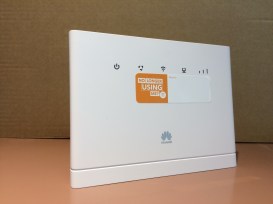
B315
B315 Skinny Jump modem

Partners are reminded that all returned B315 Skinny Jump modems – whether these are faulty or are simply not required any more – are to be withdrawn from circulation and added to a recycling box.  When you have five or six modems (whatever fits in the box), you should email us (jump@diaa.nz) with the IMEI numbers of the withdrawn modems and we will send you a courier sticker and address label for an approved recycler. We have been advised by the Spark Foundation that the effort involved in trying to repair and reset these modems is simply not justified and that replacement modems should be supplied, if required.  Partners must ensure that a new Stepping UP Profile form is completed if a replacement modem is issued.
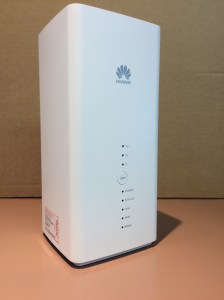
B618
B618 Skinny Jump modem

However, should a customer return a B618 modem, these are to be returned for repair and re-use.  Customers should not be returning these to you, but it appears that some do.  The only people receiving B618 modems at this stage are families with school children, who have been identified as part of the Covid-19 response by their school or the Ministry of Education as households without broadband internet. If their modem is faulty or no longer required they must contact the Skinny Helpdesk on 0800 475 4669 in the first instance.  A return courier bag will then be sent directly to them.

Partners who do end up with a B618 modem should follow the same procedure – report the returned modem to the Skinny Helpdesk and this will result in a return courier bag being sent to you.


Privacy Statement Updated

As from today, the privacy statements on the Jump Application Form and the Stepping UP Profile Form have been updated.  They now read:

All the information you have provided in this Application/Profile Form will remain confidential to Digital Inclusion Alliance Aotearoa, and our programme delivery partners such as Skinny. For example, we will provide Skinny (Spark New Zealand Trading Limited) with your phone number so they can ring you about your service. You will not be identified in any reports prepared for other parties. We will only use aggregated data, e.g. 25% of Jump users identify as seniors.

The information will also be held by Digital Inclusion Alliance Aotearoa for 7 years. You can request access to, and correction of, the personal information we hold about you by contacting us at jump@diaa.nz. But if you have any privacy concerns or feel your privacy has been compromised in some way, please let us know by contacting the Digital Inclusion Alliance Aotearoa Trust at info@diaa.nz.

By submitting this Application/Profile Form, you acknowledge that you have read and understood this privacy information.

The new wording in the first paragraph is to more explicit about who we might share contact details with.  This has arisen because Spark’s legal advisers felt the permissions we had were not explicit enough to allow us to share contact information with Spark/Skinny.  The Spark Foundation is keen to understand why people stop using Jump and whether there are any barriers preventing ongoing use.  They would not allow us to share contact information captured in our two forms – the Application Form (for Jump self-service) and the Profile Form (for Jump partner-assisted setups) – because of possible ambiguity in the privacy statement.  As a result, we (DIAA) have been contacting Jump customers to find out what is working well and whether there are any barriers limiting or preventing their ongoing use.

With the new permissions, Spark and/or Skinny staff will be able to make contact directly to provide any further support that might be required.

Can a Jump modem be linked to an existing Skinny Phone account?

Partners who have been around a while will recall that once upon a time it was possible for an existing Skinny phone customer to log into their account and ‘add’ the Jump modem, so that they could use the same email and password to log in to their Jump account as their phone account.  This made good sense to everyone.

However on 25 March 2020, when Jump 2.0 was launched, this feature was removed.  No-one quite knows why, but this appears to have been an unintended casualty of other improvements.

The bottom line now is that it is simply not possible to ‘add’ a Skinny Jump modem to an existing Skinny phone customer’s account.  The customer must use two different emails for the two services.  How dumb is that, I hear you say (and some have already said), and we agree and so do our friends at the Spark Foundation.

This has been formally raised with the Skinny technical team and they have agreed to review this.  That’s the good news.  Today we learnt that this mightn’t happen until the end of 2020.  So there’s nothing you or we can do in the meantime.  Just grin and bear it and think nice thoughts about all the good things that Jump does provide.


Jump Modems – Delivery Options

I am getting frequent questions about whether the home delivery self-service option is still available for Skinny Jump.  The short answer is “yes”, but please read on so that I can explain the ‘but‘.

All Jump inquiries are directed to a delivery partner organisation and our preference (from both a support and financial perspective) is for people to front up to a local partner.  There are now 196 publicly listed locations where people can go to get a Skinny Jump modem and new locations are being added every week.

The advantages are manifold:

(1) Partners are able more easily to assess the eligibility of the applicants;

(2) Partners are able to assist applicants set up their Skinny accounts, making sure they have a working email (and one they can remember the password for!);

(3) Partners are able to explain what customers can do with 30GB data and how they are limited to five plan renewals (total of 150GB) a month;

(4) Partners are able to explain the top up/ plan renewal process, so that customers feel confident about doing this when their first month’s internet expires;

(5) Partners are welcome to engage interpreters for customers who have English as a second language, and claim back costs from DIAA;

(6) Partners are able to offer opportunities for new internet users to participate in scheduled Stepping UP or Better Digital Futures digital literacy classes;

(7) Partners are able to develop a relationship with the customer, so that they are encouraged to return for other library services.

BUT, if for any reason the customer finds it difficult to get to a Jump partner, e.g. they could live a long way away or may have physical disabilities that prevent them from travelling, partners are welcome to use the online application form.  Note that the Application Form has been amended to require the name of the person making the referral and their organisation.  Applicants must also give a reason why they can’t visit a Jump partner.

Good news stories

We are on the lookout for good news stories.  We publish these in our Annual Report and they provide incredibly important feedback to our funders.  So, we are seeking your help in identifying some good news stories – anything from the last 12 months, for any of our programmes – Stepping UP, DORA and Digital Banking, Digital Wellbeing and of course, Jump.  Our particular focus is to profile some individuals who have participated in one of our digital inclusion programmes and who is willing to share their story (and a photograph).

With the extension of the Jump criteria on 25 March 2020 to include more groups of digitally excluded people, we are particularly interested in a diversity of stories from different digitally excluded groups:

  • Māori
  • Pacific Peoples
  • People in social housing
  • families with low incomes
  • People in rural communities
  • Unemployed people
  • People with low literacy skills
  • People with disabilities
  • Migrants and refugees
  • Offenders and ex-offenders
  • Seniors

We have a journalist who is helping us and she is happy to interview people directly, but we need your help with introductions please.  Please email me,  laurence@diaa.nz ,with any suggestions.

Does Skinny sign customers up for Jump?

No, Skinny does not sign customers up for Jump.  The only way someone can sign up for Jump is through you, our DIAA partner network.  This is the case, whether you are providing the modem (and completing the Stepping UP Profile Form) or just helping an applicant complete the Online Application Form. Now some internet-savvy people (often the children of the applicants, we suspect) have been able to find the online application form on our Stepping UP website and have completed this without talking to a partner.  But we haven’t made this particularly easy to find, so much so that we had a library partner asking us last week where he could find the Application Form, as he had a customer to sign up.

We do ask everyone completing the Application Form to tell us how they found out about Jump, but that doesn’t tell us which partner is helping them sign up.

We do want to keep encouraging applicants to signup through a partner;  partners are so important in explaining both the opportunities and constraints of Skinny Jump.  This is particularly important for people who simply see Jump as a low cost internet service (which it is), without understanding the costs of switching from an existing internet service and the need to top up every 30GB.  We contact anyone who says they already have an internet connection to understand why they want to switch, and while there are often perfectly legitimate reasons, we have found a number of situations where this is not in their best interests, so we do want applicants to make informed choices.

The absolute limit of 150GB a month needs to be clearly explained, as there is no option to ‘purchase’ extra data once the 150GB limit (5 top ups) is reached.  Jump customers who reach this limit simply have to wait until the next month to reinstate their internet service.  A few angry customers contacted the Skinny Helpdesk when they reached this limit during the first month of the new Skinny Jump service. The Helpdesk staff will respectfully suggest to these callers that they consider other plans, as they have no discretion to go above the 150GB.

Some customers also have an internet package bundled with their phone account and they need to do their sums before swapping to Jump.  In one recent case, the caller had a phone and internet package costing about $85 a month; they didn’t understand that most of this cost was for their fixed phone line, but when they did their sums realised there wouldn’t be that much saving in moving to Jump and in addition they would have the ‘inconvenience’ of having to keep topping up and renewing their Jump plan.  So in the end they decided that the $5/month saving was simply not worth the trouble of switching.


Post Haste branch contacts

All Jump modems are sent by Post Haste.  For rural communities, Post Haste hands over the final delivery stage to a partner courier company, Coural. For deliveries in Auckland, Wellington and Christchurch, the unprecedented demand for courier services during the last two months  has meant that deliveries are frequently delayed.  At times the package appears to delayed in one of the main centre depots; this was particularly bad during the Level 4 and Level 3 Covid-19 lockdown periods, when most businesses were not operating and the couriers were unable to move packages through their depots.  This resulted in huge congestion and at times Jump modems seemed to literally get buried in the depots.

If the courier tracker reveals this to be case, we advise customers (or Jump delivery partners) to follow up directly with their nearest Post Haste courier branch.  Contact details are in the table below:

Auckland 161 Station Road, Penrose 09 525 4060
Auckland North Harbour 1 Rothwell Avenue, North Harbour 09 525 2060
Blenheim 43 Grove Road, Blenheim 03 520 8430
Christchurch (includes West Coast) 20 Syd Bradley Road, Dakota Park, Christchurch 03 345 6830
Dunedin 35 Portsmouth Drive, Dunedin 03 477 7238
Hamilton 32-36 Gallagher Drive, Hamilton 07 843 0755
Hawkes Bay (Includes Gisborne) 22 Wakefield Street, Napier 06 843 9493
Invercargill / Queenstown 195 Bond Street, Invercargill 03 214 4242
Nelson Unit 7, 74 Quarantine Road, Nelson 03 545 6779
New Plymouth Unit 3, 674 Devon Road, New Plymouth 06 769 6545
Palmerston North 12-22 Cook Street, Palmerston North 06 356 5337
Rotorua (includes Taupo) 105 Biak Street, Rotorua 07 348 5666
Tauranga 34 Hull Road, Mount Maunganui 07 571 5601
Timaru 139-141 Hilton Highway, Timaru 03 687 4276
Wellington (incudes Wairarapa) 9 Glover Street, Ngauranga, Wellington 04 472 3666
Whangarei 11 Dyer Street, Whangarei 09 430 2396

Track & Trace for Jump modems

After couriering 3500 Jump modems and experiencing significant courier delays, we grew to the realisation that there must be a better way to inform customers about delivery progress.  I realise many of you, as our delivery partners, have been at the front end of this.  Having helped people connect to Jump, the next natural question people have had has been: “when will my modem arrive?”, or even “has my application been approved?”.

Everyone does get an email copy of their application form which advises them that it could take a week to get the modem to them, but inevitably people do want to make sure their application has not been overlooked.

So we have signed up for eTXT, a service provided by Spark, to provide all applicants with a text message, including a link to the Post Haste tracker for their modem.  The text will be sent when the modem is collected by the courier, which is generally around mid-day the day after the application has been submitted.

Normal courier times are overnight within the North Island and 2 days to the South Island, and for rural deliveries another day or so.  But these have not been normal times, and congestion in the courier world means that it has been taking much longer.  At times the modem gets as far as the recipient’s home but for some reason the courier is unable to locate the person the package is for and so it is returned to the local courier depot.

By giving applicants access to the courier tracker, they can monitor the journey of their modem themselves and if they find out it is held up in their local courier branch, they can contact them directly to arrange delivery.

We should have done this 8 weeks ago, but this has been a learning journey for us as well.  And it is certainly not too late, as our home deliveries for Jump modems are continuing at around 40 a day.

We expect this to be operational from Tuesday’s courier run (2 June 2020).  For those who don’t receive a text confirmation that a modem is on the way within a few days of their application, this probably means that there has been an issue with the address details or Skinny coverage.  In this case, we contact all families by phone, text or email to get the missing information or explain why we haven’t sent a modem.

So if partners do get any queries about modem deliveries please ask your customers to contact Shelley on 0800 463 422 and she will follow this up.  Please do not contact the Skinny Helpdesk with any issues about modem deliveries – they do not have access to this information.  They take over once the modem arrives and provide assistance as required in setting up Skinny accounts and providing any technical support.

Invercargill onto it!

Lindsay King, the Learning Connections Coordinator at Invercargill City Libraries, and local coordinator for Skinny Jump, is the first Jump partner since the Covid-19 lockdown ended to request a courier sticker and address label to send faulty and returned modems for recycling.  So I thought it might be timely to remind everyone of the process for handling returned and faulty Jump modems.

You may recall my earlier post about returning faulty modems. During the last 2 months, we have issued over 3500 Jump modems through our home-delivery process.  Not surprisingly, around 4% of these (140) have been identified as ‘faulty’ when customers have reported problems to the Skinny Helpdesk and we have couriered a replacement modem.   We included a note with the replacement modem, asking the customer to return the faulty modem to their nearest Jump partner after the Covid-19 lockdown ended.

Now that most partners have their doors open again, I am expecting the people holding faulty modems to return them to you.  Please just assign them to your faulty/returns modem box and when you have a box full (5 or 6 modems) please contact us at jump@diaa.nz  to get a courier sticker and return address label.  Please advise the IMEI numbers of the modems you are sending for recycling, so that we can update our records.

Note that this applies to all returned modems; we no longer require you to contact the Skinny Helpdesk to request de-linking, so that the modem can be re-issued.

You are also welcome to send modems directly to the recycler if you prefer, but can you please advise us the IMEI numbers of the modems when you do this.  Thank you.

The recycler is:

Sims E-Cycling (NZ) Ltd, 69 Aintree Avenue, Mangere, AUCKLAND Attention: Robert Herbert Phone: 09 275 1501


Jump Data boost to end on 16 June

With the closure of schools during the level 3 and 4 Covid-19 lockdown, Skinny applied a free 6GB data boost every week day during school hours to all Jump accounts.  So while this was primarily targeted at families with school children, everyone with a Jump connection has benefited.

Now that schools are open again, the need for this data boost has reduced, and as a result, Tuesday 16 June will be the last day for the free 6GB.

All Jump customers will receive an email notifying them of this by 9 June 2020.