The Skinny Jump team has advised that the issue reported yesterday has been found and fixed. They confirmed this by running a test and have managed to successfully progress through (see below)
Step 01: Enter your email address
Step 02: Set a password
Their advice for Partners/Customers:
Close Jump App
Check to ensure both app (via Playstore / App Store) and system software are up to date (via device Settings)
Reopen app and continue Sign Up process
They also reminded us of other Useful Resources if you encounter problems with the app – Jump App Cheat Sheet that is available on the SteppingUP website, here.
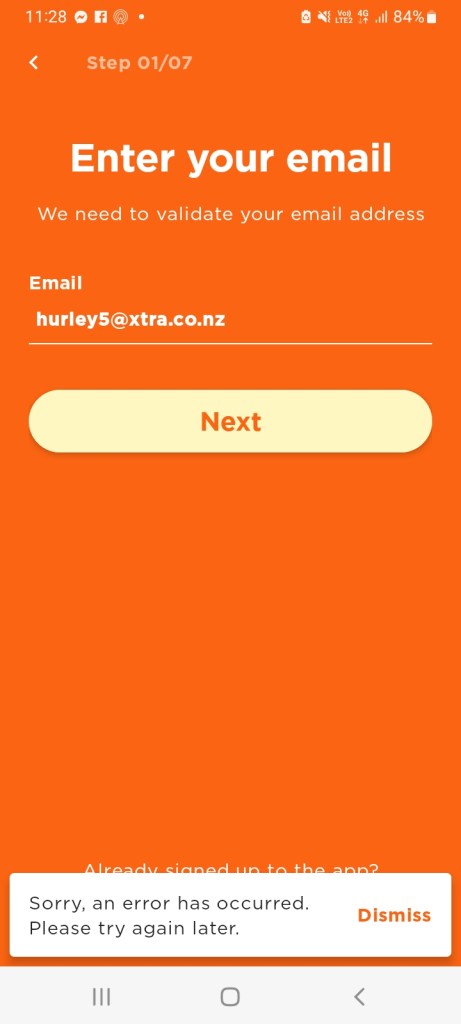
One of our Jump partners has reported a problem in signing up customers with the Jump app. They are getting the following error message:
The Skinny Jump squad has been able to replicate this error for both Android and Apple signups and have escalated the issue. In the meantime, their advice is to use the web browser signup process. They have confirmed this is still working as expected.
However, the partner who reported the problem is still experiencing a sign-up problem using this approach as well. Mel from the Skinny Jump team has advised: “I tried earlier and it worked and tried again just now to ‘Create a new account’/Register via desktop web browser and its worked and allowed me to progress through to enter First and Last name? You might need to clear cache, try incognito or different browser.”
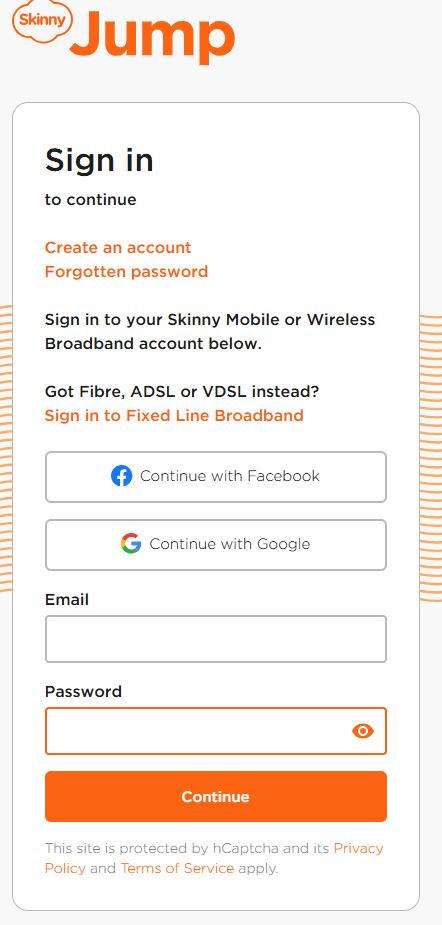
Thanks to Helen McCubbin at Tasman Libraries and her team at Tākaka Library who in December noticed a change in the Jump sign-in page when using a desktop computer:
This means the instructions in the Partner Guide now don’t make sense; these will be updated in the next issue, probably later this year.
In the meantime, please follow these instructions when signing a new customer up using a laptop or desktop computer:
Unlike the White Rabbit in Alice in Wonderland you are not too late to sign families up for Ciena Jump.
A number of partners are starting to ask whether it is too late to sign up families with school-aged children for Ciena Jump, but it is never too late! OK, I understand that families signing up in November will only get two months of support under the Ciena plan, but that’s still a saving of $60!
But the best news is that if Ciena extends their sponsorship to 2026, existing Ciena families will automatically receive a fully subsidised Jump connection for 2026 – that’s a saving of $360!
If the Ciena programme is not extended in 2026, anyone on the Ciena Plan will revert to standard Skinny Jump, which is still the most affordable internet connection available in New Zealand.
We are on track to sign up 600 new Ciena families in 2025 – we have 63 places left! 300 families with school-aged children sign up for Jump every month, so that’s 600 over the next two months. So go for it – ask every family signing up for Jump if they have school-aged children and if they do, offer them the free Ciena option. This will save them $60 this year and guarantee them a front-row seat if the programme is extended in 2026.
And one last thing – if you missed Sue’s email inviting you to complete our short Ciena survey – it’s not too late! Here is the link to the survey.
I received an email from a partner yesterday who had just completed a mini stock-take and discovered 3 modems listed on their GSheet that they no longer had. He thought this was probably because Profile Forms had not been completed by some staff members when the modems were issued.
So this led him to ask was: “what is the impact of us not completing the profile form?” He wanted a compelling reason to explain to staff issuing modems why this is important. Fair enough, I thought.
Sure, we ask for a lot of demographic information – this is used in our annual report to programme funders, providing evidence that the modems are reaching the target groups. But that is not the most important thing.
We ask for the address where the modem is going to be used, so that we can avoid issuing more than one modem to the same household. But that is not the most important thing either.
We also use the address information to provide summary reports by town and region to provide evidence that Jump is reaching the most digitally disadvantaged communities. But that is not the most important thing either.
We ask customers to tell us who is helping them set up their Jump modems. We think the support provided by libraries and local community partners is absolutely critical to the ongoing success of Jump, and this helps provide the evidence. But this is not the most important thing either.
We ask customers if they have school-aged children and therefore qualify for free internet connections with programmes like Ciena. But that is not the most important thing either.
We ask for the phone contact details of the customer and their explicit approval for any follow up calls to get feedback on how Jump is helping them. But that is not the most important thing either.
OK, enough, I hear you cry! What then is the most compelling reason for completing a Skinny Jump Profile Modem??
Quite simply, so that we know when to send you more modems!
We (DIAA) manage the modem supply process for Jump, and for probably rather obvious reasons, we do not have access to Skinny’s customer database. So we rely on the Profile Form to update us on the modems being issued. We closely monitor all partners’ stock levels and each week, prioritise deliveries to those with low stock. So if partners issue a modem without completing a Profile Form, we think you still have this modem, and you move down the re-order priorities.
We strongly recommend that all partners periodically do a stock check and confirm that the number of modems they actually have aligns with the number in cell E2 (Actual Stock on hand) of your Jump GSheet.
If there is a mismatch please send a schedule of the IMEI numbers of the modems you are holding to jump@diaa.nz and we will update your GSheet accordingly.
The good news for the partner who raised this issue was that when his Gsheet was corrected, it immediately flagged the need for a new order, which we have actioned.
Tim Edmonds, one of our Digi-Coaches based at Kapiti District Libraries, has given us a timely reminder that GPT doesn’t have all the answers to life, certainly when it comes to data analytics!
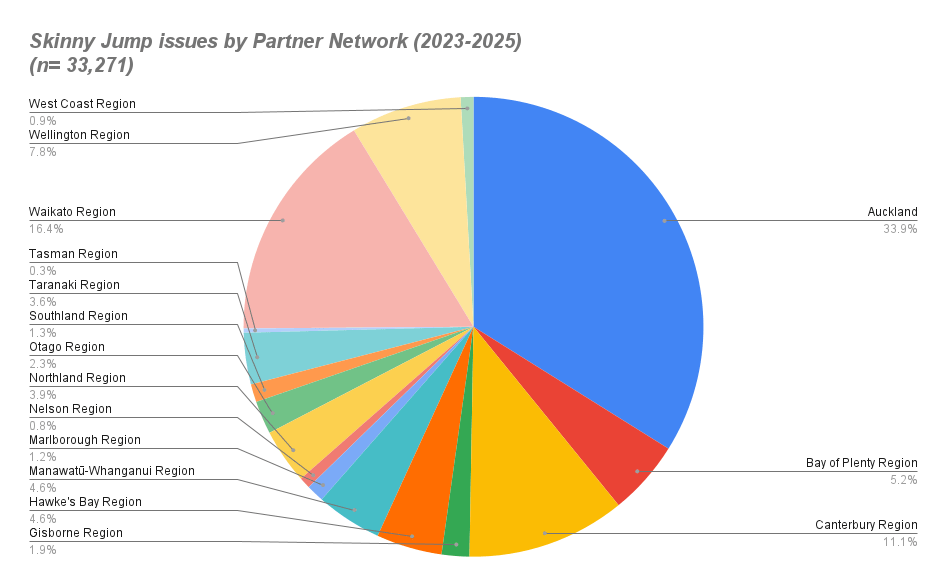
We have been trying to present our Jump stats by local and regional authority area, but have been struggling to find a look up table that groups NZ towns and cities into these regions. I thought this would be an excellent job for Chat GPT. Chat GPT helpfully identified StatsNZ as a source of data (something I sort of already knew), and directed me to some stats tables that might have been useful if I had the skills to navigate them, but after numerous frustrating attempts I failed to get the output I needed.
So with nearly 50 Digi-Coaches now working in libraries in Northland, Waikato, Central North Island, Wellington and the Top of the South Island, I threw out this challenge to them and Tim came up with the goods, in less than an hour, he said.
His solution was not to use Chat GPT, nor Claude, nor Gemini, nor Co-Pilot, but a proprietary tool called ArcGIS Pro, something he was familiar with as an Insights Data Analyst in a previous life.
So what are the results? Here’s a taster. Probably not a lot of surprises. We are planning to develop this a bit further – we are missing 10% of all issues in smaller towns and this also doesn’t include the online orders (another 10%). So with Tim’s help, we plan to add these to the pot and also do a sort by TLAs (Councils).
A Jump partner has signalled an issue that they are having with jump sign-ups using the web browser. They are getting the error message “Whoops, something went wrong” after entering the Broadband number and Verification code.
The Skinny Ops team has confirmed that they are experiencing some issues, so our suggestion is to use the App signup instead until this is resolved.
Jylesza is one of our fabulous new Digi-Coaches who are emerging in many of our Jump partner organisations. She is based at Elma Turner Nelson Public Library.
All our Digi-Coaches are trained to become Jump Specialists, so they can hit the ground running when they start their work placements. On her first day, Jylesza got a hug from a customer, as an expression of appreciation for the help she had provided. Maybe our long-term Jump partners have just got so used to getting hugs from their Jump customers that they don’t see it as ‘news’ any more!
Jylesza as well as some other partners have also asked for clarification about the ‘rules’ around Jump partners issuing modems to customers who live outside the partner’s area or region. For example, it could be someone who has tried to sign up for Jump at their local partner, but discovered they have no modems, so they ‘shop around’ to find a partner with stock, or they could simply be moving to a new area.
It goes without saying that they must satisfy the Jump coverage check for the location where they intend to use the modem, but there are no rules that restrict where they can sign up. A bit like McDonalds, you can get a Big Mac from any outlet, not just the one in your own community.
Where the uncertainty sometime arises is for library partners, who have territorial rules about who can sign up for a library card and borrow books.
Jump, however is different. While we often use the library analogy for Jump, where you get something for free and when you don’t need it anymore, you return it, but we don’t restrict where people can sign up.
One thing we do discourage is for partners who have run out of stock to direct customers to other Jump partners unless they know the other partner has stock and is happy to accept referrals. We prefer that you use your waiting list (below the blue line in your GSheet). This also helps us boost the number of modems in your next shipment.
So, thank you Jylesza for asking the question and congratulations on your first customer hug!
60 Jump partners were the first to receive the new Futura modems this week. But as these partners are discovering, the modems appear to have been provisioned for Standard Skinny, not Jump.
Now we don’t know how widespread this is and whether all 732 modems are affected, but it would be prudent to hit ‘pause’ in issuing these. My rule of thumb is that when more than one partner reports a problem, we pause sign-ups until the problem is understood and resolved.


 Digital Inclusion Alliance Aotearoa