Jump Modems without Broadband stickers

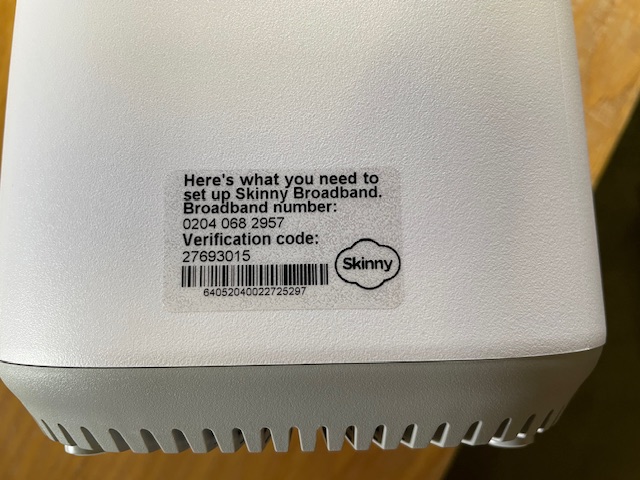
A number of Jump delivery partners are reporting an increasing frequency of new modems being supplied without a broadband sticker – that’s the clear plastic sticker on the side of the modem:

I posted about this in September 2023 when I first discovered that the most common problem was that the stickers had come off the modem and attached themselves to the inside of the box, so it pays to keep checking this first. We have raised this issue with CEVA, the company that ships the modems, seeking their assistance in ensuring that the stickers do not become detached when the modems are being boxed.

But if there is no sign of the sticker, the modem needs to be classified as faulty and a Modem Returns form completed. Explain on the form that the modem has no BB sticker and we will send you a courier bag to recover it for repair.

Jump verification code delays are causing sign-up problems again

A number of partners have reported recent problems (again) with verification codes not arriving during the Jump account set up process. This was a big problem last year – see my previous blog posts here.

So, this is more of a reminder, as a permanent fix is outside the control of the Skinny Jump team. The ‘sort of’ good news is that this is intermittent and doesn’t seem to have affected too many sign-ups, at least ones that we know about.

  1. If the email with the Verification Code does not arrive within 5 minutes, then there is no point in waiting. When (if) the email does arrive, the verification code is likely to have expired.
  2. We know that using an email that isn’t a Gmail one solves the problem, but we understand that most customers would not want to start managing more than one email account.
  3. One of our partners who faced this problem tried sending an email to the customer’s address to check it was working and the email arrived straight away, but the good news was that the email with the verification code arrived immediately after. So this seemed to provide a kick-start in delivering the email. Certainly worth a try.
  4. The only other suggestion we have is to try requesting the verification code again (after 5 minutes); in the Jump app, you simply select ‘Resend Code’.

Concerns about possible ‘scamming’ practices with Jump

From time to time I get approached by a partner who suspects that one of their customers is ‘scamming’ the Jump modem process. When this happens we try and work out a strategy to handle this on a case by case basis, so that partners and their staff are not having to face confrontational situations. Staff safety is paramount and we are happy to provide whatever support we can to ensure that the Jump delivery experience remains a positive one.

I have summarised a few scenarios below, as reported by partners and suggested some possible responses.

  1. More than one modem requested by people living at the same address. There are many situations where this is totally okay. The most common example is social housing units (although these typically have separate apartment numbers), but we also encounter this where people are living in different dwellings at the same physical address (this is quite common in many rural properties for example). But is also occurs when someone is living in a cottage separate to the main dwelling where the distance is too great for the WiFi signal. In some situations, two or more families are living in the same house, and provided they are not part of the same family unit, then they can be supplied with separate modems. Suggestion: For online applications I get an alert whenever a duplicate address shows up; I then check the applicant’s name, phone and email and if necessary view the property on Google Maps street view to determine if it is a single or multiple dwelling site. If I have any concerns I suspend the delivery until Shelley contacts the applicant to find out more. What is interesting is that most people do not respond to Shelley’s text inquiry (which in itself suggests there could be something fishy) and the application expires after 10 days. It is difficult for partners to do this sort of checking, but the principle really is to query anything that looks odd; if you are satisfied with the explanation, then you can proceed to issue a modem. But if you are not, then you have the discretion to decline the application.
  2. Same person requests a second modem within a short time. This definitely needs an explanation before a further modem is issued. If you are not satisfied, then you have the discretion to decline the application. One of our partners discovered repeated applications by the same family and the same address; they were shopping around, getting modems from different libraries in the same city. Staff became aware of this and created an informal ‘black list’ as an alert for any future applications. The exception of course is when the modem is faulty. Suggestion: Before issuing a modem to someone who claims their modem is faulty, make sure they have reported the fault to the Skinny Care Team or they have returned the faulty unit to you. Partners can also check their Jump GSheets to identify repeat applicants. Simple do a search (Ctl F) for the applicant’s name to identify duplicates.
  3. People who miraculously change their address when the address checker indicates ‘no coverage’. This is a bit more challenging. Skinny Jump does operate on a ‘high trust’ basis, but if there is clear evidence that someone is providing a false address, then partners have the discretion to decline the application. For online applications, we frequently get people at addresses that pass the coverage test, but then ask for the modem to be sent to a different address (which 9 times out of 10 fails the coverage check). Suggestion: For online applications we automatically decline any applications where the requested delivery address is not in Jump coverage. We then contact the applicant to find out why they want it sent to an address where the modem cannot be used. In most cases, we never hear back from those who are possibly scamming the system; people who do have a genuine reason always respond.
  4. People who ‘give’ their modems to someone else and then want another one. This is a bit strange and partners who have reported this have advised that they suspect the modems might have been on-sold (as opposed to ‘given’). It is a breach of the Jump conditions of service for anyone to sell or otherwise dispose of a Jump modem. The Terms and Conditions state: “You may not sell, lease, dispose of, lend or otherwise part with possession of, or modify the Modem in any way“. Suggestion: In this situation, we would advise partner to respectively decline to issue another modem, unless there is an incredibly good explanation. An exception we have encountered is where two people living together have split and one person has taken the modem with them, even though it was registered under the other person’s name. In this case, we treated the modem as ‘stolen’ and asked the Skinny team to block it and delink, so the customer could set up with a new modem.
  5. My modem has been stolen or lost. Regrettably, this is a very common issue. Almost every day at least one Jump modem is reported as ‘lost’ or ‘stolen’. Suggestion: Customers must be directed to the Skinny Care team, so that the modem can be identified and blocked before a replacement is issued. Partners should never replace a modem unless the old one has been returned.
  6. Other situations? Do send me an email (jump@diaa.nz) if you are encountering any other ‘suspicious’ behaviour.

Replacements for faulty modems can be re-provisioned for Ciena

A partner has raised a question about whether a Ciena customer can continue on the programme if their modem becomes faulty.

The short answer is, YES.

There is a provision on the Modem Return form to indicate if the customer reporting the faulty modem is on a sponsored plan, such as Ciena or OCHT. Partners should make sure this option is selected and this will trigger an action to get the replacement modem re-provisioned for Ciena or OCHT.

Applicants wanted for the Library and Information Advisory Commission

The Department of Internal Affairs (DIA) is seeking candidates interested in serving as a member of the Library and Information Advisory Commission (LIAC).
LIAC’s role is to advise the Minister on:
 library and information issues, including mātauranga Māori, and access to library and information services
 the role of library and information services, including mātauranga Māori, in the cultural and economic life of New Zealand, and
 any other matters requested by the Minister. 

Further information, including a Candidate Information Sheet and Expression of Interest Form can be found at https://www.dia.govt.nz/Appointments-to-Statutory-Bodies.
Note that Applications close 5pm Monday, 24 June 2024.
Applications should be sent to: appointments@dia.govt.nz.

DIA is also seeking applicants for the Applicants for Guardians Kaitiaki of the Alexander Turnbull Library. Further information on this role can also be found on the above Appointments to Statutory Bodies website.

EDOS to end 30 June 2024

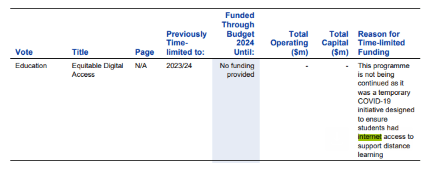
The Ministry of Education’s Equitable Digital Access (EDOS) programme is definitely ending on 30 June 2024. Some were hoping there would be a further extension announced in yesterday’s Budget, as there was last year.

But here is the decision in black and white in the Budget documents:

The Ministry is currently finalising an offer for households that are currently part of the programme and expects this to be finalised next week. In the meantime, any inquiries should be directed to EDOS on 0800 441 844.

What does this mean for Jump customers who have been part of EDOS?

Yesterday, the Skinny Jump team notified all EDOS households with an MOE-sponsored Jump connection that the sponsorship will end in 30 days and their Jump connections will revert to standard Skinny Jump. This will happen automatically unless customers contact Skinny to advise that they wish to terminate their connection.

Customers who want to terminate their service will be encouraged to return their unwanted Jump modem to their nearest Jump partner and this can be processed through our standard modem returns process.

We do not know the details of what the Ministry will be offering other EDOS households, but it could lead to some choosing to switch to Jump. They are of course welcome to do this, subject to normal Jump coverage and eligibility criteria.

Please encourage them to also return any unwanted modems; we can arrange collection and send them for recycling. If it is not a Skinny Jump modem then it shouldn’t be managed through our standard Modem Returns process; please just set them aside and let us know (jump@diaa.nz) so that we can send you a return courier bag or label.

Skinny Jump Ciena Plan no longer available for new applicants from 1 June 2024

As indicated in my earlier post, it is time to start applying the brakes for new applicants to the Ciena plan. We have nearly reached our target number of new sign-ups since the extended sponsorship was announced in December 2023.

The Skinny Jump team has agreed to continue supporting any applications received until 31 May 2024, when the Ciena Plan will be removed as an option in the Jump Profile form.

Please make sure that all staff involved in Skinny Jump sign-ups are aware of this, so they don’t inadvertently offer this option to a new family after 31 May 2024.

Please withdraw all the Ciena Jump for Students Fund referral forms and any Ciena Jump signage so that frontline staff do not offer this by mistake. You may wish to store these securely, in case the Skinny Jump team is able to secure any further sponsorship.

Just to confirm, the offer of a free internet connection continues until the end of 2024 for all families signed up to Ciena before 1 June 2024. At this stage we have no indication whether the scheme will be continued in 2025; the default is that all customers on the Ciena Plan will revert to standard Skinny Jump on 1 January 2025, unless advised otherwise.

Contacting the Skinny Care Team

We love the new tools that the Skinny team has put in place for getting Jump help – interactive voice response (IVR), online chats, email, facebook messaging, – and during March 2024, 60% of all the Care Team contacts by Jump customers used these tools.

But there are times when you really really need to talk to a human. And this is proving challenging for some Jump users. One elderly customer recently gave up trying to navigate the IVR when they were asked to enter their broadband number and verification code, so they called in to see their local Jump partner.

The partner tried to navigate the Jump IVR for this customer to find a way to get around the looped response if you don’t know these details – and failed! Unless a broadband number and verification code is entered, callers are returned to the IVR menu.

I did discover that if you don’t press ‘3’ for Jump, then you do get a press ‘9’ option to talk to a Care Agent, but what this means is that you then join the regular Skinny broadband queue. This is also so counter-intuitive that it would be impossible to explain to customers.

So the advice from the Jump Squad is to explain to customers that even if they don’t know their broadband number and verification code, they must attempt to enter some numbers. When these are entered, the system will detect them as invalid numbers and present the customer with a press ‘9’ option to talk to an agent.

I am aware that some IVR systems default to a live operator if customers reach a dead end and simply wait for 10 seconds. At this stage, the Jump IVR has not been set up this way, but changes could be made in the future.

Stolen Modems – unknown broadband number?

We get regular reports about Jump modems being lost or stolen. This presents a slight dilemma for customers when calling the Skinny Care Team to request a replacement. The IVR for Jump (press ‘3’ when calling 0800 475 4669) asks callers to enter their broadband number and verification code. But this is pretty difficult to do if the modem has been lost or stolen, or in some cases the transparent sticker with these details has been removed.

The good news is that Skinny Jump Care Agents can retrieve these details if they are sure the person calling is who they say they are. Normally, they would request the broadband number and verification code, printed on sticker on the side of the modem. Or they may ask the customer to retrieve these details from their Jump app.

In the absence of these details, the Skinny Jump agents may request the following details to verify the caller:

(1) registered email address;

(2) service address; or

(3) last top-up.

Once the Care Agent is satisfied they are talking to the right person, they will retrieve the modem details and complete a Modem Returns form, including a request for a replacement modem to be sent if this is what the customer wants.

Of course, all this assumes that the customer has been able to reach a Skinny Care agent. If they choose the IVR path (press ‘3’), they will get caught in a never-ending loop, unless they attempt to enter a broadband number and verification code; if these numbers are invalid they will then be given the option to press ‘9’ to talk to a Care Agent. More on this in my next post.

451 Ciena signups and counting!

What an amazing effort – you have signed up 451 new families to the Ciena plan since the start of the year. So, we are now on the countdown to our target of 600 for 2024. At the current rate, we’ll reach our target in about 4 weeks.

And who are our Ciena Partner champions? 68 partners have signed up a family to Ciena; the total number of issues since the start of 2023 is 1296. Here are the top 30%.

681296
Total Issues
Linwood Library13711%
Hastings War Memorial Library1088%
Shirley Library1038%
Ranui Library846%
Hornby Library595%
Wairoa Library504%
Otara Library453%
Glenfield Library443%
Manukau Library433%
Kaikohe Library423%
New Brighton Library413%
Te Takere Levin413%
Rotorua Library353%
Papatoetoe War Memorial Library333%
Manurewa Library322%
Onehunga Library302%
Mangere East Library292%
Te Paataka Koorero O Takaanini282%
Glen Innes Library212%
Flaxmere Library202%
Porirua Library202%