If your customers have tried contacting the Skinny Care team on 0800 4754669 they would have noticed two recent changes – one is a voice response that estimates the time customers are likely to have to wait to talk to a Care Agent. Unfortunately this is often becoming a rather long wait, like 30 minutes or more.
The good news is that a call-back option was introduced about a week ago. Callers now have the choice of requesting a call-back from a Skinny agent, rather than having to hold on to the call for a long time.
This appears to have been well received, with most callers selecting this option. Please share any feedback from your customers about how this new option is working for them.
You might be wondering what happens to all those faulty modems you send back to us for repair. Some are beyond repair and are extracted for recycling, but others are returned to ‘as new’ and are now being distributed with regular shipments to partners. The first batch of 173 refurbished Smart modems were distributed in recent shipments.
You might notice marks on the modem case or other slight imperfections, but don’t be fooled, the inside electronics are in top working condition. Some of us think refurbished modems are in even better condition than new ones. Each has been individually repaired and tested while new ones are often sample tested, resulting in some being faulty right out of the box.
So if you spot a refurbished Jump modem, do tell your customer how lucky they are to not only receive a unit that has been individually tested but also for making a positive contribution to the environment.
In fact, some of you didn’t wait for the starting gun. Zoe Pascoe from Linwood Library took the honours with the first CIENA signup on 20 December, closely followed by Lisa Dam from Glenfield Library with sign ups on 22 and 30 December.
There are advantages in being first off the block – it helps us identify gaps in our processes so we can fix these before the floodgates open.
New CIENA Referral form
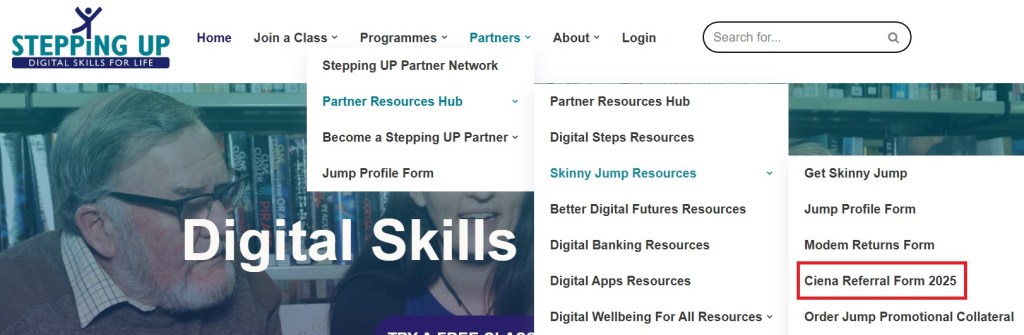
The CIENA Referral form has been updated and can be downloaded from the Stepping UP website:
Please do not use the old printed forms as these refer to the programme terminating on 31 December 2024.
Jump Profile Form
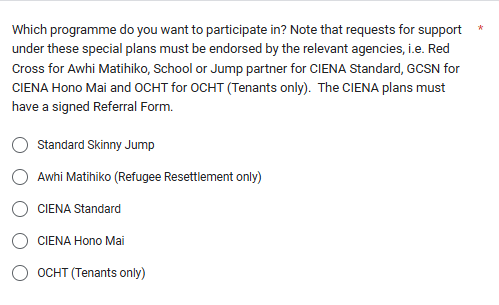
This has now been updated with some new options:
Note there are now two CIENA options, one we have called CIENA Standard and the other CIENA Hono Mai. Most partners will be choosing the CIENA Standard option. Hono Mai is a special programme being managed by the Greater Christchurch Schools Network (GCSN). This is only for families with children at Christchurch schools who have been referred by GCSN to a nearby Jump partner to collect their modems.
Email Confirmation
When families sign up for the CIENA Plan, their Jump account will initially be a standard Jump one (with the start-up 35GB data). When the Profile form is completed together with a signed Referral Form, their account will be changed to the CIENA plan with the first monthly allocation of 210GB. They will receive an email notification when their account has been re-provisioned from Standard Skinny Jump to CIENA; this will normally take a few days, hopefully before families have used their first 35GB. Please make sure that you use the parent’s email on both the Jump Profile form and the Referral Form, so that they receive this notification and any future communications about the CIENA programme.
Good news stories
Partners frequently report how appreciative families are to receive this free internet service. We would like to share these good news stories with the Skinny Jump team and CIENA, the programme sponsor. Please let Sue Kini know if you any special stories about what difference the support from CIENA is making (sue@diaa.nz).
Families who change their minds
From time to time, families on the CIENA Plan ask to switch back to Standard Jump. The main reason appears to be that parents lose some of the control over family internet usage. With a monthly top-up of 210GB on the first day of each calendar month some families can reach this data cap before the end of the month and then they lose their internet connection until the start of the following month. While the data allowance is similar to Standard Jump (6 top-ups of 35GB = 210GB),some families prefer to ration this by only topping up when a parent approves this. We ask CIENA partners to alert families to this situation when signing them up, but reassure them that they can switch back to Standard Jump if necessary. The only downside in doing this is that they will not be able to change their minds again and re-sign for CIENA in the future.
Don’t get too excited – this is really mainly for us at DIAA to better manage the flow of Jump modems – as always, our goal is for all partners to have modems in stock, so that you can continue to provide just-in-time support for your communities.
As we start the new year, we have a 6-week backlog for new modem orders (nearly 2000 modems) and 46 partners who have reached our new red alert level (less than 2 modems in stock). At the same time we have over 2000 modems available in stock at the other 220 partners.
In between Christmas festivities, we have started to address this challenge by prioritising deliveries to partners in the red alert zone and trying to better match supply with demand for other partners. This is a work in progress – the Jump registers for around 30% of all partners have been updated.
Here’s an example of the new summary data, recorded in cells B2 to G2 of each partner’s Jump Register; an explanation for each is summarised below.
Matching names: We are using the conditional formatting function in Google Sheets to identify people who may be applying for more than one modem. The total count (135 in the above case) indicates the number of times that people with the same name (first and last names) have received a modem. In many cases, this will just be a replacement for a faulty modem but there is increasing evidence that people are signing up for a new modem without returning their old one. In the Google Sheets, we use the teal shading to identify the people concerned.
Allocated more than 2 modems: This reflects the number of people who have received 3 or more modems. As above, there could be a good reason for this, but there are also indications that people are not always returning their old (presumably faulty) modem before being issued with another one.
Waiting List: The waiting list count is based on the number of date entries below the blue line. Our preference is for partners to self-manage this list, by deleting people once they are allocated a modem. However to avoid this getting out of hand, we have started to delete any entries older than 3 months. We also keep an eye on this when updating Profile Form responses and will delete anyone who has received a modem. The size of the waiting list directly affects the quantity of modems sent to partners with each shipment.
Actual Stock on hand: This is the number of modems that we believe each partner has available for issue, based on the completed Profile Forms received. This impacts delivery priorities. When actual stock drops to a critical level (2 modems for most partners or 6 modems for partners with a high turnover), this cell is shaded red to provide us with an alert to help us prioritise orders.
Modems on order: At any point in time we typically have 100 orders in the pipeline; each order is capped at 30 modems (5 boxes). In the example above, there are 3 orders, each for 30 modems, in the pipeline. We would expect these to be delivered progressively over the next 6 to 8 weeks.
Re-order trigger: This is calculated dynamically and reflects the number of modems issued by the partner during the last 6-8 weeks plus the number on the waiting list. Our logic is to try and anticipate demand for the next 6-8 weeks to ensure as much as possible a steady flow of modems. As the supply chain speeds up, we reduce the trigger level accordingly.
Updates to reflect new modems: We are also updating all partner GSheets to reflect the forthcoming introduction of the new Futura modems:
One thing to note in the summary is that this stock figure includes actual ‘on-hand’ stock as well as further supplies in the order pipeline.
Like everyone else at this time of year, the elves at CEVA who send you Jump modems are taking a break – the last order is currently being processed, so more modems are on the way for the following partners and these are expected to arrive during the Christmas- New Year holiday break:
Rotorua Library
Waipukurau Library
Mangere Bridge Library
Papatoetoe War Memorial Library
Takaanini Library and Community Hub
For everyone else, processing will re-commence during the week of 13 January and these should arrive during the following week. Depending on how long it takes for the CEVA elves to recover from their Christmas break will determine how many are sent, but I am hoping further supplies will be dispatched in January for:
Dannevirke Library
Grey District Library
Papakura Library
Otahuhu Library
Mt Albert Library
Hamilton Central Library
Morrinsville Library
Naenae Community Library
Hastings War Memorial Library
Mahurangi East Library
Dinsdale Library
Matatiki Hornby Centre
Moera Library
Waitara Library
Whakatane Library
Botany Library
Feilding Library
Helensville Library
Porirua Library
Warkworth War Memorial Library
Kawerau District Library
Southern REAP Gore
Highland Park Library
Shirley Library
Te Manawa (Massey Library)
Waahi Whanui Trust
Te Ahurei a Rangatahi
Waimarie: Hamilton East Community House
Pukekohe Whanau Resource Centre
Friendship House (Huntly) Community Charitable Trust
Ngaruawahia Community House
Bream Bay Trust
Smart Newtown
Tauranga City Library
Otaki Library
Invercargill City Library
Geraldine Library
South Waikato Pacific Islands Community Services
Opotiki Library
Hastings War Memorial Library
Manurewa Library
If you are not on this list, you are unlikely to receive any further supplies until February. Please add applicants to the Waiting List section of your Jump Register and I’ll use this as a guide when prioritising shipments. You are also welcome to contact me at jump@diaa.nz when you run out of modems.
Thank you for all your efforts during the year. You have already set a new record by helping another 15,600 households get access to a truly affordable internet service (and there is still more than a week to go).
We had two situations this week where Jump customers with faulty modems thought it might be a good idea to take the SIM card from their faulty modem and put it in their new replacement modem. This would mean they didn’t have to set up a new Jump account and link their new modem.
My first thought was that these customers might be onto something we hadn’t really considered since the beginning of the Jump programme, so we did a bit more investigation.
First of all we discovered not all Jump modems use the same size SIM card.
The Standard or Mini-SIM (also known as 2FF) measures 25 x 15 x 0.76 mm and is typically used in larger devices. Most portable devices such as today’s smartphones currently use a Micro-SIM measuring 15 x 12 x0.76 mm or a Nano-SIM, measuring 12.3 x 8.3 x 0.76mm. SIM cards are typically provided in sets of three, combining the Standard SIM (Mini-SIM), the Micro-SIM and Nano-SIM into one – it’s called the Triple SIM (or Tri-SIM). Users simply pop out the required size for their device.
We then checked out what size SIM is used in Jump modems and this is what we discovered: B315, Smart and Futura modems use a Micro-SIM, while the B618 uses a Nano-SIM.
Unaware of these differences, our enterprising Jump customer extracted his Nano-SIM from his B618 and inserted it into his new Smart Modem, and yes, you guessed it – the Nano-SIM simply disappeared inside his modem! So he now became the proud owner of a brand new faulty modem!
So that was our first lesson – never inset a Nano-SIM into a device expecting a Micro-SIM.
Undeterred, we followed this up with Skinny Jump specialists in Spark to get their view on this practice of swapping SIMS. They advised us that technically a Jump-provisioned SIM card can be swapped into new hardware (provided of course the SIM cards are the same size). BUT, and there is a big BUT, swapping SIMS might solve one problem but generate another. With a swapped SIM, the details printed on the modem sticker (broadband number and verification code) no longer match the SIM in the modem. So when it comes to reporting a fault and getting support from the Skinny Care Team, this creates huge confusion.
So our second lesson was simply to never swap a SIM.
I have been impressed by the partners who are taking my plea to get their Jump waiting lists in order before Christmas. As of today, we have 65 partners with waiting lists and a total of 309 people waiting (not much different to two weeks ago when we had 60 partners with waiting lists and 310 households waiting).
But it has also highlighted some confusion about who is responsible for removing customers from a waiting list. Our original approach was to get Alistair, who manages the transfer of Profile Form responses to individual Partner Gsheets, to remove waiters when he receives a Profile form from someone who is on a waiting list.
But what we have discovered is that this doesn’t solve the problem of waiters who fail to turn up within 7-10 days after you have notified them that you have modems in stock. Our agreed protocol for this situation is that waiters be removed from the waiting list when this occurs.
While Alistair and I will continue to help where we can, primary responsibility for waiting listing management must be with partners. Many partners use their Jump GSheets to record contact information for customers on their waiting lists and this is an excellent idea. But just as it is your responsibility to add people to the waitlist, we think you should also be primarily responsible for taking them off.
And while we are on the subject of waiting lists, I was especially impressed with the following response from Jess Thrower at Ranui Library; I suspect Jess didn’t need to rely on ChatGPT like me!
Here at Rānui, Our waitlists aren’t clear, But we are working on them With full Christmas cheer.
A lot on our waitlist Never answer their phone, So we’ll keep trying And get dial-tone.
We give extra time, As much as we can, If they don’t answer, We make a new plan.
We reach out by email, and we hope that they see. When all of that fails, We let the waitlist be.
We love to give modems, And run out so quick! When they ask for one, We’re there in a tick!
I have had two questions from partners about this so far this week (and it’s only Wednesday), so that calls for a blog post!
The challenge that partners are facing is that the same physical modem is used by Spark and Skinny for a range of different services, some of which are wireless and others are for landline (fibre) connections. So it not always easy to identify which ones have been provisioned for Skinny Jump.
My advice is to lodge ALL returned modems that look like a Skinny Jump modem through our Modem Returns Process. The Skinny team will advise us whether the modem has been provisioned for Jump or not.
Any ‘non-Jump’ modems will then be treated as ‘faulty’ and this will result in us sending you a recovery courier bag. We return these to CEVA, the company that manages the supply of modems, and it is their job to arrange the repair of faulty Jump modems or the transfer of other modems to the right party, or in case of very old or damaged modems, they would most likely be sent for recycling.
I suspect many of you a familiar with the Sunday Star*Times regular column about what’s going up and what’s going down.
From time to time we get “Going Up” feedback from Jump partners and I felt that one we received this week was worth sharing.
This came from a community partner in a rural town that prepares a Skinny Jump Accountability Report for their trustees; this summarised barriers they faced and their achievements.
Not surprisingly, amongst the barriers they identified:
limited supplies of modems, delaying the delivery of Jump;
cell tower capacity, limiting the availability of Jump;
customers with old mobile phones that didn’t support the Jump app;
incorrect email addresses and forgotten passwords when registering for Jump.
But despite these barriers they reported a stunning achievement:
Completing 529 Jump registrations since March 2020, reaching over 16% of all households in the district!
Overall they summed up their experience with Jump as:
Skinny Jump has played and will continue to play a vital role in the community.
With the advancement IT and recently AI, by today’s standards, the ability to have connectivity is inevitable.
We continue to get positive feedback from the community for they appreciate the time and effort taken during the registering process.
I know other partners provide regular updates to their managers and governance groups. Please keep doing this. One wise manager that I used to work with decades ago encouraged me to budget for ‘promotion’ as part of the project: “What’s the point of good works if no-one knows about it,” he said.
As discussed during the recent Jump webinars, new copies of the Jump Partner Guide are being shipped this week, along with a new supply of the ‘Stopped Using Your Jump modem’ stickers.
Some partners will be receiving more than one copy of the Partner Guide – one copy is for general use; the others are individual copies for each Jump Specialist.
So if you are the person opening the courier pack, please make sure these extra copies find their way to your specialists – while they have completed all the Partner Pathway modules and received a Jump Specialist badge, it is especially important that they continue to have access to the most up-to-date information.
You will also find a few copies of the new Customer Guides. These are to be used when returned modems are reset and become available for re-issue.


 Digital Inclusion Alliance Aotearoa