New processes for faulty and returned Jump modems starts today (5 January 2021)

Hopefully, some partners are already aware of the new processes that started today for faulty and returned Jump modems. Anna Paterson from Rangiora Library has been first to try out the new processes. Today, she assisted a customer set up their Skinny account, activate the modem and complete the Jump profile form – but Anna was then taken by surprise when the customer announced they had changed their mind and didn’t want the modem after all!

I suspect that Anna is not the first Jump partner to encounter customers who change their mind. But rather than consign the modem to the recycling bin, like we have been doing for the last 12 months, Anna was able to log the modem as a “returned modem” using the form here.

This form raises an alert with the Skinny Support team (not to be confused with the Skinny Care Team, who handle calls to the Skinny 0800 number). A Support Team member will de-link the modem from the customer’s account and reset it, ready for reissue, i.e. ensure that the initial 30GB data is available for a new user. When this has been actioned, Anna will receive an email from the Support team, advising her that the modem is now ready for reissue.

As this is only day one of our new processes, we are not exactly sure how long it will take for Anna to receive this email – she is going to let me know (and I will update this blog post accordingly). But we understand it should be ‘pretty quick’, like the same or next day.

6 January UPDATE: Anna has just advised me that she received confirmation from Skinny of the de-linking within 24 hours, so that’s pretty good.

In the meantime, we (DIAA) will add a comment to Column H in the partner’s GDoc Jump Register for the modem in question and mark Column B as ‘pending reset’. This has the short-term effect of reducing your stock levels by one. When we receive advice that the modem has been reset, we will remove these notes and the modem is added back as available stock, ready for reissue.

Seniors coming your way to sign up for Jump!

The December edition of the SuperSeniors Newsletter published yesterday has generated a tsunami of interest in Skinny Jump from Seniors throughout New Zealand. Today, our Jump partners have been reporting a spike in interest from seniors in signing up for Jump.

A record number of 57 people signed up for Jump through our partner network today and 30 of these identified as seniors. We welcome this support from The Office for Seniors in helping older New Zealanders discover Jump.

The article in the SuperSeniors Newsletter reads as follows:

For a lot of people cost is a major barrier to having internet access. Skinny is helping more kiwi homes access the digital world through their Skinny Jump low-cost prepaid broadband service.

Skinny Jump specifically focuses on providing service to groups that the Government has identified as being most at risk of digital exclusion, which includes seniors.

Skinny Jump is flexible prepaid broadband: Only $5 for 30GB of data, no contracts or credit checks, and the modem comes free of charge. Just top up as you go. You can get up to a maximum of 150GB every month (and it will only cost you $25).

Skinny Jump is a not-for-profit service and they don’t use your information to promote or sell other products either.

If this sounds like something you might be interested in, or you know someone in this position, you can find out the areas where Skinny Jump is available through the Skinny Jump website

You can only sign up for Skinny Jump through one of their local partners that includes public libraries and other community organisations. You can find out about how to contact your local partner and make an appointment to sign up through the Skinny Jump website

Another barrier to using the internet is learning how to use technology. Digital Inclusion Alliance Aotearoa (DIAA) is one of Skinny’s partners for delivering Skinny Jump and is also one of the Office for Seniors funded providers for delivering digital literacy training for seniors. Their Better Digital Futures programme supports seniors to learn new skills and build confidence with computers and the internet. If you are interested in learning more or know someone you think could benefit from this training, go to their website www.steppingup.nz

A Jump data boost for Summer

To celebrate the end of what has been a difficult year for us all, the Spark Foundation is giving all Jump customers 15GB of free bonus data each month over Summer. This will automatically be applied to customers’ accounts on the first day of each month, commencing on 1 December (today!). This data will not roll over.

So even if your Jump customers have let their accounts lapse, maybe because they had forgotten how to top up or because there are simply too many competing demands on their funds at this time of year, their internet connections will have sprung into life again today. How good is that!

The last 15GB of bonus data will be applied on 1 March 2021. When customers use up their bonus data each month, they can continue to top up their accounts in the normal way.

Jump modem stocktake

Our records indicate that over 1900 modems are being held by 187 Jump delivery partners. We suspect the true number is somewhat less than this, because we are still finding partners who run out of modems without triggering the automatic re-supply process. This can only happen if modems are issued without Profile Forms being completed.

Spark has asked us to review current stock levels so that we can identify any that were issued more than 2 months ago and have not yet been issued. We are considering arranging for modems in this situation to be transferred to a more active partner.

The reason for this is that Spark’s supplies of B315 Huawei modems are now exhausted and from this week, we will be starting to supply B618 modems. But it is important that partners do not issue any B618s until all local stocks of B315’s are exhausted.

During the next four weeks (Monday 23 November to Friday 18 December) we are asking all partners to do a stocktake of modems being held. This involves advising us the IMEI numbers of modems you are holding in stock, awaiting allocation. You may send your stock count at any time during this 4-week period to jump@diaa.nz. Please make sure you tell us the location where the modems are being held. We will reconcile this with our Google records and update accordingly. This will put us in a good position for the start of 2021.

More changes are on the way for Skinny Jump in 2021, so watch this space.

You should never run out of Jump modems but if you do….

We continue to receive requests from partners for more modems and that is fine – remember to use the following email: jump@diaa.nz . But every time we do get a request we ask ourselves why? We have this very efficient system that alerts us when a partner is running low on modems. Each partner has a trigger level that determines when new modems are sent. To make sure you never run out, we set the trigger level to the number of modems that you are typically issuing each week – this means we have a week to get new supplies to you. We know this isn’t perfect and are always happy to receive your individual requests.

The trigger level is set in cell G2 of your Jump register; we remind you what this is every time we ship modems, so do check the next box that arrives. Or if you would like access to your Jump register, please let us know (jump@diaa.nz); this does need to be a gmail address, or an email linked to a gmail address. Many of our partners set up a generic gmail for this purpose that can be used by all staff supporting the Jump programme.

We almost always find though that when we receive an email request it is because some other element of our tracking process is not working. The most common causes are:

Modems have been issued but Jump Profile Forms have not been completed. We totally rely on a form being completed for every modem issued; this allows us to mark up your Jump register, which in turn decreases your stock levels by one. If the form is not completed, we have no way of knowing that the modem has been issued. This generally results in us asking partners to do a stocktake and advise us of the IMEI numbers of the modems they are holding; we can then mark out the others in the Jump register to get things back on track.

There is an unexpected surge in demand for Jump modems. We update the Jump registers every day, but if a partner is holding 6 modems with a trigger level set at 5 and then issues 5 modems in one day, there will be a delay of a few days in getting new supplies. The solution in this case is to increase the trigger level or if partners are able to anticipate the surge, we can help you stock up in advance.

A box of modems has been misplaced. We understand that our partners lead busy lives and often many people are involved in supporting the Jump programme. It is easy for a box to be misplaced – under someone’s desk or in a storeroom. We have records of all modems dispatched, including the courier track and trace details. This includes the name of the person signing for the box of modems when it arrives. We often discover this person is on leave and no-one else knows where the box has been stored. The Jump registers include details of all modem shipments, including the Post Haste tracker code, so it is easy for us or for partners to quickly confirm whether this is a courier issue or a local one.

Modems appear to be faulty during the set up process and are not recorded. It is easy to make mistakes when helping a customer set up their modems and their Skinny accounts and, at times, the most pragmatic thing to do is simply move on to another modem. But is is important to contact the Skinny support team by email (support-team@skinny.co.nz) and make sure the modem is delinked and reset, ready for issue to another customer. If the modem is genuinely faulty and has not been allocated, partners should indicate this by entering ‘faulty’ in column B of the Jump register. This then reduces your stock count by one, as the modem is not available for re-issue. Or if you don’t want to mark up the Register, you can always send us an email with the IMEI number (jump@diaa.nz) and we’ll mark it up for you.

Jump Demo Modems

We encourage all our partners to hold a ‘demo’ modem. This is useful for training new staff as well as explaining to customers what the different lights mean. You can also explain to customers how to connect their digital devices to the modem using WiFi when they get home and power up their Jump modems.

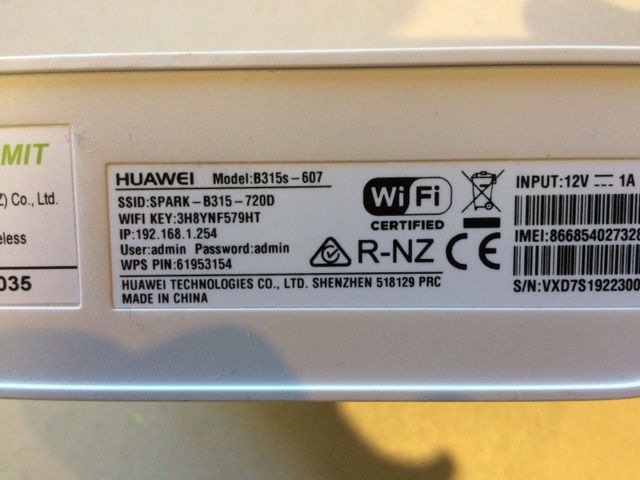
The modems do come with a lot of different codes and numbers on the stickers, so it is good to point out the WiFi Password, which could be on a sticker on the back of the modem or or the bottom. Some customers do get confused by the ‘Admin’ password and try to use this for their WiFi link, so it is good to highlight this during the setup process.

Note WiFi Password is called ‘Password’ on this sticker (not to be confused with ‘Admin’ Password)
Note WiFi Password is called WiFi Key on this sticker

When you power up the Demo modem, it will connect to the Jump network and the clock starts ticking on your initial 30 days 5GB that is pre-loaded. You do not need to top up your account when the initial 30GB expires, but if you wish to use the modem for other purposes, then it is fine to keep topping it up.

Even after the initial 30GB has expired, the Demo modem continues to be useful to explain the various features and the WiFi password.

Are you confused about de-linking Jump modems?

Some partners are still uncertain about the process for de-linking Jump modems.

When does a modem need to be de-linked?

There are three particular situations when a Jump modem needs to be de-linked from a customer’s Skinny account:

(1) A faulty modem is returned to a partner and a replacement modem is issued. Customers should contact the Skinny Helpdesk whenever they have a faulty modem and if the fault cannot be fixed, the Skinny Care Team will ask the customer to return the modem to a nearby partner and get a replacement. At the same time the Skinny Care Team will issue a request to the Skinny Support Team to de-link the modem from the customer’s Skinny account. If the modem is not de-linked, the customer will not be able to use any credit remaining on their Skinny account; they would have to set up a new Skinny account with a different email address and would lose any balance on their old account. This will become obvious to partners when trying to set up the replacement modem. To get the modem de-linked, partners must email the Skinny Support Team on: support-team@skinny.co.nz . Customers must also call the Help desk (Care Team) to get their replacement modem linked to their existing account.

NOTE the difference between the Skinny Care Team and Skinny Support Team. The Care Team is contacted by telephone (0800 475 4669) and the Support Team by email only support-team@skinny.co.nz . The Care Team is not authorised to de-link accounts; all requests for de-linking are handled by the Support Team.

(2) An error is made during the setup process and the modem needs to be re-set before it can be re-issued. Partners should email the Skinny Support Team support-team@skinny.co.nz and ask for the modem to be de-linked and reset.

(3) A modem is returned in good condition by a customer who does not want it anymore. Since February 2020, our advice has been to put all returned modems (faulty or otherwise) in a recycling box. However, some partners have continued with the previous process, which was to contact the Skinny Support Team support-team@skinny.co.nz and ask for the modem to be de-linked from the previous customer’s account and reset for re-issue ($5/30GB preloaded). We expect to return to this process in 2021, so if this is already working for you, keep on trucking!

Are you having to turn Jump customers away?

Many of our partners have reported an increase in the number of Jump applicants that they are having to turn away. My earlier post refers to this. Earlier today, the Spark Foundation team provided a Zoom briefing for partners in the areas most affected – Kaitaia, Whitianga, Coromandel, Huntly, Te Aroha, Greerton Tauranga, Fairfield Hamilton, Otorohanga, Palmerston North, Patea, Shannon, Picton, Kaikoura, Riverton and Otara. Their advice to partners in these areas (referred to as “stop sell” areas) is to remove any Jump promotional posters. We will update the information on the Skinny website about partners in these areas to alert any customers that they might not be able to get service at the moment. The situation is quite fluid and could change from week to week, so if any customers do request service in these areas, it could still be worthwhile doing an address check on the Skinny website. Our advice in my previous post was to ask any customers who do not appear to have coverage to complete our online application form so that we can double check for coverage as well as update our database on areas where there are coverage issues.

Our records are showing a much larger number of partners in areas other than the ones noted above are also having to turn some customers away. This depends very much on the particular cell tower they are connected to and even on the same cell tower, which of the three sectors the household is in (each sector covers 120 degrees – see photo above).

Our advice is the same – always check for coverage using the Skinny Jump address checker and for customers who can’t get service, ask them to complete an online application form. However it is important to manage customer expectations; completing the online application form is unlikely to change anything immediately, but does help us understand where there is demand for Jump. We will be reporting this to the government agencies responsible for broadband infrastructure and hopefully this will influence their investment priorities.

We also send the following message to the applicant:

Thank you for your recent application for a Skinny Jump internet connection. We have double checked coverage at your location and unfortunately, Skinny cannot currently provide wireless broadband service at your address. This may be because of limited network capacity in your area. Skinny wants to make sure that their Skinny Mobile and Skinny Broadband (including Jump) customers get the best service possible and this includes not overloading the cell towers near you. Skinny is constantly adding new capacity to their network, so please try the Jump address checker again in the near future and if you do have coverage please contact your nearest Jump partner again to sign up. We are sorry that we are not able to help you on this occasion.

“Broadband Compare” results can be confusing

Many partners encourage customers to use the Broadband Compare website to look for alternative internet options at their address when the Skinny checker indicates that Jump 4G service is not available. They are then surprised to find that Broadband Compare suggests that Skinny 4G plans are available at their customer’s location. We are seeking clarification from the teams at both Spark and Broadband Compare to understand how frequently the Skinny 4G data is updated, as this could be a possible explanation.

Jump coverage checker says “no”

Partners may have noticed that the message below is popping up more frequently these days in the Skinny Jump address checker.

This may be because of limited or no coverage, or increasingly, this is to prevent overloading on individual cellphone towers. There can also be a problem if the address is not recognised by the Jump address checker; the checker only works with recognised addresses, so you must select the address from the pull-down list. And if it doesn’t recognise 24A Brandon Street, try just 24 Brandon Street. The same is true for addresses beginning with Flat 1; you might need to delete ‘Flat 1’ to get an exact match for the address checker to work.

Unfortunately, when the address checker does indicate there is no coverage, you are going to have to say “no” to your customer and not provide them with a Jump modem. However, we would like to encourage you to assist your customer complete an online Jump application form. This will give us the opportunity to double check the coverage issues in your area and follow up with Skinny and Spark to see what options might be possible. If we can’t find a satisfactory solution we will advise the customer accordingly. We have included a new question in the Application Form seeking the customer’s permission to hold their Application on file so that we can check from time to time if Skinny coverage is available.