Something new every day!

Well, would you believe it! Next year with be the 10th anniversary of the Skinny Jump internet service (originally call Spark Jump). And what is even more surprising is that there are still things to learn about this remarkable service.

Today’s questions came from Phoebe Wang at Ashburton Library at 10:10 am. I can feel a Kahoot coming on, but maybe Jump delivery partners can use this as a rapid fire test for all their staff involved in issuing Jump modems:

  1. Do customers get a reminder when their data is about to run out?
  2. If so, is this a text message, a Jump app notification or an email?
  3. How much data is left when you get the notification?
  4. Can you top up after you have run out of data?

Well, who knows the answers?

To start with I asked myself – surely after nearly 10 years I should know some basic stuff like this. Well I scored a miserable 1/4 and even that missed a very important option – think IVR (see below)!

So I turned to our DIAA expert in all things Jump – Sue Kini; she has been producing Jump training materials for most of the last 10 years, and what’s more, collaborating with the Spark team that developed the Jump Partner Pathway training modules. She has also been the creator of challenging Jump exams (called Kahoots). Surely she would know. Ummm….. maybe not. It is Friday after all.

So next up I thought I’d check with Shelley Struthers, who spends much of her day helping Jump partners around the country with all their day-to-day problems. But, oops… Friday is Shelley’s day off, so I thought better of disturbing her.

OK, so I need to elevate this to the one person I send all my “Jump don’t knows” to – Mel Manueli. Mel has a new job title Digital Equity Partner (Skinny Jump – Digital and Operations). Fortunately, she’s the same Mel who handles all our “don’t knows”. So, at 10:37am I toss the ball to Mel.

And at 14:14, bingo! Mel produces the goods! She explains that there are some default settings that can be viewed through the web dashboard sign-in, but not the Jump App:
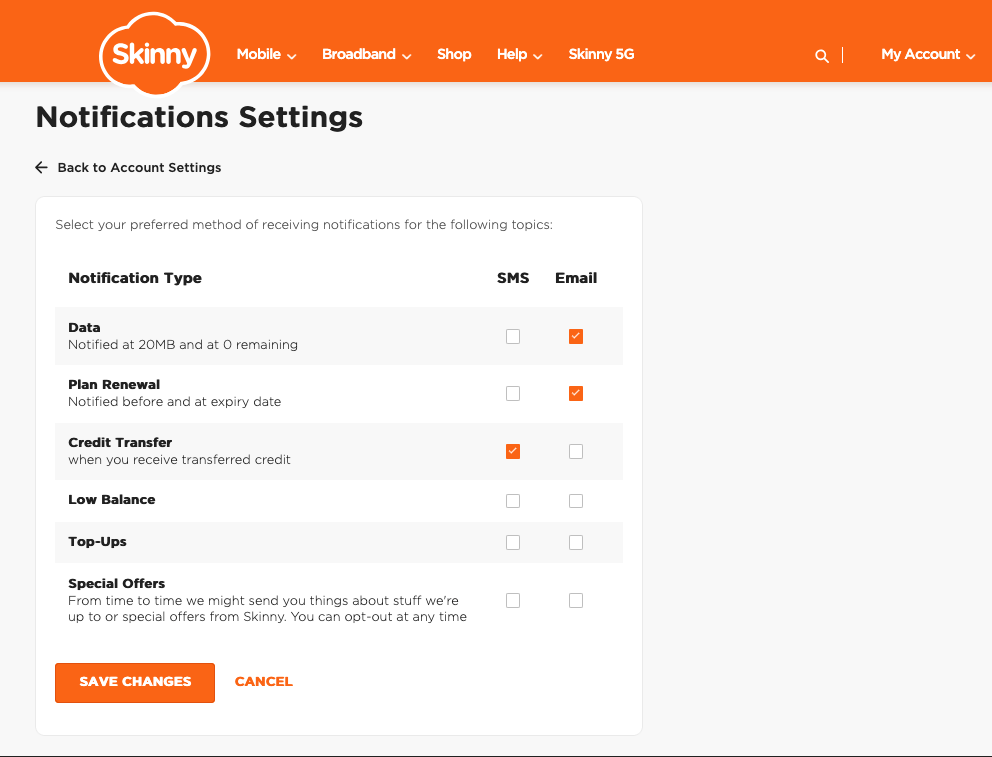
This default setting means that Standard Jump customers will automatically receive an email:

  • When they are at 20MB of data (for their current plan) left
  • When they are at 0MB of data (for their current plan)

To be able to receive Email notifications for successful Top-Ups – they’ll need to go into these settings: My Account / Dashboard > Account Settings > Notification Settings and tick/untick the options based on their preference.

Things to note

  • The above controls/settings can only be accessed and updated when a customer logs in via a web browser (can be on their phone or desktop), but not on the Jump App
  • These settings are the same for Mobile customers – so unfortunately the ‘SMS’ option is not able to be setup for Jump customers

Mel also reminded us of the IVR option if customers have no data available and want to top up.:
Call 0800 4 Skinny > Press ‘3’ > Enter BB Number & Modem Verification Code > Top-Up

I’m not sure if Mel just knows this stuff or whether she has a higher order knowledge partner who she sends her “don’t knows” to. But do we care – Phoebe has her answer and to close the loop at 16:22 she replies:

“Thank you so much for your prompt reply, you* are amazing as always. The customer is happy with the answers, it ease his worry. Have a good weekend.” 😊

*Footnote: to be clear Phoebe’s reference to “you” is the ‘royal you’, i.e. everyone involved in delivering and supporting such a fantastic service!
Calling all CIENA partners…time to start your engines

In fact, some of you didn’t wait for the starting gun. Zoe Pascoe from Linwood Library took the honours with the first CIENA signup on 20 December, closely followed by Lisa Dam from Glenfield Library with sign ups on 22 and 30 December.

There are advantages in being first off the block – it helps us identify gaps in our processes so we can fix these before the floodgates open.

New CIENA Referral form

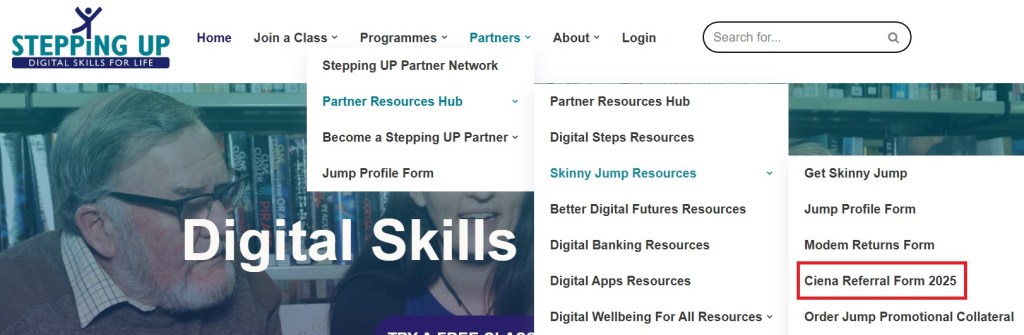
The CIENA Referral form has been updated and can be downloaded from the Stepping UP website:

Please do not use the old printed forms as these refer to the programme terminating on 31 December 2024.

Jump Profile Form

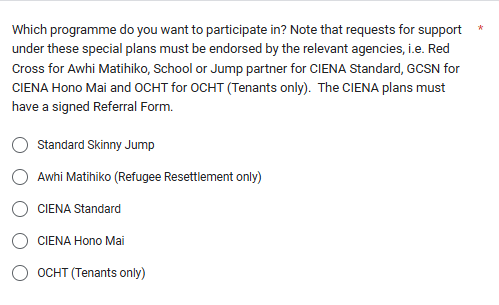
This has now been updated with some new options:

Note there are now two CIENA options, one we have called CIENA Standard and the other CIENA Hono Mai. Most partners will be choosing the CIENA Standard option. Hono Mai is a special programme being managed by the Greater Christchurch Schools Network (GCSN). This is only for families with children at Christchurch schools who have been referred by GCSN to a nearby Jump partner to collect their modems.

Email Confirmation

When families sign up for the CIENA Plan, their Jump account will initially be a standard Jump one (with the start-up 35GB data). When the Profile form is completed together with a signed Referral Form, their account will be changed to the CIENA plan with the first monthly allocation of 210GB. They will receive an email notification when their account has been re-provisioned from Standard Skinny Jump to CIENA; this will normally take a few days, hopefully before families have used their first 35GB. Please make sure that you use the parent’s email on both the Jump Profile form and the Referral Form, so that they receive this notification and any future communications about the CIENA programme.

Good news stories

Partners frequently report how appreciative families are to receive this free internet service. We would like to share these good news stories with the Skinny Jump team and CIENA, the programme sponsor. Please let Sue Kini know if you any special stories about what difference the support from CIENA is making (sue@diaa.nz).

Families who change their minds

From time to time, families on the CIENA Plan ask to switch back to Standard Jump. The main reason appears to be that parents lose some of the control over family internet usage. With a monthly top-up of 210GB on the first day of each calendar month some families can reach this data cap before the end of the month and then they lose their internet connection until the start of the following month. While the data allowance is similar to Standard Jump (6 top-ups of 35GB = 210GB),some families prefer to ration this by only topping up when a parent approves this. We ask CIENA partners to alert families to this situation when signing them up, but reassure them that they can switch back to Standard Jump if necessary. The only downside in doing this is that they will not be able to change their minds again and re-sign for CIENA in the future.

And the winner is…

It is Friday and I have been promising to tell you who the winner was in our Friday Quiz from a few weeks back.

Congratulations to Wendy Brock from Picton Library “I can only think of one thing – logging on! Logging on to their email, their skinny account, and modem password! Don’t know if this counts as one or more answers.” But Wendy also suggested a solution: “If they can’t remember their email password (as their phone has a cracked screen and cannot be used) they use one of our laptops and we help them set up a new email and write their passwords down on a piece of paper (which will probably get lost). That is after giving up on resetting their password as they don’t have the same phone number…. LOL.

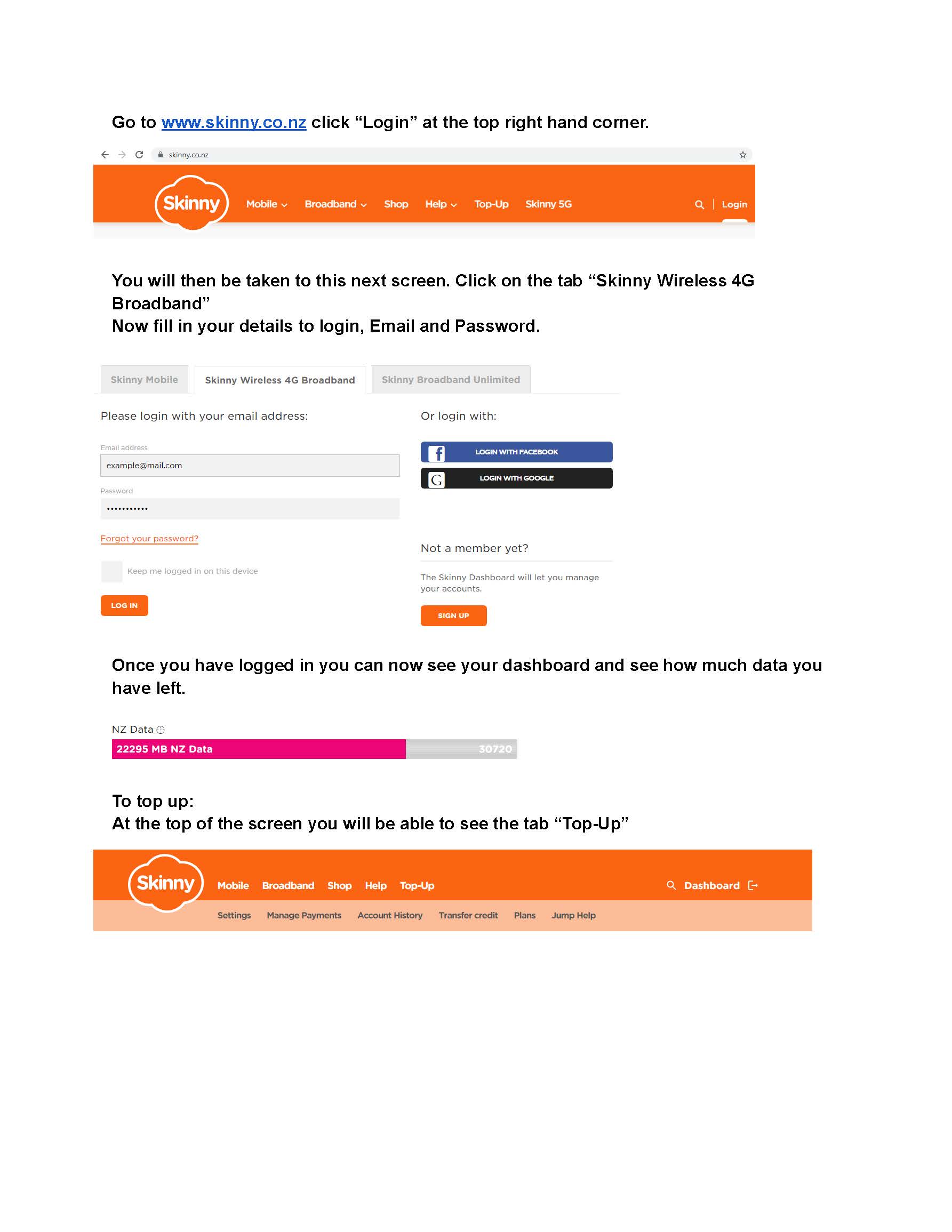
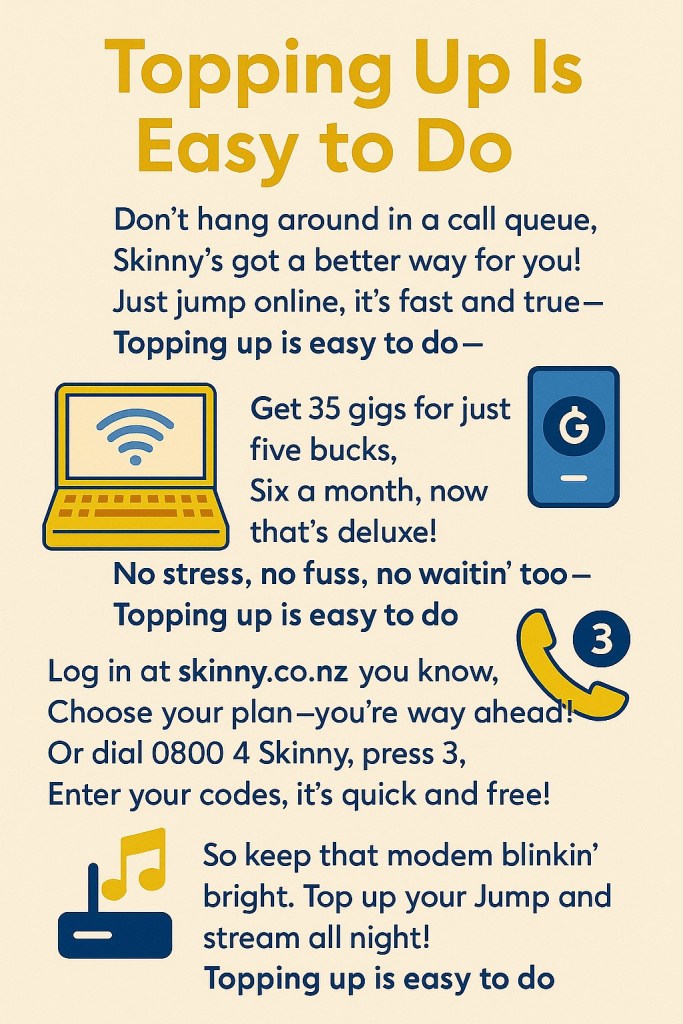
I was also impressed with the suggestion from Shantel Hennessy at Taitech in Gisborne. She nearly had the right answer, like many of you, but what impressed me was how she helps people remember what to do when it comes to top-up time: “I’m guessing the answer would be payment options. I’ve had a few come to me for help with  payment or renewing plans. I’ll ask the customer to pop into Taitech and we will do it together. I’ve ended up making a print out of step by steps on the payment options that I give them, I think they forget that there is that info in the booklet they first get when signing up for skinny jump.”

And here’s the handout that Shantel gives them:

So well done Wendy and Shantel. Thanks for your helpful responses. Now a visit to Moore Wilsons to see what treats I can find for you both.

PS. Thanks to everyone who responded to my quiz.

Ooops – it’s Monday

I promised everyone that I would give you the answer on Friday to my question posed on Friday 4 October concerning what Jump customers find to be one of the most challenging things about being a Jump customer. 

Most of you sort of got it right – something to do with top-ups using the app. But that wasn’t the exact answer I was looking for. What I wanted to know is what the particular barrier was that caused nearly 300,000 failed attempts last year and what partners can do to address this.

A couple of you really hit the nail on the head with the correct answer – people simply couldn’t remember the email they used to set up their Skinny Jump account or their password!

And what was even better, these partners had some excellent strategies for addressing this (I’ll share these with you when I get back to my office).

The Jump partner guide does recommend that you advise all customers to write down the email they have used for their Jump account as well as their password. What the Guide doesn’t say is where to write this down.

We strongly suggest that during the sign-up process, and before customers leave with their modem, you insist that these details are written down on the inside cover of their Partner Guide – the little booklet that is supplied with every modem.

Jump customers to get extra year before their SIM expires

More good news for Skinny Jump customers!

We know that around 17% of all active Jump customers (that’s over 5000 customers) never use more data than their free 15GB top-up each month. This of course means they have a totally free internet connection.

But until recently, the downside has been that the Jump modem SIM cards expire if they are never topped up within a 12-month period. This expiry period has now been extended to 24 months for all new customers after 12 March 2024.

So while this is good news, there does come a day when Jump customers who rely totally on their free 15GB will face SIM expiry. This means the modem is classified as faulty and needs to be returned for repair, including a new SIM card.

To avoid this problem, all that Jump customers have to do is to make sure that they carry out at least one top-up and plan renewal every two years.

Now comes the hard part. Will people in this very low data usage group even remember how to top up when the time comes? We suspect most of the people who rely on the free 15GB data are elderly; how can we expect them (or anyone else for that matter!) to remember how to do this after two years. They probably won’t even be able to find their user guides after all this time.

We also know that over 30% of all calls from Jump customers to the Skinny Care Team are seeking help in topping up and renewing their plans.

So, we are looking for on-the-ground suggestions about how to solve this problem. Top-up Tuesdays??

Jump Ciena Plans vs Top-ups

What is it that ‘Water and Oil’ have in common with ‘Ciena Plans and Jump Top-ups’? Yes, you’ve got it. They don’t mix!

Families opting for the Ciena Plan get 210GB data loaded to their accounts on the first day of each calendar month. The good news is that this is free until the end of the 2024 school year; the not so good news is that some families use all this data before the end of the month and then lose the internet.

Regular Jump customers pay $5 for 35GB data with a maximum of 6 top-ups every 30 days. 5 x 35GB = 210GB. Regular customers also get a bonus 15GB of free data on the first day of each calendar month.

This week, we received a cry from a Jump customer on a Ciena Plan:

“My plan isn’t the same. I signed up for Ciena in August last year but my dashboard now says I have to pay $5 to purchase another 35GB.”

A bit of investigation revealed two areas of confusion:

(1) the customer claims the partner who helped them set up their Jump modem told them that they could top up when they used the sponsored 210GB allowance. Sorry, WRONG advice! Not true. When customers use up their 210GB data, that’s it for the rest of the month. No more internet! So how do you stop the kids gaming or netflixing away all the data before month end? Frankly that’s a bit of a challenge that the technology can’t solve, nor can Chat GPT! But perfect for pre-pay services like regular Jump.

(2) the customer called the Skinny Care Team and were advised that they could either wait until the end of the month and get the next 210GB data package (so far so good) or top up their account, which would then change them back to standard Skinny Jump. Can you hear alarm bells ringing? More WRONG ADVICE!! A year ago this was possible, but not anymore. Sometime last year, the option to top-up and purchase a standard Skinny Jump Plan was removed for customers on sponsored plans like Ciena.

So like oil and water, you can’t have a bob each way. One or the other. No mix ‘n match, I’m afraid.

I am sure you are all wondering how this story ends. We have to be a bit cautious about families playing the system using the sponsored 210GB, switching to standard Jump for the rest of the month, thereby securing another 210GB and then switching back to Ciena, etc. A friendly call to the customer quickly sorts this; in this case a genuine problem of confusing advice. Also an opportunity to fully explain the limitations of sponsored plans. The customer asked for Ciena to be reinstated, but also indicated that they would start investigating commercial unlimited broadband plans if they find the 210GB an ongoing constraint.

So, a sort of happy ending for all.

THE END

One Android problem fixed but another emerges

My previous post celebrated the launch of the new Jump Android App that included a bug fix for the shorter broadband numbers. But unfortunately, another bug has emerged with the Android version of the Jump App.

When customers click on ‘top up’ in the App, the App closes – thanks to Noha from Porirua Library who first reported this.

The good news is that the app team has already isolated the issue and submitted code to fix it – and it is only affecting the Android version. The not so good news is that we don’t know how long it might take before the App can be updated on the Google Play Store. This update has to be approved by Google and is outside the control of the Spark app team.

The suggested workaround for customers in the meantime is to use the dashboard on a PC to do the ‘top up’ or a browser on their smartphones. Of course, they can also top up using the Jump Interactive Voice Response front-end on calls to the Skinny Care Team (0800 475 4669).

The Jump team expects to have a definitive timeline next week for the update to be uploaded.

Jump Credit balances for customers who switch to sponsored plans

A few partners have raised questions this week about what happens to customers’ credit balances when they switch to a sponsored plan like Ciena.

Jump customers will be used to seeing the credit balance on their dashboard when they sign into Jump. However, when they move to a sponsored plan like Ciena this balance disappears from their dashboard. The Skinny Jump team has acknowledged that this shouldn’t happen and have some work in progress to get this re-instated.

The good news is that balances on customer accounts will remain for 12 months after their last plan renewal. However, for customers on multi-year sponsored plans who can not renew a data plan, this can be a problem, as they will eventually lose any credit balance.

Customers in this situation should contact the Skinny Care Team on 0800 475 4669 within 12 months to arrange a refund.

Special Alert for Jump Ciena Partners

We have had two Ciena customers contact us to ask why their Ciena Plan did not renew on 1 May. We escalated this to the Skinny Jump team at Spark in case this was a system glitch that could be affecting other Ciena customers.

The good news is that this isn’t a system glitch, so hopefully only two customers have been affected. The reason identified is that these two customers attempted to purchase additional data during month and when they did this, their accounts reverted to standard Skinny Jump.

The Jump team acknowledges that this could be confusing for customers and would like to remove the top-up option altogether for anyone on a sponsored plan, but this involves further software development and this could take some time.

As an immediate fix, any customer on a sponsored plan who attempts to top-up their account will now receive an error message.

This does highlight how important it is that Ciena partners carefully explain that being on a Ciena plan means they cannot top-up their accounts, as they are already receiving the maximum of 6 top-ups (210GB) each month.

We acknowledge that the User Guide and Partner Guides do not really cover this situation and this is something the Jump team is going to take a look at, but in the meantime, please make a special point of explaining this to Ciena applicants.

We will contact the two families that have raised this with us – their accounts have already been reset for the Ciena plan. Please contact us on jump@diaa.nz if any customer raises this issue with you and we can arrange for their accounts to be re-provisioned with the Ciena plan. Thank you.