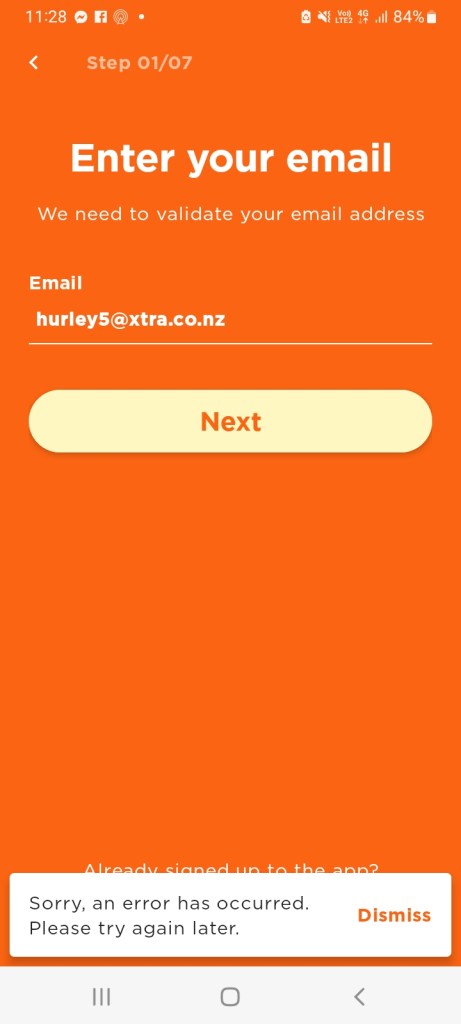
The Skinny Jump team has advised that the issue reported yesterday has been found and fixed. They confirmed this by running a test and have managed to successfully progress through (see below)
Step 01: Enter your email address
Step 02: Set a password
Their advice for Partners/Customers:
Close Jump App
Check to ensure both app (via Playstore / App Store) and system software are up to date (via device Settings)
Reopen app and continue Sign Up process
They also reminded us of other Useful Resources if you encounter problems with the app – Jump App Cheat Sheet that is available on the SteppingUP website, here.
One of our Jump partners has reported a problem in signing up customers with the Jump app. They are getting the following error message:
The Skinny Jump squad has been able to replicate this error for both Android and Apple signups and have escalated the issue. In the meantime, their advice is to use the web browser signup process. They have confirmed this is still working as expected.
However, the partner who reported the problem is still experiencing a sign-up problem using this approach as well. Mel from the Skinny Jump team has advised: “I tried earlier and it worked and tried again just now to ‘Create a new account’/Register via desktop web browser and its worked and allowed me to progress through to enter First and Last name? You might need to clear cache, try incognito or different browser.”
Well, would you believe it! Next year with be the 10th anniversary of the Skinny Jump internet service (originally call Spark Jump). And what is even more surprising is that there are still things to learn about this remarkable service.
Today’s questions came from Phoebe Wang at Ashburton Library at 10:10 am. I can feel a Kahoot coming on, but maybe Jump delivery partners can use this as a rapid fire test for all their staff involved in issuing Jump modems:
Do customers get a reminder when their data is about to run out?
If so, is this a text message, a Jump app notification or an email?
How much data is left when you get the notification?
Can you top up after you have run out of data?
Well, who knows the answers?
To start with I asked myself – surely after nearly 10 years I should know some basic stuff like this. Well I scored a miserable 1/4 and even that missed a very important option – think IVR (see below)!
So I turned to our DIAA expert in all things Jump – Sue Kini; she has been producing Jump training materials for most of the last 10 years, and what’s more, collaborating with the Spark team that developed the Jump Partner Pathway training modules. She has also been the creator of challenging Jump exams (called Kahoots). Surely she would know. Ummm….. maybe not. It is Friday after all.
So next up I thought I’d check with Shelley Struthers, who spends much of her day helping Jump partners around the country with all their day-to-day problems. But, oops… Friday is Shelley’s day off, so I thought better of disturbing her.
OK, so I need to elevate this to the one person I send all my “Jump don’t knows” to – Mel Manueli. Mel has a new job title Digital Equity Partner (Skinny Jump – Digital and Operations). Fortunately, she’s the same Mel who handles all our “don’t knows”. So, at 10:37am I toss the ball to Mel.
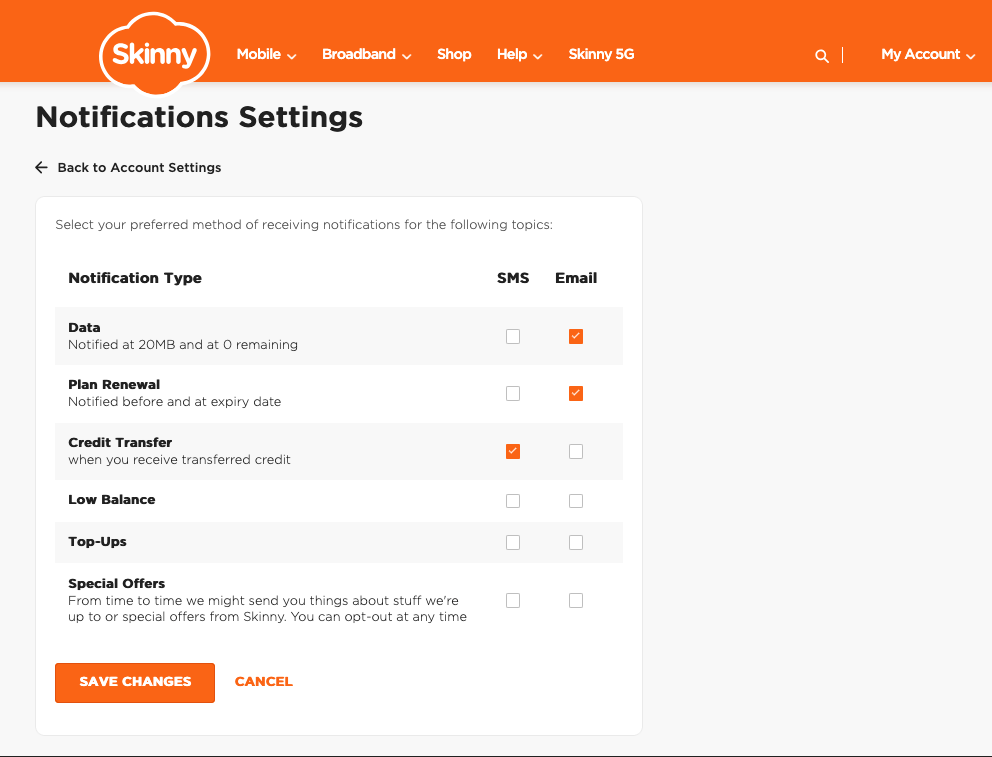
And at 14:14, bingo! Mel produces the goods! She explains that there are some default settings that can be viewed through the web dashboard sign-in, but not the Jump App:
This default setting means that Standard Jump customers will automatically receive an email:
When they are at 20MB of data (for their current plan) left
When they are at 0MB of data (for their current plan)
To be able to receive Email notifications for successful Top-Ups – they’ll need to go into these settings: My Account / Dashboard > Account Settings > Notification Settings and tick/untick the options based on their preference.
Things to note
The above controls/settings can only be accessed and updated when a customer logs in via a web browser (can be on their phone or desktop), but not on the Jump App
These settings are the same for Mobile customers – so unfortunately the ‘SMS’ option is not able to be setup for Jump customers
Mel also reminded us of the IVR option if customers have no data available and want to top up.: Call 0800 4 Skinny > Press ‘3’ > Enter BB Number & Modem Verification Code > Top-Up
I’m not sure if Mel just knows this stuff or whether she has a higher order knowledge partner who she sends her “don’t knows” to. But do we care – Phoebe has her answer and to close the loop at 16:22 she replies:
“Thank you so much for your prompt reply, you* are amazing as always. The customer is happy with the answers, it ease his worry. Have a good weekend.”
*Footnote: to be clear Phoebe’s reference to “you” is the ‘royal you’, i.e. everyone involved in delivering and supporting such a fantastic service!
A Jump partner has signalled an issue that they are having with jump sign-ups using the web browser. They are getting the error message “Whoops, something went wrong” after entering the Broadband number and Verification code.
The Skinny Ops team has confirmed that they are experiencing some issues, so our suggestion is to use the App signup instead until this is resolved.
What’s this got to do with Jump, you might well be asking. Well this is a test for those of you who like Friday afternoon challenges – find the hidden code!
Now what I really wanted to update you on is a problem that some Jump Partners have been discovering with the App – where the ‘Forgot Password’ link was sending a reset password email with button links that didn’t work.
The good news is that this was fixed earlier this week (the morning of 5 May 2025, to be precise) by the App development team.
If you receive a visit from a customer with this problem, can you assist with the following troubleshooting steps:
(1) Open the ‘Google Play store’ app > search for ‘Skinny Jump App’ > tap ‘Update’ if available and then attempt to log in via the app.
(20 Uninstall and reinstall the Jump app, then restart the device before attempting to log in or use the reset password link.
(3) Check the device system software for any updates.
And for those of you still scratching your heads about the puzzle, here’s a clue – this ‘Forgot Password’ problem has only been experienced on Android devices.
I promised everyone that I would give you the answer on Friday to my question posed on Friday 4 October concerning what Jump customers find to be one of the most challenging things about being a Jump customer.
Most of you sort of got it right – something to do with top-ups using the app. But that wasn’t the exact answer I was looking for. What I wanted to know is what the particular barrier was that caused nearly 300,000 failed attempts last year and what partners can do to address this.
A couple of you really hit the nail on the head with the correct answer – people simply couldn’t remember the email they used to set up their Skinny Jump account or their password!
And what was even better, these partners had some excellent strategies for addressing this (I’ll share these with you when I get back to my office).
The Jump partner guide does recommend that you advise all customers to write down the email they have used for their Jump account as well as their password. What the Guide doesn’t say is where to write this down.
We strongly suggest that during the sign-up process, and before customers leave with their modem, you insist that these details are written down on the inside cover of their Partner Guide – the little booklet that is supplied with every modem.
Some partners reported problems when signing up customers using the Jump Android App. They would get through to last part of the sign up process, but when the customer tried to enter their address, they would get an error message.
This proved to be a software bug, that has now been fixed and uploaded to Google Play on 6 November 2023.
Thank you to the partners who reported this problem.
The Skinny Jump team has advised that a new Android version of the Jump App has been published this morning in the Google Play Store and is available for download. This addresses the problem reported last week where Android users could not top up from their phones.
My previous post celebrated the launch of the new Jump Android App that included a bug fix for the shorter broadband numbers. But unfortunately, another bug has emerged with the Android version of the Jump App.
When customers click on ‘top up’ in the App, the App closes – thanks to Noha from Porirua Library who first reported this.
The good news is that the app team has already isolated the issue and submitted code to fix it – and it is only affecting the Android version. The not so good news is that we don’t know how long it might take before the App can be updated on the Google Play Store. This update has to be approved by Google and is outside the control of the Spark app team.
The suggested workaround for customers in the meantime is to use the dashboard on a PC to do the ‘top up’ or a browser on their smartphones. Of course, they can also top up using the Jump Interactive Voice Response front-end on calls to the Skinny Care Team (0800 475 4669).
The Jump team expects to have a definitive timeline next week for the update to be uploaded.
An updated version of the Skinny Jump App for Android (v1.1.1) was uploaded to the Google Play Store on 24 October 2023. This included a fix for the shorter broadband numbers that have been causing problems.
For new Jump customers, they will automatically get the new version when they download the App. Customers receiving a replacement for a faulty modem should be advised to delete their existing App and then download the new version.

 Digital Inclusion Alliance Aotearoa