Yesterday, I received 33 Modem Returns forms; six of these had been incorrectly classified by the person completing the form (Jump Partners and Skinny Care Team). This is not that unusual, which suggests to me that there are different ways to interpret these classifications, so I thought it worth explaining what difference this makes.
There are 4 options in the Modem Returns form for classifying a ‘returned’ modem; only the first two of these should be used by Jump Delivery Partners – the other two are additional options for the Skinny Care Team.
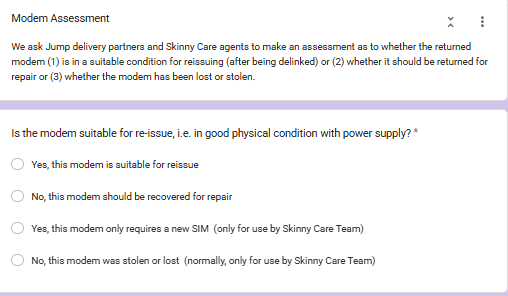
So what do each of these mean?
Yes, this modem is suitable for reissue
This is for situations where the customer no longer wants the Skinny Jump service. Partners are expected to make the call on the physical state of the modem, i.e. is it in a condition that means it would be suitable for reissue. This means the modem would be not be broken or physically defaced, nor would it be dirty. It would also have an installed SIM card and the person returning the modem would advise it is still in working condition.
If the modem has just been dropped off, it is worthwhile starting with the assumption it is suitable for reissue. Skinny Support will delink the modem from the customer’s email and reset the modem with 35GB start-up data, ready for reissue, or they will advise that the modem cannot be delinked and needs to be treated as faulty.
If there are missing parts, e.g. power supply, ethernet cable, customer guide, then DIAA can supply these on request – see my earlier blog post about this. Also my post about the different power supplies.
No, this modem should be recovered for repair
This option is to be selected when the returned modem is known to be faulty or is otherwise unsuitable for reissue. This includes obsolete B315 and B618 Huawei modems – all these are to be recovered for recycling.
Customers are expected to report all faulty issues to the Skinny Care Team and if the modem is assessed as faulty, the Care agents will complete a Modem Returns Form. This results in DIAA couriering a replacement directly to the customer, along with a recovery bag for the faulty unit. The Form is also used by the Skinny Support team to initiate the delinking process so that the customer can use their same email address in setting up a new account when the replacement modem arrives.
However, we know that some customers do not follow this procedure and simply turn up at a Partner expecting a replacement. We have also been unable to prevent some Care Agents advising customers to go to a local partner to get a replacement. In these cases, Partners have the discretion to issue replacement modems, but they must alert customers that they will not be able to set up a new Jump account using their existing email until the faulty unit is delinked – this can take 24-28 hours, but sometimes longer.
Yes, this modem only requires a new SIM (this option is only for use by the Skinny Care Team)
This option is to be selected when the Care Team determines that a simple SIM Swap will correct the fault. This generates a request to DIAA to initiate the agreed SIM Swap process, which results in a replacement SIM being couriered to the customer, together with instructions on how to activate the SIM Swap while retaining the same Broadband number (albeit with a different Verification Code). Jump Delivery Partners can not use this option if the modem has been returned to them – it must then be classified as faulty.
No, this modem was stolen or lost (this option should normally only be selected by the Skinny Care Team)
Our agreed procedures require all lost or stolen modems to be reported by the customer to the Skinny Care Team. They can verify the identity of the customer and arrange to block the lost/stolen modem as well as delink the customer’s account. If the customer requires a replacement, the Care Team will request DIAA to send a replacement by courier. By the time this arrives, the customer’s email will have been delinked, so they can proceed to set up a new account using their same email.
What should Partners do when a customer reports a lost/stolen modem to them?
They must direct the customer to contact the Skinny Care Team. Jump Partners must never issue a replacement modem unless customers can produce the faulty unit, which clearly they can’t do if the modem has been lost or stolen.

