Is there still a problem with Jump modems not being properly de-linked?

Partners trying to reissue returned modems during the last 3 months have experienced numerous problems when they try to use these ‘de-linked’ modems, only to discover they are still linked to the previous owner’s email.

I appreciate that this has been extremely frustrating and appears to have resulted in partners feeling a bit nervous about re-issuing de-linked modems.

We think the problem is because of staff changes in the Skinny Jump team and misunderstandings about the de-linking and resetting processes. We appreciate that there has also been confusion about exactly what is required to de-link, reset and reprovision a Jump modem.

After much discussion between the Jump team in Spark and the Skinny support team, a new de-linking process was introduced on 24 March 2025 that we believe will solve the problem.

We have also used this as an opportunity to be very clear about what is meant by the terms used to describe this process. It is unfortunate that the language used in the new November 2024 Jump Partner Guide is still a bit confusing.

The umbrella term to be used for all returned modems is now “de-linking”, whether the modem is to be reused or sent for repair.

This involves completely deleting the customer account linked to the modem, which both frees up the modem for re-use as well as releasing the customer’s email for reuse should the customer wish to set up a replacement modem.

In the past, we have used the terms “resetting” and “reprovisioning” to explain how delinked modems are readied for reissue with a 35GB start-up data plan, but we are going to stop using these terms, as they are just sub-sets of the de-linking process.

Every modem that is delinked is automatically reprovisioned with a new 35GB start-up data plan, whether the modem is for reuse or repair.

The only exception is modems that are reported as ‘lost’ or ‘stolen’; these are permanently blocked.

The good news is that the new process seems to be working well, with timely notifications to partners as well as excellent tracking of the various components of the de-linking process. The not so good news is that the delinking process is taking a bit longer – up to 3 or 4 days. But in our view if this results in a more robust process it is well worth the wait.

We are going to be watching very closely any modems that have been delinked since 24 March to make sure the new process is working as expected. Partners holding modems that have been reset before this date are welcome to submit them again if you have any concerns that they might not have been de-linked properly.

Footnote: You might also be wondering what happens to any credit on a customer’s account when their old account is deleted. The Skinny team records the amount of this credit on the customer card, so that when a customer calls up and asks for the credit to be transferred to their new account, they can arrange this.

Reburbished Jump modems making their way back to customers

You might be wondering what happens to all those faulty modems you send back to us for repair. Some are beyond repair and are extracted for recycling, but others are returned to ‘as new’ and are now being distributed with regular shipments to partners. The first batch of 173 refurbished Smart modems were distributed in recent shipments.

You might notice marks on the modem case or other slight imperfections, but don’t be fooled, the inside electronics are in top working condition. Some of us think refurbished modems are in even better condition than new ones. Each has been individually repaired and tested while new ones are often sample tested, resulting in some being faulty right out of the box.

So if you spot a refurbished Jump modem, do tell your customer how lucky they are to not only receive a unit that has been individually tested but also for making a positive contribution to the environment.

Swapping Jump Modem SIMs is not the Solution!

We had two situations this week where Jump customers with faulty modems thought it might be a good idea to take the SIM card from their faulty modem and put it in their new replacement modem. This would mean they didn’t have to set up a new Jump account and link their new modem.

My first thought was that these customers might be onto something we hadn’t really considered since the beginning of the Jump programme, so we did a bit more investigation.

First of all we discovered not all Jump modems use the same size SIM card.

The Standard or Mini-SIM (also known as 2FF) measures 25 x 15 x 0.76 mm and is typically used in larger devices. Most portable devices such as today’s smartphones currently use a Micro-SIM measuring 15 x 12 x0.76 mm or a Nano-SIM, measuring 12.3 x 8.3 x 0.76mm. SIM cards are typically provided in sets of three, combining the Standard SIM (Mini-SIM), the Micro-SIM and Nano-SIM into one – it’s called the Triple SIM (or Tri-SIM). Users simply pop out the required size for their device.

We then checked out what size SIM is used in Jump modems and this is what we discovered: B315, Smart and Futura modems use a Micro-SIM, while the B618 uses a Nano-SIM.

Unaware of these differences, our enterprising Jump customer extracted his Nano-SIM from his B618 and inserted it into his new Smart Modem, and yes, you guessed it – the Nano-SIM simply disappeared inside his modem! So he now became the proud owner of a brand new faulty modem!

So that was our first lesson – never inset a Nano-SIM into a device expecting a Micro-SIM.

Undeterred, we followed this up with Skinny Jump specialists in Spark to get their view on this practice of swapping SIMS. They advised us that technically a Jump-provisioned SIM card can be swapped into new hardware (provided of course the SIM cards are the same size). BUT, and there is a big BUT, swapping SIMS might solve one problem but generate another. With a swapped SIM, the details printed on the modem sticker (broadband number and verification code) no longer match the SIM in the modem. So when it comes to reporting a fault and getting support from the Skinny Care Team, this creates huge confusion.

So our second lesson was simply to never swap a SIM.

What do I do with a returned modem that isn’t a Skinny Jump one?

I have had two questions from partners about this so far this week (and it’s only Wednesday), so that calls for a blog post!

The challenge that partners are facing is that the same physical modem is used by Spark and Skinny for a range of different services, some of which are wireless and others are for landline (fibre) connections. So it not always easy to identify which ones have been provisioned for Skinny Jump.

My advice is to lodge ALL returned modems that look like a Skinny Jump modem through our Modem Returns Process. The Skinny team will advise us whether the modem has been provisioned for Jump or not.

Any ‘non-Jump’ modems will then be treated as ‘faulty’ and this will result in us sending you a recovery courier bag. We return these to CEVA, the company that manages the supply of modems, and it is their job to arrange the repair of faulty Jump modems or the transfer of other modems to the right party, or in case of very old or damaged modems, they would most likely be sent for recycling.

Why we ask you to return all unwanted modems

During the week a partner notified us that a Skinny Jump modem had been returned in a very poor condition and questioned whether it was worth the cost of a courier package to return it.

While the primary motivation in recovering unwanted modems is to refurbish them so that they can be used for another family, equally important is the need to keep electronic waste out of landfills.

I am not sure how the partner who raised this issue was planning to dispose of the modem, but New Zealand is still facing many challenges in having robust ways for us to dispose of our e-waste. There are three particular challenges:

  1. where do you take your e-waste;
  2. what does the organisation accepting your e-waste do with it; and
  3. who pays?

There is a solution, called Product Stewardship, were suppliers of electronic goods are required to not only pay for the recovery and processing of e-waste, but also meet robust environmental standards for the processing and disposal of recycled materials.

Most manufacturers of electronic goods are happy to pay these costs; they simply add recycling costs to the price of new goods, so the consumer actually pays. But, in countries where they do this, they insist that governments create mandatory product stewardship regulations. This ensures a level playing field for all suppliers. And this is what is missing in New Zealand. There have been calls for this for nearly 20 years, but successive governments have failed to get this across the line.

The previous government made some progress and there are hopes we could see mandatory e-waste product stewardship schemes in operation within the next couple of years.

In the meantime, we rely on suppliers to take responsibility on a voluntary basis. Some already do this, but it is not that straightforward when most of the electrical and electronic equipment used in New Zealand is imported. We then rely on local equipment distributors or local authorities to assist with recovery and recycling.

Spark NZ has made a commitment to take responsibility for the recovery and refurbishment or recycling of all Skinny Jump modems. They can then ensure that no unwanted equipment ends up in landfills or with recyclers who do not comply with good environmental practices.

So, yes, it is worth paying the courier charges to recover all unwanted modems.

Jump Modems without Broadband stickers

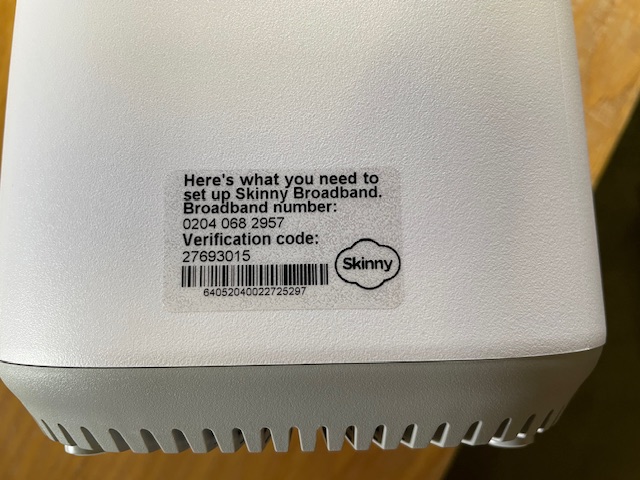
A number of Jump delivery partners are reporting an increasing frequency of new modems being supplied without a broadband sticker – that’s the clear plastic sticker on the side of the modem:

I posted about this in September 2023 when I first discovered that the most common problem was that the stickers had come off the modem and attached themselves to the inside of the box, so it pays to keep checking this first. We have raised this issue with CEVA, the company that ships the modems, seeking their assistance in ensuring that the stickers do not become detached when the modems are being boxed.

But if there is no sign of the sticker, the modem needs to be classified as faulty and a Modem Returns form completed. Explain on the form that the modem has no BB sticker and we will send you a courier bag to recover it for repair.

Concerns about possible ‘scamming’ practices with Jump

From time to time I get approached by a partner who suspects that one of their customers is ‘scamming’ the Jump modem process. When this happens we try and work out a strategy to handle this on a case by case basis, so that partners and their staff are not having to face confrontational situations. Staff safety is paramount and we are happy to provide whatever support we can to ensure that the Jump delivery experience remains a positive one.

I have summarised a few scenarios below, as reported by partners and suggested some possible responses.

  1. More than one modem requested by people living at the same address. There are many situations where this is totally okay. The most common example is social housing units (although these typically have separate apartment numbers), but we also encounter this where people are living in different dwellings at the same physical address (this is quite common in many rural properties for example). But is also occurs when someone is living in a cottage separate to the main dwelling where the distance is too great for the WiFi signal. In some situations, two or more families are living in the same house, and provided they are not part of the same family unit, then they can be supplied with separate modems. Suggestion: For online applications I get an alert whenever a duplicate address shows up; I then check the applicant’s name, phone and email and if necessary view the property on Google Maps street view to determine if it is a single or multiple dwelling site. If I have any concerns I suspend the delivery until Shelley contacts the applicant to find out more. What is interesting is that most people do not respond to Shelley’s text inquiry (which in itself suggests there could be something fishy) and the application expires after 10 days. It is difficult for partners to do this sort of checking, but the principle really is to query anything that looks odd; if you are satisfied with the explanation, then you can proceed to issue a modem. But if you are not, then you have the discretion to decline the application.
  2. Same person requests a second modem within a short time. This definitely needs an explanation before a further modem is issued. If you are not satisfied, then you have the discretion to decline the application. One of our partners discovered repeated applications by the same family and the same address; they were shopping around, getting modems from different libraries in the same city. Staff became aware of this and created an informal ‘black list’ as an alert for any future applications. The exception of course is when the modem is faulty. Suggestion: Before issuing a modem to someone who claims their modem is faulty, make sure they have reported the fault to the Skinny Care Team or they have returned the faulty unit to you. Partners can also check their Jump GSheets to identify repeat applicants. Simple do a search (Ctl F) for the applicant’s name to identify duplicates.
  3. People who miraculously change their address when the address checker indicates ‘no coverage’. This is a bit more challenging. Skinny Jump does operate on a ‘high trust’ basis, but if there is clear evidence that someone is providing a false address, then partners have the discretion to decline the application. For online applications, we frequently get people at addresses that pass the coverage test, but then ask for the modem to be sent to a different address (which 9 times out of 10 fails the coverage check). Suggestion: For online applications we automatically decline any applications where the requested delivery address is not in Jump coverage. We then contact the applicant to find out why they want it sent to an address where the modem cannot be used. In most cases, we never hear back from those who are possibly scamming the system; people who do have a genuine reason always respond.
  4. People who ‘give’ their modems to someone else and then want another one. This is a bit strange and partners who have reported this have advised that they suspect the modems might have been on-sold (as opposed to ‘given’). It is a breach of the Jump conditions of service for anyone to sell or otherwise dispose of a Jump modem. The Terms and Conditions state: “You may not sell, lease, dispose of, lend or otherwise part with possession of, or modify the Modem in any way“. Suggestion: In this situation, we would advise partner to respectively decline to issue another modem, unless there is an incredibly good explanation. An exception we have encountered is where two people living together have split and one person has taken the modem with them, even though it was registered under the other person’s name. In this case, we treated the modem as ‘stolen’ and asked the Skinny team to block it and delink, so the customer could set up with a new modem.
  5. My modem has been stolen or lost. Regrettably, this is a very common issue. Almost every day at least one Jump modem is reported as ‘lost’ or ‘stolen’. Suggestion: Customers must be directed to the Skinny Care team, so that the modem can be identified and blocked before a replacement is issued. Partners should never replace a modem unless the old one has been returned.
  6. Other situations? Do send me an email (jump@diaa.nz) if you are encountering any other ‘suspicious’ behaviour.

Replacements for faulty modems can be re-provisioned for Ciena

A partner has raised a question about whether a Ciena customer can continue on the programme if their modem becomes faulty.

The short answer is, YES.

There is a provision on the Modem Return form to indicate if the customer reporting the faulty modem is on a sponsored plan, such as Ciena or OCHT. Partners should make sure this option is selected and this will trigger an action to get the replacement modem re-provisioned for Ciena or OCHT.

Reset modems – to box or not to box?

Two partners have been in touch this week (and it’s only Tuesday!) about handling modems that have been returned and then reset remotely by Skinny for re-issue.

The dilemma they face (which I am sure is shared by many other partners) is whether to issue the modem without its packaging. As one partner pointed out, it is not very professional to issue a modem and its extras – power supply, ethernet cable, user guide, modem return flyer and ‘keeping your whānau safe’ pamphlet- without some form of packaging. They have used library bags in the past, but these are no more.

Our approach to date has been to encourage partners to issue reset modems without packaging, but we really didn’t think about all the tag-along bits and pieces.

We have raised this with the Skinny Jump team at Spark to see if we could get supplies of new packaging but a good interim step was suggested by another partner – set aside any packaging returned by customers rather than send it back to us.

We are going to do this as well, at least in the meantime – we recover an average of 30 faulty modems every week, and many of these include their packaging; we are going to start retaining the packaging so that we can send some to partners as required.

Couriering a single empty box is probably a bit over the top, but we could possibly package six Smart Modem boxes using the same boxes that the modems arrive in.

If anyone has a better idea, please shout it from the rooftops!

Always use your own email when filling out a Modem Returns form

I had an inquiry today from a partner wondering if the modem she had entered on a Modem Returns form had been de-linked yet, as she wanted to proceed in setting up her customer with a new modem.

I explained to her that she should have received an email notification from the Skinny Care Team, advising her when the modem has been delinked. But then I checked her Modem Return responses and realised she had used a generic email at the start of the form.

This email should always be the one belonging to the staff member completing the form.

Skinny uses this email to notify you when the modem has been de-linked and whether it is ready for re-issue or whether it should be set aside until we (DIAA) send you a recovery bag.

In the case above the partner had used a generic internal email, so that not only did she not receive the notification email, no-one would have received it. As an internal email, it was set to reject any outside messages.

Partners should get a heads-up about this as soon as they submit a Modems Return form, as a copy of the information submitted on the form is returned to the email entered in the first field on the form. If you don’t receive this, then it is possible you have used an email that is blocked for outside parties like Skinny Jump.