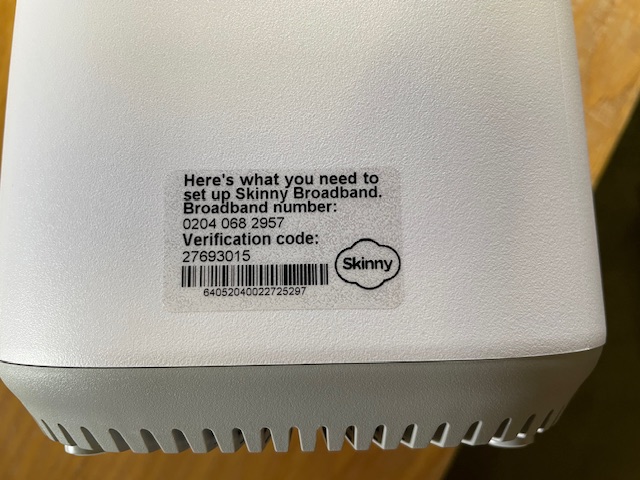
Jump Modems without Broadband stickers

A number of Jump delivery partners are reporting an increasing frequency of new modems being supplied without a broadband sticker – that’s the clear plastic sticker on the side of the modem:

I posted about this in September 2023 when I first discovered that the most common problem was that the stickers had come off the modem and attached themselves to the inside of the box, so it pays to keep checking this first. We have raised this issue with CEVA, the company that ships the modems, seeking their assistance in ensuring that the stickers do not become detached when the modems are being boxed.

But if there is no sign of the sticker, the modem needs to be classified as faulty and a Modem Returns form completed. Explain on the form that the modem has no BB sticker and we will send you a courier bag to recover it for repair.

Concerns about possible ‘scamming’ practices with Jump

From time to time I get approached by a partner who suspects that one of their customers is ‘scamming’ the Jump modem process. When this happens we try and work out a strategy to handle this on a case by case basis, so that partners and their staff are not having to face confrontational situations. Staff safety is paramount and we are happy to provide whatever support we can to ensure that the Jump delivery experience remains a positive one.

I have summarised a few scenarios below, as reported by partners and suggested some possible responses.

  1. More than one modem requested by people living at the same address. There are many situations where this is totally okay. The most common example is social housing units (although these typically have separate apartment numbers), but we also encounter this where people are living in different dwellings at the same physical address (this is quite common in many rural properties for example). But is also occurs when someone is living in a cottage separate to the main dwelling where the distance is too great for the WiFi signal. In some situations, two or more families are living in the same house, and provided they are not part of the same family unit, then they can be supplied with separate modems. Suggestion: For online applications I get an alert whenever a duplicate address shows up; I then check the applicant’s name, phone and email and if necessary view the property on Google Maps street view to determine if it is a single or multiple dwelling site. If I have any concerns I suspend the delivery until Shelley contacts the applicant to find out more. What is interesting is that most people do not respond to Shelley’s text inquiry (which in itself suggests there could be something fishy) and the application expires after 10 days. It is difficult for partners to do this sort of checking, but the principle really is to query anything that looks odd; if you are satisfied with the explanation, then you can proceed to issue a modem. But if you are not, then you have the discretion to decline the application.
  2. Same person requests a second modem within a short time. This definitely needs an explanation before a further modem is issued. If you are not satisfied, then you have the discretion to decline the application. One of our partners discovered repeated applications by the same family and the same address; they were shopping around, getting modems from different libraries in the same city. Staff became aware of this and created an informal ‘black list’ as an alert for any future applications. The exception of course is when the modem is faulty. Suggestion: Before issuing a modem to someone who claims their modem is faulty, make sure they have reported the fault to the Skinny Care Team or they have returned the faulty unit to you. Partners can also check their Jump GSheets to identify repeat applicants. Simple do a search (Ctl F) for the applicant’s name to identify duplicates.
  3. People who miraculously change their address when the address checker indicates ‘no coverage’. This is a bit more challenging. Skinny Jump does operate on a ‘high trust’ basis, but if there is clear evidence that someone is providing a false address, then partners have the discretion to decline the application. For online applications, we frequently get people at addresses that pass the coverage test, but then ask for the modem to be sent to a different address (which 9 times out of 10 fails the coverage check). Suggestion: For online applications we automatically decline any applications where the requested delivery address is not in Jump coverage. We then contact the applicant to find out why they want it sent to an address where the modem cannot be used. In most cases, we never hear back from those who are possibly scamming the system; people who do have a genuine reason always respond.
  4. People who ‘give’ their modems to someone else and then want another one. This is a bit strange and partners who have reported this have advised that they suspect the modems might have been on-sold (as opposed to ‘given’). It is a breach of the Jump conditions of service for anyone to sell or otherwise dispose of a Jump modem. The Terms and Conditions state: “You may not sell, lease, dispose of, lend or otherwise part with possession of, or modify the Modem in any way“. Suggestion: In this situation, we would advise partner to respectively decline to issue another modem, unless there is an incredibly good explanation. An exception we have encountered is where two people living together have split and one person has taken the modem with them, even though it was registered under the other person’s name. In this case, we treated the modem as ‘stolen’ and asked the Skinny team to block it and delink, so the customer could set up with a new modem.
  5. My modem has been stolen or lost. Regrettably, this is a very common issue. Almost every day at least one Jump modem is reported as ‘lost’ or ‘stolen’. Suggestion: Customers must be directed to the Skinny Care team, so that the modem can be identified and blocked before a replacement is issued. Partners should never replace a modem unless the old one has been returned.
  6. Other situations? Do send me an email (jump@diaa.nz) if you are encountering any other ‘suspicious’ behaviour.

Replacements for faulty modems can be re-provisioned for Ciena

A partner has raised a question about whether a Ciena customer can continue on the programme if their modem becomes faulty.

The short answer is, YES.

There is a provision on the Modem Return form to indicate if the customer reporting the faulty modem is on a sponsored plan, such as Ciena or OCHT. Partners should make sure this option is selected and this will trigger an action to get the replacement modem re-provisioned for Ciena or OCHT.

Reset modems – to box or not to box?

Two partners have been in touch this week (and it’s only Tuesday!) about handling modems that have been returned and then reset remotely by Skinny for re-issue.

The dilemma they face (which I am sure is shared by many other partners) is whether to issue the modem without its packaging. As one partner pointed out, it is not very professional to issue a modem and its extras – power supply, ethernet cable, user guide, modem return flyer and ‘keeping your whānau safe’ pamphlet- without some form of packaging. They have used library bags in the past, but these are no more.

Our approach to date has been to encourage partners to issue reset modems without packaging, but we really didn’t think about all the tag-along bits and pieces.

We have raised this with the Skinny Jump team at Spark to see if we could get supplies of new packaging but a good interim step was suggested by another partner – set aside any packaging returned by customers rather than send it back to us.

We are going to do this as well, at least in the meantime – we recover an average of 30 faulty modems every week, and many of these include their packaging; we are going to start retaining the packaging so that we can send some to partners as required.

Couriering a single empty box is probably a bit over the top, but we could possibly package six Smart Modem boxes using the same boxes that the modems arrive in.

If anyone has a better idea, please shout it from the rooftops!

Always use your own email when filling out a Modem Returns form

I had an inquiry today from a partner wondering if the modem she had entered on a Modem Returns form had been de-linked yet, as she wanted to proceed in setting up her customer with a new modem.

I explained to her that she should have received an email notification from the Skinny Care Team, advising her when the modem has been delinked. But then I checked her Modem Return responses and realised she had used a generic email at the start of the form.

This email should always be the one belonging to the staff member completing the form.

Skinny uses this email to notify you when the modem has been de-linked and whether it is ready for re-issue or whether it should be set aside until we (DIAA) send you a recovery bag.

In the case above the partner had used a generic internal email, so that not only did she not receive the notification email, no-one would have received it. As an internal email, it was set to reject any outside messages.

Partners should get a heads-up about this as soon as they submit a Modems Return form, as a copy of the information submitted on the form is returned to the email entered in the first field on the form. If you don’t receive this, then it is possible you have used an email that is blocked for outside parties like Skinny Jump.

Replacement modems for customers with no coverage

I had a call today from a Jump partner who was unsure about whether she could issue a replacement modem for a faulty one, when the coverage checker was indicating no coverage or capacity at her address.

The short answer is ‘Yes, you can’. When it comes to replacing faulty modems, we want to make this as seamless as possible, so there really isn’t any need to do a coverage check at all.

Unless of course if the customer has moved to a new address and not notified Skinny. But if they are at the same address and they already have Jump service, then you should just be as helpful as possible in getting them a replacement modem.

If all Jump customer played by our “rules”, partners should not even be involved in issuing replacement modems – this is for the Skinny Care Team to do when a customer calls them with a suspected faulty modem.

But we know customers don’t always follow the rules, so they turn up on your doorstep and you have to take it from there. C’est la Vie! That’s life!

Could there be some confusion about handling returned modems?

After three partner calls today about modem return processes, I thought it might be helpful to restate current procedures.

A Modem Returns Form must be completed for every returned modem. Any modem that has been issued to a customer and returned, or any partners who experience problems when assisting partners set up a new modem, must be put through our modem returns process. Please do not contact Skinny about these, by email or phone. This just wastes your time and theirs, as queries inevitably come back to us at DIAA.

We do our best to try and stop partners having to deal with returned modems at all. Please stress with your customers that they should always contact the Skinny Care Team on 0800 475 4669 to report any faulty modems; the Care Team then completes the Modem Returns Form, saving partners the time and effort.

We know this doesn’t stop your customers just turning up on your door-step saying their modem is faulty, and thank you to all partners who do their best to help. We also know that some Skinny Care agents incorrectly advise customers to go to their nearest Jump partner – we are trying to fix this with the Skinny Jump team with regular reminders. But there will always be some agents who get it wrong, especially if they are new ones, and we must accept that that is life – none of us are perfect.

Helpful tip: If any customers returning faulty modems claim that Skinny told them to go to a partner, please ask your customer the day and time when they received this advice and if possible the name of the Skinny agent that told them to do this. All calls to the Care Team are recorded for training purposes, so if these details are known the Skinny Jump team can find the recording of the call and find out what is causing the wrong information to be given – it is not always the fault of the Care Team; some customers can be very difficult, as I am sure you well know, even when they are benefitting from such a wonderfully subsidised service like Jump.

So what happens next? Modem Return Forms populate a shared GSheet that is used by the Skinny Support Team to advise the next steps. If the modem is truly faulty, they will ask us (DIAA) to send a replacement and recover the faulty unit for repair. By the time this arrives, normally within 2-3 days, the faulty modem has been delinked from the customer’s account, and the customer can proceed to set up the new modem with their same email. If they have residual funds on their old account they can also call the Skinny Care Team and ask for these funds to be transferred (they can not do this if they use a new email to set up their new modem).

Some partners have reported challenges when completing Modem Returns Forms as they don’t have all the details to hand. Don’t be put off – if there are any data fields you don’t know, then simply enter “not known” and the form will let you proceed to the next field. What is most important is that the Broadband number is entered; if you don’t have this then we you suggest you just contact Shelley (0800 463 422) and ask her to send you a return courier bag, as without a Broadband number, the modem is automatically faulty. The Skinny Care team can not initiate the modem reset and de-linking process if they don’t know the Broadband number, so there is no point in carrying on with our wonderfully thought out processes – just short-circuit straight to Shelley.

I know this seems like a lot of words to explain things – if you prefer a better version please work through Tawera’s fabulous new online Jump training modules. I know many of you are and are enjoying the experience.

Possible delays with Jump modem de-linking

The Skinny Care team has advised that there could be some delays in de-linking and resetting modems; some staff have been temporarily diverted to assist with call queues.

Their goal is to action all de-linking/ reset requests lodged through the Modem Return form within 36 hours.

This is just a heads up in case your customers expect you to arrange instant de-linking of faulty and returned modems. Do remind them that the correct procedure is to report the fault to the Care team and this will trigger a replacement modem being couriered to them. By the time it arrives they can be 100% sure that their faulty modem has been de-linked and they can use the same email to set up a new Skinny account with their replacement modem.

When are Jump modems unsuitable for re-issue?

A Jump delivery partner was cleaning out a storage cupboard today and came across three “reset” modems; they were “pretty old and not looking in the best of condition”; one was missing cables and another had very dirty cables. The label with the Broadband number had come off the other modem and had been stuck back on with cellotape.

In her assessment, as well as the person who assigned the modems to the storage cupboard in the first place, these modems were not fit for reissue. Hence they had been assigned to the storage cupboard awaiting a courier bag to return them for repair or recycling. But after about 6 months, when no courier bag had arrived, they were discovered by another staff member.

So what went wrong with our Modem Return process?

When a customer reports a faulty modem to the Skinny Care Team, the agent does their best to fix the problem remotely, but if they determine the modem has a technical fault, they complete a Modem Return form to arrange for a replacement to be sent and the faulty unit recovered.

However if a customer just turns up on a Jump delivery partner’s doorstep with what they claim is a faulty modem, partners have to take this at face value – we do not expect you to try and diagnose the problem or fix it in any way. All we ask partners to do is to complete a Modem Return form and wait for Skinny to reset the modem so that it can be re-issued, or assessed as faulty so that it needs to be returned for repair, e.g. because the SIM card has expired.

Now comes the interesting part. The Skinny Care team can not determine the physical state of the modem; some returned modems have been used as an artist’s canvas (not always to everyone’s taste); others have missing parts and many are physically dirty. Some even come loaded with cockroaches!

So we need Jump partners to make a judgement call – is the modem physically suitable for re-issue? For our library partners, this is something they are used to – at what point are books withdrawn from circulation and send for repair?

Even if the modem gets the green (technical) tick from the Skinny Care Team, partners may need to override the ‘reissue’ judgement with ‘return for repair’, based on a physical assessment.

If it is just a missing ethernet cable or even a missing power supply, we (DIAA), can send you a replacement. But if it is dirty or defaced, then the modem is immediately classified as faulty (based on being unsuitable for re-issue to another customer).

One of the questions asked in the Modem Return form is “Why is the modem to be delinked and reset?”. If you feel the modem is unsuitable for re-issue, please add a comment to this effect. This will result in a recovery courier bag being sent to you. If we don’t have this information, we act on Skinny’s technical evaluation, which often means the modem is relisted in your Google sheet ready for reissue, but in reality it is sitting in a cupboard.

To cut a long story short, please keep an eye on unallocated reset modems in your Google sheets and please advise jump@diaa.nz if the Google sheet does not align with actual stock on hand. And remember, reset modems should always be issued before new stock.

Jump customers being referred by Skinny Care Team to Partners for replacement modems

This shouldn’t be happening, but I get regular regular reports from partners that it is. Our agreed procedures for handing faulty and returned modems are clearly set out on our website.

The Skinny Care agents rely on a knowledge base to provide advice to customers when they call, so the Jump team went on an exploratory mission to find out where the agents were getting this wrong information.

And success! They discovered a rogue flowchart that was directing Skinny Care agents to some obsolete information that instructed them to advise customers with faulty modems to return them to a nearby Jump partner. Needless to say, this has been corrected. Thanks, River.

Thank you also to the partners who alerted us to this issue. We always welcome feedback on processes that are not working as they should. We can then try and fix them.